
1. Overview
This instruction manual provides essential information for the proper use and care of your HPRT Hard EVA Storage Case, designed specifically for the MT800 and MT800Q Mobile A4 Thermal Printers. This case offers robust protection and convenient portability for your device and its accessories.
Key Features:
- Reliable EVA Material: Constructed from high-quality EVA for durability and longevity.
- Waterproof and Shockproof: Protects your thermal printer from impacts and splashes.
- Perfectly Sized: Custom-designed to fit MT800/MT800Q portable A4 thermal printers. Outer dimensions: 14.2 x 3.6 x 2.4 inches.
- Compact and Lightweight: Easy to carry for office use, business trips, or travel.
- Unique and Stylish Design: Features a gray interior with red-stitched zippers for a distinctive look.
- Convenient and Portable with High Capacity: Includes a built-in mesh pocket for accessories like USB cables, ribbons, and adapters.
Compatibility:
This case is designed exclusively for HPRT MT800 and MT800Q Mobile A4 Thermal Printers. It is not compatible with other printer models, including the MT810.
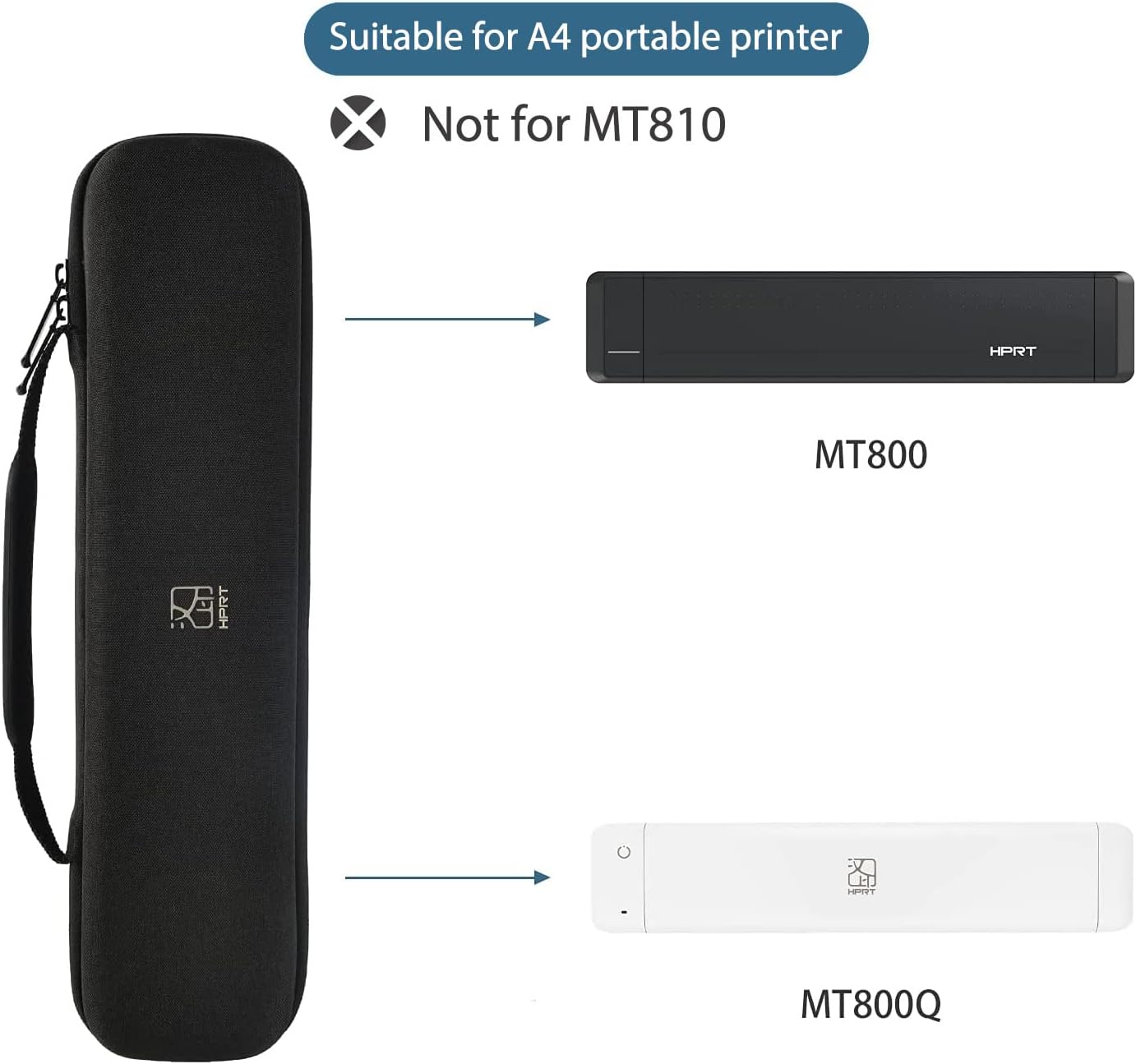
Image 1: Illustrates the HPRT storage case and its compatibility with MT800 and MT800Q printers, explicitly stating non-compatibility with MT810.
2. Setup
Proper setup ensures your printer is securely stored and protected within the case.
2.1 Inserting the Printer
- Unzip the case completely using the smooth 360-degree zipper.
- Gently place your HPRT MT800 or MT800Q thermal printer into the main compartment of the case. Ensure it fits snugly without forcing.
- The soft, velvety interior lining will prevent scratches and provide cushioning.

Image 2: Shows the HPRT storage case opened, with the MT800 printer placed inside and accessories stored in the mesh pocket.
2.2 Storing Accessories
- Utilize the built-in mesh pocket located in the upper lid of the case to store smaller accessories.
- Carefully place items such as the USB charging cable, thermal ribbons, and power adapter into the mesh pocket to keep them organized and prevent them from scratching the printer.
- Ensure all accessories are securely placed before closing the case.

Image 3: Displays the interior of the HPRT storage case, highlighting the mesh pocket, soft lining, and waterproof exterior.
3. Operating the Case
The case is designed for ease of use and maximum portability.
3.1 Opening and Closing
- To open, grasp the zipper pulls and smoothly slide them around the case until it fully opens.
- To close, align the two halves of the case and pull the zippers together until they meet securely. The 360-degree zipper ensures a complete and secure closure.
3.2 Carrying Options
- Integrated Handle: Use the sturdy handle for convenient hand-carrying.
- Compact Design: The mini size and portable nature of the case allow it to be easily stored in a backpack, briefcase, or luggage.

Image 4: Shows the HPRT storage case with its integrated handle, emphasizing ease of carrying.

Image 5: Depicts the HPRT storage case being placed into a bag, illustrating its portability.
3.3 Video Demonstration: Mobile Office Usage
Video 1: This video demonstrates the HPRT MT800Q portable printer and its case being used in various mobile office scenarios, highlighting its convenience for printing anywhere and anytime.
4. Maintenance
To ensure the longevity and effectiveness of your storage case, follow these maintenance guidelines:
4.1 Cleaning Instructions
- Wipe the exterior of the EVA case with a soft, damp cloth to remove dust or spills.
- For the interior, use a soft, dry cloth or a lint roller to remove any debris from the velvety lining.
- Avoid using harsh chemicals or abrasive cleaners, as these can damage the material.
4.2 Care for Protective Features
- While the case is waterproof, avoid prolonged exposure to water or submerging it.
- Inspect the zipper periodically for any debris that might hinder its smooth operation. Clean if necessary.
- Store the case in a cool, dry place away from direct sunlight and extreme temperatures to preserve its material integrity.
5. Troubleshooting
If you encounter any issues with your HPRT storage case, refer to the following common problems and solutions:
5.1 Case Not Closing Properly
- Issue: The zipper is difficult to close or the case does not shut completely.
- Solution: Ensure that the printer and all accessories are correctly positioned within their designated compartments and not obstructing the zipper path. Remove any excess items if the case is overfilled.
5.2 Zipper Stuck
- Issue: The zipper is jammed or difficult to move.
- Solution: Check for any fabric, threads, or debris caught in the zipper teeth. Gently remove any obstructions. Avoid forcing the zipper, as this can cause damage.
6. Specifications
| Feature | Detail |
|---|---|
| Product Name | HPRT Hard EVA Storage Case |
| Compatible Models | HPRT MT800, HPRT MT800Q Mobile A4 Thermal Printers |
| Material | High-quality EVA |
| Exterior Dimensions (L x W x H) | 14.2 x 3.6 x 2.4 inches (34cm x 8cm x 9cm) |
| Weight | 9.14 ounces (278g) |
| Protection Features | Waterproof, Shockproof, Scratch-resistant interior |
| Storage | Main compartment for printer, built-in mesh pocket for accessories |
| Closure Type | Smooth 360-degree zipper |
| Portability | Integrated handle, compact design for easy transport |

Image 6: Provides a detailed view of the HPRT storage case, including its dimensions (34cm L x 8cm W x 9cm H) and weight (278g), along with compatible printer models.
7. Warranty and Support
For warranty information, technical support, or to purchase additional accessories, please contact HPRT Official Store US.
- Manufacturer: Xiamen Hanin Electronic Technology Co.,Ltd
- Seller: HPRT Official Store US
- Contact: Please refer to the seller's contact information on the platform where the product was purchased.
- Online Store: Visit the HPRT Store for product information and support.


