
Midea AC100-20ARB
Midea 4-in-1 Mobile Air Cooler User Manual
Model: AC100-20ARB
1. Introduction
Thank you for choosing the Midea 4-in-1 Mobile Air Cooler. This versatile appliance is designed to enhance your indoor comfort by functioning as an air cooler, fan, humidifier, and air purifier. With its advanced features and user-friendly design, you can enjoy a cooler, cleaner, and more comfortable living environment.
Please read this manual thoroughly before operating the appliance and keep it for future reference.
2. Safety Instructions
WARNING: To reduce the risk of fire, electric shock, or injury, always follow basic safety precautions when using this appliance.
- Ensure the power supply matches the voltage specified on the rating label.
- Do not immerse the appliance, plug, or cord in water or other liquids.
- Unplug from the outlet when not in use, before cleaning, or before moving.
- Keep the appliance out of reach of children.
- Do not operate with a damaged cord or plug, or after the appliance malfunctions or has been damaged in any manner.
- Place the appliance on a stable, flat surface.
- Do not block air inlets or outlets.
- Only use clean tap water in the water tank.
- The appliance features an intelligent warning function for water shortage and automatically shuts off the fan pump if the water tank is empty or the cover is removed, for safety reasons.
3. Product Overview


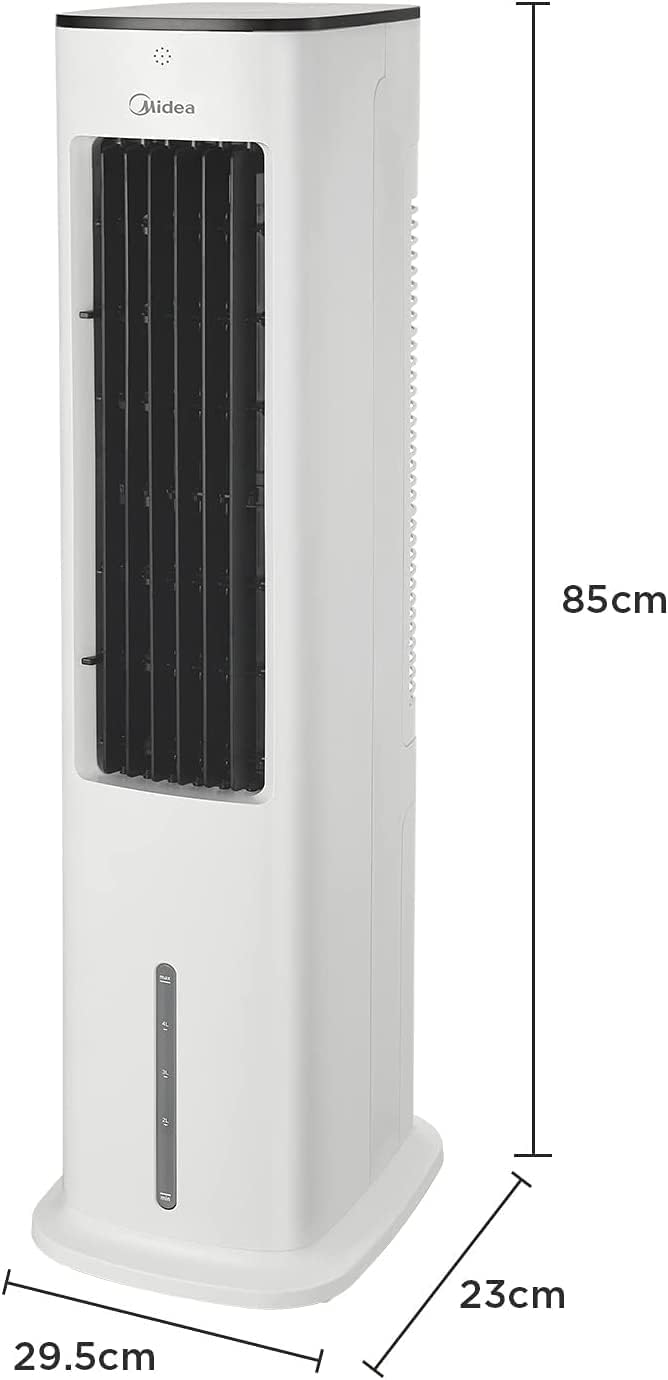

4. Setup
- Unpacking: Carefully remove the air cooler from its packaging. Retain packaging for future storage or transport.
- Placement: Place the air cooler on a firm, level surface. Ensure there is adequate space around the unit for proper airflow. This unit is effective for rooms up to 25m².
- Filling the Water Tank:
- Pull out the water tank from the bottom rear of the unit.
- Fill the 5-liter water tank with clean tap water. Do not exceed the maximum fill line.
- For enhanced cooling, place the included ice packs (or ice cubes) into the water tank.
- Carefully slide the water tank back into the unit until it clicks into place.

The 5-liter water tank provides extended operation, ideal for hot summer nights. 
The water tank is easily removable for filling and cleaning. - Power Connection: Plug the power cord into a standard 220V electrical outlet.
5. Operating Instructions
5.1 Control Panel and Remote Control
The unit can be operated using the touchscreen control panel on top of the unit or the included remote control.
5.2 Functions
- Power On/Off: Press the power button (⏻) to turn the unit on or off.
- Speed Settings: Cycle through 3 fan speeds (Low, Medium, High) by pressing the speed button.
- Modes: Select from Normal, Nature, or Sleep modes.
- Cooling/Humidification: Activate the cooling/humidification function by pressing the cooling button. This function requires water in the tank. For enhanced cooling, ensure ice packs are in the water tank.
- Oscillation: Press the oscillation button to activate the wide-angle 90° oscillation feature, distributing cool air across a larger area.
- Timer: Set the timer for up to 7 hours of continuous operation.


6. Maintenance
Regular maintenance ensures optimal performance and longevity of your air cooler.
6.1 Cleaning the Filter
The air cooler features removable filters for easy cleaning, which helps prevent pet hair, dirt, and lint accumulation.
- Unplug the appliance from the power outlet.
- Remove the rear cover of the unit.
- Carefully pull out the filter assembly.
- Clean the filter with a soft brush or vacuum cleaner to remove dust and debris. For deeper cleaning, rinse with water and mild detergent, then allow to air dry completely before reinserting.
- Reinsert the dry filter and replace the rear cover.

6.2 Cleaning the Water Tank
Periodically clean the water tank to prevent mold and mildew growth.
- Unplug the appliance.
- Remove the water tank as described in the Setup section.
- Empty any remaining water.
- Clean the tank with a soft cloth and mild detergent. Rinse thoroughly with clean water.
- Allow the tank to air dry completely before reinserting.
6.3 General Cleaning
Wipe the exterior of the unit with a soft, damp cloth. Do not use abrasive cleaners or solvents.
7. Troubleshooting
| Problem | Possible Cause | Solution |
|---|---|---|
| Unit does not turn on. | No power supply. | Check if the power cord is securely plugged into a working outlet. |
| No cool air/humidification. | Water tank is empty or low. | Refill the water tank. The unit has an automatic shut-off for water shortage. |
| Weak airflow. | Air filter is dirty. | Clean the air filter as described in the Maintenance section. |
| Unusual noise. | Unit not on a level surface or internal obstruction. | Ensure the unit is on a flat, stable surface. If noise persists, contact customer support. |
8. Specifications
| Feature | Specification |
|---|---|
| Model Number | AC100-20ARB |
| Dimensions (L x W x H) | 19 x 24.99 x 84.99 cm |
| Weight | 7.9 kg |
| Power Consumption | 55W |
| Voltage | 220 Volt |
| Water Tank Capacity | 5 Liters |
| Airflow Capacity | 355 m³/h (210 CFM) |
| Noise Level | 55 dB |
| Recommended Room Area | Up to 25 m² |
9. Warranty and Support
Midea offers a 3-year warranty for this air cooler, independent of statutory warranty rights. For any product inquiries, technical support, or warranty claims, please visit the official Midea store or contact customer service through the details provided on the product packaging or the Midea website.
You can find more information and support at the Midea Brand Store.
Related documentsAC100-20ARB


Ask a question about this manual
Ask about setup, troubleshooting, compatibility, parts, safety, or missing instructions. Manuals+ will review the question and use this page’s manual context to help answer it.