
EWA A116
EWA A116 Bluetooth Speaker User Manual
Model: A116
Introduction
This user manual provides detailed instructions for the safe and efficient operation of your EWA A116 Bluetooth Speaker. Please read this manual thoroughly before using the product and retain it for future reference.
Product Overview
The EWA A116 is a compact, portable Bluetooth speaker designed for high-quality wireless audio playback. Its robust construction and versatile connectivity options make it suitable for various environments.

Image: The EWA A116 Bluetooth Speaker in a rose gold finish, showcasing its round design and top speaker grille with the EWA logo.
Package Contents
Please check the package contents upon unboxing to ensure all items are present:
- EWA A116 Bluetooth Speaker
- USB Charging Cable
- User Manual
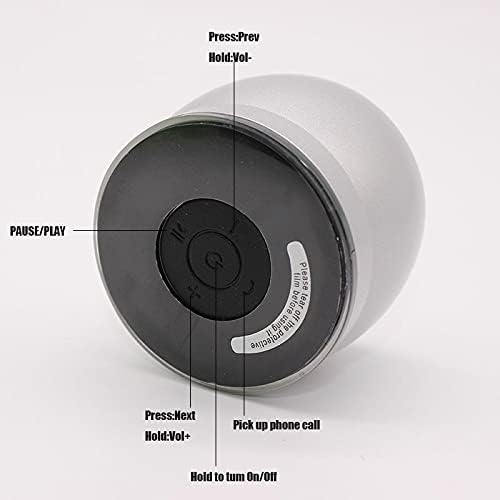
Image: The EWA A116 speaker, its green retail box, a white USB charging cable, and a small user manual disc.
Controls and Indicators
Familiarize yourself with the speaker's controls and ports for optimal use.

Image: The underside of the EWA A116 speaker, illustrating the control buttons. Labels indicate functions such as "Press: Prev / Hold: Vol-", "PAUSE/PLAY", "Press: Next / Hold: Vol+", "Pick up phone call", and "Hold to turn On/Off".
- Power Button: Hold to turn On/Off.
- Play/Pause Button: Press to play or pause audio.
- Previous Track / Volume Down: Press for previous track, hold for volume down.
- Next Track / Volume Up: Press for next track, hold for volume up.
- Call Button: Press to pick up phone calls.

Image: A side view of the EWA A116 speaker, highlighting the Micro USB charging port and a Micro SD card slot for alternative audio input.
- Micro USB Port: For charging the speaker.
- Micro SD Card Slot: For playing audio directly from a Micro SD card.
Setup
1. Charging the Speaker
- Connect the provided USB charging cable to the Micro USB port on the speaker.
- Connect the other end of the USB cable to a USB power adapter (not included) or a computer's USB port.
- The charging indicator light will illuminate during charging and turn off when fully charged.
- Allow approximately 2-3 hours for a full charge.
2. Power On/Off
- To Power On: Press and hold the Power button (located on the bottom) for approximately 3 seconds until you hear an audible prompt.
- To Power Off: Press and hold the Power button for approximately 3 seconds until you hear an audible prompt.
3. Bluetooth Pairing
- Ensure the speaker is powered on and in Bluetooth pairing mode (indicated by a flashing LED light, if present).
- On your mobile device (smartphone, tablet, computer), enable Bluetooth.
- Search for available Bluetooth devices. The speaker will appear as "EWA A116" or similar.
- Select "EWA A116" from the list to connect.
- Once successfully paired, you will hear a confirmation sound, and the LED indicator will typically become solid.
- The speaker will automatically attempt to reconnect to the last paired device when powered on.
Operating Instructions
1. Playing Audio via Bluetooth
- After successful Bluetooth pairing, open your music application on your device and start playback.
- Use the speaker's Play/Pause button to control playback.
- Press the Previous/Next Track buttons to skip tracks.
- Hold the Volume Down/Up buttons to adjust the speaker's volume.
2. Playing Audio via Micro SD Card
- Insert a Micro SD card with audio files into the Micro SD card slot on the speaker.
- The speaker should automatically detect the card and begin playback.
- Use the Play/Pause, Previous/Next Track, and Volume Down/Up buttons to control playback as described for Bluetooth mode.
3. Call Management
- When a call comes in while connected via Bluetooth, the speaker will ring.
- Press the Call Button (often integrated with Play/Pause or a dedicated button) to answer an incoming call.
- Press the Call Button again to end the call.
- Hold the Call Button to reject an incoming call (functionality may vary).
Maintenance
- Cleaning: Use a soft, dry cloth to clean the speaker's surface. Do not use abrasive cleaners or solvents.
- Storage: Store the speaker in a cool, dry place away from direct sunlight and extreme temperatures.
- Water Exposure: This speaker is not waterproof. Avoid exposing it to water or excessive moisture.
- Battery Care: To prolong battery life, charge the speaker fully before long periods of inactivity and recharge it at least once every three months.
Troubleshooting
| Problem | Solution |
|---|---|
| Speaker does not power on. | Ensure the speaker is fully charged. Connect it to a power source using the USB cable. |
| Cannot pair with Bluetooth device. |
|
| No sound or low volume. |
|
| Micro SD card not playing. |
|
Specifications
| Brand | EWA |
| Model Number | A116 |
| Speaker Type | Bluetooth Speakers |
| Connectivity Technology | Wired/Wireless (Bluetooth, Micro SD) |
| Speaker Maximum Output Power | 10 Watts |
| Audio Output Mode | Surround |
| Item Weight | 400 Grams |
| Mounting Type | Tabletop |
| Color | Multi Color (as per product variant) |
| First Available | 9 April 2021 |
Warranty and Support
For warranty information and customer support, please refer to the documentation included with your purchase or contact EWA customer service through their official website. Keep your proof of purchase for warranty claims.
Related documentsA116


Ask a question about this manual
Ask about setup, troubleshooting, compatibility, parts, safety, or missing instructions. Manuals+ will review the question and use this page’s manual context to help answer it.