
blucoil XLR-MIC
Blucoil Cardioid Condenser Studio XLR Microphone User Manual
Model: XLR-MIC
Introduction
The Blucoil Cardioid Condenser Studio XLR Microphone is engineered to capture the purest and most natural sound from your voice or instruments. With its precise cardioid polar pattern and robust construction, it is an ideal choice for home studio recording, live streaming, podcasting, and professional voiceovers. This manual provides comprehensive instructions for setup, operation, maintenance, and troubleshooting to ensure you get the best performance from your microphone.
What's in the Box

This image displays all components included with your Blucoil XLR Studio Microphone: the microphone itself, an XLR cable for connection, a shock mount to reduce vibrations, a foam windscreen to minimize plosives, and a soft pouch for storage and transport.
- Blucoil Studio XLR Microphone
- 3-pin XLR Cable
- Noise-isolating Shock Mount
- Windscreen
- Protective Pouch
Setup
Connecting the Microphone
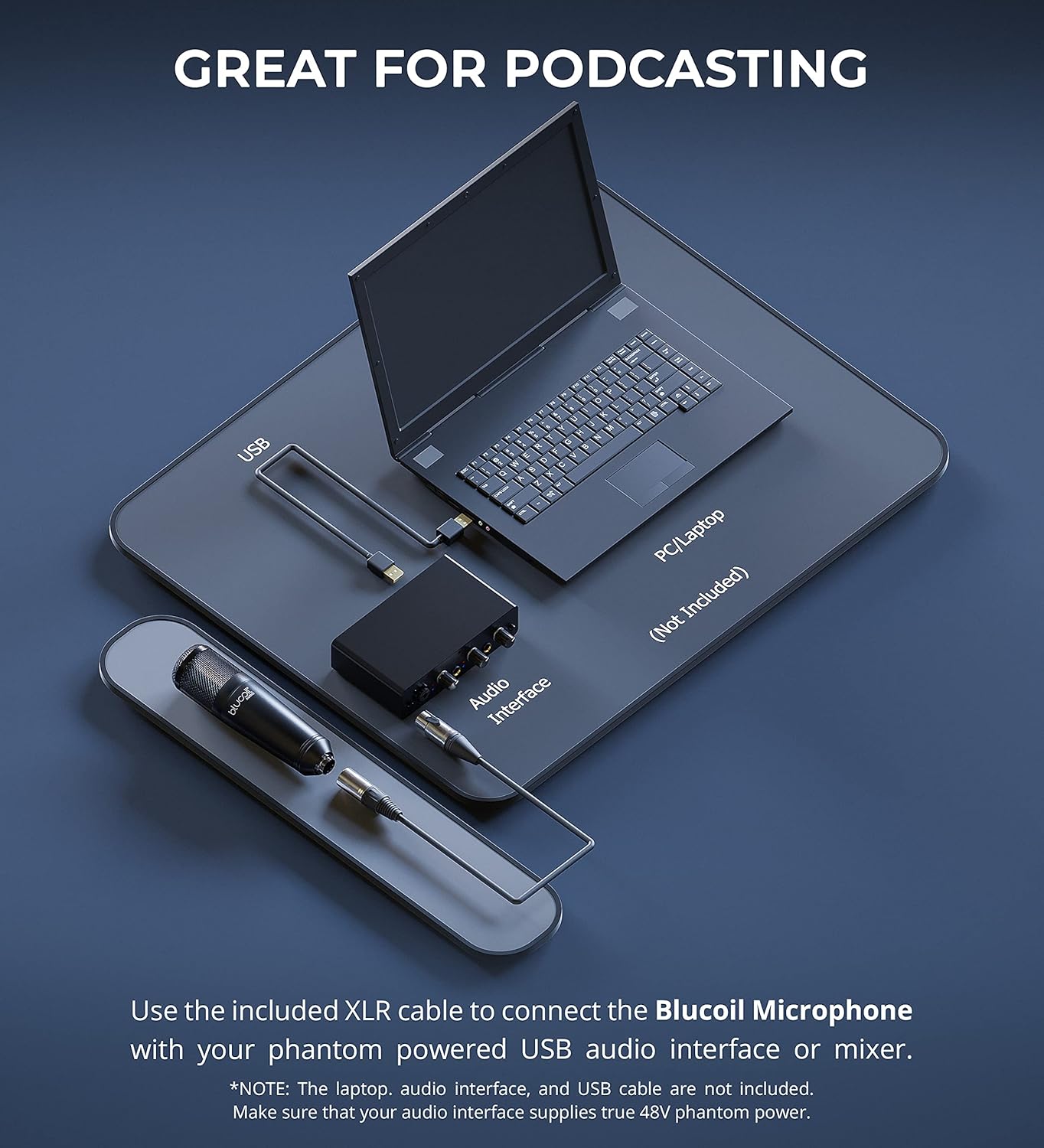
This diagram illustrates the connection process for the Blucoil XLR Studio Microphone. The microphone connects to an audio interface or mixer using the supplied XLR cable. The audio interface then connects to your PC or laptop via USB. Ensure your audio interface provides +48V phantom power for the microphone to function correctly.
- Attach the Blucoil Studio XLR Microphone to the included shock mount. The shock mount helps to isolate the microphone from vibrations and handling noise.
- Mount the shock mount onto a compatible microphone stand (not included).
- Connect one end of the supplied 3-pin XLR cable to the microphone's XLR output.
- Connect the other end of the XLR cable to an XLR input on your audio interface or mixer.
- Ensure your audio interface or mixer is capable of providing +48V phantom power and activate it. This microphone requires phantom power to operate.
- Connect your audio interface or mixer to your computer via USB or other appropriate connection.
Operating the Microphone
Optimal Sound Capture

This image shows the microphone in use for recording vocals and acoustic guitar. The Blucoil Studio XLR Microphone features a 16mm low-mass diaphragm that captures subtle details across a 30Hz - 18kHz frequency range, ensuring clear and natural sound reproduction with low self-noise.
The Blucoil Studio XLR Microphone is a cardioid condenser microphone, meaning it is most sensitive to sound coming from directly in front of it and less sensitive to sounds from the sides and rear. This polar pattern is ideal for isolating the desired sound source and minimizing background noise.
Noise Isolation

This image illustrates the microphone's improved noise isolation. Its cardioid polar pattern effectively rejects ambient noise from the rear and sides. Additionally, the included shock mount further attenuates noise and vibrations transmitted through the mounting surface, contributing to cleaner recordings.
For optimal performance, position the microphone directly facing the sound source. The included windscreen should be used to reduce plosive sounds (e.g., 'p' and 'b' sounds) and breath noise, especially during vocal recordings.
Versatile Applications

This collage demonstrates the versatile applications of the Blucoil XLR Studio Microphone. With a high 125dB SPL handling, it is suitable for recording a wide range of sound sources, including vocals, acoustic guitars, woodwind instruments, and even percussion instruments like drums.
The microphone's ability to handle up to 125dB SPL makes it suitable for recording both subtle and loud sound sources, including vocals, acoustic guitars, woodwind instruments, and percussion. Its low 15dB self-noise ensures clean audio recordings with minimal hiss.
Maintenance
- Always store the microphone in its protective pouch when not in use to prevent dust accumulation and physical damage.
- Avoid exposing the microphone to extreme temperatures, humidity, or direct sunlight.
- Clean the microphone body with a soft, dry cloth. Do not use liquid cleaners or solvents.
- Regularly check XLR cable connections for any signs of wear or damage.
Troubleshooting
| Problem | Possible Cause | Solution |
|---|---|---|
| No Sound Output | No phantom power; Incorrect cable connection; Faulty cable; Input gain too low. | Ensure +48V phantom power is activated on your audio interface/mixer. Check all XLR cable connections. Try a different XLR cable. Increase the input gain on your audio interface/mixer. |
| Low Volume / Weak Signal | Input gain too low; Microphone too far from source; Incorrect polar pattern usage. | Increase input gain. Position microphone closer to the sound source. Ensure the microphone is facing the sound source directly. |
| Excessive Background Noise | Poor room acoustics; Microphone picking up unwanted sounds; No shock mount or windscreen. | Record in a treated acoustic environment if possible. Ensure the cardioid pattern is utilized effectively. Use the included shock mount and windscreen. |
Specifications
- Model: XLR-MIC
- Microphone Form Factor: Table Array
- Polar Pattern: Unidirectional (Cardioid)
- Frequency Range: 30Hz - 18kHz
- Signal-to-Noise Ratio: 79 dB
- Noise Level: 15 dB (Self Noise)
- Max SPL Handling: 125 dB
- Connectivity Technology: XLR
- Power Source: Corded Electric (Requires +48V Phantom Power)
- Item Weight: 1 pound (16 ounces)
- Product Dimensions (L x W x H): 1 x 1.97 x 7.48 inches
- Compatible Devices: PC (via audio interface)
- Recommended Uses: Music Recording, Podcasting, Streaming, Voiceover, Content Creation
Warranty and Support
For information regarding warranty coverage and technical support for your Blucoil Studio XLR Microphone, please refer to the official Blucoil website or contact Blucoil customer service directly. Specific warranty terms may vary by region and retailer.
Ask a question about this manual
Ask about setup, troubleshooting, compatibility, parts, safety, or missing instructions. Manuals+ will review the question and use this page’s manual context to help answer it.