
1. Introduction
The Ingco HLDD0401 is a compact and precise laser distance meter designed for quick and accurate measurements. It is suitable for various applications in construction, interior design, and DIY projects, providing reliable distance, area, and volume calculations. This manual provides essential information for the safe and effective operation, setup, and maintenance of your device.
2. Safety Instructions
Please read and understand all safety instructions before using the device. Failure to follow these instructions may result in laser radiation exposure, electric shock, fire, or serious injury.
- Laser Radiation: This device emits Class 2 laser radiation. Do not stare into the laser beam or direct it at other people or reflective surfaces. Eye protection is recommended when operating in environments where direct exposure is possible.
- Power Source: Use only the specified battery type (2 x 1.5V AAA alkaline batteries). Do not mix old and new batteries or different types of batteries.
- Operating Environment: Do not operate the device in explosive atmospheres, such as in the presence of flammable liquids, gases, or dust.
- Maintenance: Do not attempt to modify or disassemble the device. Repairs should only be performed by authorized service personnel.
- Children: Keep the device out of reach of children.
3. Product Overview
3.1 Device Components
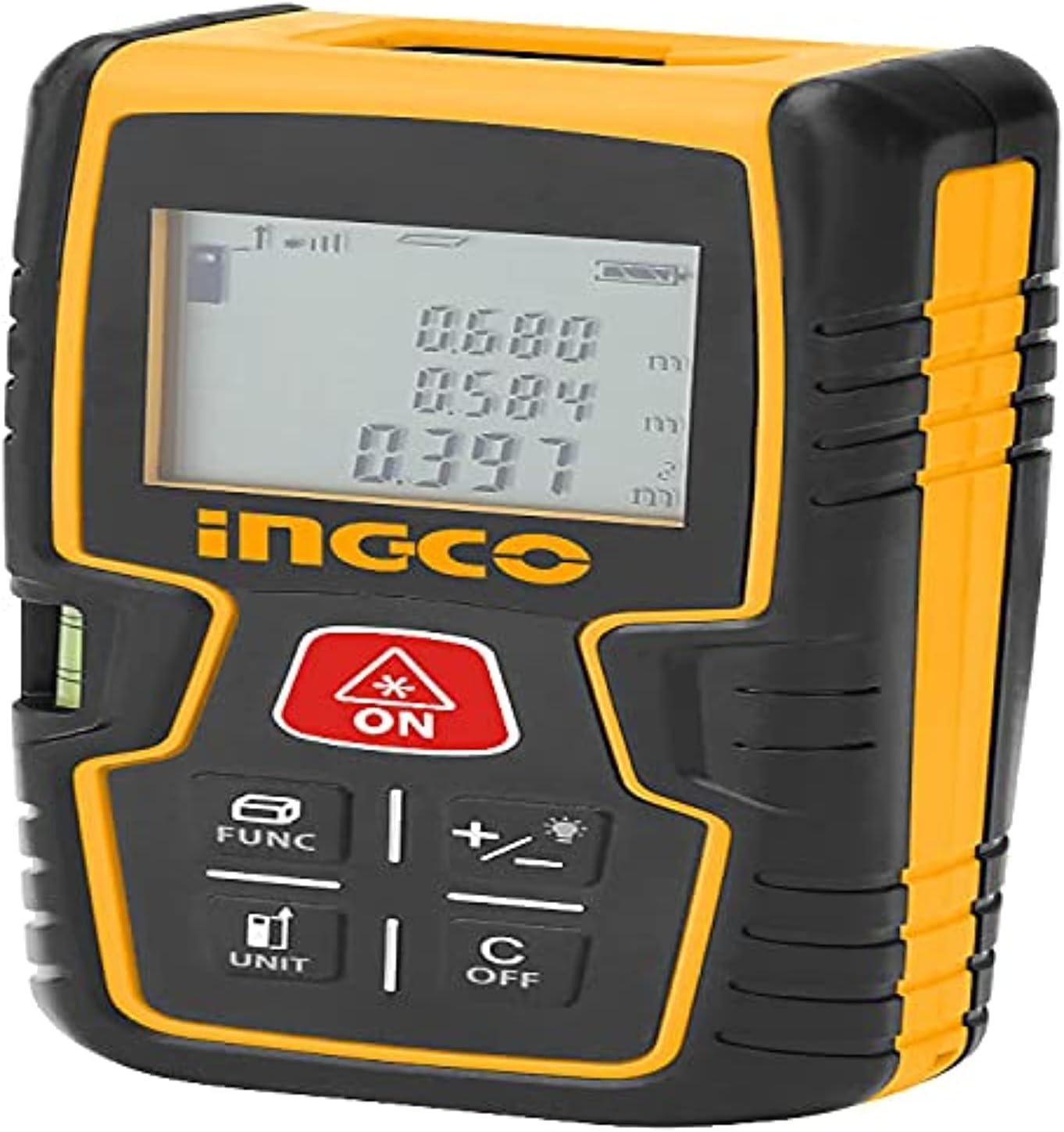
Figure 1: Front view of the Ingco HLDD0401 Laser Distance Meter. The image displays the device's yellow and black casing, the LCD screen showing measurement values, and the control buttons. Key buttons visible include the red ON/MEAS button, FUNC, +/-, UNIT, and C/OFF. A small spirit level is also visible on the left side.
- Laser Aperture: Emits the laser beam.
- Receiver Lens: Detects the reflected laser beam.
- LCD Display: Shows measurements, modes, and status indicators.
- Keypad: For controlling device functions.
- Battery Compartment: Located at the rear for battery installation.
- Spirit Level: For horizontal alignment (visible on the side).
3.2 Keypad Functions
- ON / MEAS (Red Button): Powers the device on. Press once to activate the laser, press again to take a measurement.
- FUNC: Cycles through measurement functions (e.g., single distance, continuous, area, volume, Pythagorean).
- +/- (with lightbulb icon): Adds or subtracts measurements. Long press may activate/deactivate backlight.
- UNIT: Changes the measurement unit (e.g., meters, feet, inches).
- C / OFF: Clears the last measurement or error. Long press to power off the device.
4. Setup
4.1 Battery Installation
- Locate the battery compartment cover on the rear of the device.
- Slide or unclip the cover to open it.
- Insert two (2) 1.5V AAA alkaline batteries, ensuring correct polarity (+/-) as indicated inside the compartment.
- Close the battery compartment cover securely.
The device is now ready for use. A battery indicator will appear on the display.
5. Operation
5.1 Power On/Off
- To Power On: Press the ON / MEAS button once. The display will light up.
- To Power Off: Long press the C / OFF button until the display turns off. The device also features an automatic power-off function after a period of inactivity to conserve battery life.
5.2 Single Distance Measurement
- Power on the device.
- Point the laser aperture at the target surface.
- Press the ON / MEAS button once to activate the laser. A red laser dot will appear on the target.
- Press the ON / MEAS button again to take the measurement. The distance will be displayed on the screen.
5.3 Continuous Measurement (Tracking)
- Power on the device.
- Press the FUNC button repeatedly until the continuous measurement icon (often a running person or similar) appears on the display.
- Move the device slowly towards or away from the target. The display will continuously update with the current distance.
- Press the ON / MEAS button to stop continuous measurement.
5.4 Area Measurement
- Press the FUNC button until the area measurement icon (a square) appears.
- Measure the first side (e.g., length) by pressing ON / MEAS.
- Measure the second side (e.g., width) by pressing ON / MEAS.
- The device will automatically calculate and display the area.
5.5 Volume Measurement
- Press the FUNC button until the volume measurement icon (a cube) appears.
- Measure the length by pressing ON / MEAS.
- Measure the width by pressing ON / MEAS.
- Measure the height by pressing ON / MEAS.
- The device will automatically calculate and display the volume.
5.6 Pythagorean Measurement (Indirect Measurement)
This function allows for indirect measurement of heights or distances using the Pythagorean theorem.
- Press the FUNC button until the Pythagorean icon (a triangle) appears. There might be different Pythagorean modes (e.g., two-point or three-point).
- Follow the on-screen prompts to measure the required sides (hypotenuse and one leg) by pressing ON / MEAS for each measurement.
- The device will calculate and display the unknown side.
5.7 Adding/Subtracting Measurements
- Take a measurement.
- Press the +/- button. A '+' or '-' symbol will appear on the display.
- Take the next measurement. The device will automatically add or subtract it from the previous value.
- Repeat as needed. Press C / OFF to clear the operation.
5.8 Unit Conversion
Press the UNIT button to cycle through available measurement units (e.g., meters (m), feet (ft), inches (in), ft+in).
5.9 Memory Function
The device can store up to 50 measurements. To access stored data, press the FUNC button repeatedly until the memory icon appears, then use the +/- buttons to scroll through the stored values.
6. Maintenance
- Cleaning: Use a soft, damp cloth to clean the device. Do not use abrasive cleaners or solvents. Clean the laser aperture and receiver lens with a soft, lint-free cloth, similar to cleaning camera lenses.
- Storage: Store the device in a dry, cool place, away from direct sunlight and extreme temperatures. If storing for an extended period, remove the batteries to prevent leakage.
- Battery Care: Replace batteries when the low battery indicator appears on the display. Dispose of used batteries responsibly according to local regulations.
- Impact Protection: While the device has an IP54 rating for dust and splash resistance, avoid dropping or subjecting it to heavy impacts.
7. Troubleshooting
| Problem | Possible Cause | Solution |
|---|---|---|
| Device does not power on | Dead or incorrectly inserted batteries | Check battery polarity; replace with new 1.5V AAA batteries. |
| Inaccurate measurements | Unstable surface, obstruction, or dirty lens | Ensure stable measurement position. Clear any obstructions. Clean laser aperture and receiver lens. |
| "Error" message on display | Measurement out of range, strong light interference, or internal error | Ensure target is within 0.2-40m range. Avoid strong light sources. Press C / OFF to clear and retry. If persistent, contact support. |
| Laser beam not visible | Device not powered on, or laser not activated | Press ON / MEAS to power on, then press again to activate laser. Check batteries. |
8. Specifications
- Model: HLDD0401
- Measurement Range: 0.2 - 40 meters
- Measurement Accuracy: ±2.0 mm
- Laser Class: Class 2, 620-690 nm
- Memory: 50 measurements
- Battery Type: 2 x 1.5V AAA Alkaline Batteries
- Battery Life: > 5000 measurements
- Material: Metal, Plastic
- Item Weight: 209 g (0.21 kg)
- Product Dimensions: 10 x 20 x 37 cm
- International Protection Rating: IP54 (Dust and splash resistant)
9. Warranty and Support
For warranty information, technical support, or service inquiries, please refer to the warranty card included with your product or contact your local Ingco distributor or retailer. Keep your purchase receipt as proof of purchase for warranty claims.

