Introduction
This manual provides detailed instructions for the setup, operation, and maintenance of your Technical Pro Professional 1000 Watts Receiver with USB SD Card Inputs, 2 Mic Inputs, Recorder, and Wireless Remote. Please read this manual thoroughly before using the product to ensure proper function and to maximize your listening experience.
The RX45BTT receiver is designed to deliver powerful audio performance with versatile connectivity options, including Bluetooth, USB, SD card, and multiple audio inputs. It also features microphone inputs with effects for karaoke and public address applications.
Safety Information
- Ensure proper ventilation around the unit to prevent overheating.
- Do not expose the unit to rain, moisture, dripping, or splashing.
- Do not place objects filled with liquids, such as vases, on the unit.
- Only use attachments/accessories specified by the manufacturer.
- Refer all servicing to qualified service personnel. Servicing is required when the apparatus has been damaged in any way, such as power-supply cord or plug is damaged, liquid has been spilled or objects have fallen into the apparatus, the apparatus has been exposed to rain or moisture, does not operate normally, or has been dropped.
- To completely disconnect this apparatus from the AC Mains, disconnect the power supply cord plug from the AC receptacle.
- The mains plug of the power supply cord shall remain readily operable.
What's in the Box
- Professional Bluetooth Receiver (RX45BTT)
- Wireless Remote Control
Product Overview

Front view of the Technical Pro RX45BTT Professional 1000 Watts Receiver, showcasing its digital fluorescent display, illuminated controls, and front-panel inputs.
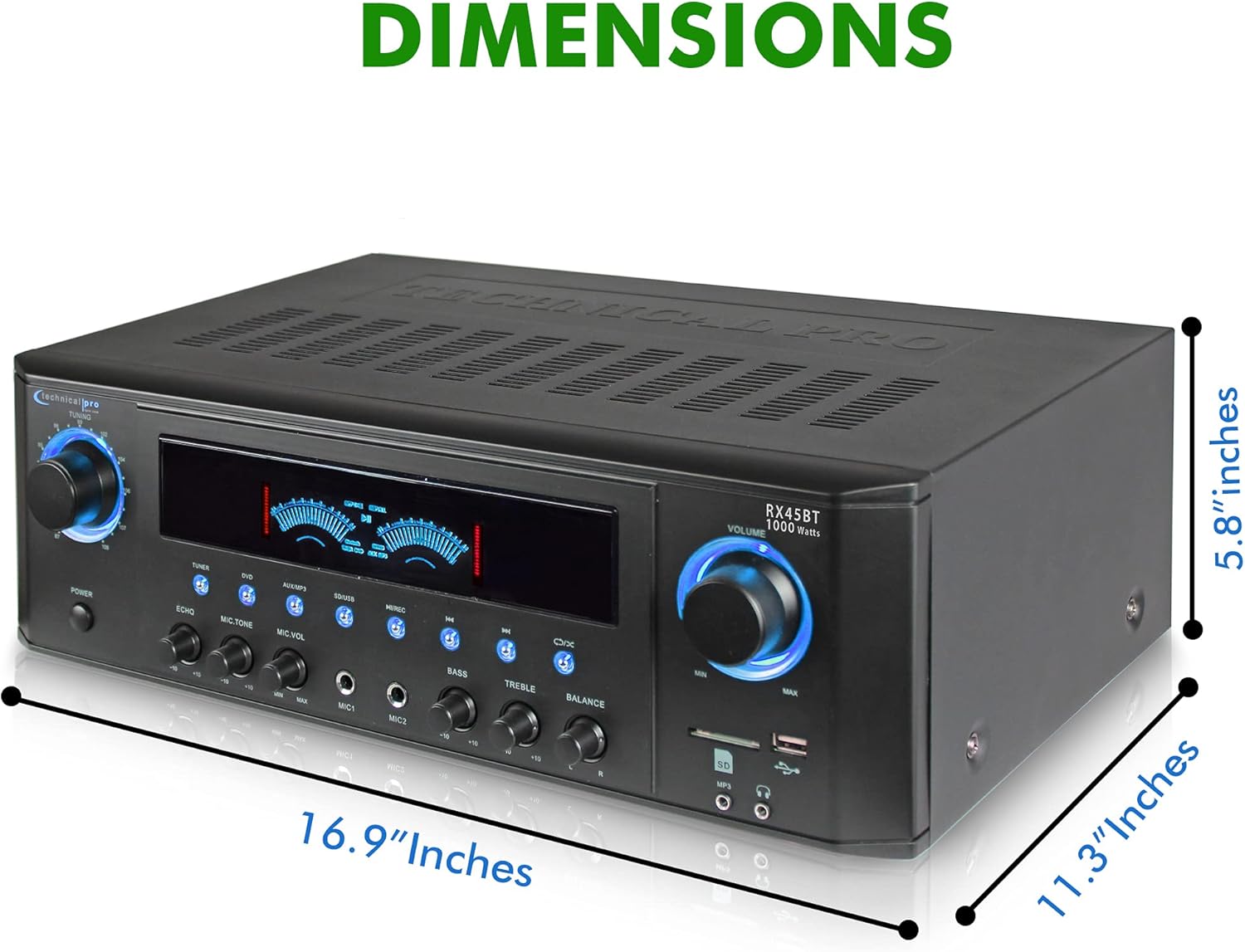
Side view illustrating the dimensions of the RX45BTT receiver: 16.9 inches (width) x 11.3 inches (depth) x 5.8 inches (height).

Diagram highlighting key features of the RX45BTT receiver, including 1000 watts peak power, Bluetooth, FM manual tuner, dual mic inputs with volume, echo, and tone controls, bass/treble/balance controls, USB & SD Card maximum size: 32GB, 128 kbps / 32 KHz sampling rate on .wav file recordings, and various inputs/outputs.

Rear panel view of the RX45BTT receiver, showing the various audio input and output connections, including RCA (AUX, DVD, LINE), Subwoofer Out, Surround Speakers, and Main Speakers terminals.
This video provides a visual overview of the Technical Pro Professional 1000 Watts Receiver, demonstrating its LCD screen, vibrant dB meter, dual mic inputs, and various rear panel connections. It also highlights the included remote control.
Setup
1. Placement
Place the receiver on a stable, flat surface with adequate ventilation. Avoid placing it near heat sources or in direct sunlight.
2. Speaker Connections
Connect your speakers to the "MAIN SPEAKERS" terminals on the rear panel. Ensure correct polarity (+ to + and - to -) for optimal sound. The unit supports 8-ohm speakers for surround sound. For surround speakers, connect to the "SURROUND SPEAKERS" terminals.
- Main Speakers: Use banana binding posts for secure connection.
- Surround Speakers: Use push button terminals.
3. Audio Source Connections
Connect your audio sources to the appropriate RCA input jacks on the rear panel (AUX, DVD, LINE). For external recording devices, use the RCA Line Out. The unit also features RCA (Subwoofer Out) for connecting a powered subwoofer.
- USB/SD Card: Insert USB drives or SD cards into the front panel slots.
- MP3 (AUX): Connect portable devices via the 3.5mm AUX input on the front panel.
- Microphones: Connect up to two microphones to the MIC1 and MIC2 inputs on the front panel.
4. Power Connection
Connect the power cord to the AC inlet on the rear panel and then to a suitable wall outlet.
Operating Instructions
1. Power On/Off
Press the POWER button on the front panel to turn the unit on or off.
2. Input Selection
Use the input selector buttons (TUNER, DVD, AUX/MP3, SD/USB, BLUETOOTH) on the front panel to choose your desired audio source. The selected input will be displayed on the LCD screen.
3. Volume Control
Adjust the overall volume using the large MASTER VOLUME knob on the right side of the front panel. The MICROPHONE VOLUME knob on the left controls the microphone input level independently.
4. Microphone Effects and Controls
- ECHO: Adjust the echo effect for microphones.
- MIC TREBLE: Control the high frequencies of the microphone sound.
- MIC BASS: Control the low frequencies of the microphone sound.
5. Equalization Controls
- BASS: Adjust the low frequencies of the main audio output.
- TREBLE: Adjust the high frequencies of the main audio output.
- BALANCE: Adjust the left/right audio balance.
6. FM Tuner Operation
Select the TUNER input. Use the FM SCAN button for auto station seeking or manually tune using the appropriate controls (not explicitly detailed in input, but implied by "FM Manual Tuner"). The unit can store up to 50 radio station presets.
7. USB/SD Card Playback and Recording
Insert a USB flash drive or SD card (up to 32GB) into the respective slots. The unit supports MP3 playback. You can also record .wav files from Tuner & RCA inputs onto the USB/SD card at 128 kbps / 32 KHz sampling rate.
8. Bluetooth Connectivity
Select the BLUETOOTH input. The unit will enter pairing mode. Search for "RX45BTT" on your Bluetooth-enabled device and connect. Once paired, you can stream audio wirelessly.
9. Remote Control Usage
The included wireless remote control provides convenient access to various functions, including input selection, volume adjustment, track navigation (for USB/SD/Bluetooth), and EQ controls. Refer to the remote's button labels for specific functions.
Maintenance
- Cleaning: Use a soft, dry cloth to clean the exterior of the unit. Do not use liquid cleaners or aerosols.
- Ventilation: Regularly check that the ventilation openings are not blocked by dust or debris.
- Storage: If storing the unit for an extended period, disconnect it from power and store in a cool, dry place.
Troubleshooting
| Problem | Possible Cause | Solution |
|---|---|---|
| No power | Power cord not connected; power outlet not active. | Ensure power cord is securely plugged in. Check power outlet with another device. |
| No sound output | Incorrect input selected; speaker wires loose; volume too low; audio source issue. | Select correct input. Check speaker connections and polarity. Increase master volume. Verify audio source is playing. |
| Bluetooth connection unstable/drops | Device too far; interference; receiver needs reset. | Move Bluetooth device closer to receiver. Avoid obstacles. Restart the receiver and try reconnecting. |
| Microphone not working | Microphone not plugged in correctly; mic volume too low; mic switch off. | Ensure microphone is fully inserted. Increase microphone volume. Check if microphone has an on/off switch. |
| USB/SD card not recognized | Unsupported format; card/drive corrupted; maximum size exceeded. | Ensure files are MP3. Try a different USB/SD card. Verify card size is 32GB or less. |
Specifications
| Feature | Detail |
|---|---|
| Power Output | 1000 Watts (Peak) |
| Product Dimensions (L x W x H) | 16.9 x 11 x 5.8 inches |
| Item Weight | 9.6 pounds |
| Model Number | RX45BTT |
| Connectivity Technology | Bluetooth |
| Inputs | USB, SD Card, 2 Mic Inputs, RCA (AUX, DVD, LINE) |
| Outputs | RCA (Subwoofer Out), Main Speakers (Banana Binding Post), Surround Speakers (Push Button) |
| FM Tuner | Manual Tuner with 50 Presets |
| Recording | .wav files onto USB/SD Card (128 kbps / 32 KHz) |
| Max USB/SD Card Size | 32GB |
| Color | Black |
| Surround Sound Channel Configuration | 5.1 (Note: Surround only works when all surround speakers are connected. Only use with 8 ohm speakers.) |
Warranty and Support
Technical Pro products are designed for reliability and performance. For warranty information, technical support, or service inquiries, please refer to the contact information provided with your product packaging or visit the official Technical Pro website.
Please retain your proof of purchase for any warranty claims.


