
1. Introduction
Thank you for choosing the ZAFRO D6550 Dehumidifier. This manual provides essential information for the safe and efficient operation of your new appliance. Please read it thoroughly before use and retain it for future reference.
This dehumidifier is designed to remove excess moisture from the air, helping to prevent mold, mildew, and other humidity-related issues in your home or designated area. It features a powerful compressor, multiple operating modes, and user-friendly controls.
2. Product Overview
Key Features
- High Capacity: Removes up to 22 pints/day at 65°F (55 pints/day max at 85°F) for spaces up to 2500 sq ft.
- Ultra-Quiet Operation: Operates at 38.7dB on low speed, suitable for bedrooms and offices.
- Dry Clothes Mode: Accelerates indoor laundry drying by up to 50%.
- Large Water Tank: 4.8L capacity reduces frequency of emptying.
- Continuous Drainage: Option for direct drainage with included hose.
- Eco-Friendly: Uses R32 refrigerant for higher efficiency.
- Washable Filter: Reusable filter for improved air quality and cost savings.
- Portable Design: Equipped with 360° wheels and a soft leather handle for easy movement.
Components and Design
The ZAFRO D6550 features a sleek, minimalist white design that blends well with various home decors. It includes an intuitive control panel and a visible water level window.
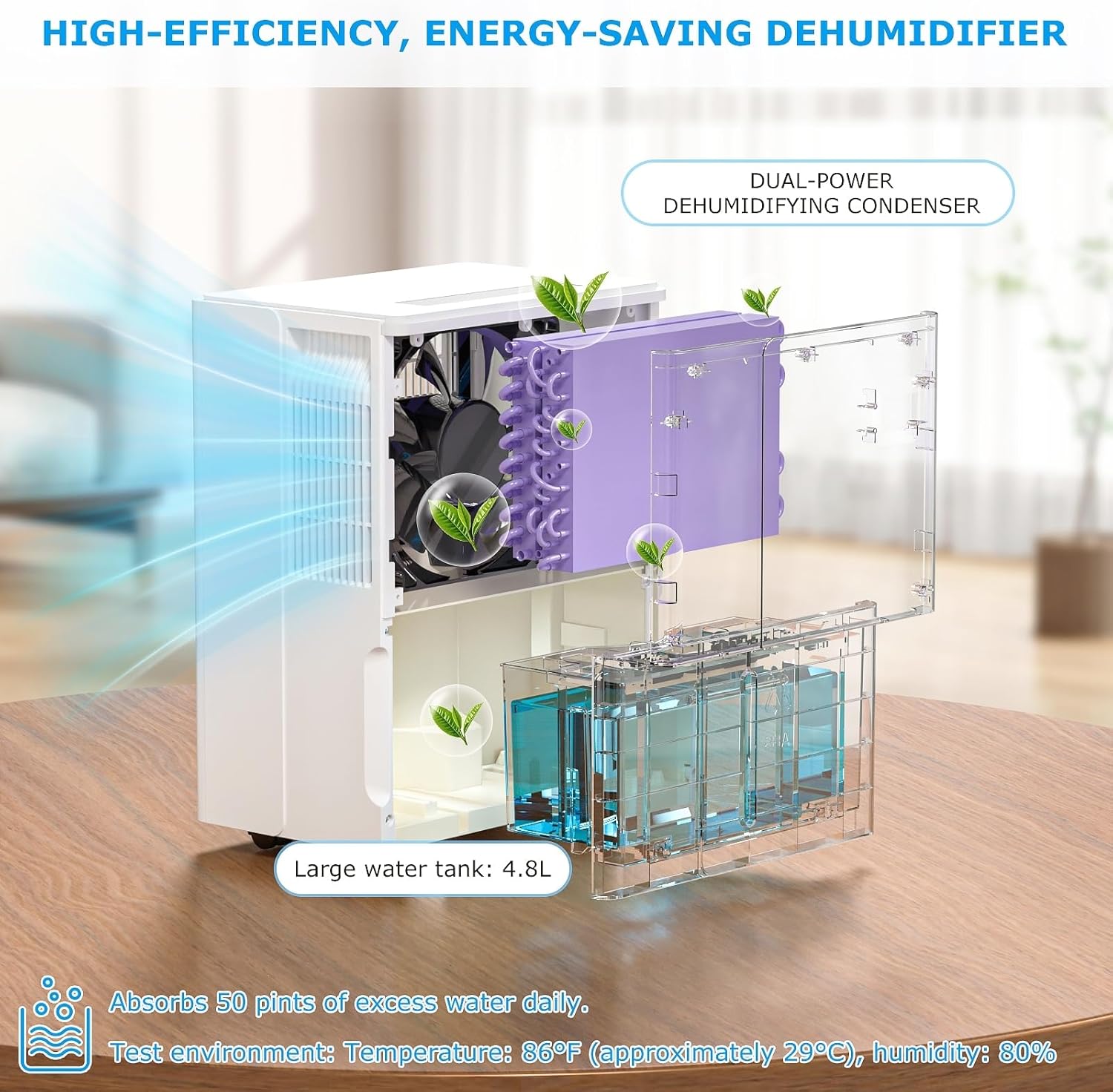


3. Setup
Unpacking
- Carefully remove the dehumidifier from its packaging.
- Remove all packing materials, including any tape or protective films.
- Inspect the unit for any damage. If damaged, do not operate and contact customer support.
Placement
- Place the dehumidifier on a level, stable surface.
- Ensure there is at least 8 inches (20 cm) of space around the unit for proper airflow.
- Avoid placing the unit near heat sources, in direct sunlight, or in areas where it may be exposed to water splashes.
- For optimal performance, close all doors and windows in the room where the dehumidifier is operating.
Power Connection
Plug the power cord into a grounded electrical outlet. The unit is now ready for operation.
4. Operating Instructions
Control Panel Overview
The ZAFRO D6550 features an intuitive LED digital control panel on the top of the unit. The current humidity level is also displayed on the front of the unit for easy monitoring.

Basic Operation
- Power On/Off: Press the Power button () to turn the unit on or off.
- Setting Humidity Level: Use the Up () and Down () arrow buttons to set your desired humidity level between 30% and 80%. The unit will automatically maintain this level.
- Fan Speed: Press the Fan Speed button () to cycle between low and high fan speeds.
Operating Modes
Press the Mode button () to select from the following modes:
- Normal Dehumidification: Standard operation to reduce humidity.
- Continuous Dehumidification: Runs continuously regardless of humidity level.
- Strong/Turbo Dehumidification: Maximizes moisture removal for very damp conditions.
- Ventilation: Circulates air without active dehumidification.
- Dry Clothes Mode: Optimized settings for faster laundry drying.

Additional Functions
- Timer: Press the Timer button () to set an auto-on or auto-off time from 1 to 24 hours.
- Sleep Mode: Press the Sleep button () to dim the display lights for undisturbed sleep. Press any button to temporarily reactivate the display.
- Child Lock: To activate, press and hold the Sleep and Timer buttons simultaneously for 3 seconds. This locks the control panel to prevent accidental changes. Repeat the action to unlock.

Video Demonstration
5. Maintenance
Emptying the Water Tank
The dehumidifier will automatically shut off when the 4.8L water tank is full. The water level window allows you to monitor the tank's fill status.
- Gently pull out the water tank from the front of the unit.
- Carefully carry the tank to a sink or drain.
- Empty the collected water.
- Slide the empty tank back into the dehumidifier until it clicks into place.
Continuous Drainage
For continuous operation without needing to empty the tank, connect the included drain hose (inner diameter: 0.787 inch) to the continuous drainage port on the back of the unit. Ensure the hose is sloped downwards to allow gravity drainage into a suitable receptacle or floor drain.
Cleaning the Washable Filter
The filter indicator light will illuminate after approximately 250 hours of operation, signaling that the filter needs cleaning.
- Turn off and unplug the dehumidifier.
- Remove the filter from the back of the unit.
- Wash the filter with clean water and a mild detergent.
- Allow the filter to air dry completely before reinserting it.
- Once the clean, dry filter is reinserted, long-press the Filter Clean button () to reset the filter timer and turn off the indicator light.

6. Troubleshooting
If you encounter issues with your ZAFRO D6550 Dehumidifier, please refer to the following common problems and solutions before contacting customer support.
| Problem | Possible Cause | Solution |
|---|---|---|
| Dehumidifier does not turn on. | No power supply; Power cord not properly connected; Water tank full or incorrectly installed. | Check power outlet; Ensure power cord is securely plugged in; Empty and correctly reinsert water tank. |
| Unit is running but not collecting water. | Room temperature too low (below 41°F/5°C); Humidity level already low; Filter is clogged. | Dehumidifiers are less effective in cold temperatures; Check ambient humidity; Clean the air filter. |
| Unit is noisy. | Unit not on a level surface; Filter is clogged. | Place unit on a flat, stable surface; Clean the air filter. |
| Water leaks from the unit. | Water tank not properly installed; Continuous drainage hose is loose or blocked. | Ensure water tank is correctly seated; Check hose connection and clear any blockages. |
| Error codes displayed. | Specific internal malfunction. | Refer to the full manual for specific error code meanings or contact customer support. |
7. Specifications
| Feature | Specification |
|---|---|
| Brand | ZAFRO |
| Model Name | D6550 |
| Dehumidification Capacity | 22 Pints per Day (at 65°F), 55 Pints Max (at 85°F) |
| Coverage Area | Up to 2500 Square Feet |
| Water Tank Volume | 4.8 Liters |
| Noise Level | 38.7dB (Ultra Quiet) |
| Product Dimensions (D x W x H) | 10.2" x 14.57" x 19.69" |
| Item Weight | 34.1 pounds |
| Material | Plastic |
| Color | White |
| Special Feature | LED Power Indicator, Child Lock, Sleep Mode, Dry Clothes Mode |
| Refrigerant | R32 (Eco-Friendly) |
| Operation Mode | Automatic |
| UPC | 755594479120 |
| ASIN | B09229RWKJ |

8. Warranty and Support
ZAFRO products are manufactured to the highest quality standards. For warranty information, technical support, or service inquiries, please refer to the contact information provided with your purchase documentation or visit the official ZAFRO website.


