
QFX BT-60
QFX BT-60-BK 4-inch Bluetooth Speaker User Manual
Model: BT-60
1. Introduction
Thank you for purchasing the QFX BT-60-BK 4-inch Bluetooth Speaker. This manual provides essential information for setting up, operating, and maintaining your speaker. Please read these instructions carefully before use to ensure optimal performance and longevity of your device.

Image 1.1: Front view of the QFX BT-60-BK Bluetooth Speaker with active LED lights.
2. Package Contents
Please check the box for the following items:
- QFX BT-60-BK Bluetooth Speaker
- Power Cord
- User Manual (this document)
3. Product Overview
The QFX BT-60-BK is a portable Bluetooth speaker featuring a 4-inch woofer, LED party lights, and multiple input options for versatile audio playback.

Image 3.1: Diagram illustrating the various components and ports of the BT-60-BK speaker.
3.1 Controls and Ports

Image 3.2: Top panel controls of the BT-60-BK speaker.
- M/+ (Mode/LED Light): Press to switch between input modes (Bluetooth, USB, TF, AUX, FM Radio). Press and hold to change LED light patterns.
- - (Volume Down/Previous): Press to decrease volume. Press and hold to go to the previous track.
- ►▮ (Play/Pause/TWS): Press to play or pause audio. Press and hold to activate TWS pairing mode.
- + (Volume Up/Next): Press to increase volume. Press and hold to go to the next track.

Image 3.3: Rear panel ports of the BT-60-BK speaker.
- AUX Input: 3.5mm jack for connecting external audio devices.
- MIC Input: 6.35mm jack for connecting a microphone.
- Micro-USB Charging Port: For charging the speaker's internal battery.
- ON/OFF Switch: Power switch for the speaker.
- USB Port: For playing audio from a USB flash drive.
- TF Card Slot: For playing audio from a TF (Micro-SD) card.
- Battery Light Indicator: Indicates charging status.
4. Setup
4.1 Charging the Speaker
- Connect the provided power cord to the Micro-USB charging port on the speaker.
- Plug the other end of the power cord into a compatible USB power adapter (not included) or a USB port on a computer.
- The battery light indicator will illuminate during charging. It will turn off or change color when fully charged.
- A full charge typically takes 2-3 hours.
4.2 Powering On/Off
- To power on the speaker, slide the ON/OFF switch to the 'ON' position.
- To power off the speaker, slide the ON/OFF switch to the 'OFF' position.
5. Operating Instructions
5.1 Bluetooth Pairing
- Ensure the speaker is powered on and in Bluetooth mode. If not, press the 'M/+' button repeatedly until 'Bluetooth' mode is announced or indicated.
- Enable Bluetooth on your mobile device (smartphone, tablet, etc.).
- Search for available Bluetooth devices. You should see 'QFX BT-60' in the list.
- Select 'QFX BT-60' to pair. Once paired, the speaker will emit a confirmation tone.
5.2 True Wireless System (TWS) Pairing
TWS allows two BT-60 speakers to connect wirelessly and play Bluetooth audio simultaneously for a stereo sound experience. This feature only works in Bluetooth mode.

Image 5.1: Illustration of two BT-60 speakers connected using True Wireless System (TWS).
- Ensure both BT-60 speakers are powered on and in Bluetooth mode.
- On one of the speakers (this will be the primary speaker), press and hold the '►▮' button for a few seconds until you hear a pairing tone.
- The two speakers will automatically connect to each other. A confirmation tone will sound once connected.
- Now, connect your mobile device to the primary speaker via Bluetooth as described in Section 5.1. The audio will play through both speakers in stereo.
5.3 USB/TF Card Playback
- Insert a USB flash drive or TF (Micro-SD) card into the respective port on the speaker.
- The speaker will automatically switch to USB or TF card mode and begin playing audio files. If not, press the 'M/+' button to select the correct mode.
- Use the '+', '-', and '►▮' buttons to control playback (next track, previous track, play/pause).
5.4 AUX Input
- Connect one end of a 3.5mm audio cable (not included) to the AUX input port on the speaker.
- Connect the other end of the audio cable to the headphone jack or audio output of your external device.
- Press the 'M/+' button to switch the speaker to AUX mode.
- Control playback and volume from your external device.
5.5 Microphone Input
- Plug a 6.35mm microphone into the MIC input port on the speaker.
- Adjust the microphone volume as needed.
5.6 LED Light Modes
- Press and hold the 'M/+' button to cycle through different LED light patterns or to turn the lights off.
6. Maintenance
- Cleaning: Use a soft, dry cloth to clean the speaker's exterior. Do not use abrasive cleaners or solvents.
- Storage: When not in use for extended periods, store the speaker in a cool, dry place away from direct sunlight and extreme temperatures.
- Battery Care: To prolong battery life, avoid fully discharging the battery frequently. Charge the speaker regularly, even if not in use.
- Water Exposure: This speaker is not waterproof. Avoid exposing it to water or moisture.
7. Troubleshooting
| Problem | Possible Solution |
|---|---|
| Speaker does not power on. | Ensure the battery is charged. Connect the speaker to a power source and try again. Check the ON/OFF switch position. |
| No sound. | Check the volume level on both the speaker and your connected device. Ensure the correct input mode is selected. Verify audio cables are securely connected. |
| Bluetooth pairing fails. | Ensure the speaker is in Bluetooth mode. Disable and re-enable Bluetooth on your device. Move your device closer to the speaker. Forget 'QFX BT-60' from your device's Bluetooth list and try pairing again. |
| TWS pairing fails. | Ensure both speakers are in Bluetooth mode and not connected to any other device. Repeat the TWS pairing steps carefully. |
| USB/TF card not playing. | Ensure the card/drive is inserted correctly. Verify that the audio files are in a compatible format (e.g., MP3). Check if the speaker is in the correct USB/TF mode. |
8. Specifications
| Feature | Detail |
|---|---|
| Model Number | BT-60-BK |
| Speaker Type | Coaxial |
| Woofer Diameter | 4 Inches |
| Connectivity Technology | Bluetooth |
| Wireless Communication | Bluetooth |
| Power Source | Battery Powered (1 Lithium Ion battery included) |
| Audio Output Mode | Stereo (with TWS) |
| Control Method | Manual Buttons |
| Product Dimensions | 5.59"D x 4.84"W x 7.64"H |
| Item Weight | 1.66 pounds |
| Included Components | Speaker, power cord, user manual |
| UPC | 606540039748 |
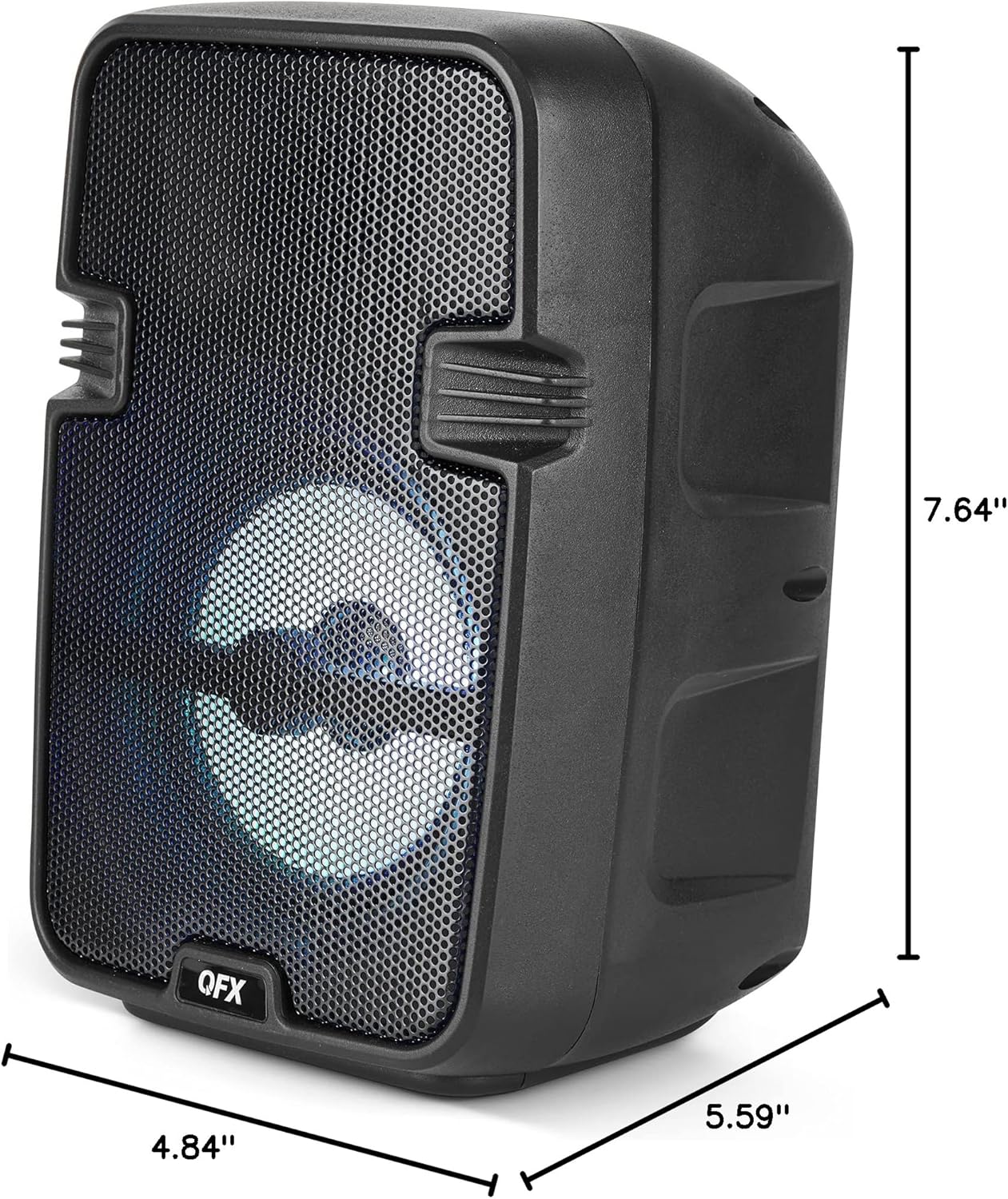
Image 8.1: Product dimensions of the BT-60-BK speaker.
9. Warranty and Support
The QFX BT-60-BK speaker comes with a limited warranty. For specific warranty details, please refer to the warranty card included with your purchase or visit the official QFX website. For technical support or customer service inquiries, please contact QFX customer support through their official channels.
Related documentsBT-60


Ask a question about this manual
Ask about setup, troubleshooting, compatibility, parts, safety, or missing instructions. Manuals+ will review the question and use this page’s manual context to help answer it.