
1. Introduction
This manual provides detailed instructions for the installation, operation, and maintenance of the Walfront 12VDC Water Level Controller Module. This electronic component is designed to automatically manage liquid levels by controlling a pump or solenoid valve for filling or draining applications. It is suitable for various uses, including fish tanks, aquariums, and water storage systems.
2. Safety Information
- Ensure the power supply is disconnected before performing any wiring or installation to prevent electrical shock.
- The module operates on 12VDC. Do not connect it to higher voltage power sources.
- Handle the PCB board with care to avoid damaging electronic components.
- Keep the module away from moisture and extreme temperatures unless properly enclosed.
- If you are unsure about any wiring steps, consult a qualified electrician.
3. Package Contents
- 1 x Walfront Water Level Controller Module
4. Specifications
| Specification | Value |
|---|---|
| Item Type | Water Level Controller Module |
| Material | PCB Board Electronic Component |
| Voltage | 12VDC (Operating range 9-12V AC/DC) |
| Charging Power | 10 A (Relay capacity) |
| Size | Approx. 60 x 50 x 22mm (2.4 x 2.0 x 0.9 inches) |
| Item Weight | 30 g |
| Country of Origin | China |
5. Setup and Installation
Careful wiring is essential for the correct operation of the water level controller module. Refer to the diagrams below for proper connections.
5.1 Module Overview

Image 1: Top view of the Walfront 12VDC Water Level Controller Module, showing the relay, capacitor, resistors, and terminal blocks.

Image 2: Angled view of the Walfront 12VDC Water Level Controller Module, illustrating its dimensions of 60mm (2.4in) length, 50mm (2.0in) width, and 22mm (0.9in) height.
5.2 Wiring Connections
The module requires a 9-12V AC or DC power input. It uses three water level probes (sensors) and controls an external 12V load such as a water pump or solenoid valve.
- Power Input: Connect your 9-12V AC or DC power supply to the terminal block labeled '9-12V'. Ensure correct polarity if using DC (red for positive, black for negative).
- Water Level Probes: Connect the three water level probes to the terminal block labeled 'X Z S'.
- X: Upper Limit Probe (detects full level)
- Z: Common Line Probe (reference point, typically placed at the lowest desired water level or bottom of the tank)
- S: Lower Limit Probe (detects low level)
Note: The water level probes can be made from ordinary household aluminum core wire. Peel off the wire insulation by more than 5cm for the part that will be submerged in water to ensure proper conductivity.
- Load Output: The module controls a relay with three terminals: 1 (Normally Closed), 2 (Common), and 3 (Normally Open). Connect your 12V load (e.g., water pump, solenoid valve) as follows:
- For drainage control (pump turns on when water is high, off when low): Connect one side of your 12V load to the Common (2) terminal and the other side to the Normally Closed (1) terminal.
- For pumping/filling control (pump turns on when water is low, off when high): Connect one side of your 12V load to the Common (2) terminal and the other side to the Normally Open (3) terminal.

Image 3: Physical wiring diagram showing connections for power supply, water level sensors in a tank, and a water pump motor for filling control.
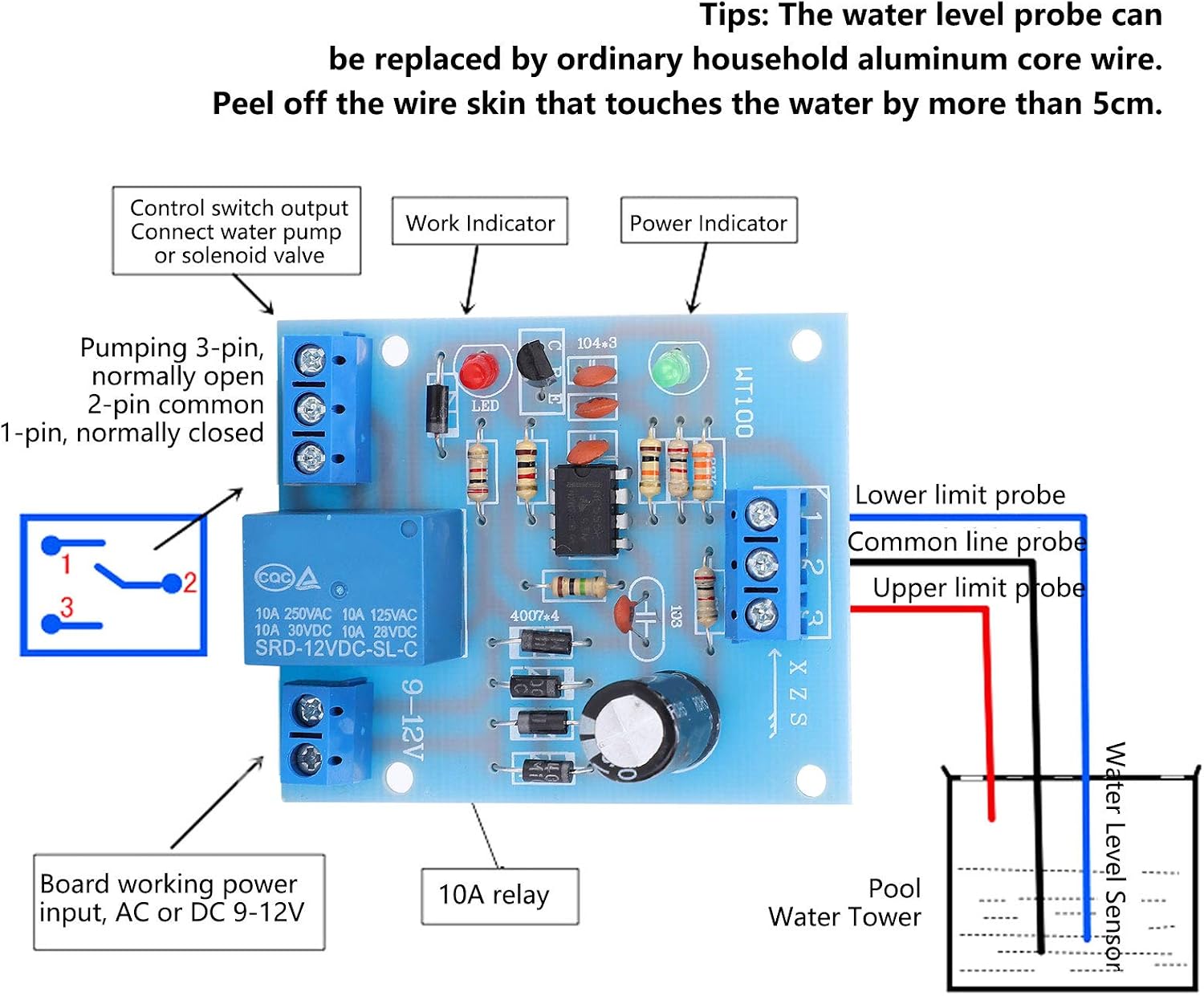
Image 4: Detailed wiring diagram illustrating the connections for the power input, water level probes (Lower limit, Common line, Upper limit), and the control switch output (Normally Open, Common, Normally Closed) for a pump or solenoid valve.
6. Operating Instructions
The Walfront Water Level Controller Module operates based on the water levels detected by the three probes (Lower, Common, Upper). Its primary function is to automatically maintain a desired water level by activating or deactivating a connected pump or solenoid valve.
6.1 Filling Mode (Pump On when Low, Off when High)
When configured for filling (load connected to Common and Normally Open terminals):
- If the water level drops below the Lower Limit Probe (S), the module will activate the relay, turning on the connected pump to start filling the tank.
- The pump will continue to run until the water level reaches the Upper Limit Probe (X). At this point, the module will deactivate the relay, turning off the pump.
- The Common Line Probe (Z) acts as a reference and should be placed at the lowest point where water is expected to be present, or at the desired minimum operating level.
6.2 Draining Mode (Pump On when High, Off when Low)
When configured for draining (load connected to Common and Normally Closed terminals):
- If the water level rises above the Upper Limit Probe (X), the module will activate the relay, turning on the connected pump to start draining the tank.
- The pump will continue to run until the water level drops below the Lower Limit Probe (S). At this point, the module will deactivate the relay, turning off the pump.
Important Note: The module's internal logic 'remembers' its current state (filling or draining) based on the sequence of sensor activations. If you need to switch between filling and draining modes, or if the module behaves unexpectedly after manual intervention with water levels, it is recommended to power cycle the module (turn it off and then on again) to reset its state.
7. Maintenance
- Regularly inspect all wiring connections to ensure they are secure and free from corrosion.
- Check the water level probes periodically for any buildup or damage that might affect their conductivity. Clean them if necessary.
- Keep the module in a dry, protected environment to prevent damage from moisture or dust.
- Ensure the power supply is stable and within the specified 9-12V range.
8. Troubleshooting
- Module not powering on: Verify the 9-12V power supply is correctly connected and providing the specified voltage. Check for loose wires or incorrect polarity.
- Pump/Solenoid not activating: Ensure the load is correctly wired to the relay's Common and either Normally Open (for filling) or Normally Closed (for draining) terminals. Check the load itself (pump/solenoid) for functionality.
- Incorrect water level detection: Inspect the water level probes. Ensure they are clean, properly submerged, and that the exposed wire sections are making good contact with the water. Verify the Common Line Probe (Z) is correctly positioned.
- Erratic behavior: Power cycle the module by disconnecting and reconnecting its power supply. This can reset its internal state. Ensure there is no electrical interference affecting the sensor wires.
9. Product Video
Watch this video for a visual overview of the Walfront Water Level Controller Module.
Video 1: A brief demonstration of the Walfront 12VDC Water Level Controller Module, showcasing its physical appearance and components.
10. Warranty and Support
This Walfront Water Level Controller Module is covered by the manufacturer's standard warranty. For specific warranty details, please refer to the product packaging or contact your retailer.
For technical support or inquiries, please contact Walfront customer service through their official channels or the retailer from whom the product was purchased.