
CAZOKASI CAZOKASI
CAZOKASI Personal USB Rechargeable Waist Clip Fan
Model: CAZOKASI
Introduction
Thank you for purchasing the CAZOKASI Personal USB Rechargeable Waist Clip Fan. This manual provides essential information for the safe and efficient operation, maintenance, and troubleshooting of your device. Please read it thoroughly before use and retain it for future reference.
Safety Information
- Do not immerse the fan in water or other liquids.
- Keep out of reach of children and pets.
- Avoid placing fingers or foreign objects into the fan blades.
- Do not disassemble or attempt to repair the fan yourself. Contact customer support for assistance.
- Use only the provided charging cable or a certified USB charger.
- Do not expose the fan to extreme temperatures or direct sunlight for extended periods.
- Ensure the fan is fully charged before first use to optimize battery life.
Package Contents
- CAZOKASI Personal USB Rechargeable Waist Clip Fan
- USB Charging Cable
- Neck Lanyard
- Cleaning Brush
- User Manual (this document)
Product Overview
The CAZOKASI Personal USB Rechargeable Waist Clip Fan is designed for portable cooling in various environments. It features a powerful motor, a large capacity battery, and multiple wearing options.

Figure 1: Front view of the CAZOKASI Personal USB Rechargeable Waist Clip Fan, showing the main body, waist clip, and included cleaning brush.
Key Features
- 4-in-1 Functionality: Can be used as a waist clip fan, neck hanging fan, desktop fan, and a power bank for emergency phone charging.
- High Capacity Battery: Equipped with an 8000mAh battery for extended operation.
- Powerful Airflow: Features a motor with a maximum speed of 5100 RPM for effective cooling.
- Adjustable Air Outlet: Directs airflow precisely for personal comfort.
- Detachable and Cleanable Design: Allows for easy maintenance and prolonged product life.

Figure 2: Illustration of the fan's versatile usage modes: waist clip, neck hanging, desktop, and emergency power bank function.
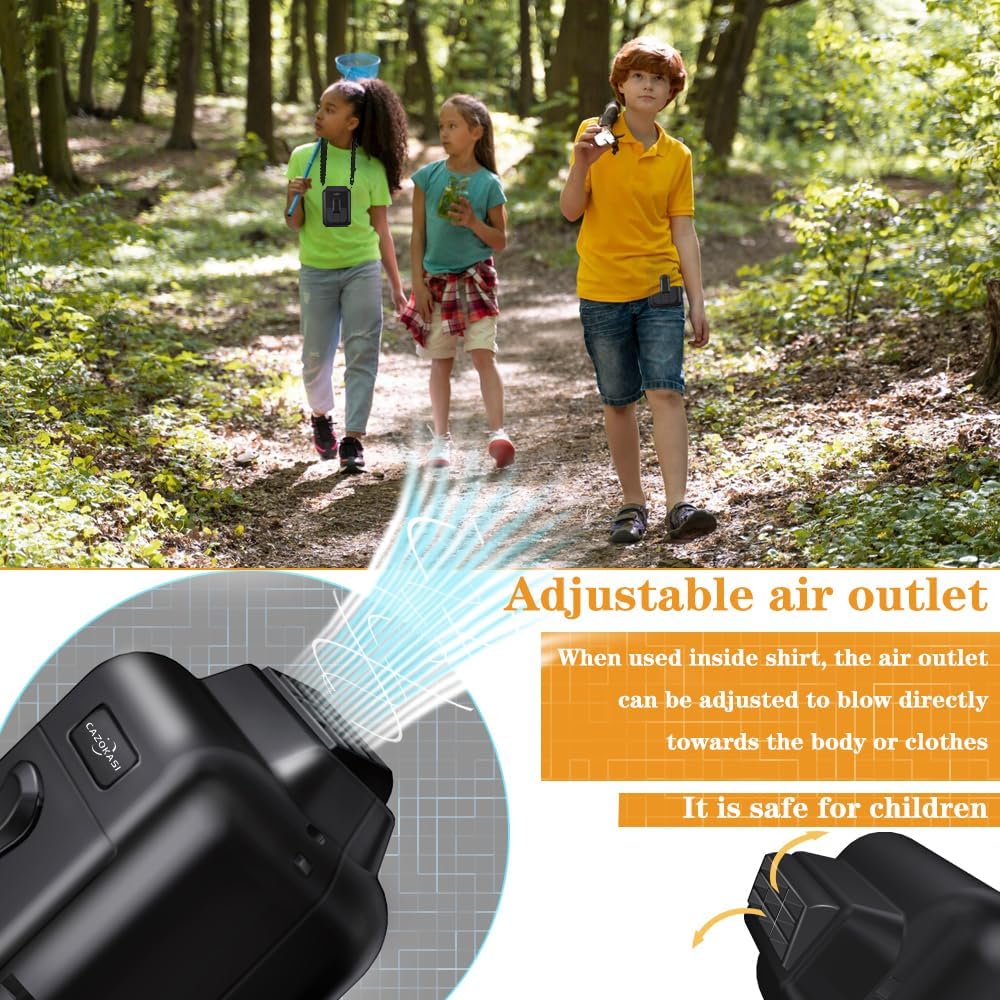
Figure 3: Close-up view of the adjustable air outlet, demonstrating how airflow can be directed for optimal personal cooling.

Figure 4: Diagram illustrating the extended battery life of the 8000mAh fan at different speed settings: Low (32 hours), Mid (16 hours), High (6 hours).
Setup
Charging the Fan
- Connect the provided USB charging cable to the fan's charging port (USB Type A).
- Plug the other end of the USB cable into a compatible USB power adapter (not included) or a computer's USB port.
- The charging indicator light will illuminate during charging. It will change or turn off once fully charged.
- A full charge typically takes several hours. Ensure the fan is fully charged before its first use.
Wearing the Fan
- Waist Clip: Use the integrated clip to attach the fan to your waistband, belt, or pocket. Ensure it is securely fastened.
- Neck Hanging: Attach the provided neck lanyard to the designated loops on the fan. Adjust the lanyard length for comfortable wearing around your neck.
- Desktop Use: The fan can be placed on a flat surface for use as a personal desk fan.
Operating Instructions
Power On/Off and Speed Adjustment
- Power On: Press the power button once to turn on the fan at the lowest speed setting.
- Adjust Speed: Press the power button repeatedly to cycle through the three available speed settings (Low, Medium, High).
- Power Off: After the highest speed setting, pressing the power button again will turn the fan off.
Using as a Power Bank
The fan's 8000mAh battery can be used to provide emergency power to other USB-powered devices, suchs as smartphones.
- Connect your device's charging cable to the fan's USB output port.
- The fan will begin charging your device. Note that using the fan as a power bank will reduce its operating time as a fan.
Maintenance
Regular cleaning ensures optimal performance and extends the lifespan of your fan.

Figure 5: The fan's detachable cover and internal components, along with the cleaning brush, demonstrating its easy-to-clean design.
- Ensure the fan is turned off and disconnected from any power source before cleaning.
- Gently remove the front cover of the fan. Refer to Figure 5 for guidance.
- Use the included cleaning brush to carefully remove any dust or debris from the fan blades and internal components.
- Wipe the exterior of the fan with a soft, dry cloth. Do not use abrasive cleaners or solvents.
- Once clean, reattach the front cover, ensuring it is securely in place.
Troubleshooting
| Problem | Possible Cause | Solution |
|---|---|---|
| Fan does not turn on. | Battery is depleted. | Charge the fan fully using the provided USB cable. |
| Weak airflow. | Fan speed is too low; fan blades are obstructed by dust. | Increase the fan speed. Clean the fan blades and air inlets/outlets as described in the Maintenance section. |
| Fan makes unusual noise. | Dust or debris inside the fan; fan not placed on a stable surface. | Clean the fan. Ensure it is on a stable surface if used as a desktop fan. |
| Cannot charge external devices. | Fan battery is low; incorrect cable or device. | Ensure the fan is sufficiently charged. Use a compatible USB cable for your device. |
Specifications
| Feature | Detail |
|---|---|
| Brand | CAZOKASI |
| Model Name | CAZOKASI |
| Battery Capacity | 8000mAh Lithium Ion |
| Working Time (Low Speed) | Up to 32 hours |
| Max Fan Speed | 5100 RPM |
| Noise Level | 52 dB (max) |
| Power Source | Battery Powered (Rechargeable) |
| Charging Port | USB Type A |
| Number of Speed Levels | 3 |
| Product Dimensions | 2.01"D x 3.11"W x 4.41"H |
| Item Weight | 11.8 ounces (0.74 Pounds) |
| Color | Black |
Warranty and Support
For warranty information or technical support, please refer to the product packaging or contact CAZOKASI customer service through your purchase platform. Keep your purchase receipt as proof of purchase.
Ask a question about this manual
Ask about setup, troubleshooting, compatibility, parts, safety, or missing instructions. Manuals+ will review the question and use this page’s manual context to help answer it.