
Introduction
The BenQ V7050i is a state-of-the-art 4K Laser Smart TV Projector designed to redefine your home entertainment experience. Featuring Ultra Short Throw technology, it delivers stunning 4K UHD visuals with exceptional brightness and color accuracy, even in well-lit rooms. This manual provides comprehensive instructions for setting up, operating, and maintaining your projector to ensure optimal performance.

Front view of the BenQ V7050i 4K Laser Smart TV Projector.
Key Features
- True 4K UHD Resolution: Experience incredible clarity with 3840×2160 (8.3 million pixels) for a truly immersive viewing experience.
- Ultra Short Throw: Achieve a 100” projection size from just 8.7” away, offering flexibility in placement and eliminating shadows.
- 2500 ANSI Lumens: Enjoy bright and beautiful images suitable for both dark and brightly lit rooms.
- HDR-PRO Technology: Enhanced Dynamic Range for HDR content, delivering vibrant colors and deep contrast.
- 98% DCI-P3 Color Gamut: Provides highly accurate and cinematic color performance.
- Google-certified Android TV: Seamlessly stream content from your favorite apps and cast wirelessly from your devices.
- Motorized Lens Cover: Automatically protects the lens from dust and damage when not in use.
Setup
Placement and Projection Distance
The BenQ V7050i is an Ultra Short Throw projector, meaning it can project a large image from a very short distance. For a 100” projection, the projector needs to be approximately 8.7 inches (22 cm) from the screen. The built-in rulers on the projector provide accurate measurements for various screen sizes.
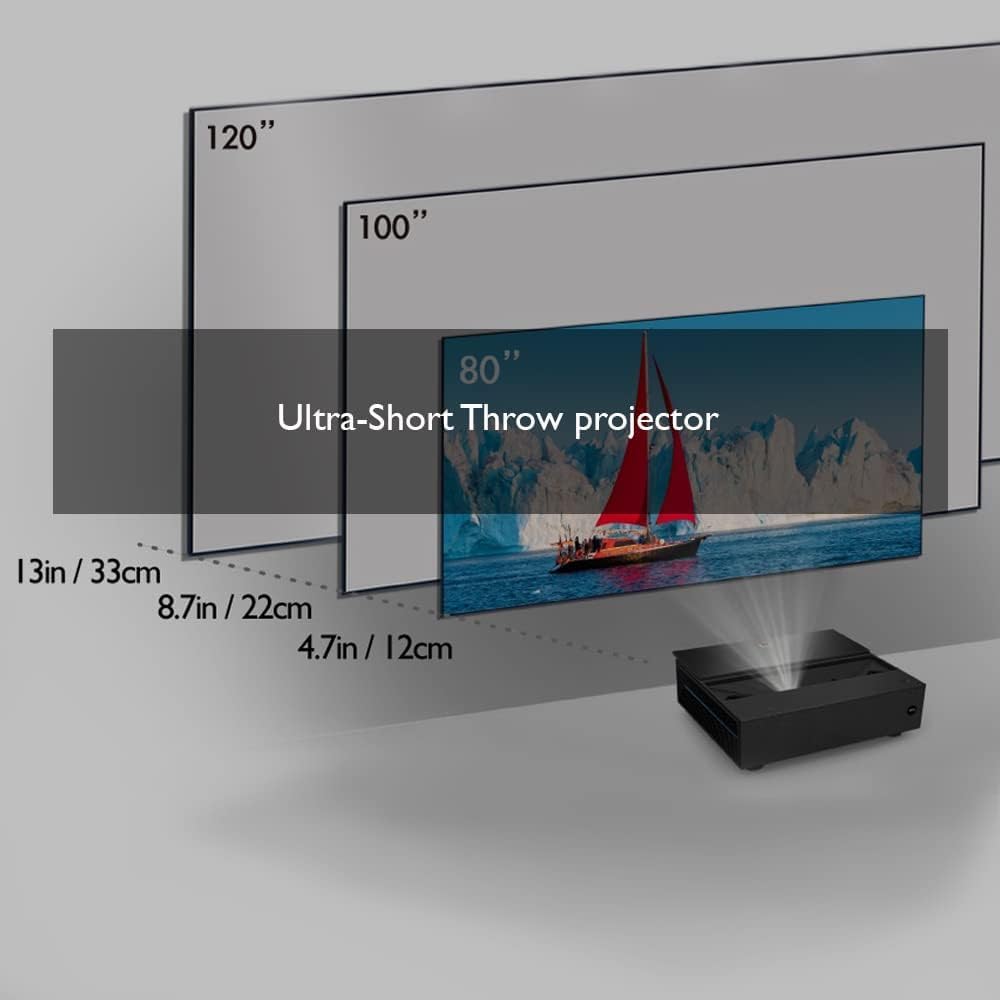
Ultra Short Throw projection distances for various screen sizes.
Consider the depth of your TV shelf or cabinet when placing the projector. Ensure the projection wall is suitable for the desired screen size.

Visual guide for projector placement and wall considerations.
Connections
The projector features multiple input and output ports on its rear panel. These include HDMI ports, USB ports, and an SPDIF optical audio output.
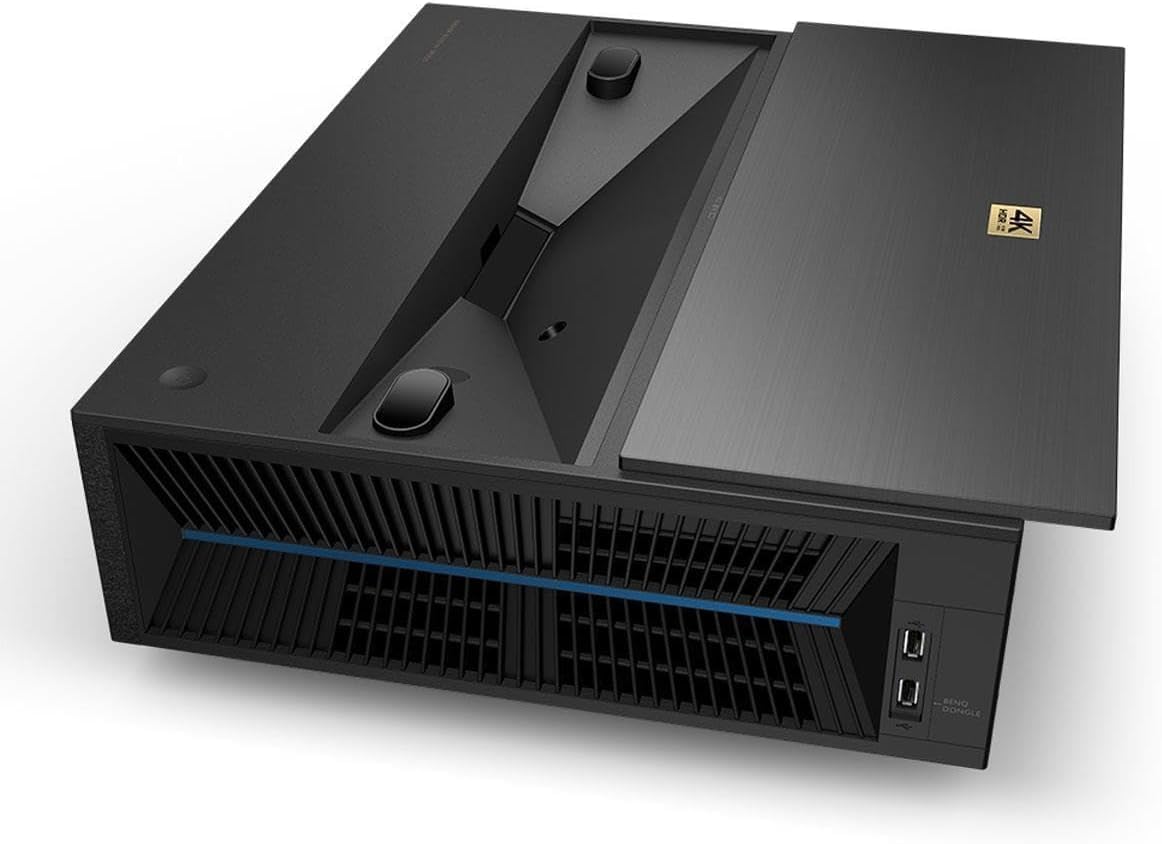
Rear panel connections of the BenQ V7050i projector.
One HDMI port is specifically designed to house the included BenQ QS01 media dongle, which powers the Android TV functionality. This dongle requires a USB power connection, which can be supplied by the projector's USB port.
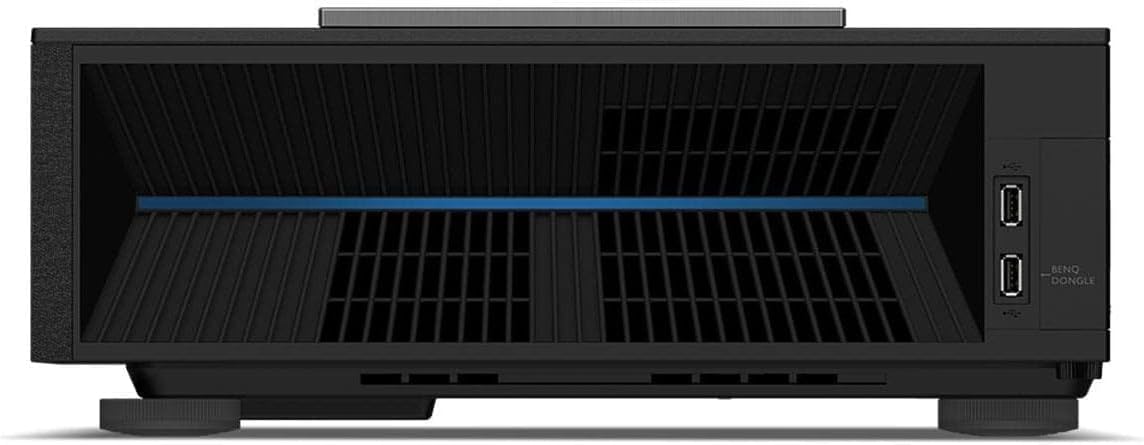
Detail of the HDMI and USB ports for the BenQ dongle.
Motorized Lens Cover
The projector features a motorized lens cover that automatically opens when the projector is powered on and closes when it's turned off, protecting the lens from dust and damage.

Top view of the projector with the motorized lens cover open.
Operating
Android TV Interface
The BenQ V7050i runs on Google-certified Android TV, providing a user-friendly interface for accessing streaming services, apps, and Google Assistant. The interface is similar to other Android TV setups, offering a wide range of entertainment options.

Android TV interface with popular streaming applications.
Wireless casting is supported, allowing you to mirror content from your compatible devices directly to the projector.

Wireless casting functionality from various devices.
Remote Controls
The projector comes with two remote controls: one for the BenQ QS01 media dongle (white) and a main projector remote (black) with backlighting and shortcut functions. The media dongle remote also features a microphone for Google Assistant voice commands.

The BenQ V7050i projector with its two remote controls.
Picture and Sound Settings
The projector offers extensive picture and sound settings for customization. You can adjust brightness, contrast, color, tint, and sharpness. Advanced settings include Gamma Selection, Color Temperature, Color Management, Cinema Master, Noise Reduction, Brilliant Color, Wide Color Gamut, LumiExpert, and Light Mode. For sound, you can select various effect modes like Standard, Cinema, Music, Game, Sport, and User.
Official Product Video
Official BenQ V7050i 4K Laser Projector promotional video, showcasing its design and features.
Maintenance
The BenQ V7050i utilizes a laser light source with a life expectancy of 20,000 hours (typical, light source only), providing long-lasting performance without the need for frequent lamp replacements. Regular dusting of the projector's exterior and ensuring proper ventilation will help maintain its performance and longevity.
Troubleshooting
If you encounter any issues with your BenQ V7050i projector, please refer to the comprehensive User Manual (PDF) available for download. Common issues and their solutions are typically detailed within the manual's troubleshooting section.
Specifications
| Feature | Value |
|---|---|
| Model Number | V7050i |
| Light Source Life | 20,000 hours (typical, light source only) |
| Display Resolution | 3840 x 2160 (4K UHD) |
| Brightness | 2500 ANSI Lumens |
| Contrast Ratio | 2,000,000:1 |
| Color Gamut | 98% DCI-P3 |
| Connectivity Technology | Bluetooth, HDMI, USB, SPDIF |
| Product Dimensions | 19 x 13.5 x 21.96 inches |
| Item Weight | 22 pounds |
What's in the Box
- BenQ V7050i 4K Laser Smart TV Projector
- Power Cord
- BenQ QS01 Media Dongle
- Remote Controls (2)
Warranty and Support
The BenQ V7050i comes with a 3-Year Limited Warranty. For detailed warranty information or technical support, please refer to the official BenQ website or the provided user documentation.


