
1. Introduction
The Phelinta D2 3-in-1 Wireless Charging Station is designed to simultaneously charge your compatible Samsung smartphone, Galaxy Watch, and Galaxy Buds. This device provides a convenient and organized charging solution, reducing cable clutter and optimizing your space. Please read this manual carefully before use to ensure proper operation and to maximize the lifespan of your charging station.
2. Setup
2.1 Package Contents
- 1 x Phelinta D2 3-in-1 Wireless Charging Station
- 1 x USB-C to USB-C Charging Cable
- 1 x User Manual
Note: A power adapter (charging brick) is not included and must be purchased separately. A Quick Charge 3.0 (QC3.0) or Power Delivery (PD) adapter of 18W or higher is recommended for optimal performance.
2.2 Connecting to Power
- Connect the provided USB-C charging cable to the USB-C port on the back of the charging station.
- Connect the other end of the USB-C cable to a compatible power adapter (not included).
- Plug the power adapter into a wall outlet. The indicator lights on the charging station will briefly illuminate, indicating it is powered on.
2.3 Compatibility & Important Notices
Ensure your devices are compatible with the Phelinta D2 charging station before use. Refer to the image below for detailed compatibility information.
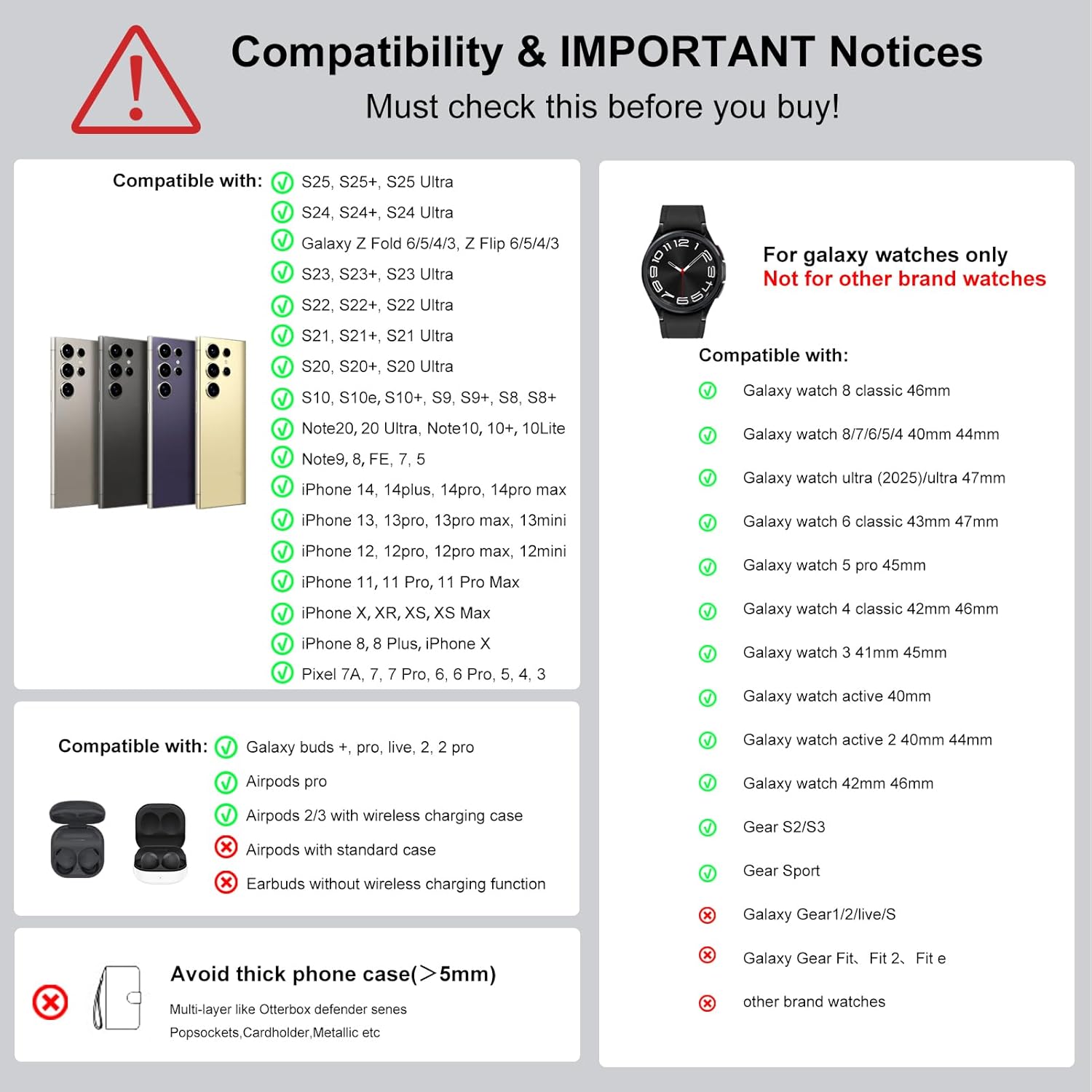
Image: Detailed compatibility chart for smartphones, smartwatches, and earbuds with the Phelinta D2 charging station. It shows supported Samsung Galaxy phones (S25, S24, S23, Note 20, Z Fold/Flip series), Galaxy Watches (8, 7, 6, 5, 4, 3, Active series), and Galaxy Buds. It also lists incompatible items like thick phone cases (>5mm), metal cases, metal rings, credit cards, magnetic pads, and non-Samsung watches.
- Phone Case Thickness: Phones covered with metal cases or thick cases (thickness >5mm) are not supported.
- Watch Compatibility: Designed exclusively for Samsung Galaxy Watches. Not compatible with other watch brands or models like Gear S2/S3/S4/Gear Sport (older models) or Galaxy Gear Fit series.
- Earbuds: Compatible with Galaxy Buds series and Apple AirPods (with wireless charging case). Earbuds without wireless charging functionality are not supported.
- Foreign Objects: Magnetic or metal attachments, credit cards, or other foreign objects placed between the device and the charging surface will interfere with charging and may cause overheating.
3. Operating Instructions
3.1 Charging Your Devices
The Phelinta D2 charging station features dedicated areas for your smartphone, smartwatch, and earbuds. Each area is designed for optimal wireless charging.
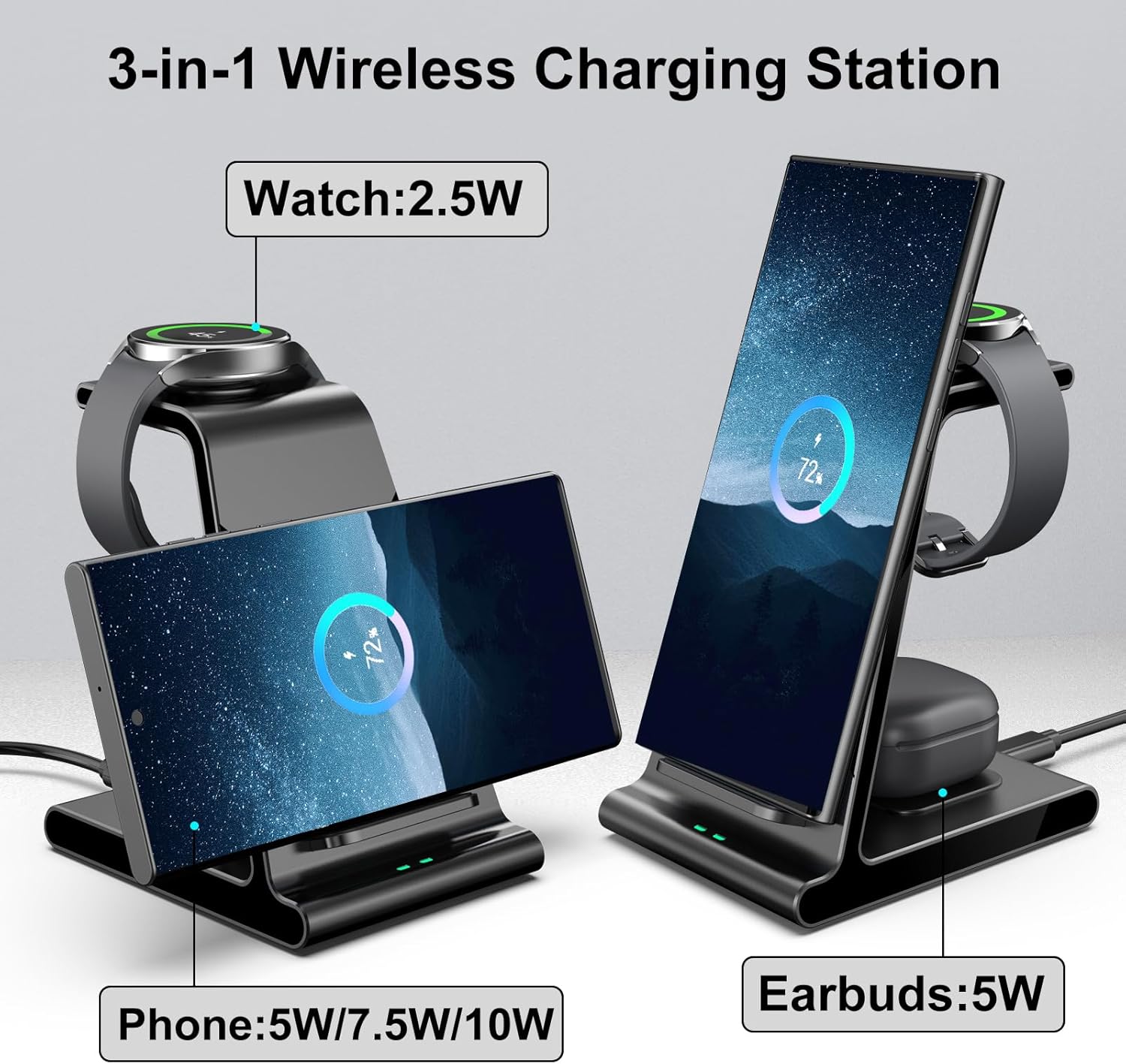
Image: The Phelinta D2 3-in-1 Wireless Charging Station showing the designated charging areas for a phone (5W/7.5W/10W), a watch (2.5W), and earbuds (5W).
- Charging a Smartphone: Place your compatible smartphone vertically or horizontally on the main charging stand. Ensure the phone is centered on the charging pad for proper connection. The phone charging area supports 5W, 7.5W, and 10W output depending on the phone model and power adapter.
- Charging a Galaxy Watch: Place your Galaxy Watch on the elevated watch charging pad. The watch will magnetically align and begin charging. The watch charging area provides 2.5W output.
- Charging Earbuds: Place your wireless charging compatible earbuds case on the flat charging pad at the base of the station. The earbuds charging area provides 5W output.
When a device is correctly placed and charging, the corresponding indicator light on the front of the station will show a green breathing light. If a red light flashes, it indicates a foreign object detection or improper placement.
3.2 Vertical and Horizontal Charging
The dual-coil design of the phone charging stand allows for both vertical and horizontal charging. This enables you to browse, watch videos, or make video calls while your phone charges.

Image: A collage showing the Phelinta D2 charging station in various settings, demonstrating a phone charging vertically while a user works on a laptop, a phone charging horizontally for video viewing, and the station on a bedside table.
3.3 Safety Features
The Phelinta D2 charging station incorporates multiple safety features to protect your devices and ensure safe charging:
- Overcharge Protection: Prevents devices from being overcharged.
- Over-current Protection: Safeguards against excessive current flow.
- Over-voltage Protection: Protects against voltage spikes.
- Foreign Object Detection (FOD): Detects metal objects on the charging surface and stops charging to prevent damage or overheating.
- Temperature Control: Built-in heat dissipation design helps maintain optimal charging temperatures.
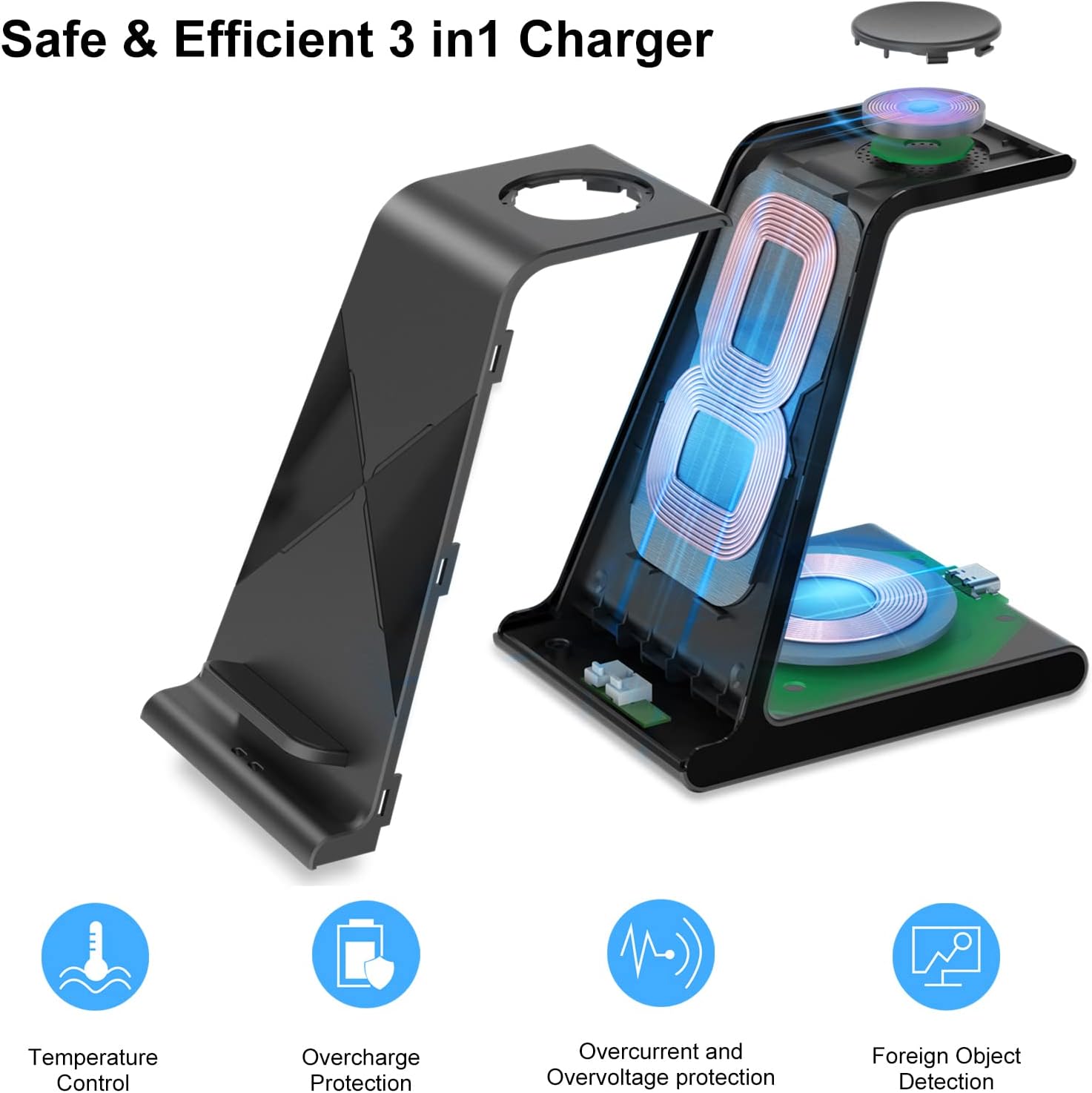
Image: An exploded view diagram of the Phelinta D2 charging station highlighting its internal coils and safety features such as Temperature Control, Overcharge Protection, Overcurrent and Overvoltage Protection, and Foreign Object Detection.

Image: Close-up views of the Phelinta D2 charging station, illustrating the heat dissipation design with vents on the back and bottom surfaces.
3.4 Video Instructions
Video: A demonstration of how to use the Phelinta D2 3-in-1 Wireless Charging Station to charge Samsung earbuds, a Samsung Galaxy Watch, and a Samsung smartphone simultaneously. The video highlights the dedicated charging areas for each device.
Video: A quick overview demonstrating the 3-in-1 wireless charging capabilities of the Phelinta D2 station for Samsung devices, showing the placement of a phone, watch, and earbuds for charging.
4. Maintenance
To ensure the longevity and optimal performance of your Phelinta D2 Wireless Charging Station, follow these maintenance guidelines:
- Cleaning: Disconnect the power before cleaning. Use a soft, dry, lint-free cloth to wipe the surface of the charging station. Do not use abrasive cleaners, solvents, or chemical sprays, as these may damage the finish or internal components.
- Storage: When not in use for extended periods, store the charging station in a cool, dry place away from direct sunlight and extreme temperatures.
- Avoid Liquids: Keep the charging station away from water and other liquids. If liquid spills on the device, immediately disconnect power and allow it to dry completely before re-using.
- Handle with Care: Avoid dropping or subjecting the charging station to strong impacts, which can damage internal circuitry.
5. Troubleshooting
If you encounter issues with your Phelinta D2 Wireless Charging Station, refer to the following common problems and solutions:
| Problem | Possible Cause | Solution |
|---|---|---|
| Device not charging or charging slowly. |
|
|
| Indicator light flashing red. | Foreign object detected or device not placed correctly. | Remove any foreign objects (e.g., keys, coins, credit cards) from the charging surface. Re-position the device correctly. |
| Charging station is hot. | Normal during wireless charging, but excessive heat can indicate an issue. | Ensure there is adequate ventilation around the charger. Remove any foreign objects. If overheating persists, discontinue use and contact support. |
| Watch not charging. | Incompatible watch model. | Verify your watch is a compatible Samsung Galaxy Watch model as listed in the compatibility section. |
6. Specifications
| Feature | Detail |
|---|---|
| Model Number | D2 |
| Product Dimensions | 3.94 x 1.97 x 1.18 inches |
| Item Weight | 10 ounces |
| Input Voltage | 5 Volts |
| Amperage | 2 Amps |
| Connector Type | USB Type C |
| Phone Output | 5W / 7.5W / 10W |
| Watch Output | 2.5W |
| Earbuds Output | 5W |
| Special Feature | 3 IN 1 Design, Wireless Charging |
| Included Components | 1 * 3IN1 Wireless Charging Station, 1 * Charging Cable (USB C to TYPE C), User Manual |
| Manufacturer | Shenzhen Xuanfeng Innovations Technology Co., Ltd. |
7. Warranty & Support
Phelinta products are manufactured with high-quality standards. For warranty information or technical support, please refer to the contact details provided with your purchase documentation or visit the official Phelinta website. If you have any questions or require assistance, please feel free to contact us via email.