
Walfront HT107B
Walfront HT107B Socket Tester User Manual
Model: HT107B
1. Introduction
This manual provides detailed instructions for the safe and effective use of the Walfront HT107B Socket Tester. This device is designed to quickly detect the correct electrical connection of a 3-pin power socket, measure voltage, and perform leakage detection.
2. Safety Information
WARNING: Electrical testing can be hazardous. Always exercise extreme caution when working with electrical circuits. Failure to follow these safety instructions may result in electric shock, fire, or personal injury.
- Read all instructions carefully before use.
- Do not use the tester if it appears damaged or is not functioning properly.
- Ensure your hands are dry before handling the tester or any electrical outlets.
- Do not use the tester in wet or damp conditions.
- This device is intended for use by qualified individuals or under the supervision of a qualified electrician.
- Always disconnect power before attempting any repairs based on tester readings.
- The GFCI test function should only be used on GFCI-protected circuits.
3. Product Overview
The Walfront HT107B Socket Tester is a compact and easy-to-use device for verifying the wiring status of electrical outlets. It features a clear display and LED indicators to show various wiring conditions.

Figure 1: Front view of the Walfront HT107B Socket Tester, showing the digital display and LED indicator panel.
Key Features:
- 3-pin socket line sequence detection.
- Phase voltage (L-N) detection.
- Leakage voltage (N-E) detection.
- Leakage switch (RCD) detection (GFCI test).
- Clear LED indicators for various wiring faults.
- Digital display for voltage readings.
4. Setup
The Walfront HT107B Socket Tester requires no complex setup. It is ready for use directly out of the packaging.
- Inspect the tester for any visible damage before each use.
- Ensure the socket you intend to test is a standard 3-hole power socket.
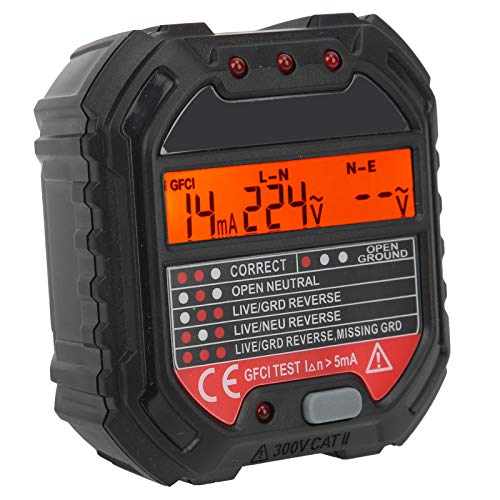
Figure 2: The socket tester being inserted into a standard electrical outlet.
5. Operating Instructions
5.1 Basic Socket Wiring Test
- Plug the Walfront HT107B Socket Tester into the 3-hole power socket you wish to test.
- Observe the LED indicators on the tester. The pattern of illuminated lights will indicate the wiring status.
- Refer to the wiring chart below to interpret the results.
- The digital display will show the phase voltage (L-N) and leakage voltage (N-E).
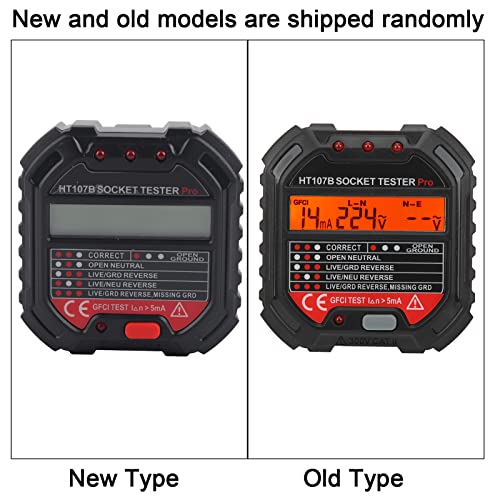
Figure 3: The socket tester displaying readings, accompanied by a detailed wiring fault indicator chart.
Wiring Indicator Chart:
Note: Illuminated LEDs are represented by ● and unilluminated by ○. On the device, "Correct" indicators are typically white, while fault indicators are red.
| Condition | Left LED | Middle LED | Right LED |
|---|---|---|---|
| Correct | ● | ● | ● |
| Missing Ground | ● | ● | ○ |
| Missing Neutral Line | ○ | ● | ● |
| Missing Live Wire | ● | ○ | ○ |
| Live and Ground Reverse Connection | ○ | ● | ○ |
| Live and Neutral Line Reverse Connection | ● | ○ | ● |
| Live and Ground Wire Are Reversely Connected, Lack of Ground | ○ | ● | ○ |
Note: This tester cannot distinguish between the reverse connection of the neutral wire and the ground wire. If the live wire and ground wire are reversely connected and the ground wire is also not connected, the tester will indicate a "Live and Ground Reverse Connection" or "Live and Ground Wire Are Reversely Connected, Lack of Ground" fault.
5.2 GFCI (RCD) Test
The GFCI test function checks the integrity of Ground Fault Circuit Interrupter protection. Only perform this test on GFCI-protected outlets.
- Plug the tester into a GFCI-protected outlet.
- Press the "GFCI TEST" button (often labeled with a lightning bolt or "RCD").
- A working GFCI outlet should trip, cutting power to the outlet. The tester's lights will go out, and the GFCI outlet's reset button will pop out.
- If the GFCI does not trip, it indicates a fault with the GFCI protection, and the outlet should not be used until inspected by a qualified electrician.
- To restore power, press the reset button on the GFCI outlet.
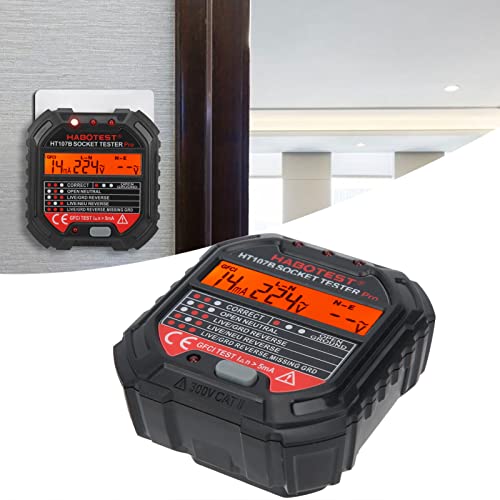
Figure 4: The socket tester plugged into an outlet, highlighting the GFCI test button.
6. Maintenance
- Cleaning: Wipe the tester with a dry, soft cloth. Do not use abrasive cleaners or solvents.
- Storage: Store the tester in a cool, dry place, away from direct sunlight and extreme temperatures.
- Inspection: Regularly inspect the tester for any signs of damage, such as cracks in the casing or bent pins. Do not use if damaged.
7. Troubleshooting
- Tester does not light up or display readings:
- - Ensure the socket has power. Test with a known working appliance or another tester.
- - Check if the tester is fully inserted into the socket.
- - The socket may have a "Missing Live Wire" fault, as indicated by the chart if the tester has some power but no display.
- GFCI test button does not trip the outlet:
- - Confirm the outlet is indeed GFCI-protected.
- - The GFCI mechanism in the outlet may be faulty and requires professional inspection.
- Inconsistent readings:
- - Ensure a stable connection. Re-insert the tester firmly.
- - Test multiple sockets to compare results. If inconsistencies persist, the tester may be faulty or the electrical system requires professional assessment.
If you encounter issues not covered here, or if you suspect a serious electrical fault, consult a qualified electrician.
8. Specifications
| Brand | Walfront |
| Model Number | HT107B (Item model number: Walfrontzv9c65hsgy95) |
| Operating Voltage Range | 90-250V AC |
| Power Source | Electric (powered by outlet) |
| Product Dimensions | Approximately 0.39 x 0.39 x 0.39 inches (10 x 10 x 10 mm) |
| Item Weight | Approximately 3.46 ounces (98 Grams) |
| Color | Black |
| Safety Rating | 300V CAT II (as indicated on device) |
9. Warranty and Support
Specific warranty information for the Walfront HT107B Socket Tester is not provided in this manual. Please refer to the product packaging or the retailer's website for warranty details.
For technical support or further inquiries, please contact Walfront customer service through their official channels or the retailer from whom the product was purchased.
You can visit the Walfront Store for more information: Walfront Official Store
10. Product Videos
No official product videos from the seller were found that meet the embedding criteria for this manual.
Ask a question about this manual
Ask about setup, troubleshooting, compatibility, parts, safety, or missing instructions. Manuals+ will review the question and use this page’s manual context to help answer it.