
BlitzWolf BW-HP2
BlitzWolf® BW-HP2 Wireless Over-Ear Headset User Manual
Model: BW-HP2
Introduction
Thank you for choosing the BlitzWolf® BW-HP2 Wireless Over-Ear Headset. This manual provides essential information for the proper use, setup, and maintenance of your new headset. Please read it thoroughly before use to ensure optimal performance and longevity of the product.

Image: The BlitzWolf BW-HP2 headset, highlighting its foldable design and wireless capabilities.
Safety Information
- Do not expose the headset to extreme temperatures, humidity, or corrosive substances.
- Avoid dropping or subjecting the headset to strong impacts.
- Do not disassemble or modify the headset. This will void the warranty.
- Clean the headset with a soft, dry cloth. Do not use harsh chemicals or abrasive materials.
- Listen at moderate volume levels to prevent hearing damage.
Package Contents
Please check the package for the following items:
- 1 x BlitzWolf BW-HP2 Bluetooth V5.0 Wireless Headset
- 1 x 3.5mm Audio Cable
- 1 x USB Charging Cable
- 1 x User Manual (this document)
- 1 x Headphone Stand (Bessa Protes 3D printed)

Image: The BlitzWolf BW-HP2 headset displayed on the included stand.
Product Overview
Familiarize yourself with the various parts and controls of your BW-HP2 headset.

Image: Front view of the BlitzWolf BW-HP2 headset, showing the earcups and headband.
Key Features:
- 50mm Speaker Driver: Delivers high-definition sound quality with deep full-frequency audio.
- Touch Control: Simple and convenient touch or press operations for various functions.
- Graphene Diaphragm: Enhances sound clarity and bass response.
- 1000mAh Battery: Provides extended usage time with low power consumption.
- Noise Canceling Microphone: Omnidirectional noise reduction ensures clear call quality.
- Comfortable Wearing: Ergonomic over-ear design with high-quality PU leather earcups.
- Bluetooth V5.0: Advanced chip for stable connection and speedy transmission.

Image: Detailed diagram illustrating the 50mm large dynamic driver with graphene diaphragm, highlighting sound quality.
Setup
1. Charging the Headset
Before first use, fully charge the headset. Connect the USB charging cable to the headset's charging port and a USB power source (e.g., computer, wall adapter). The LED indicator will show charging status.
- Charging Time: Approximately 3.5 hours
- Music Playback Time: Up to 42 hours (at 70% volume in Bluetooth mode)
- Call Time: Up to 42 hours
- Standby Time: Up to 600 hours
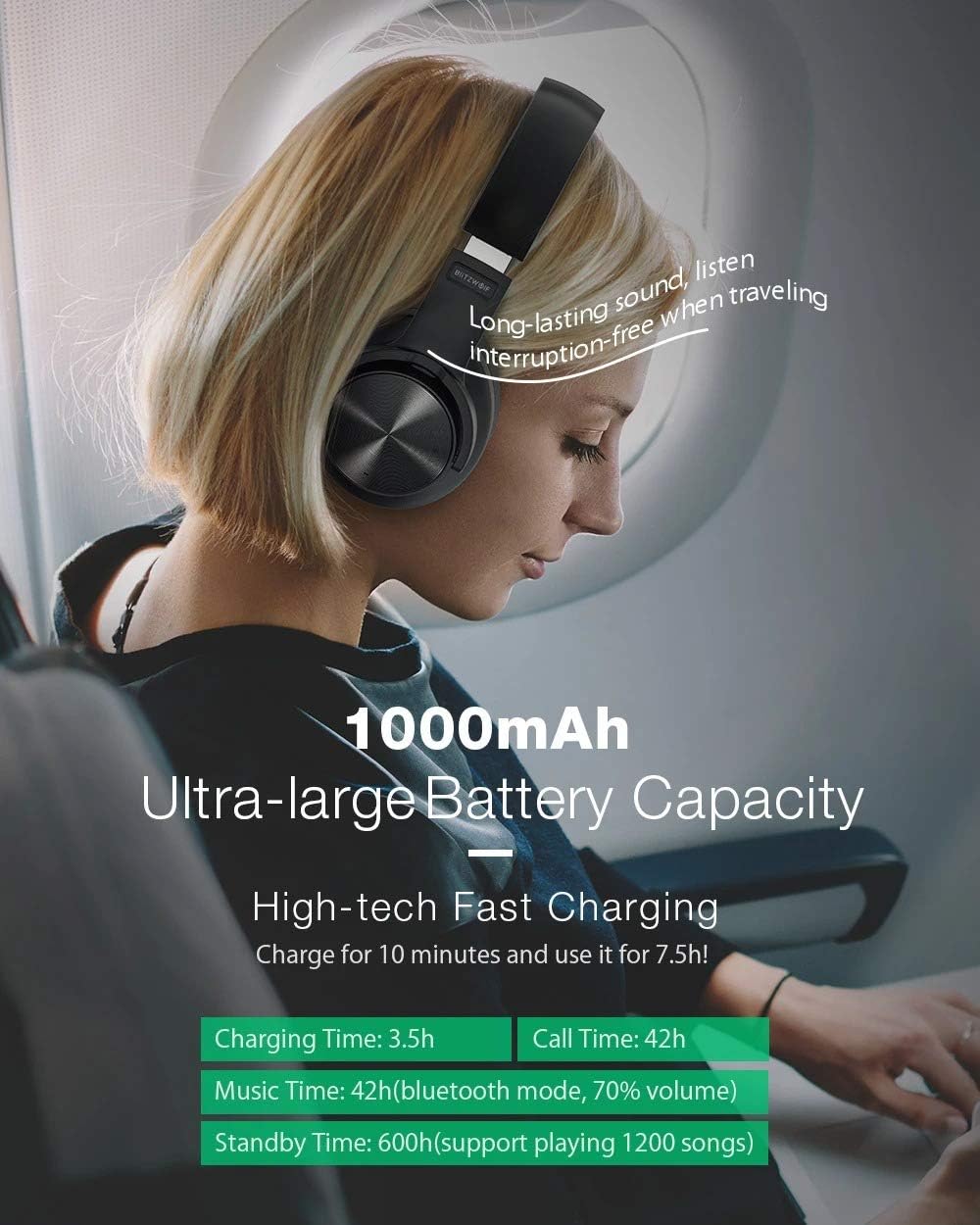
Image: Visual representation of the 1000mAh battery capacity and estimated usage times.
2. Bluetooth Pairing
To connect your BW-HP2 headset to a Bluetooth-enabled device:
- Ensure the headset is charged and turned off.
- Press and hold the Power/Multi-function button until the LED indicator flashes red and blue alternately, indicating pairing mode.
- On your device (smartphone, tablet, computer), enable Bluetooth and search for available devices.
- Select "BW-HP2" from the list of found devices.
- Once connected, the LED indicator will turn solid blue or flash blue slowly.
3. Pairing Two Devices Simultaneously
The BW-HP2 supports connecting to two Bluetooth devices at the same time:
- Turn on Bluetooth on the first device.
- Press the headset's "power button" for 3 seconds until the blue/red light flashes.
- Connect with the first device, then turn off Bluetooth on the first device.
- Connect the headphone with the second Bluetooth device according to the above steps (Bluetooth Pairing).
- Open Bluetooth of the first device, select the headphone and connect.
- You can now answer calls from two mobile phones.
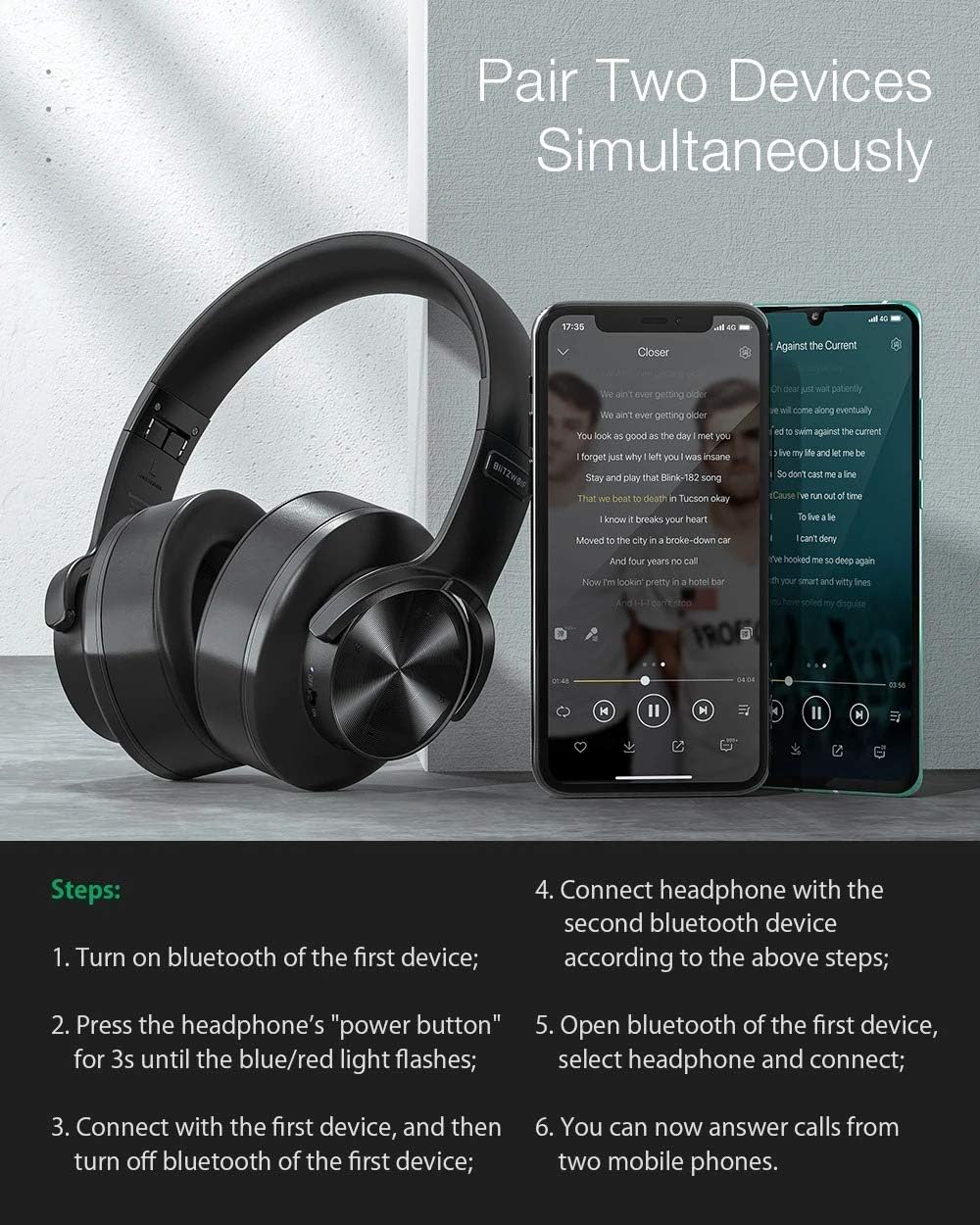
Image: Visual guide demonstrating the steps to pair the headset with two devices concurrently.
4. Wired Connection (3.5mm Audio Cable)
To use the headset with non-Bluetooth devices or when the battery is depleted, connect the included 3.5mm audio cable to the headset's audio jack and your device's audio output.
Operating Instructions
Power On/Off
- Power On: Press and hold the Power/Multi-function button for 3 seconds.
- Power Off: Press and hold the Power/Multi-function button for 3 seconds. The headset will automatically power off after five minutes of no connection to save battery.
Music Playback Control (Touch Control)
- Play/Pause: Single tap the touch control area on the earcup.
- Next Track: Swipe forward on the touch control area.
- Previous Track: Swipe backward on the touch control area.
- Volume Up: Swipe up on the touch control area.
- Volume Down: Swipe down on the touch control area.
Call Management (Touch Control)
- Answer/End Call: Single tap the touch control area during an incoming call.
- Reject Call: Press and hold the touch control area for 2 seconds during an incoming call.
- Redial Last Number: Double tap the touch control area.

Image: A user wearing the BW-HP2 headset, illustrating its comfortable fit and noise-canceling capabilities for clear audio.
Maintenance
- Cleaning: Wipe the headset with a soft, slightly damp cloth. Do not use alcohol, solvents, or abrasive cleaners.
- Storage: When not in use, store the headset in a cool, dry place, away from direct sunlight and extreme temperatures. The foldable design allows for compact storage.
- Battery Care: To prolong battery life, avoid fully discharging the headset frequently. Charge it regularly, even if not in use for extended periods.

Image: Side view of the BlitzWolf BW-HP2 headset resting on its stand, demonstrating proper storage.
Troubleshooting
| Problem | Possible Cause | Solution |
|---|---|---|
| Headset does not power on. | Low battery. | Charge the headset fully. |
| Cannot pair with device. | Headset not in pairing mode; Bluetooth off on device; device too far. | Ensure headset is in pairing mode (flashing red/blue). Turn on Bluetooth on your device. Move headset closer to device (within 10m). |
| No sound or low volume. | Volume too low; incorrect audio source; headset not connected. | Adjust volume on both headset and device. Ensure headset is properly connected via Bluetooth or 3.5mm cable. |
| Intermittent connection. | Interference; device too far; low battery. | Move away from sources of interference (Wi-Fi routers, other Bluetooth devices). Move headset closer to device. Charge the headset. |
Specifications
| Feature | Detail |
|---|---|
| Brand | BlitzWolf (Generic) |
| Model | BW-HP2 |
| Wearing Type | Over-Ear (Circumaural) |
| Material | ABS + PC |
| Net Weight | 240g |
| Microphone | Yes, Omnidirectional Noise Reduction |
| Volume Control | Yes |
| Bluetooth Version | V5.0 |
| Supported Profiles | HSP / HFP / A2DP / AVRCP |
| Transmission Distance | 10m (33 feet) |
| Reception Sensitivity | 108 ± 3dB |
| Frequency Response | 20-20000Hz |
| Battery Capacity | 1000mAh |
| Charging Time | 3.5 hours |
| Music Time | 42 hours (70% volume) |
| Call Time | 42 hours |
| Connector | 3.5mm Jack |
| Specific Uses | Gaming, Entertainment |

Image: Illustration of the advanced Bluetooth V5.0 chip, emphasizing stable performance and low power consumption.
Warranty and Support
This product is covered by a standard manufacturer's warranty. Please refer to the warranty card included in your package for specific terms and conditions. For technical support, troubleshooting assistance, or warranty claims, please contact your retailer or the manufacturer's customer service.
Keep your purchase receipt as proof of purchase for warranty purposes.
Related documentsBW-HP2


Ask a question about this manual
Ask about setup, troubleshooting, compatibility, parts, safety, or missing instructions. Manuals+ will review the question and use this page’s manual context to help answer it.