
Introduction
This manual provides essential information for the safe and effective use of your Coast XP9R 1200 Lumen USB-C Rechargeable Dual Power LED Flashlight. Please read these instructions thoroughly before operating the device and retain them for future reference.

Image: The Coast XP9R flashlight, showcasing its black aluminum body and red accent ring.
The Coast XP9R is a versatile LED flashlight designed for various applications, offering a maximum output of 1200 lumens. It features Rechargeable Dual Power technology, allowing it to operate with a ZITHION-X rechargeable battery or CR123 lithium batteries. The patented SLIDE FOCUS optical system provides seamless transitions between a wide flood beam and a focused spot beam. The flashlight is also rated IP54 for splash resistance and dust protection.
Package Contents
- Coast XP9R Flashlight
- ZITHION-X Rechargeable Battery (ZX850)
- USB-C Charging Cable

Image: The Coast XP9R flashlight, its ZITHION-X rechargeable battery, and the included USB-C charging cable.
Setup
Battery Installation and Charging
- Access Battery Compartment: Unscrew the tail cap of the flashlight to access the battery compartment.
- Insert Battery: Insert the included ZITHION-X rechargeable battery (ZX850) with the positive (+) end facing towards the flashlight head. Alternatively, if using CR123 lithium batteries (not included), insert them according to the polarity markings.
- Secure Tail Cap: Screw the tail cap back on securely.
- Charging (Rechargeable Battery): The ZITHION-X battery features a built-in USB-C charging port. Connect the provided USB-C cable to the battery and plug the other end into a compatible USB power source (e.g., wall adapter, computer USB port). The charging indicator on the battery will show its status.

Image: Diagram illustrating the Rechargeable Dual Power system, showing the ZITHION-X rechargeable battery with its USB-C charging port and the option to use alkaline batteries.
Note: The XP9R can operate on either the ZITHION-X rechargeable battery or two CR123 lithium batteries (purchased separately). Do not attempt to charge CR123 batteries within the flashlight or directly via the battery's USB-C port, as they are not rechargeable.
Operating Instructions
Power On/Off and Light Modes (Quick-Cycle Switch System)
The XP9R features a Quick-Cycle Switch System located on the tail cap for easy operation.
- Power On: Press the tail cap switch once to turn the flashlight on.
- Cycle Modes: With the flashlight on, press the switch repeatedly to cycle through the available light modes: Medium, High, Low.
- Power Off: To turn the flashlight off, press the switch after cycling through all modes, or hold the switch down for approximately 2 seconds from any mode.

Image: Close-up view of the flashlight's tail cap, highlighting the Quick-Cycle Power Switch and the anti-roll design. The USB-C charging port is on the battery itself, accessed by removing the tail cap.
Adjusting the Beam (PURE BEAM SLIDE FOCUS)
The XP9R utilizes COAST's patented PURE BEAM SLIDE FOCUS system, allowing you to adjust the beam from a wide flood to a focused spot.
- Adjust Focus: Gently push or pull the flashlight head forward or backward to transition between the Ultra View Flood Beam and the BULLS-EYE Spot Beam.
- Flood Beam: Pull the head back for a broad, even light distribution, ideal for illuminating a large area.
- Spot Beam: Push the head forward for a concentrated beam, suitable for long-range illumination.

Image: Illustration of the Slide Focus mechanism, showing arrows indicating the movement of the flashlight head to adjust the beam.
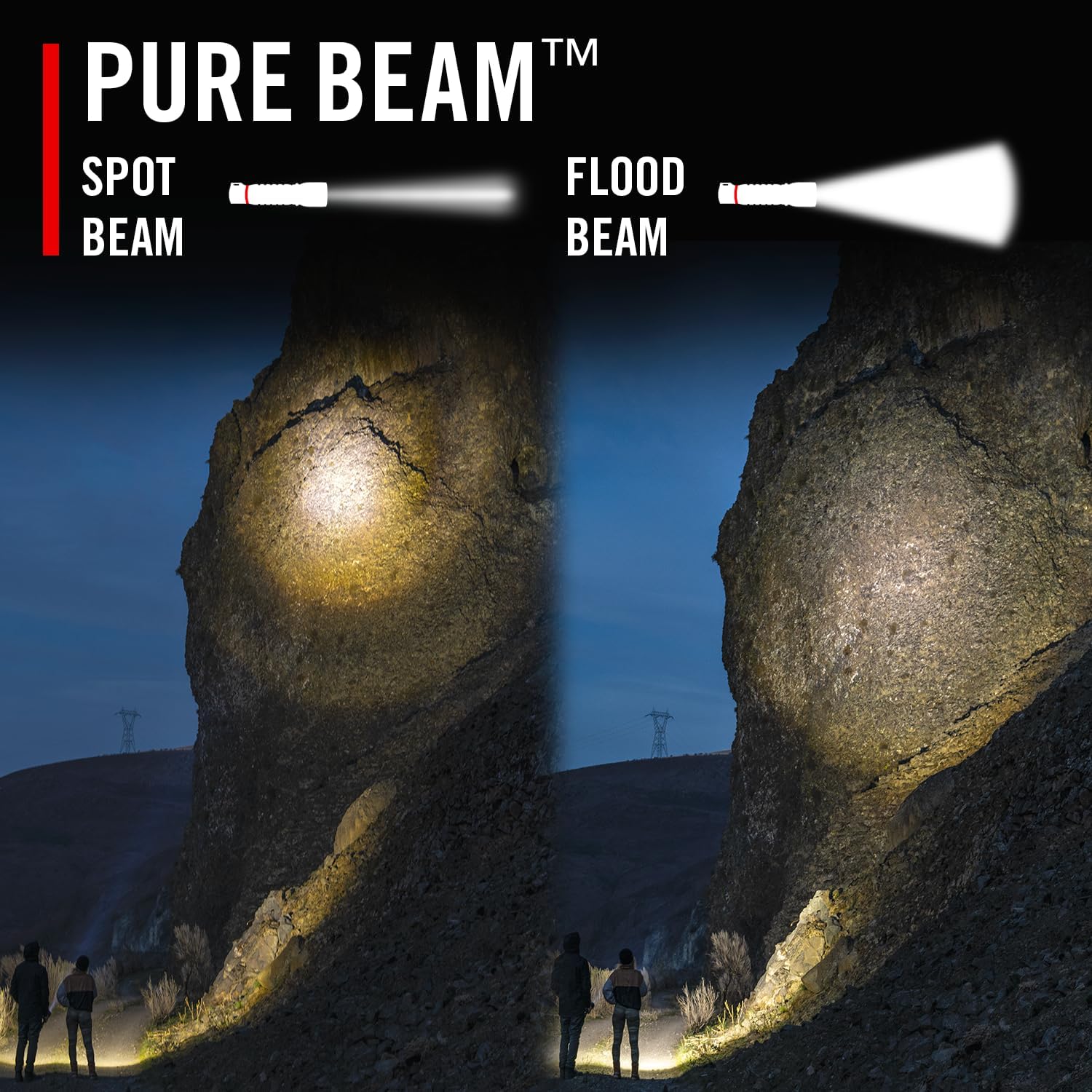
Image: A side-by-side comparison demonstrating the difference between the focused spot beam and the wide flood beam of the Pure Beam technology, illuminating a rocky landscape.
Beam Lock Feature
The XP9R includes a Beam Lock feature to secure your desired focus position.
- Once you have adjusted the beam to your preferred spot or flood setting, rotate the flashlight head slightly to engage the Beam Lock. This prevents accidental changes to the focus during use or transport.
- To unlock, rotate the flashlight head in the opposite direction.

Image: Illustration showing the Beam Lock mechanism, with icons of open and locked padlocks indicating how to engage and disengage the focus lock by rotating the flashlight head.
Features Overview
- PURE BEAM SLIDE FOCUS: Seamlessly transition between a broad Ultra View Flood Beam and a concentrated BULLS-EYE Spot Beam without dark rings or hot spots.
- RECHARGEABLE-DUAL POWER: Operates with the included ZITHION-X rechargeable battery or compatible CR123 lithium batteries (sold separately), offering flexibility and cost savings.
- QUICK-CYCLE SWITCH SYSTEM: Easily cycle through Medium, High, and Low light output modes with a single button.
- IP54 RATING: Designed to be splash-resistant and dust-resistant, ensuring reliable performance in various environmental conditions.
- Durable Construction: Built with high-grade aluminum for robust and long-lasting use.

Image: Graphic displaying key specifications: 1200 lumens maximum output, 220 meters maximum beam distance, and 14 hours maximum runtime.
Maintenance
- Cleaning: Wipe the flashlight body with a soft, damp cloth. Do not use abrasive cleaners or solvents. Keep the lens clean for optimal light output.
- Battery Care:
- For the ZITHION-X rechargeable battery, charge it regularly, especially if the flashlight will not be used for an extended period.
- If using alkaline batteries, remove them if the flashlight is to be stored for a long time to prevent leakage.
- O-Rings: Periodically inspect the O-rings for wear and tear. A light application of silicone grease can help maintain their water resistance.
Troubleshooting
| Problem | Possible Cause | Solution |
|---|---|---|
| Flashlight does not turn on. |
|
|
| Light output is dim. |
|
|
| Beam focus is not smooth. |
|
|
Specifications
| Feature | Detail |
|---|---|
| Model | XP9R (Part Number: 30321) |
| Max Light Output | 1200 Lumens |
| Max Beam Distance | 220 Meters (722 ft) |
| Max Runtime | 14 Hours (Low mode) |
| Power Source | ZITHION-X Rechargeable Battery (included) or 2x CR123 Lithium Batteries (not included) |
| Water Resistance | IP54 (Splash Resistant) |
| Light Source Type | LED |
| Material | Aluminum Blend |
| Dimensions (L x W x H) | 5.12"D x 1.32"W x 1.32"H |
| Item Weight | 5.6 ounces (0.35 Pounds) |
| Voltage | 3.6 Volts |
| Battery Cell Composition | Lithium Ion |
| UPC | 015286303714, 015286308030, 015286303219, 015286306128 |

Image: Table detailing the FL1 Standard specifications for Medium, High, and Low light modes, including lumens, beam distance, and runtime.
Warranty and Support
Warranty Information
Coast provides a Lifetime Warranty on its knives, tools, and LED flashlights/headlamps to the original purchaser, covering defects in materials and workmanship. This warranty does not cover normal wear and tear, damage from misuse or neglect, nor does it cover batteries and charging accessories (or damage caused by them, such as leakage).
Customer Support
For warranty claims, technical assistance, or further inquiries, please visit the official Coast website or contact their customer service department. You can find more information and products at the Coast Store on Amazon.


