
ETA ETA714990030
ETA Delicca 2 Bread Maker User Manual
Model: ETA714990030
1. Introduction
Thank you for choosing the ETA Delicca 2 Bread Maker. This appliance is designed to simplify your baking process, allowing you to effortlessly prepare a variety of breads, doughs, jams, and even yogurts. With its 12 pre-defined programs and user-friendly interface, you can enjoy fresh, homemade goods with minimal effort. Please read this manual carefully before first use to ensure safe and optimal operation of your new bread maker.
2. Safety Instructions
- Always ensure the appliance is placed on a stable, flat, heat-resistant surface, away from water and heat sources.
- Do not immerse the bread maker's main unit, cord, or plug in water or any other liquid.
- Keep children and pets away from the appliance during operation, as surfaces can become very hot.
- Unplug the bread maker from the power outlet when not in use, before cleaning, or before adding/removing parts.
- Do not operate the appliance with a damaged cord or plug, or if it has malfunctioned or been damaged in any way.
- Use only accessories recommended by the manufacturer.
- Never insert hands or utensils into the bread maker during operation.
- Ensure proper ventilation around the appliance during use.
3. Product Overview
Familiarize yourself with the components of your ETA Delicca 2 Bread Maker:

Figure 3.1: The ETA Delicca 2 Bread Maker with its removable bread pan. The control panel is visible on the left, and the main unit features a sleek stainless steel finish.
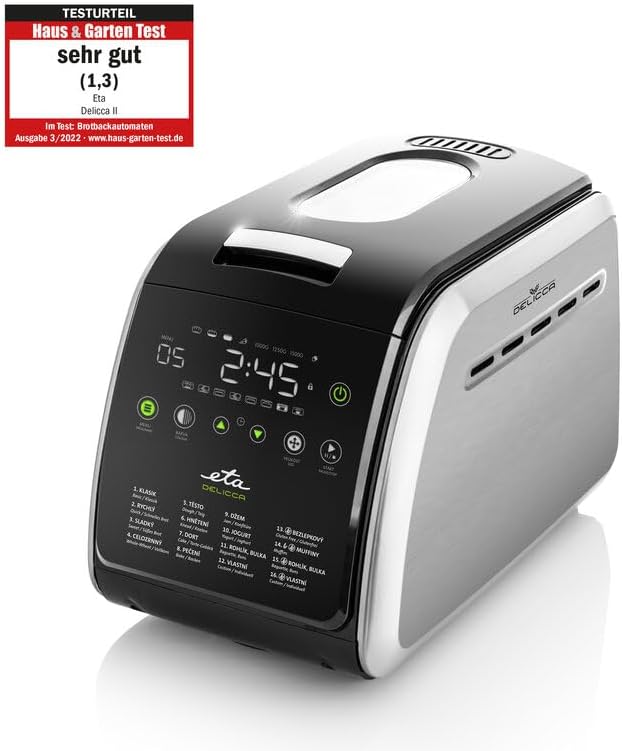
Figure 3.2: The bread maker shown with its essential accessories: two kneading paddles, a measuring cup, and a measuring spoon. These tools are crucial for accurate ingredient measurement and proper dough preparation.

Figure 3.3: An overhead view of the bread maker with its lid open, revealing the interior cavity where the bread pan is placed. The heating elements and the mechanism for the kneading paddles are visible at the bottom.
Components:
- Main Unit: Houses the motor, heating element, and control panel.
- Bread Pan: Removable non-stick pan for baking.
- Kneading Paddles: Two paddles for mixing and kneading ingredients.
- Measuring Cup: For liquid ingredients.
- Measuring Spoon: For smaller quantities of ingredients (e.g., yeast, salt).
- Lid: With a viewing window to monitor the baking process.
4. Setup
First Use:
- Unpack the bread maker and all its accessories. Remove any packaging materials.
- Wash the bread pan and kneading paddles with warm, soapy water. Rinse thoroughly and dry completely.
- Wipe the exterior of the main unit with a damp cloth. Do not use abrasive cleaners.
- Before first use, it is recommended to run the 'Bake' program (Program 12) for about 10 minutes without any ingredients to burn off any manufacturing residues. Ensure good ventilation during this process. Allow the unit to cool down completely afterwards.
Placement:
Place the bread maker on a stable, level, and heat-resistant surface. Ensure there is adequate space around the appliance for ventilation, especially at the back and sides. Do not place it near curtains or flammable materials.
5. Operating Instructions
Basic Bread Making Steps:
- Insert Kneading Paddles: Place the kneading paddles onto the shafts at the bottom of the bread pan.
- Add Ingredients: Add ingredients to the bread pan in the order specified by your recipe (typically liquids first, then dry ingredients, with yeast last and separate from liquids/salt). Ensure accurate measurements using the provided cup and spoon.
- Place Bread Pan: Insert the bread pan into the main unit, pressing down firmly until it clicks into place. Close the lid.
- Plug In: Connect the power cord to a suitable electrical outlet. The display will light up.
- Select Program: Use the 'Menu' button to cycle through the 12 pre-defined programs until you reach your desired program.
- Select Loaf Size & Crust Color: Use the 'Loaf Size' and 'Crust Color' buttons to adjust settings according to your recipe and preference.
- Start: Press the 'Start/Stop' button to begin the program. The bread maker will automatically mix, knead, rise, and bake.
- Remove Bread: Once the program is complete, the bread maker will beep. Unplug the appliance. Using oven mitts, carefully remove the bread pan from the unit. Invert the pan to release the bread onto a wire rack to cool. Remove the kneading paddles from the bread if they remain embedded.
Special Functions:
- Delay Timer: Allows you to delay the start of the baking process for up to 13 hours. Add ingredients, set program, then use the '+' and '-' buttons to set the delay time, and press 'Start/Stop'.
- Keep Warm: After baking, the bread maker automatically enters a 60-minute 'Keep Warm' cycle to maintain bread temperature.
- Add Ingredients Signal: For some programs, the bread maker will beep during the kneading cycle to indicate when to add additional ingredients like fruits, nuts, or seeds.

Figure 5.1: The ETA Delicca 2 Bread Maker positioned in a modern kitchen, surrounded by a variety of freshly baked goods, including loaves of bread, cake, and jam, demonstrating its versatility.
6. Program Guide
The ETA Delicca 2 offers 12 pre-set programs to cater to various baking needs:
| Program No. | Program Name | Description |
|---|---|---|
| 1 | Basic | For white and mixed breads, mainly consisting of basic bread flour. |
| 2 | French | For light breads made from fine flour. Typically results in a crispier crust. |
| 3 | Whole Wheat | For breads containing whole wheat flour, which requires a longer kneading and rising time. |
| 4 | Sweet | For breads with high sugar, fats, and protein content. |
| 5 | Gluten-Free | For gluten-free recipes. These breads often require different kneading and rising conditions. |
| 6 | Rapid Bake | For quick baking of basic bread. Note: May result in a denser texture. |
| 7 | Dough | For preparing doughs for pizza, rolls, or pastries without baking. |
| 8 | Knead | For kneading dough only, without rising or baking. |
| 9 | Cake | For mixing and baking cakes and quick breads. |
| 10 | Jam | For making homemade jams and marmalades. |
| 11 | Yogurt | For preparing homemade yogurt. |
| 12 | Bake | For baking only, without kneading or rising. Useful for additional baking time or pre-made dough. |
7. Maintenance and Cleaning
Regular cleaning ensures the longevity and optimal performance of your bread maker.
Cleaning Steps:
- Unplug and Cool: Always unplug the bread maker and allow it to cool completely before cleaning.
- Bread Pan and Paddles: Remove the bread pan and kneading paddles. Fill the pan with warm, soapy water and let it soak for 10-15 minutes to loosen any stuck-on dough. Use a soft sponge or cloth to clean. Do not use metal scouring pads or abrasive cleaners, as they can damage the non-stick coating. Rinse thoroughly and dry completely.
- Interior: Wipe the interior of the baking chamber with a damp cloth to remove any crumbs or residue. Do not use excessive water.
- Exterior: Clean the exterior of the bread maker with a soft, damp cloth. For stubborn stains, a mild detergent can be used. Dry thoroughly.
- Storage: Store the bread maker in a clean, dry place once completely dry.
Note: The bread pan and kneading paddles are not dishwasher safe, as this can damage the non-stick coating.
8. Troubleshooting
If you encounter issues with your bread maker, refer to the following common problems and solutions:
| Problem | Possible Cause | Solution |
|---|---|---|
| Bread does not rise | Expired or inactive yeast; incorrect water temperature; too much salt/sugar. | Check yeast expiry; use lukewarm water (38-43°C); ensure correct ingredient measurements. |
| Bread is too dense/heavy | Too much flour; not enough liquid; insufficient kneading. | Measure ingredients precisely; ensure proper program selection for dough type. |
| Bread collapses during baking | Too much liquid; too much yeast; high humidity. | Reduce liquid slightly; ensure correct yeast amount; adjust recipe for humidity. |
| Kneading paddles stuck in bread | Common occurrence. | Carefully remove with a non-metallic utensil after bread cools. |
| Display shows error code | Overheating; motor overload; sensor issue. | Unplug and let cool for 20-30 minutes. If problem persists, contact customer support. |
9. Specifications
| Feature | Detail |
|---|---|
| Brand | ETA |
| Model Number | ETA714990030 |
| Color | Stainless steel |
| Dimensions (L x W x H) | 30 x 12.5 x 20 cm |
| Capacity | Up to 3 pounds (approx. 1.5 kg) |
| Power | 850 Watts |
| Voltage | 230 Volts |
| Material | Stainless steel |
| Weight | 7 Kilograms |
| Number of Programs | 12 |
10. Warranty and Support
For warranty information, please refer to the documentation provided at the time of purchase. Keep your proof of purchase for any warranty claims.
If you require technical assistance, have questions about your product, or need to order spare parts, please contact ETA customer support. Contact details can typically be found on the manufacturer's website or in your purchase documentation.
Note: Information regarding the availability of spare parts for this model is currently unavailable.
Related documentsETA714990030


Ask a question about this manual
Ask about setup, troubleshooting, compatibility, parts, safety, or missing instructions. Manuals+ will review the question and use this page’s manual context to help answer it.