
1. Important Safety Instructions
Before using this product, please read this user manual carefully and save it for future reference. Failure to follow these instructions may result in electric shock, fire, or serious injury.
- This appliance is not intended for use by persons (including children) with reduced physical, sensory or mental capabilities, or lack of experience and knowledge, unless they have been given supervision or instruction concerning use of the appliance by a person responsible for their safety.
- Do not use the vacuum cleaner outdoors or on wet surfaces.
- Do not allow children to play with the appliance. Close supervision is necessary when used by or near children.
- Do not pick up flammable or combustible materials, such as gasoline, or use in areas where they may be present.
- Do not pick up anything that is burning or smoking, such as cigarettes, matches, or hot ashes.
- Do not use without dust bag and/or filters in place.
- Turn off the appliance before making any adjustments, changing accessories, or storing the vacuum cleaner.
- Use only as described in this manual. Use only manufacturer’s recommended attachments.
- Do not handle the charger or appliance with wet hands.
2. Product Overview
The Roborock H7 is a cordless stick vacuum cleaner designed for versatile and efficient cleaning. It features a lightweight design, powerful suction, and a long-lasting battery.
2.1 Included Components
The following components are typically included with your Roborock H7 vacuum cleaner:
- H7 Stick Vacuum
- Multi-Surface Brush
- Dust Bag Holder
- Dust Bag (x2)
- Baton (Extension Wand)
- Docking Station
- Dusting Brush
- Motorized Mini-Brush
- Power Supply
- Flex Tube
- Crevice Tool
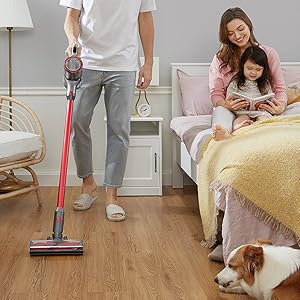
Image: All components included in the Roborock H7 package.
3. Setup and Assembly
3.1 Assembling the Vacuum
- Attach the extension wand (baton) to the main vacuum body until it clicks into place.
- Connect the desired cleaning head (e.g., Multi-Surface Brush) to the other end of the extension wand.
- For handheld use, attach accessories directly to the main vacuum body.
3.2 Installing the Docking Station
The wall-mountable docking station provides convenient storage and charging. Ensure it is installed on a stable wall surface.

Image: Roborock H7 mounted on its wall docking station.
The MagBase system allows accessories to be magnetically attached to the docking station or other magnetic surfaces for easy access.

Image: Flexible MagBase accessories storage.
4. Charging and Battery
The Roborock H7 is powered by a Lithium-Ion battery, offering extended cleaning time.
4.1 Charging the Vacuum
- Connect the power supply to the docking station and plug it into a wall outlet.
- Place the vacuum cleaner onto the docking station. The OLED screen will indicate charging status.
- A full charge from empty takes approximately 2.5 hours.
4.2 Battery Runtime
The vacuum offers varying runtimes depending on the selected cleaning mode:
- Eco Mode: Up to 90 minutes
- Standard Mode: Up to 45 minutes
- Max Mode: Up to 8 minutes
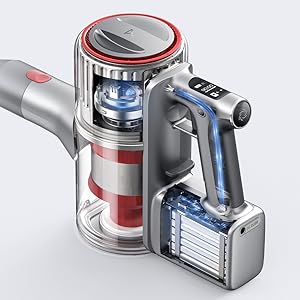
Image: Battery runtime and recharge time details.
5. Operating Instructions
5.1 Powering On/Off and Suction Modes
The vacuum cleaner features 160 AW constant suction power for effective cleaning across various surfaces.
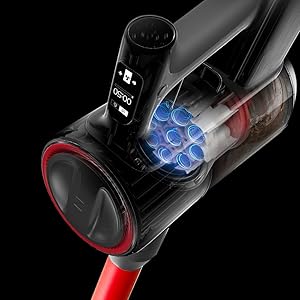
Image: Roborock H7 demonstrating its suction power.
- Press the power button to turn the vacuum on or off.
- Use the mode selection button to cycle through the three cleaning modes: Eco, Standard, and Max.
- The OLED screen displays the current mode and remaining battery life.
5.2 OLED Screen Information
The integrated OLED screen provides real-time updates on the vacuum's status, including:
- Remaining battery percentage and estimated runtime.
- Current cleaning mode.
- Maintenance alerts (e.g., filter cleaning reminder).
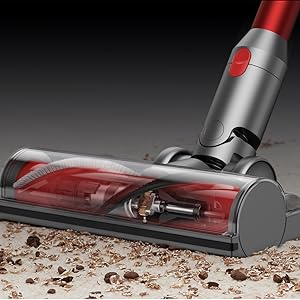
Image: OLED screen displaying operational information.
5.3 Using Various Attachments
The Roborock H7 comes with several attachments for different cleaning needs:
- Multi-Surface Brush: Ideal for carpets and hard floors.
- Motorized Mini-Brush: Effective for pet hair and upholstery.
- Crevice Tool: For narrow spaces and corners.
- Dusting Brush: For delicate surfaces and dusting.
- Flex Tube: Provides extended reach and flexibility for awkward areas.
Image: Roborock H7 in various cleaning scenarios with different attachments.
6. Maintenance
Regular maintenance ensures optimal performance and extends the lifespan of your Roborock H7 vacuum cleaner.
6.1 Emptying the Dustbin
Empty the dustbin after each use or when the MAX line is reached. The H7 supports both bagless operation and disposable dust bags for convenience.
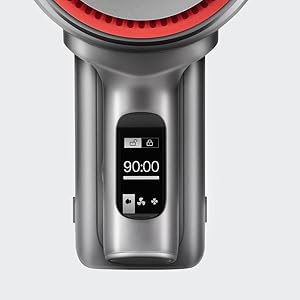
Image: Emptying the 560ml dust bag.
- Ensure the vacuum is turned off.
- Press the dustbin release button and remove the dustbin.
- Open the dustbin lid and empty contents into a trash receptacle.
- If using a dust bag, remove the full bag and replace it with a new one.
- Reattach the dustbin to the vacuum until it clicks securely.
6.2 Cleaning the Filters
The five-stage HEPA air filtration system helps maintain clean air. Filters should be cleaned regularly.

Image: Five-stage HEPA air filtration system.
- Remove the dustbin and then carefully remove the filters.
- Tap the filters gently to remove loose dust.
- Rinse the filters under running water. Ensure they are completely dry before reinserting (allow 24 hours).
- Replace filters if they are damaged or heavily soiled.
6.3 Cleaning the Brush Head
Periodically check the brush head for tangled hair or debris and clean as needed.
- Turn off the vacuum and detach the cleaning head.
- Use scissors or a cleaning tool to cut and remove any tangled hair or fibers from the brush roll.
- Ensure the brush roll spins freely before reattaching.
7. Troubleshooting
Refer to this section for common issues and their solutions.
| Problem | Possible Cause | Solution |
|---|---|---|
| Vacuum does not turn on. | Battery is depleted. | Charge the vacuum fully. |
| Low suction power. | Dustbin is full; Filters are clogged; Brush head is obstructed. | Empty dustbin; Clean or replace filters; Clear brush head of debris. |
| Brush head stops rotating. | Obstruction in the brush roll. | Turn off the vacuum and remove any tangled hair or debris from the brush roll. |
| OLED screen displays an error code. | Specific internal issue. | Refer to the specific error code in the full manual or contact customer support. |
8. Specifications
| Feature | Detail |
|---|---|
| Brand | roborock |
| Model | H7 |
| Special Features | Cordless, HEPA Filtration, Lightweight |
| Filter Type | HEPA Filter |
| Wattage | 160 watts |
| Charging Time | 2.5 Hours |
| Recommended Uses | Deep Clean Carpets, Indoor Use |
| Form Factor | Stick |
| Product Dimensions | 11.2"L x 4.4"W x 9.1"H |
| Battery Type | Lithium-Ion |
| Noise Level | 74 Decibels |
| Battery Life (Max) | 90 minutes (Eco Mode) |
| Item Weight | 3.1 pounds |
| Number of Speeds/Power Levels | 3 |
9. Official Product Videos
Watch these official videos for visual guidance on using and maintaining your Roborock H7.
Video: Detailed overview and demonstration of the Roborock H7's features and operation (4:18 duration).
Video: In-depth guide to the Roborock H7, including assembly and usage tips (6:15 duration).
Video: Comprehensive demonstration of the Roborock H7's capabilities and maintenance (7:57 duration).
Video: User guide for the Roborock H7, covering various aspects of its use (5:01 duration).
10. Warranty and Support
The Roborock H7 Cordless Stick Vacuum Cleaner comes with a manufacturer's warranty. Please refer to the warranty card included in your product packaging for specific terms and conditions.
For technical support, troubleshooting assistance, or to inquire about replacement parts, please contact Roborock customer service through their official website or the contact information provided in your product documentation.


