
Alpicool CF55
Alpicool CF55 55L Portable Compressor Car Refrigerator User Manual
Model: CF55
Introduction
Thank you for choosing the Alpicool CF55 55L Portable Compressor Car Refrigerator. This manual provides essential information for the safe and efficient operation, maintenance, and troubleshooting of your new appliance. Please read it thoroughly before use and retain it for future reference.
The Alpicool CF55 is designed for versatile use, functioning as both a refrigerator and a freezer, suitable for vehicles, camping, RVs, and boats. It features efficient cooling performance and a 3-level battery protection mode.
Safety Instructions
- Ensure the power supply voltage matches the specifications of the appliance.
- Do not operate the appliance if the power cord is damaged.
- Keep the ventilation openings clear of obstructions.
- Avoid placing the appliance in direct sunlight or near heat sources.
- Do not immerse the appliance in water or expose it to heavy rain.
- Only qualified personnel should perform repairs.
- Keep children away from the appliance.
Package Contents
Upon unpacking, please verify that all items listed below are present and undamaged:
- 1 x Alpicool CF55 Car Refrigerator
- 1 x 2.5M DC Power Cord (12/24V)
- 1 x AC Power Cord with Adapter (100-240V)
- 1 x User Manual (this document)
Setup
1. Placement
Place the refrigerator on a flat, stable surface. Ensure adequate ventilation around the unit, especially for the compressor area. Avoid direct sunlight and heat sources.
2. Power Connection
The Alpicool CF55 can be powered by both DC (12V/24V) and AC (100-240V) power sources.
- DC Connection: Connect the 2.5M DC power cord to the refrigerator's DC input port and then to your vehicle's 12V or 24V power outlet (cigarette lighter socket).
- AC Connection: Connect the AC power cord to the refrigerator's AC input port, then plug the adapter into a standard 100-240V AC wall outlet.
After connecting to power, the display panel will illuminate, indicating the unit is ready for operation.

Figure 1: Alpicool CF55 Portable Refrigerator. This image shows the overall design of the refrigerator, including its control panel and handles, alongside a smartphone displaying its control app interface.
Operating Instructions
1. Power On/Off
Press the Power Button on the control panel to turn the unit on or off.
2. Temperature Adjustment
Use the Up (▲) and Down (▼) buttons to set the desired temperature. The temperature range is from -20℃ to 20℃ (-4℉ to 68℉).

Figure 2: Control Panel. This image highlights the digital display and control buttons for temperature adjustment and power on the Alpicool CF55.
3. Cooling Performance
The CF55 features an efficient compressor for rapid cooling. It can reduce the internal temperature from 25℃ (77℉) to 0℃ (32℉) in approximately 15 minutes under optimal conditions.

Figure 3: Efficient Compressor. This graphic illustrates the internal compressor system and a graph showing the rapid temperature drop from 25℃ to -20℃ over 1.5 hours.
4. ECO and MAX Modes
The unit offers two operating modes:
- ECO Mode (45W): Energy-saving mode, suitable for maintaining temperature and extending battery life.
- MAX Mode (60W): Fast cooling and freezing mode, ideal for quickly reaching desired low temperatures.

Figure 4: ECO and MAX Modes. This image visually distinguishes between the ECO (45W, energy-saving) and MAX (60W, fast cooling) power modes, showing their respective benefits.
5. 3-Level Battery Protection Mode
This feature protects your vehicle's battery from excessive discharge. The refrigerator automatically disconnects when the input voltage is too low and restarts when the voltage is sufficient. This prevents battery exhaustion and ensures your vehicle can start.
Refer to the control panel settings for adjusting the battery protection level (High, Medium, Low) based on your vehicle's battery type and usage.
6. Storage Compartments
The 55L capacity is divided into a freezer compartment and a refrigerator compartment, allowing for versatile storage of various items.
- Freezer Compartment: Suitable for seafood, meat, frozen drinks, and ice cream.
- Refrigerator Compartment: Ideal for fruits, vegetables, milk, and cosmetics.
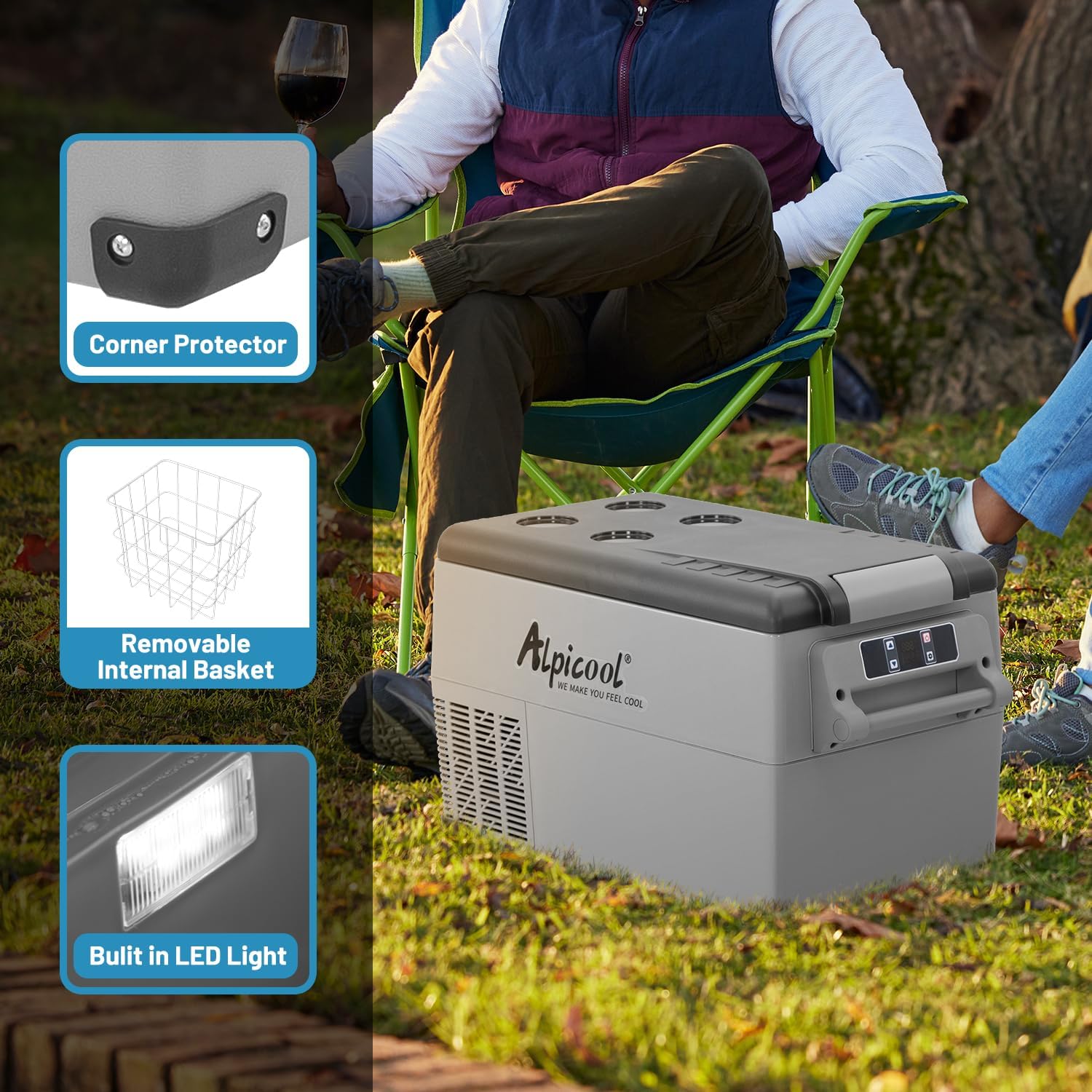
Figure 5: Multiple Applications. This image displays the interior of the Alpicool CF55, showing its two distinct compartments and examples of items that can be stored in each (freezer and refrigerator sections).
7. Additional Features
- Corner Protectors: For enhanced durability and protection during transport.
- Removable Internal Basket: Facilitates organized storage and easy access to contents.
- Built-in LED Light: Illuminates the interior for convenience in low-light conditions.

Figure 6: Key Features. This image highlights practical features of the Alpicool CF55, including robust corner protectors, a removable internal basket for organization, and a built-in LED light for visibility.
Maintenance
1. Cleaning
- Always disconnect the power before cleaning.
- Wipe the interior and exterior surfaces with a damp cloth and mild detergent.
- Do not use abrasive cleaners or sharp objects, as they can damage the surfaces.
- Ensure the unit is completely dry before reconnecting power.
2. Defrosting
If a thick layer of ice forms inside, turn off the unit and allow the ice to melt naturally. Remove the melted water with a cloth. Do not use sharp tools to remove ice.
3. Storage
When not in use for an extended period, clean the unit thoroughly, leave the lid slightly ajar to prevent odors, and store it in a dry, well-ventilated area.
Troubleshooting
If you encounter issues with your Alpicool CF55, please refer to the following common problems and solutions before contacting support.
| Problem | Possible Cause | Solution |
|---|---|---|
| Unit does not turn on | No power supply; Damaged power cord; Blown fuse in vehicle | Check power connections; Replace power cord if damaged; Check vehicle fuse. |
| Unit not cooling effectively | Insufficient ventilation; Door not closed properly; Ambient temperature too high; ECO mode selected | Ensure clear ventilation; Close door tightly; Move to cooler area; Switch to MAX mode. |
| Display shows error code (e.g., F2) | Specific internal fault (e.g., fan error, sensor error) | Turn off the unit, wait a few minutes, then restart. If the error persists, contact customer support. |
| Excessive noise | Unit not on a stable surface; Obstruction near fan | Place on a flat surface; Clear any obstructions from fan area. |
For issues not covered here or if problems persist, please contact Alpicool customer support.
Specifications
| Parameter | Value |
|---|---|
| Model | CF55 |
| Capacity | 55 Liters |
| Power Supply | DC 12V/24V, AC 100-240V |
| Rated Current (DC) | 5.0A (12V), 2.5A (24V) |
| Rated Current (AC) | 1.2A-0.5A |
| Temperature Range | -20℃ to 20℃ (-4℉ to 68℉) |
| Rated Power Input | 60W |
| Noise Level | <45dB |
| Item Weight | 14.5 Kilograms |
| Product Dimensions (L x W x H) | 69.3 x 34.5 x 53.1 cm |
| Installation Method | Freestanding |
| Defrost System | Automatic |
Figure 7: Internal Capacity. This image illustrates the internal layout of the Alpicool CF55, demonstrating the spaciousness that contributes to its 55-liter capacity.
Warranty and Support
Warranty Information
The Alpicool CF55 comes with a 1-year warranty from the date of purchase. This warranty covers manufacturing defects and malfunctions under normal use. Please retain your proof of purchase for warranty claims.
The warranty does not cover damage caused by improper use, accidents, unauthorized repairs, or normal wear and tear.
Customer Support
For technical assistance, warranty claims, or any questions regarding your Alpicool CF55 refrigerator, please contact Alpicool customer service. You can typically find contact information on the Alpicool official website or through your retailer.
When contacting support, please have your model number (CF55) and proof of purchase readily available.
Related documentsCF55


Ask a question about this manual
Ask about setup, troubleshooting, compatibility, parts, safety, or missing instructions. Manuals+ will review the question and use this page’s manual context to help answer it.