
Sharper Image 1012644
Sharper Image Smartsense Shiatsu Realtouch Massaging Chair Pad
Model: 1012644
Introduction
The Sharper Image Smartsense Shiatsu Realtouch Massaging Chair Pad is designed to provide a customizable and soothing massage experience. Featuring Smartsense Technology, it accurately identifies pressure points for targeted relief. The RealTouch gel nodes mimic the feel of human fingertips, delivering deep kneading shiatsu massage. An optional heat function further enhances relaxation, making it suitable for use on various chairs, couches, or recliners.

Image: The Sharper Image Smartsense Shiatsu Realtouch Massaging Chair Pad in use, demonstrating its ergonomic design and how it fits onto a standard chair.
Safety Information
For safe operation of your Sharper Image Massaging Chair Pad, please observe the following guidelines:
- Always use the massager while seated. Avoid standing on the unit or applying excessive pressure.
- Do not use the heat setting for extended periods to prevent burns. Monitor skin temperature during use.
- Ensure the power cord is not pinched, twisted, or damaged. Follow all electrical safety precautions.
- Keep the massager away from water or damp environments.
- Consult a physician before use if you have any medical conditions, are pregnant, or have a pacemaker.
- Do not attempt to disassemble or repair the unit yourself. Contact customer support for assistance.
Product Features
The Sharper Image Smartsense Shiatsu Realtouch Massaging Chair Pad incorporates several advanced features for an optimal massage experience:
- Smartsense Technology: Intelligently scans and locates your body's pressure points for a personalized massage.
- RealTouch Gel Nodes: Flexible massage nodes designed to mimic the sensation of human fingertips for a realistic shiatsu massage.
- Soothing Heat Function: Provides gentle warmth to help relax tense muscles in the back, shoulders, and lumbar region.
- Custom Comfort: Designed with adjustable straps to securely fit most chairs, couches, and recliners, enhancing versatility. Includes an extra cushion for added comfort.
- Targeted Massage Areas: Allows selection of specific areas for massage, including full back, upper back, lower back, and spot massage.

Image: An illustration of the massager's internal components, highlighting the RealTouch gel nodes and the heated areas for targeted relief.

Image: A visual breakdown of the massager's key features, including Smartsense technology for intelligent pressure point detection, RealTouch gel nodes for realistic massage, soft-touch nodes, warming function, and adjustable design.
Setup and Assembly
Follow these steps to set up your Sharper Image Massaging Chair Pad:
- Unpack Contents: Carefully remove all components from the packaging. Ensure you have the massager unit, comfort mat and pillow, and DC adapter.
- Position the Massager: Place the massager on your desired chair, couch, or recliner. Ensure the chair is stable and provides adequate support.
- Secure with Straps: Use the adjustable straps located on the back of the massager to securely fasten it to your chair. This prevents the unit from shifting during use.
- Connect Power: Plug the DC adapter into the massager's power input port, then plug the adapter into a standard electrical outlet.
- Prepare for Use: Sit comfortably on the massager, ensuring your back is aligned with the massage nodes.

Image: A visual representation of the items included in the box: the main massager unit, the comfort mat and pillow, and the DC power adapter.
Operating Instructions
The massager is controlled via a wired remote. Familiarize yourself with the remote's functions:
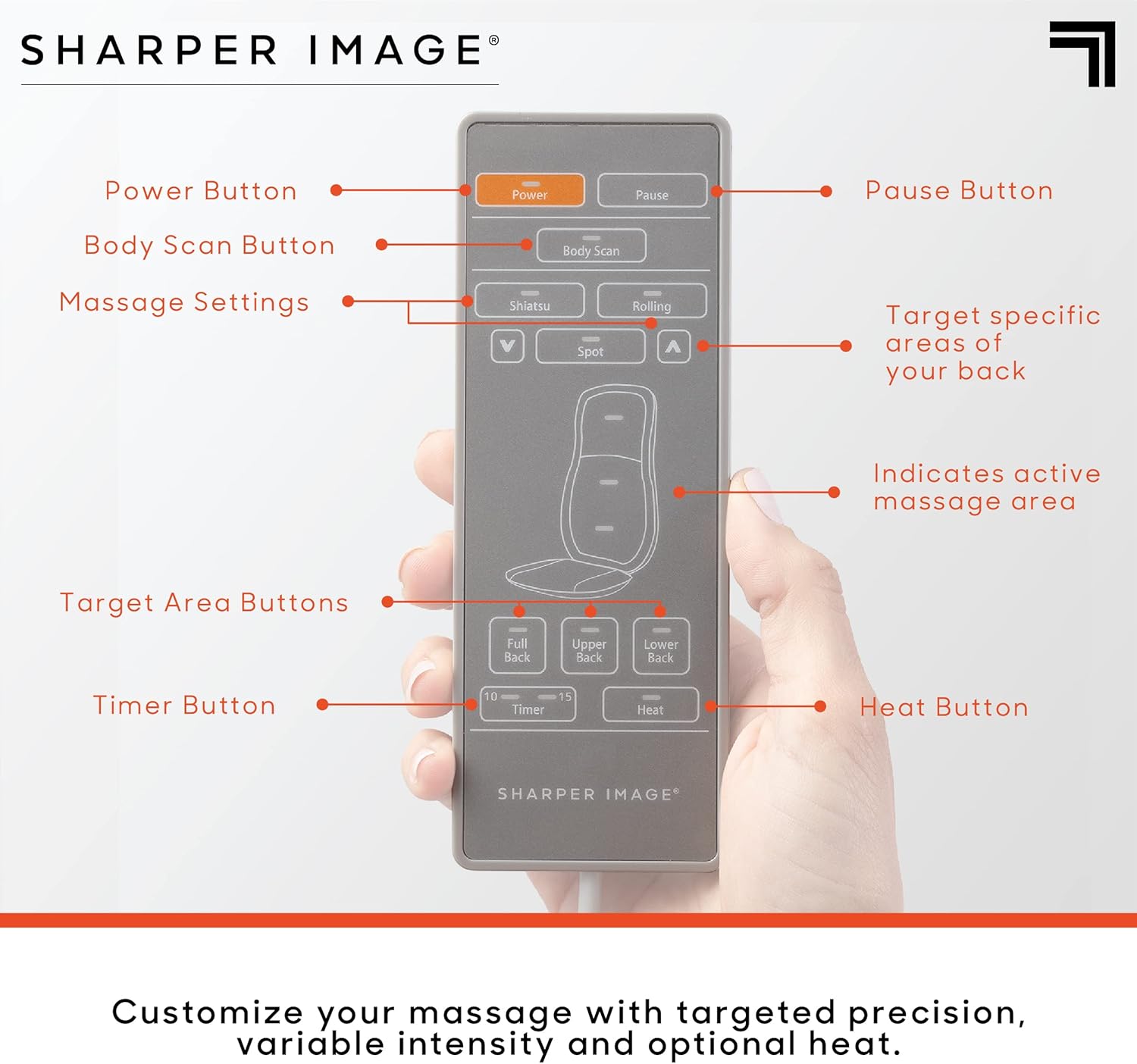
Image: A detailed diagram of the remote control, indicating the function of each button, including power, pause, body scan, massage settings (Shiatsu, Rolling, Spot), target area buttons (Full Back, Upper Back, Lower Back), timer, and heat.
Remote Control Functions:
- Power Button: Press to turn the massager ON or OFF.
- Pause Button: Temporarily stops the massage program. Press again to resume.
- Body Scan Button: Initiates the Smartsense body scan to customize the massage to your unique back curvature and pressure points.
- Massage Settings:
- Shiatsu: Provides a deep kneading massage.
- Rolling: Offers a gentle rolling massage along the spine.
- Spot: Allows you to pinpoint a specific area for concentrated massage. Use the up/down arrows to adjust the spot location.
- Target Area Buttons: Select specific regions for massage:
- Full Back: Massages the entire back area.
- Upper Back: Focuses massage on the upper back and shoulders.
- Lower Back: Concentrates massage on the lumbar region.
- Timer Button: Sets the duration of the massage. Available settings typically include 10, 15, or 20 minutes. The unit will automatically shut off after the selected time.
- Heat Button: Activates or deactivates the soothing heat function. An indicator light will illuminate when heat is active.
Starting a Massage:
- Ensure the massager is properly set up and plugged in.
- Press the Power button on the remote.
- The unit may perform a brief body scan.
- Select your desired massage type (Shiatsu, Rolling, or Spot) and target area (Full, Upper, Lower Back).
- Optionally, press the Heat button for added warmth.
- Select a massage duration using the Timer button.
- Relax and enjoy your massage.
Maintenance and Care
Proper maintenance ensures the longevity and performance of your massager:
- Cleaning: Always unplug the unit before cleaning. Wipe the surface with a soft, slightly damp cloth. Do not use abrasive cleaners, solvents, or harsh chemicals.
- Storage: When not in use, store the massager in a cool, dry place, away from direct sunlight and excessive heat. Avoid placing heavy objects on the unit.
- Cord Care: Do not wrap the power cord tightly around the unit. Avoid bending or twisting the cord excessively.
- Fabric Care: The comfort mat and pillow can be spot cleaned as needed. Refer to any specific care labels if present.
Troubleshooting
If you encounter issues with your massager, refer to the following common problems and solutions:
| Problem | Possible Cause | Solution |
|---|---|---|
| Massager does not turn on. | Not plugged in; power outlet issue; power button not pressed. | Ensure the DC adapter is securely plugged into both the massager and a working electrical outlet. Press the Power button firmly. |
| Massage nodes are not moving. | Unit is paused; incorrect mode selected; safety shutdown. | Press the Pause button to resume. Select a massage mode (Shiatsu, Rolling, Spot). Unplug and replug the unit to reset if it has overheated. |
| Heat function is not working. | Heat button not activated; unit not powered on. | Ensure the massager is powered on and the Heat button is pressed (indicator light should be on). Allow a few minutes for the heat to become noticeable. |
| Massage feels too intense or too weak. | Body position; comfort cushion not used. | Adjust your seating position. Use the extra comfort cushion to reduce intensity if needed. |
If the problem persists after attempting these solutions, please contact Sharper Image customer support for further assistance.
Specifications
| Brand | Sharper Image |
| Model Number | 1012644 |
| Product Dimensions | 19 x 18.5 x 30.5 inches |
| Item Weight | 15.9 Pounds |
| Material | Plastic, Polyester |
| Power Source | Corded Electric |
| Use For | Back, Neck |
| Manufacturer | MerchSource |
| Date First Available | April 2, 2021 |

Image: A visual representation of the massager's dimensions, indicating its width, depth, and height for proper fit and placement.
Warranty and Support
Sharper Image products are built with quality and performance in mind. For information regarding warranty coverage, product support, or to purchase replacement parts, please contact Sharper Image customer service.
You can typically find contact information on the official Sharper Image website or within the product packaging. Please have your model number (1012644) and purchase date ready when contacting support.
For additional resources, you may visit the Sharper Image Store on Amazon.
Related documents1012644

Ask a question about this manual
Ask about setup, troubleshooting, compatibility, parts, safety, or missing instructions. Manuals+ will review the question and use this page’s manual context to help answer it.