
Other SD-548C
Sunding SD-548C Wireless Waterproof Bicycle Computer LCD Speedometer User Manual
Model: SD-548C | Brand: Other
Introduction
This manual provides comprehensive instructions for the installation, operation, and maintenance of your Sunding SD-548C Wireless Waterproof Bicycle Computer. Please read this manual thoroughly before use to ensure proper functionality and longevity of the device.

Figure 1: Front view of the Sunding SD-548C Wireless Bicycle Computer. The display shows speed and other metrics, with "Sunding" branding and "WIRELESS" indicator visible.
Package Contents
Upon opening the package, verify that all components are present:
- Sunding SD-548C Bicycle Computer Unit
- Wireless Speed Sensor
- Mounting Bracket
- Magnet for Wheel Spoke
- Cable Ties (for mounting)
- Battery (CR2032, typically pre-installed or included)
- User Manual (this document)
Setup and Installation
- Install Battery: Open the battery compartment on the back of the computer unit and the sensor. Insert the CR2032 battery with the positive (+) side facing up. Close the compartment securely.
- Mount the Computer Unit:
- Attach the mounting bracket to your bicycle's handlebar or stem using the provided cable ties. Ensure it is firmly secured and positioned for easy viewing.
- Slide the SD-548C computer unit onto the mounting bracket until it clicks into place.
- Install the Speed Sensor:
- Attach the wireless speed sensor to the front fork of your bicycle using cable ties. Position it on the side opposite to the disc brake (if applicable).
- Ensure the sensor is aligned with the wheel spoke where the magnet will be attached. The distance between the sensor and the magnet should be less than 5mm.
- Attach the Magnet:
- Securely attach the magnet to a spoke on your front wheel.
- Adjust the magnet's position so that it passes directly in front of the speed sensor's marked area with each wheel rotation, maintaining the less than 5mm gap.
- Initial Settings:
- Press and hold the SET button (usually on the back or bottom) to enter setting mode.
- Set the unit of speed (KM/H or M/H) using the MODE button and confirm with SET.
- Set the wheel circumference. Refer to the table below for common wheel sizes. For accurate readings, measure your wheel's circumference or use an online calculator.
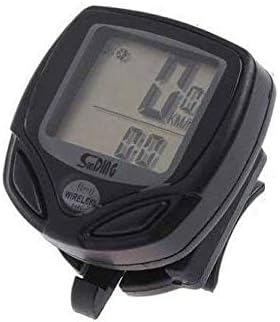
Figure 2: Illustration of the bicycle computer mounted on handlebars, with the wireless sensor attached to the fork and the magnet on a wheel spoke. Proper alignment is crucial for accurate speed measurement.
Wheel Circumference Reference Table (Approximate)
| Wheel Size (Inches) | Circumference (mm) |
|---|---|
| 16" | 1272 |
| 20" | 1596 |
| 24" | 1916 |
| 26" | 2073 |
| 27" | 2155 |
| 27.5" | 2200 |
| 29" | 2340 |
| 700C | 2136 |
Note: These values are approximate. For best accuracy, measure your specific tire's circumference.
Operating Instructions
Button Functions
- MODE Button: Short press to cycle through different display modes (e.g., Speed, Odometer, Trip Distance, Max Speed, Average Speed, Riding Time, Clock). Long press to enter setting mode in some contexts.
- SET Button: Used to confirm settings or reset values. Long press typically enters setting mode or resets current trip data.
Display Modes
The SD-548C offers various display modes to monitor your ride data:
- SPD (Current Speed): Displays your real-time speed.
- ODO (Odometer): Total accumulated distance. This value cannot be reset.
- DST (Trip Distance): Distance covered during the current trip. Can be reset.
- MXS (Maximum Speed): Highest speed achieved during the current trip.
- AVS (Average Speed): Average speed during the current trip.
- TM (Riding Time): Duration of the current trip.
- CLK (Clock): Displays the current time (12H/24H format).
- SCAN: Automatically cycles through DST, MXS, AVS, and TM displays every few seconds.
Resetting Trip Data
To reset trip-specific data (DST, MXS, AVS, TM), navigate to any of these modes and typically long-press the SET button until the values reset to zero. Refer to the specific button combination for your model if this does not work.
Maintenance
- Cleaning: Wipe the computer unit and sensor with a soft, damp cloth. Do not use abrasive cleaners or solvents.
- Water Resistance: The SD-548C is waterproof. However, avoid submerging it in water for extended periods or exposing it to high-pressure water jets.
- Battery Replacement: When the display becomes dim or erratic, it's time to replace the battery (CR2032) in both the computer unit and the sensor. Ensure the battery compartment seals are properly seated after replacement to maintain water resistance.
- Sensor/Magnet Alignment: Periodically check the alignment and gap between the speed sensor and the wheel magnet. Adjust if necessary to ensure consistent readings.
Troubleshooting
| Problem | Possible Cause | Solution |
|---|---|---|
| No speed reading / Display shows 0.0 |
|
|
| Inaccurate speed reading |
|
|
| Display is dim or blank |
|
|
Specifications
- Model: SD-548C
- Brand: Other
- Display Type: Digital LCD
- Connectivity: Wireless
- Sensor Type: Speed Sensor
- Mounting: Handlebar Mount
- Power Source: CR2032 Battery (Computer & Sensor)
- Water Resistance: Yes (Waterproof)
- Color: Black
- Item Weight: Approximately 0.08 Kilograms (80g)
- Package Dimensions: 15.9 x 7.4 x 6.3 cm
Warranty and Support
For warranty information or technical support, please refer to the retailer or point of purchase. As the brand is listed as "Other", specific warranty details may vary. Keep your purchase receipt as proof of purchase.
For general inquiries or further assistance, you may attempt to contact the manufacturer if their details are provided on the product packaging or through the retailer.
Ask a question about this manual
Ask about setup, troubleshooting, compatibility, parts, safety, or missing instructions. Manuals+ will review the question and use this page’s manual context to help answer it.