
DUNLOP 59127
Dunlop Portable Wireless Bluetooth Speaker 3W User Manual
Introduction
Thank you for purchasing the Dunlop Portable Wireless Bluetooth Speaker 3W. This manual provides essential information for the safe and efficient use of your new speaker. Please read it thoroughly before operating the device and retain it for future reference.
This compact and versatile speaker allows you to enjoy your favorite music anywhere, anytime, with Bluetooth 4.2 connectivity, FM radio, and various input options. It also features integrated LED ambient lighting to enhance your listening experience.
Important Safety Information
Please observe the following safety precautions to prevent damage to the device or injury to yourself:
- Do not expose the speaker to extreme temperatures, direct sunlight, or high humidity.
- Avoid dropping or subjecting the speaker to strong impacts.
- Do not disassemble, repair, or modify the device yourself. Refer all servicing to qualified personnel.
- Keep the speaker away from water and other liquids.
- Use only the provided charging cable or a certified equivalent.
- Ensure proper ventilation when operating the speaker.
Package Contents
Verify that all items are present in the package:
- Dunlop Portable Wireless Bluetooth Speaker 3W
- USB Charging Cable
- AUX Audio Cable
- User Manual
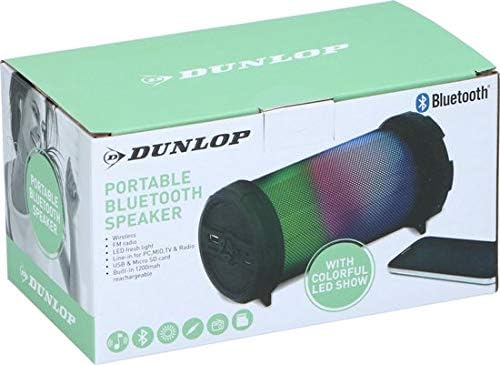
Image: The retail packaging for the Dunlop Portable Wireless Bluetooth Speaker 3W, showing the speaker and its features.

Image: The included USB charging cable and AUX audio cable.
Product Overview
The Dunlop Portable Wireless Bluetooth Speaker 3W features a cylindrical design with integrated LED lighting and various control buttons and ports. Familiarize yourself with the speaker's components:

Image: A general view of the Dunlop Portable Wireless Bluetooth Speaker 3W, showcasing its cylindrical shape and mesh grille.

Image: A close-up front view of the speaker, highlighting the Dunlop logo on the speaker grille.
Controls and Ports (Typical Layout)
- Power Button: Turns the speaker on/off.
- Mode Button: Switches between Bluetooth, FM Radio, AUX, USB, and Micro SD modes.
- Play/Pause Button: Controls music playback.
- Volume Up/Next Track Button: Increases volume or skips to the next track.
- Volume Down/Previous Track Button: Decreases volume or goes to the previous track.
- LED Light Button: Controls the ambient LED lighting effects.
- Micro USB Charging Port: For charging the speaker.
- AUX Input Port: For connecting external audio devices via a 3.5mm cable.
- USB Port: For playing music from a USB flash drive.
- Micro SD Card Slot: For playing music from a Micro SD card.
Setup
1. Charging the Speaker
- Connect the small end of the Micro USB charging cable to the Micro USB port on the speaker.
- Connect the larger USB end of the cable to a USB power adapter (not included) or a computer's USB port.
- The charging indicator light will illuminate, typically red, during charging.
- Once fully charged (approximately 2-3 hours), the indicator light may change color or turn off.
- Disconnect the charging cable.
2. Powering On/Off
- To power on, press and hold the Power Button for a few seconds until you hear an audible prompt or see the LED lights activate.
- To power off, press and hold the Power Button again for a few seconds.
Operating Instructions
Bluetooth Mode
- Ensure the speaker is powered on. It will typically enter Bluetooth pairing mode automatically, indicated by a flashing LED light and an audible prompt.
- On your smartphone, tablet, or other Bluetooth-enabled device, go to the Bluetooth settings.
- Search for available devices and select "Dunlop Speaker" (or similar name) from the list.
- Once paired, the speaker will emit an audible confirmation, and the LED light will stop flashing.
- You can now play music from your device through the speaker.
- The effective range for Bluetooth connectivity is up to 10 meters (33 feet).
FM Radio Mode
- Press the Mode Button repeatedly until you hear the FM radio prompt.
- To auto-scan and save available stations, press the Play/Pause Button once. The speaker will scan and store stations automatically.
- Use the Volume Up/Next Track and Volume Down/Previous Track buttons to navigate between saved stations.
AUX Input Mode
- Connect one end of the 3.5mm AUX audio cable to the AUX input port on the speaker.
- Connect the other end of the cable to the headphone jack of your external audio device (PC, TV, MP3 player, etc.).
- Press the Mode Button until you hear the AUX input prompt.
- Play audio from your connected device.
USB/Micro SD Card Playback
- Insert a USB flash drive into the USB port or a Micro SD card into the Micro SD card slot.
- The speaker will automatically detect the storage device and begin playing compatible audio files. If not, press the Mode Button to switch to the correct mode.
- Use the Play/Pause, Volume Up/Next Track, and Volume Down/Previous Track buttons to control playback.
LED Ambient Lighting
The integrated LED lighting creates a dynamic visual experience. You can control the lighting effects:

Image: The speaker displaying a vibrant, multi-colored LED light show.

Image: The speaker displaying a red and blue LED light combination.
- Press the LED Light Button to cycle through different lighting modes (e.g., all colors, single color, color-changing patterns, or off).
- Select the mode that best suits your mood or music.

Image: The Dunlop speaker positioned on a desk next to a laptop, demonstrating its use in a typical environment.
Maintenance
Cleaning
- Ensure the speaker is powered off and disconnected from any power source before cleaning.
- Wipe the exterior of the speaker with a soft, dry, lint-free cloth.
- Do not use abrasive cleaners, solvents, or strong chemicals, as these may damage the surface.
- Avoid getting moisture into any openings.
Storage
- Store the speaker in a cool, dry place away from direct sunlight and extreme temperatures.
- If storing for an extended period, charge the battery periodically (e.g., every 3 months) to maintain battery health.
Troubleshooting
| Problem | Possible Cause | Solution |
|---|---|---|
| Speaker does not turn on. | Battery is depleted. | Charge the speaker for at least 30 minutes. |
| No sound from the speaker. | Volume is too low or muted. | Increase the volume on both the speaker and the connected device. |
| Incorrect input mode selected. | Press the Mode Button to cycle through modes until the correct input is selected. | |
| Cannot pair via Bluetooth. | Speaker is not in pairing mode. | Ensure the speaker is in Bluetooth mode and the LED is flashing. Restart the speaker if necessary. |
| Bluetooth device is too far away. | Move the Bluetooth device closer to the speaker (within 10 meters). | |
| Previous device is still connected. | Disconnect the speaker from any previously paired devices or turn off Bluetooth on those devices. | |
| FM radio reception is poor. | Weak signal. | Reposition the speaker or move to an area with better reception. The charging cable can sometimes act as an antenna; try connecting it. |
Specifications
| Feature | Detail |
|---|---|
| Brand | DUNLOP |
| Model Number | 59127 |
| Connectivity Technology | Bluetooth 4.2 |
| Maximum Speaker Output Power | 3 Watts |
| Audio Output Mode | Stereo |
| Battery | 1200 mAh Lithium-ion (built-in) |
| Maximum Range | 10 Meters (Bluetooth) |
| Product Dimensions (L x W x H) | 170 x 82 x 85 mm (approx. 6.7 x 3.2 x 3.3 inches) |
| Weight | 2 Kilograms (approx. 4.4 lbs) |
| Material | Metal |
| Special Features | Bluetooth, FM Radio, LED Ambient Lighting, USB Playback, Micro SD Playback, AUX Input |
| Control Method | Button |
| Compatible Devices | Smartphone, Tablet, Laptop, TV |
| Power Source | Battery Powered |
Warranty and Support
For warranty information and customer support, please refer to the documentation provided with your purchase or contact your retailer. Keep your proof of purchase for any warranty claims.
Related documents59127

Ask a question about this manual
Ask about setup, troubleshooting, compatibility, parts, safety, or missing instructions. Manuals+ will review the question and use this page’s manual context to help answer it.