
1. Introduction
The Salter 1048 Digital Kitchen Scale is designed for precise measurement of ingredients in your kitchen. This versatile scale features an easy-to-read LCD display and includes a measuring jug, allowing for accurate weighing of various items, including liquids, directly within the container. This manual provides essential information for the safe and effective use of your new kitchen scale.
2. Safety Information
Please read all safety instructions before using the Salter 1048 Digital Kitchen Scale.
- Do not immerse the scale base in water or other liquids. Clean with a damp cloth only.
- Use the scale on a flat, stable, and level surface to ensure accurate readings.
- Keep the scale out of reach of children.
- Do not overload the scale beyond its maximum capacity. Overloading can cause permanent damage.
- Avoid exposing the scale to extreme temperatures or direct sunlight.
- Do not use abrasive cleaning agents or sharp objects on the scale's surface or display.
3. Package Contents
Verify that all items are present in the package:
- 1 x Salter 1048 Digital Kitchen Scale Base
- 1 x Measuring Jug
- 1 x Instruction Manual
4. Setup
- Unpack: Carefully remove all components from the packaging.
- Battery Installation: Open the battery compartment on the underside of the scale. Insert the required batteries (e.g., AAA or button cell) ensuring correct polarity (+/-). Close the compartment securely.
- Placement: Place the scale base on a firm, flat, and level surface, such as a kitchen countertop.
- Jug Placement: Position the measuring jug securely onto the scale platform.
5. Operating Instructions
5.1 Power On/Off
- To turn the scale ON, press the ON/OFF button. The display will show '0' or '0.0'.
- To turn the scale OFF, press and hold the ON/OFF button for a few seconds until the display turns off. The scale may also turn off automatically after a period of inactivity to conserve battery life.
5.2 Unit Conversion
The Salter 1048 scale can measure in various units.
- Press the UNIT button repeatedly to cycle through the available measurement units: grams (g), ounces (oz), milliliters (ml), and fluid ounces (fl.oz).
- Select the desired unit before or during weighing.
5.3 Tare Function (Zeroing)
The Tare function allows you to weigh multiple ingredients in the same container or to exclude the weight of a container.
- Place an empty container (e.g., the measuring jug) onto the scale platform. The display will show its weight.
- Press the TARE button. The display will reset to '0' or '0.0'.
- Add your first ingredient to the container. The display will show the weight of only the ingredient.
- To add another ingredient, press the TARE button again to zero the display, then add the next ingredient. Repeat as needed.
5.4 Weighing Ingredients
- Ensure the scale is on a flat, stable surface and turned on.
- If using a container, place it on the scale and press TARE to zero the display.
- Place the ingredients directly onto the scale platform or into the tared jug.
- Read the weight displayed on the LCD screen.
5.5 Weighing Liquids
The Salter 1048 is capable of measuring liquids by volume.
- Turn on the scale and place the measuring jug on the platform.
- Press TARE to zero the display.
- Press the UNIT button until 'ml' (milliliters) or 'fl.oz' (fluid ounces) is displayed.
- Slowly pour the liquid into the jug. The display will show the volume of the liquid.
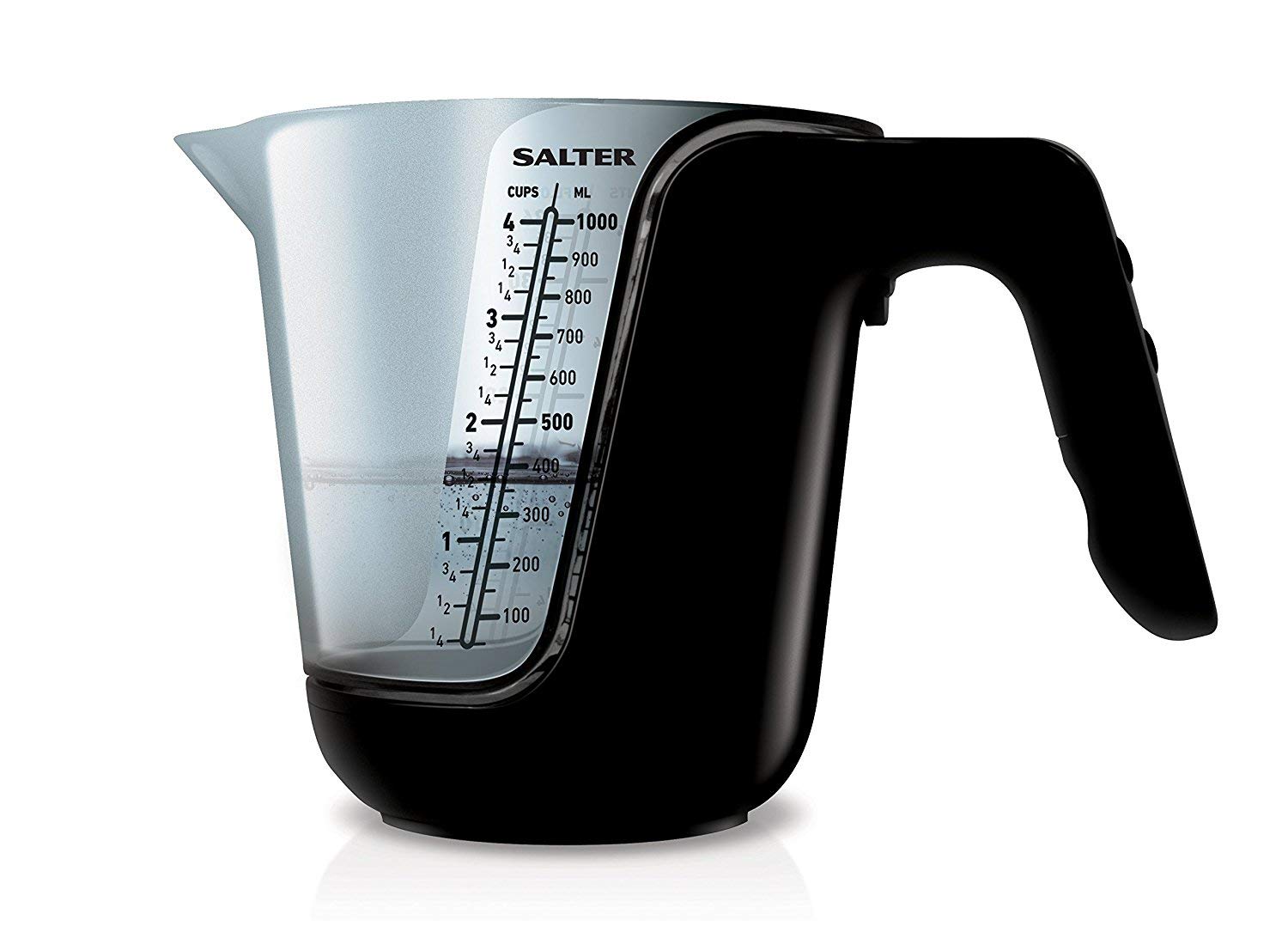
Figure 1: The Salter 1048 Digital Kitchen Scale with its clear measuring jug. The LCD display is illuminated, showing a measurement of '25.5 mL' for 'water', demonstrating its liquid weighing capability.
6. Maintenance and Care
- Cleaning the Scale Base: Wipe the scale base with a soft, damp cloth. Do not use chemical cleaners or immerse in water.
- Cleaning the Jug: The measuring jug can be washed by hand with warm soapy water or placed in the dishwasher. Ensure it is completely dry before placing it back on the scale.
- Storage: Store the scale in a cool, dry place. If storing for an extended period, it is recommended to remove the batteries to prevent leakage.
- Battery Replacement: When the display shows 'Lo', replace the batteries promptly with new ones of the correct type.
7. Troubleshooting
| Problem | Possible Cause | Solution |
|---|---|---|
| Display shows 'Lo' | Low battery power. | Replace the batteries with new ones. |
| Display shows 'Err' | Scale overloaded or unstable surface. | Remove items from the scale. Turn the scale off, then restart it on a flat, stable surface. Ensure weight does not exceed maximum capacity. |
| Inaccurate readings | Scale not on a level surface, or not tared correctly. | Ensure the scale is placed on a firm, level surface. Press the TARE button to zero the display before weighing. Avoid vibrations during use. |
| Scale does not turn on | Batteries are dead or incorrectly installed. | Check battery polarity and ensure they are correctly inserted. Replace batteries if necessary. |
8. Specifications
- Brand: Salter
- Model: 1048
- Color: Black
- Material: Plastic
- Display: LCD
- Units of Measurement: g, oz, ml, fl.oz
- ASIN: B091J7PDL9
- First Available Date: April 1, 2021
- Power Source: Batteries (type not specified, typically AAA or button cell)
9. Warranty and Support
For detailed warranty information, product registration, or customer support, please refer to the documentation included with your purchase or visit the official Salter website. You may also contact your retailer for assistance.
Manufacturer: Salter


