
Total TG1061356
Total Tools Super Select Impact Drill 680W
Model: TG1061356 User Manual
1. Introduction
This manual provides essential instructions for the safe operation, maintenance, and troubleshooting of your Total Tools Super Select Impact Drill 680W, model TG1061356. Please read this manual thoroughly before using the tool to ensure proper function and to prevent injury.
Important Safety Information: Always wear appropriate personal protective equipment (PPE) such as safety glasses, hearing protection, and gloves when operating power tools. Ensure the work area is clean and well-lit. Disconnect the drill from the power source before making any adjustments or changing accessories.
2. Setup
2.1 Unpacking
Carefully remove the drill and all accessories from the packaging. Inspect for any damage that may have occurred during transit. Retain packaging for future storage or transport.
2.2 Attaching the Auxiliary Handle
The auxiliary handle provides additional control and stability. To attach:
- Loosen the auxiliary handle clamp by rotating it counter-clockwise.
- Slide the handle onto the front of the drill body.
- Adjust the handle to a comfortable position for your grip.
- Tighten the clamp by rotating it clockwise until secure.

Figure 1: Total Tools Super Select Impact Drill with auxiliary handle. The handle is positioned at the front of the drill for improved control.
2.3 Installing a Drill Bit (Keyed Chuck)
This drill features a 13mm keyed chuck for secure bit retention.
- Disconnect from Power: Ensure the drill is unplugged from the power outlet.
- Open Chuck: Insert the chuck key into one of the holes on the chuck and rotate counter-clockwise to open the chuck jaws.
- Insert Bit: Place the drill bit into the chuck, ensuring it is centered and inserted as far as possible without touching the chuck jaws' base.
- Tighten Chuck: Rotate the chuck key clockwise to tighten the chuck jaws firmly around the drill bit. Use all three holes on the chuck to ensure even and secure tightening.
- Remove Key: Always remove the chuck key before operating the drill.
2.4 Power Connection
Connect the drill's power cord to a suitable 220V AC power outlet. Ensure the outlet is properly grounded and rated for the drill's power requirements (680W).
3. Operating Instructions
3.1 Powering On/Off
- To Turn On: Press the trigger switch. The drill speed is variable depending on how far the trigger is pressed.
- To Lock On (for continuous operation): Press the trigger switch fully, then press the lock-on button (usually located on the side of the handle).
- To Turn Off (from locked-on position): Press the trigger switch fully again, then release it.
- To Turn Off (from momentary operation): Simply release the trigger switch.
3.2 Speed Adjustment
The drill features variable speed control via the trigger switch. For precise control, a speed pre-selection dial may be present (refer to specific model features if available, otherwise rely on trigger control). Maximum speed is 3000 RPM.
3.3 Mode Selection (Drill / Impact)
This impact drill offers two modes: rotary drilling and impact drilling. A selector switch, typically located on the top or side of the drill, allows you to choose the appropriate mode.
- Rotary Drilling Mode (Drill Symbol): For drilling into wood, metal, plastics, and for screwdriving.
- Impact Drilling Mode (Hammer Symbol): For drilling into masonry, concrete, and brick.

Figure 2: Side view of the drill, highlighting the mode selector switch (typically near the chuck) and the product label with specifications.
3.4 Reverse Function
The drill is equipped with a reverse rotation function, useful for removing jammed drill bits or for screwdriving applications. The forward/reverse switch is usually located above the trigger.
- Push the switch to the left for forward rotation (drilling).
- Push the switch to the right for reverse rotation (removing bits).
Always ensure the drill has come to a complete stop before changing the direction of rotation.
3.5 Drilling Techniques
- General: Apply steady, even pressure. Do not force the drill. Allow the drill bit to do the work.
- Wood: Use high speeds and wood-specific drill bits.
- Metal: Use lower speeds and metal-specific drill bits. Apply cutting oil for harder metals to prolong bit life.
- Masonry/Concrete (Impact Mode): Use impact-rated masonry bits. Apply firm, consistent pressure. The impact action will assist in breaking through hard materials.
4. Maintenance
Regular maintenance ensures the longevity and safe operation of your drill.
4.1 Cleaning
- Disconnect Power: Always unplug the drill before cleaning.
- Exterior: Wipe the exterior of the drill with a clean, damp cloth. Do not use harsh chemicals or abrasive cleaners.
- Ventilation Slots: Keep the ventilation slots clear of dust and debris to prevent overheating. Use compressed air if necessary.
4.2 Chuck Maintenance
Periodically clean the chuck jaws to ensure proper gripping of drill bits. A small amount of light machine oil can be applied to the chuck jaws to keep them moving smoothly.
4.3 Carbon Brush Inspection (If Applicable)
Some power tools use carbon brushes that wear over time. If your drill experiences reduced power or intermittent operation, the carbon brushes may need inspection or replacement. This procedure should ideally be performed by a qualified service technician.
4.4 Storage
Store the drill in a dry, secure location, out of reach of children. Protect it from direct sunlight and extreme temperatures.
5. Troubleshooting
Before attempting any repairs, ensure the drill is unplugged from the power source.
| Problem | Possible Cause | Solution |
|---|---|---|
| Drill does not start. | No power supply; faulty power cord/plug; trigger switch issue. | Check power outlet; inspect cord for damage; contact service if switch is faulty. |
| Reduced power or intermittent operation. | Worn carbon brushes; motor overheating; loose connections. | Inspect/replace carbon brushes (if applicable); allow drill to cool; check connections. |
| Drill bit jams frequently. | Incorrect bit for material; excessive pressure; dull bit. | Use correct, sharp bit; reduce pressure; clear debris from hole. |
| Excessive vibration or noise. | Loose chuck; bent drill bit; internal component issue. | Ensure chuck is tight; replace bent bit; contact service for internal issues. |
If the problem persists after attempting these solutions, contact an authorized service center.
6. Specifications
The following are the technical specifications for the Total Tools Super Select Impact Drill 680W (Model: TG1061356):
| Feature | Detail |
|---|---|
| Brand | Total Tools |
| Model Number | TG1061356 |
| Power Source | Corded Electric |
| Maximum Power | 680 Watts |
| Voltage | 220 Volts |
| Chuck Type | Keyed |
| Maximum Chuck Size | 13 Millimeters |
| Speed | 3000 RPM (No-load) |
| Adjustable Speed | Yes (Variable via trigger) |
| Reverse Function | Yes |
| Hammer Functionality | Yes (Impact Drill) |
| Item Weight | 209 g (0.21 Kilograms) |
| Product Dimensions | 10 x 20 x 37 cm |
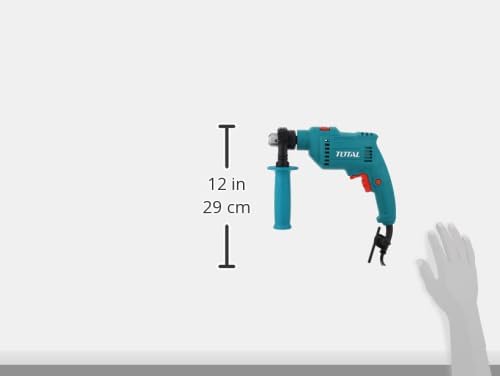
Figure 3: Approximate dimensions of the Total Tools Impact Drill.
7. Warranty and Support
Total Tools products are manufactured to high-quality standards. For specific warranty terms and conditions, please refer to the warranty card included with your product or visit the official Total Tools website. For technical support, service, or spare parts, please contact your local Total Tools authorized dealer or service center.
Please retain your proof of purchase for warranty claims.
Related documentsTG1061356


Ask a question about this manual
Ask about setup, troubleshooting, compatibility, parts, safety, or missing instructions. Manuals+ will review the question and use this page’s manual context to help answer it.