
Remax RB-X5
Remax RB-X5 Outdoor Bluetooth Karaoke Speaker User Manual
Your comprehensive guide to setting up, operating, and maintaining your Remax RB-X5 speaker.
Introduction
Thank you for choosing the Remax RB-X5 Outdoor Bluetooth Karaoke Speaker. This powerful and versatile speaker is designed for outdoor use, offering high-quality audio, wireless connectivity, and karaoke functionality. Please read this manual carefully to ensure proper use and to maximize your enjoyment of the product.

Figure 1: The Remax RB-X5 Outdoor Bluetooth Karaoke Speaker, featuring a retractable handle and wheels for portability.
Package Contents
Upon opening the package, please verify that all items are present and in good condition:
- Remax RB-X5 Outdoor Bluetooth Karaoke Speaker
- Power Adapter/Charging Cable
- Wireless Microphone(s) (if included with your model)
- Remote Control (if included with your model)
- User Manual (this document)

Figure 2: The Remax RB-X5 speaker shown with included accessories: two wireless microphones and a remote control.
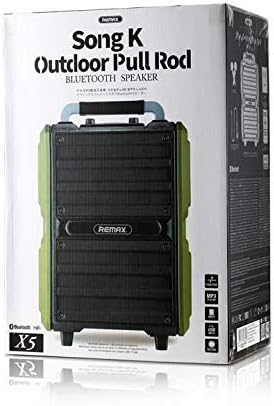
Figure 3: The retail packaging for the Remax RB-X5 speaker, indicating its "Song K Outdoor Pull Rod Bluetooth Speaker" designation.
Setup
1. Charging the Speaker
Before first use, fully charge the speaker. Connect the power adapter to the DC 15V IN port on the speaker's control panel and plug it into a power outlet. The charging indicator light will show the charging status.
2. Powering On/Off
Locate the power switch on the control panel. Flip the switch to the "ON" position to power on the speaker. Flip it to "OFF" to power off.
3. Control Panel Overview
Familiarize yourself with the various inputs and controls on the speaker's rear panel:

Figure 4: Detailed view of the Remax RB-X5 speaker's control panel, showing various ports and adjustment knobs.
- Power Switch: ON/OFF.
- DC 15V IN: Power input for charging.
- USB Port: For USB flash drives.
- TF Card Slot: For MicroSD/TF cards.
- AUX IN: 3.5mm audio input for external devices.
- MIC IN (MIC1, MIC2): 6.35mm inputs for wired microphones.
- GUITAR IN: Input for connecting a guitar.
- Volume Knobs: Master Volume, Bass, Treble, Mic Volume, Mic Echo, Guitar Level.
- Mode Button: To switch between Bluetooth, AUX, USB, TF card modes.
- Playback Controls: Play/Pause, Previous Track, Next Track.
- MIC PRIORITY: Button to enable/disable microphone priority (ducks music when speaking).
Operating Instructions
1. Bluetooth Connection
- Power on the speaker. It will automatically enter Bluetooth pairing mode, indicated by a flashing LED light.
- On your mobile device (smartphone, tablet, etc.), enable Bluetooth and search for available devices.
- Select "Remax RB-X5" from the list of devices.
- Once connected, the speaker will emit a confirmation sound, and the LED light will stop flashing.
- You can now play audio from your device through the speaker.
2. USB/TF Card Playback
Insert a USB flash drive or TF card (with MP3 audio files) into the respective port. The speaker will automatically switch to USB/TF mode and begin playing music. Use the playback controls on the speaker or remote to manage tracks.
3. AUX Input
Connect an external audio device (e.g., MP3 player, laptop) to the AUX IN port using a 3.5mm audio cable. Press the "Mode" button until "AUX" mode is selected. Audio will now play from your connected device.
4. Karaoke Function
- Connect the wireless microphone(s) (if applicable) or a wired microphone to the MIC IN port(s).
- Adjust the "MIC VOL" knob to control the microphone's volume.
- Adjust the "MIC ECHO" knob to add an echo effect to your vocals.
- Use the "MIC PRIORITY" button to enable or disable the function that lowers background music volume when you speak into the microphone.
5. Guitar Input
Connect your guitar to the GUITAR IN port. Adjust the "GUITAR LEVEL" knob to control the guitar's volume.
Maintenance
- Cleaning: Use a soft, dry cloth to clean the speaker's exterior. Do not use abrasive cleaners or solvents.
- Storage: Store the speaker in a cool, dry place away from direct sunlight and extreme temperatures.
- Battery Care: To prolong battery life, avoid fully discharging the battery frequently. Charge the speaker regularly, even if not in use for extended periods.
- Water Resistance: While designed for outdoor use, avoid submerging the speaker in water or exposing it to heavy rain.
Troubleshooting
| Problem | Possible Cause | Solution |
|---|---|---|
| No power | Battery is dead; Power switch is OFF. | Charge the speaker; Turn the power switch to ON. |
| No sound | Volume too low; Incorrect mode selected; Device not connected properly. | Increase master volume and device volume; Press MODE button to select correct input; Reconnect Bluetooth/AUX cable. |
| Cannot connect Bluetooth | Speaker not in pairing mode; Device Bluetooth is off; Speaker too far from device. | Ensure speaker is in Bluetooth mode (flashing LED); Turn on Bluetooth on your device; Move device closer to speaker (within 10 meters). |
| Microphone not working | Microphone volume too low; Microphone not powered on (wireless); Incorrect MIC IN port. | Increase MIC VOL knob; Ensure wireless microphone has batteries and is ON; Connect to correct MIC IN port. |
Specifications

Figure 5: Comparison of two Remax RB-X5 speakers, illustrating their compact dimensions and portable design with a retractable handle.
| Feature | Detail |
|---|---|
| Model Number | RB-X5 |
| Brand | Remax |
| Speaker Type | Karaoke Speakers |
| Connectivity Technology | Wired/Wireless (Bluetooth) |
| Nominal Output / Max Output Power | 40 - 50 Watts |
| Audio Output Mode | Stereo |
| Port Type | Multi (USB, TF Card, AUX, MIC, Guitar) |
| Material | Plastic |
| Mounting Type | Floor Standing |
| Dimensions (Approx.) | 62.2 x 43.2 x 28.2 cm (Package Dimensions) |
| Weight (Approx.) | 13.9 kg (Package Weight) |
| Special Features | Wireless, Bluetooth, Karaoke Function, Retractable Handle, Wheels |
Warranty and Support
For information regarding warranty coverage, technical support, or service, please refer to the warranty card included with your purchase or visit the official Remax website. Keep your proof of purchase for warranty claims.
For further assistance, you may contact Remax customer support through their official channels.
Ask a question about this manual
Ask about setup, troubleshooting, compatibility, parts, safety, or missing instructions. Manuals+ will review the question and use this page’s manual context to help answer it.