
1. Introduction
Thank you for choosing the TIDEWE Golf Rangefinder. This device is designed to provide accurate distance measurements for golfing and hunting, featuring advanced functions like slope compensation, flagpole locking, and speed measurement. Its compact and lightweight design ensures comfortable handling and portability.

Image: TIDEWE Golf Rangefinder (White & Gray model).
2. Product Features
- Integrated Functions: Features straight-line distance, flagpole locking, golf trajectory (slope), speed, and horizontal/vertical distance. Includes a Race Mode for tournament play without height and angle compensation.
- Fast Accurate Reading: Provides accurate measurements from 3 to 1000 yards with a precision of +/-1 yard and a measuring speed of less than 0.5 seconds.
- Easy to Use: Simple point-and-press operation with an easy-to-read LCD display. Mode selection via short press, Race Mode toggle via long press of the power button. Adjustable sight focus.
- Portable & Lightweight: Compact dimensions (4.12" x 2.61" x 1.50") and light weight (0.35lb) for easy carrying. Ergonomic design for comfortable grip.
- Long Battery Life: Equipped with a 750mAh rechargeable Li-ion battery, capable of 20,000 measurements on a full charge. Features a clear built-in LCD display for low light conditions.
- Magnetic Holder: Includes a magnetic strap for convenient attachment to a golf cart or other metallic surfaces.
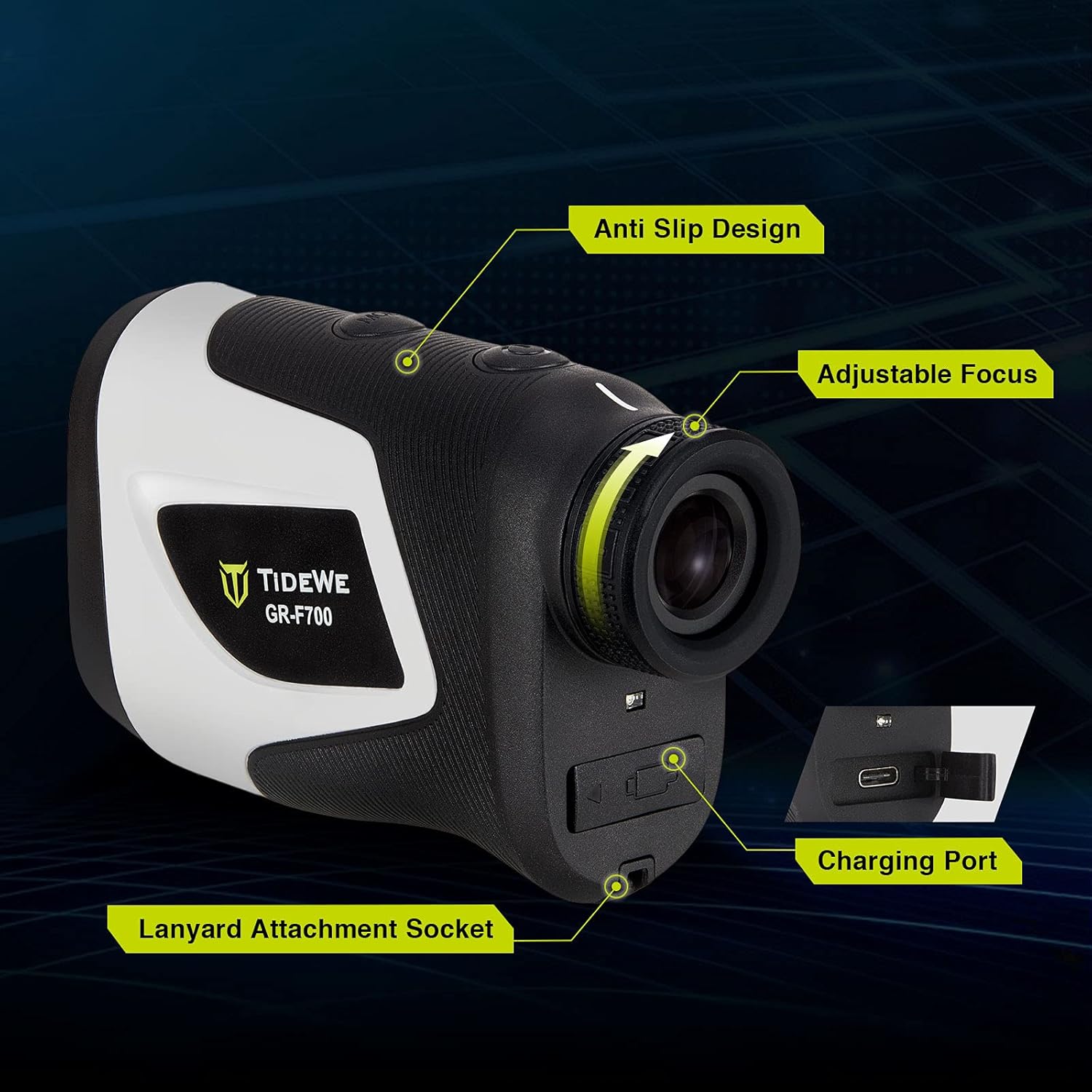
Image: Key features including anti-slip design, adjustable focus, charging port, and lanyard attachment socket.
Video: Overview of the TIDEWE Golf Rangefinder, highlighting its features and ease of use.
3. Package Contents
Upon opening your TIDEWE Golf Rangefinder package, please ensure all the following items are present:
- TIDEWE Golf Rangefinder (RF002-WE700)
- Carrying Case
- USB Charging Cable
- Lanyard
- Cleaning Cloth
- User Manual

Image: All items included in the TIDEWE Golf Rangefinder package.
4. Setup
4.1. Charging the Battery
The TIDEWE Golf Rangefinder comes with a built-in rechargeable Li-ion battery. Before first use, or when the battery indicator shows low power, charge the device using the provided USB cable.
- Locate the charging port on the side of the rangefinder (refer to Product Features image).
- Connect the USB charging cable to the rangefinder and a compatible USB power source (e.g., computer, wall adapter).
- The charging indicator will show the charging status. A full charge can provide up to 20,000 measurements.
Image: Visual representation of the rangefinder's battery status.
4.2. Adjusting Focus
To ensure a clear view through the eyepiece, adjust the focus knob located near the eyepiece. Rotate the knob until the image appears sharp and clear.

Image: Illustrates the 6X magnification and clear display of the rangefinder, showing the view through the eyepiece.
5. Operating Instructions
5.1. Powering On/Off
- To power on: Press the Power button once. The LCD display will activate.
- To power off: The device will automatically power off after a period of inactivity to conserve battery. Alternatively, you can long press the Power button to access settings and manually power off if available.
5.2. Taking a Measurement
- Look through the eyepiece and aim the crosshairs at your desired target.
- Press the Power button once to activate the laser and take a measurement. The distance will be displayed almost instantaneously on the LCD.

Image: Depicts the rangefinder's fast and accurate reading capability with a digital overlay showing distance.
5.3. Changing Measurement Units (Yards/Meters)
While the device is powered on, long press the 'MODE' button to switch between yards (Y) and meters (M).
6. Measurement Modes
The TIDEWE Golf Rangefinder offers multiple modes to suit various measurement needs. Short press the 'MODE' button to cycle through the available modes.
- Straight-Line Distance Measurement: Provides the direct distance from the rangefinder to the target.
- Flagpole Locking: Designed for golf, this mode helps lock onto the flagpole, ignoring background objects. The device will vibrate once when an object is measured and twice when the flagpole is locked.
- Golf Trajectory Compensation (Slope): Calculates the adjusted distance based on the incline or decline to the target, providing a more accurate