
1. Introduction
This manual provides essential information for the safe and effective use of your Baomain BMS-35-24 Switching Power Supply. This device is designed to convert alternating current (AC) from 110V or 220V to a stable direct current (DC) of 24V with a maximum power output of 35W. It is suitable for various applications including industrial automation, LED lighting, CCTV cameras, security systems, radio equipment, and computer projects.
Please read this manual thoroughly before installation and operation to ensure proper functionality and safety.
2. Safety Information
- Indoor Use Only: This power supply is designed for indoor use in dry environments. Do not expose it to water, moisture, or high humidity.
- Proper Ventilation: Ensure adequate ventilation around the unit to prevent overheating. Do not cover the ventilation holes.
- Electrical Shock Hazard: This unit contains high voltage. Do not open the casing. All installation and wiring should be performed by qualified personnel.
- Input Voltage Selection: Before connecting the power supply, verify that the input voltage switch is set correctly to either 110V or 220V, matching your local mains supply. Incorrect setting can cause damage to the unit.
- Grounding: Ensure the unit is properly grounded to prevent electrical shock.
- Overload Protection: Do not exceed the rated output power of 35W. Overloading can damage the unit and connected devices.
- Secure Connections: Ensure all wire connections are secure and properly insulated to prevent short circuits.
3. Product Overview
The Baomain BMS-35-24 is a compact and efficient switching power supply. It features a metal enclosure with ventilation for heat dissipation and clearly marked terminal blocks for easy wiring.
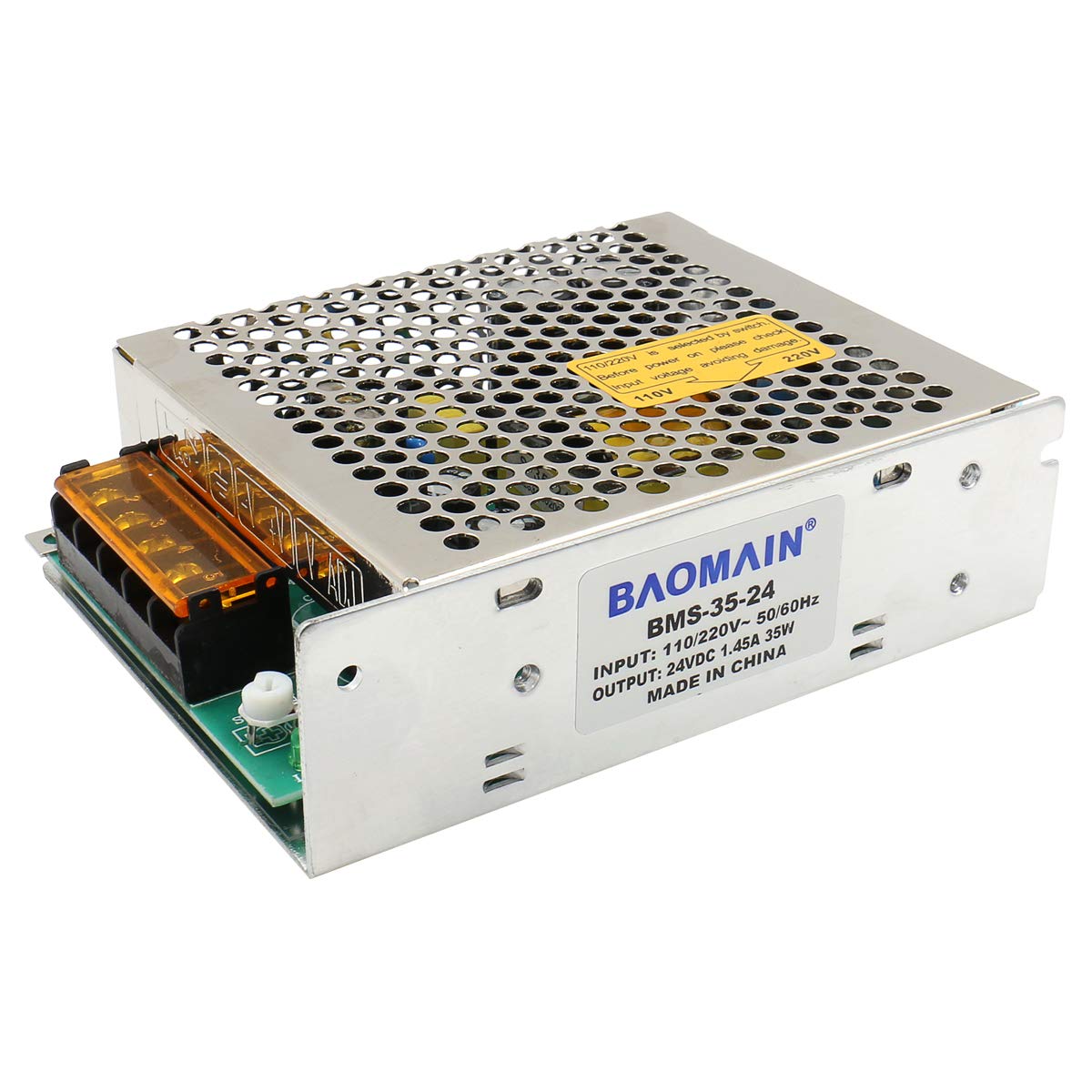
Image 3.1: Top-down view of the Baomain BMS-35-24 Switching Power Supply, showing the perforated metal casing and terminal block.

Image 3.2: Angled view of the power supply, highlighting its compact design and metal housing.
Key Features:
- Converts AC 110V/220V to DC 24V.
- Rated power output of 35W.
- High efficiency, designed for 85%.
- Safety compliance: CB, CE, RoHS.
- Built-in over current, over voltage, and overload protection.
4. Setup
Follow these steps for safe and correct installation of your power supply.
4.1. Unpacking and Inspection
- Carefully remove the power supply from its packaging.
- Inspect the unit for any signs of physical damage. If damage is found, do not proceed with installation and contact customer support.
4.2. Input Voltage Selection
Before connecting any power, locate the voltage selector switch on the side of the unit. This switch allows you to select between 110V and 220V AC input. Ensure this switch is set to match your local mains voltage before connecting the power supply to an AC source.

Image 4.1: View of the power supply showing its dimensions and the input voltage selector switch (labeled 110V/220V).
4.3. Wiring Connections
Refer to the terminal block for correct wiring. Always ensure power is disconnected before making any connections.

Image 4.2: Close-up view of the terminal block, showing input (AC) and output (DC) connections.
- Input (AC): Connect your AC mains power to the terminals labeled 'L' (Live), 'N' (Neutral), and '⏚' (Ground). Ensure proper polarity and secure grounding.
- Output (DC): Connect your 24VDC load to the terminals labeled '-V' (Negative) and '+V' (Positive). Ensure correct polarity for your connected devices.
- Voltage Adjustment (V ADJ): A potentiometer labeled 'V ADJ' is present for fine-tuning the output voltage. Use a small screwdriver to adjust if necessary.
After all connections are made, double-check them for security and correctness before applying power.
5. Operating Instructions
- Verify Connections: Ensure all input and output wires are correctly and securely connected, and the input voltage selector switch is set to the appropriate voltage (110V or 220V).
- Apply Power: Connect the AC mains power to the power supply. The unit should power on.
- Check Output Voltage: If precise voltage is required, use a multimeter to measure the output voltage between the '+V' and '-V' terminals.
- Adjust Output Voltage (Optional): If the output voltage needs fine-tuning, carefully turn the 'V ADJ' potentiometer with a small, insulated screwdriver until the desired 24V output is achieved. Do not over-adjust.
- Monitor Operation: Observe the connected load to ensure it is functioning correctly. The power supply is designed to operate continuously within its specified limits.
6. Maintenance
The Baomain BMS-35-24 Switching Power Supply requires minimal maintenance. Adhering to the following guidelines will help ensure its longevity and reliable operation:
- Keep Clean: Periodically clean the exterior of the unit with a soft, dry cloth. Do not use liquid cleaners or solvents.
- Ensure Ventilation: Regularly check that the ventilation holes are not obstructed by dust or debris. Clear any blockages to maintain proper airflow.
- Check Connections: Periodically inspect all wiring connections to ensure they remain tight and secure. Loose connections can lead to poor performance or safety hazards.
- Environmental Conditions: Ensure the operating environment remains within the specified temperature and humidity ranges.
- No User-Serviceable Parts: Do not attempt to open or repair the power supply. There are no user-serviceable parts inside, and opening the unit voids the warranty and poses an electrical shock risk.
7. Troubleshooting
If you encounter issues with your power supply, refer to the following common troubleshooting steps:
- No Output Power:
- Check if the AC input power is connected and active.
- Verify the input voltage selector switch is set correctly (110V or 220V).
- Ensure all input and output wires are securely connected.
- Check for any tripped circuit breakers or blown fuses in your AC supply.
- Incorrect Output Voltage:
- Use a multimeter to measure the output voltage.
- Adjust the 'V ADJ' potentiometer slightly to fine-tune the voltage.
- Ensure the load is not exceeding the 35W rated power, which could cause voltage drop.
- Overheating:
- Ensure adequate ventilation around the unit. Clear any obstructions from the ventilation holes.
- Reduce the load if it is close to or exceeding 35W.
- Ensure the ambient temperature is within the specified operating range.
- Unit Shuts Down:
- This may indicate activation of over current, over voltage, or overload protection.
- Disconnect the load and AC input, wait a few minutes, then reconnect. If it shuts down again, check the load for short circuits or excessive power draw.
If these steps do not resolve the issue, contact customer support for further assistance.
8. Specifications
| Parameter | Value |
|---|---|
| Product Name | Switching Power Supply |
| Model Number | BMS-35-24 |
| Input Voltage | 110V/220V AC (Switchable) |
| Output Voltage | 24V DC |
| Rated Power | 35W |
| Frequency Range | 47-63 Hz |
| Input Current | 0.62A@110V, 0.31A@220V |
| Inrush Current | 30A/115VAC; 45A/230VAC |
| Line Regulation | ±0.5% |
| Load Regulation | ±0.5% |
| Over Current Protection | 100%-120% of rating |
| Over Voltage Protection | 130% of rating |
| Over Load Protection | 105%-120% of rating (auto recovery) |
| Working Temperature | -20~+60 ℃ |
| Working Humidity | 20-90% RH non-condensing |
| Safety Compliance | CB, CE, RoHS, EN61347, IEC60950, EN60950-1:2011+A2:2013 |
| Dimensions (L*W*H) | 129*97*38 mm (5.08" x 3.82" x 1.50") |

Image 8.1: Side view of the power supply, showing the solid metal casing.
9. Warranty
This Baomain BMS-35-24 Switching Power Supply comes with a 2-year warranty from the date of purchase. This warranty covers defects in materials and workmanship under normal use. It does not cover damage resulting from improper installation, misuse, abuse, unauthorized modifications, or natural disasters. Please retain your proof of purchase for warranty claims.
10. Support
For technical assistance, warranty claims, or any questions regarding your Baomain BMS-35-24 Switching Power Supply, please contact Baomain customer support through the retailer where the product was purchased or visit the official Baomain website for contact information.
We recommend having your product model number (BMS-35-24) and purchase details available when contacting support.