
1. Introduction
This manual provides detailed instructions for the HEAD Digital Watch Sydney series (models H140200, H140201, H140202, H140203). The Sydney watch is designed for versatility, offering both digital and analog time display, chronograph functions, and water resistance suitable for various activities. Please read this manual thoroughly before using your watch to ensure proper operation and longevity.
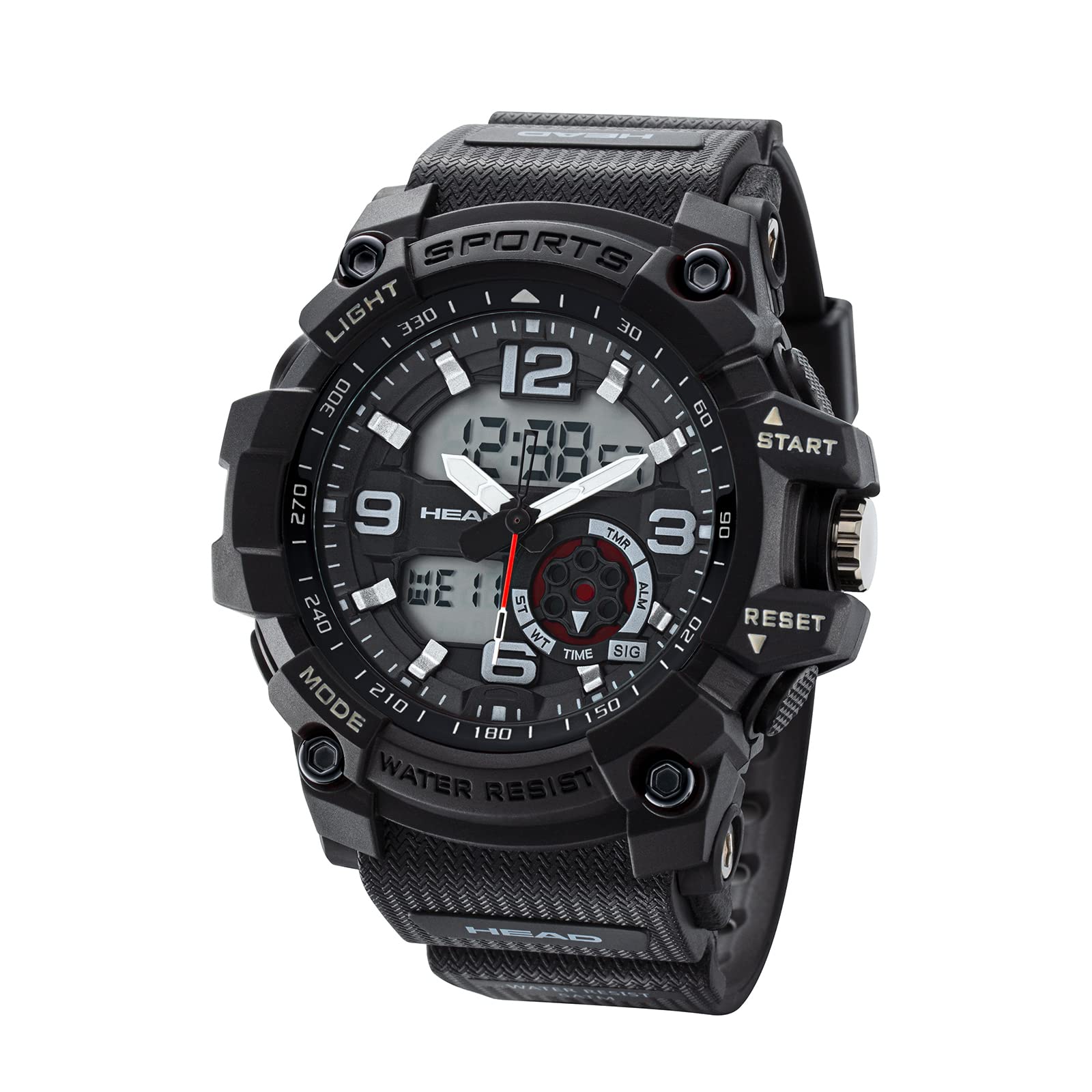
Figure 1: Front view of the HEAD Digital Watch Sydney H140200.
2. Safety Information
- Water Exposure: The watch has a water resistance rating of 5 ATM (50 meters). This means it is suitable for everyday use, showering, and swimming in shallow water. It is not suitable for high-impact water sports, diving, or prolonged submersion.
- Cleaning: Do not wash the watch with strong detergents or abrasive materials. Refer to the Maintenance section for proper cleaning instructions.
- Temperature: Avoid exposing the watch to extreme temperatures (hot or cold) for extended periods, as this may affect its accuracy and battery life.
- Impact: While robust and shock-resistant, avoid severe impacts or dropping the watch to prevent damage.
3. Product Overview
The HEAD Sydney watch features a durable case, a comfortable silicone strap, and a dual analog-digital display. Key components include:
- Display: Analog hands for traditional timekeeping and a digital display for additional functions.
- Buttons: Multiple buttons on the side for mode selection, setting adjustments, and chronograph control.
- Crown: A crown for setting analog time.
- Strap: A flexible silicone strap with a buckle clasp for secure and comfortable wear.
- Case Back: Stainless steel case back indicating water resistance.

Figure 2: Side view illustrating the watch buttons (START, RESET, Mode, Light).

Figure 3: Back view showing the stainless steel case and water resistance marking.
4. Setup
4.1 Setting Analog Time
- Pull the crown (located on the right side of the watch) out to the first position.
- Rotate the crown to adjust the hour and minute hands to the correct time.
- Push the crown back into its normal position to start the analog timekeeping.
4.2 Setting Digital Time and Date
The digital display allows for precise time and date settings.
- In normal timekeeping mode, press the MODE button (usually bottom-left) repeatedly until the digital time setting mode is displayed (often indicated by flashing digits).
- Use the RESET button (usually bottom-right) to select the digit or setting you wish to adjust (e.g., seconds, hours, minutes, year, month, day).
- Use the START button (usually top-left) to increase the selected value. Hold it down for faster adjustment.
- Once all settings are correct, press the MODE button again to exit the setting mode and return to normal timekeeping.
5. Operating the Watch
5.1 Timekeeping Mode
In the default timekeeping mode, the watch displays the current time digitally, along with the day of the week and date. The analog hands also show the current time.
5.2 Using the Chronograph (Stopwatch)
- From normal timekeeping mode, press the MODE button until the chronograph mode is displayed (often indicated by "00:00:00").
- Press the START button to begin timing.
- Press the START button again to pause timing.
- Press the RESET button to reset the chronograph to zero.
- To exit chronograph mode, press the MODE button.
5.3 Alarm Function
Your watch may include an alarm function. To set and activate the alarm:
- Press the MODE button until the alarm setting mode is displayed.
- Use the RESET button to select the hour or minute digits.
- Use the START button to adjust the alarm time.
- Press the MODE button to confirm and activate the alarm. An alarm icon will typically appear on the display.
- To turn off the alarm sound when it rings, press any button. To deactivate the alarm function, navigate back to the alarm setting mode and toggle it off.
5.4 Backlight
To illuminate the digital display in low-light conditions, press the LIGHT button (usually top-right). The backlight will typically stay on for a few seconds.
6. Maintenance
6.1 Cleaning Your Watch
- Wipe the watch case and strap with a soft, damp cloth.
- For stubborn dirt, use a mild soap solution and rinse thoroughly with a damp cloth. Ensure no water enters the watch.
- Dry the watch completely with a soft, dry cloth.
- Important: Do not use chemical cleaners, solvents, or abrasive materials, as these can damage the watch's finish and seals. Do not wash the watch under running water or submerge it for cleaning.
6.2 Battery Replacement
The watch is powered by a battery. When the display becomes dim or functions become erratic, it may be time to replace the battery. Battery replacement should ideally be performed by a qualified watch technician to ensure the water resistance seal is properly maintained. Attempting to replace the battery yourself may void the warranty and compromise water resistance.
6.3 Water Resistance Care
- Ensure the crown is fully pushed in before any contact with water.
- Do not operate buttons while the watch is wet or submerged.
- After exposure to saltwater, rinse the watch with fresh water and dry it thoroughly.
- Water resistance is not a permanent condition and may decrease over time due to wear and tear or impact. It is recommended to have the water resistance checked periodically by a professional, especially after battery replacement.
7. Troubleshooting
| Problem | Possible Cause | Solution |
|---|---|---|
| Digital display is dim or blank. | Low battery. | Replace the battery (recommended by a professional). |
| Analog hands are not moving. | Crown is pulled out; low battery. | Push the crown back in. If still not moving, replace the battery. |
| Time is incorrect. | Time not set correctly; impact. | Re-set the analog and digital time as per Section 4. If problem persists after impact, seek professional service. |
| Water inside the watch. | Crown not fully pushed in; buttons operated underwater; damaged seal. | Immediately take the watch to a professional for inspection and repair to prevent further damage. |
8. Specifications
- Model Name: Sydney
- Model Number: H140200 (also H140201, H140202, H140203 variants)
- Brand: HEAD
- Display Type: Digital-Analog
- Movement Type: Quartz
- Case Material: Stainless Steel (case back)
- Dial Window Material Type: Plastic
- Band Material Type: Silicone
- Clasp Type: Buckle (Tang Buckle)
- Case Diameter: 55 Millimeters
- Case Thickness: 12 Millimeters
- Band Width: 2
- Water Resistance Depth: 50 Meters (5 ATM)
- Special Features: Chronograph, Water Resistant
- Power Source: Battery Powered
- Item Shape: Round
- Item Weight: 210 grams
9. Warranty Information
Specific warranty details for the HEAD Digital Watch Sydney H140200 are not provided in this document. Please refer to the warranty card included with your purchase or visit the official HEAD Watches website for comprehensive warranty terms and conditions. Keep your proof of purchase for any warranty claims.
10. Support
For further assistance, technical support, or service inquiries regarding your HEAD Digital Watch Sydney H140200, please contact HEAD customer service through their official website or the contact information provided with your product packaging.


