
1. Product Overview
The EVERSECU 9-Channel AC 24V 5 Amp Distributed Power Box is designed to provide stable and protected power to multiple CCTV cameras, DVRs, PTZs, IR illuminators, video processors, and access control systems. This unit features individual PTC resettable fuses for each output channel, ensuring that a fault on one channel does not affect the operation of others. It is housed in a durable metal enclosure with a lock for enhanced security.
Key Features:
- Input: 100-240VAC; Output: 24V AC; Supply Current: 5Amp; Max. Amp: 2Amp/Channel.
- General Protection: Each output has an independent PTC fuse and LED indicator. Problems on one output do not affect others.
- Circuit Short Protection: Independent PTC fuses automatically open the circuit upon a short condition and reset when the condition is removed.
- High Voltage Protection: Integrated surge protection safeguards connected devices.
- Over Current Protection: The power supply automatically enters self-protection mode during overcurrent events and returns to normal when the condition is resolved.
- Durable Construction: New metal housing offers compressive, wear-resisting reinforcement.

Figure 1: Front view of the EVERSECU 9-Channel AC 24V 5A CCTV Power Box, showing the locked enclosure and status indicators.
2. Safety Information
Please read and understand all safety instructions before installing or operating this device. Failure to follow these instructions may result in electric shock, fire, or damage to the product or connected equipment.
- Electrical Safety: Installation should be performed by qualified personnel in accordance with all local and national electrical codes.
- Power Source: Connect the unit only to a grounded AC power outlet within the specified voltage range (100-240VAC).
- Ventilation: Ensure adequate ventilation around the power box. Do not block ventilation openings.
- Environment: Do not expose the unit to moisture, rain, or extreme temperatures. Avoid installing in areas with high humidity or dust.
- Overload: Do not exceed the maximum output current of 5 Amps total or 2 Amps per channel.
- Servicing: Do not attempt to open or service the unit yourself. Refer all servicing to qualified service personnel.
3. Setup and Installation
Follow these steps for proper installation of your EVERSECU 9-Channel AC 24V 5A CCTV Power Box.
3.1 Unpacking and Inspection
- Carefully remove the power box from its packaging.
- Inspect the unit for any signs of damage during transit. If damaged, do not proceed with installation and contact your supplier.
- Verify all components are present: Power Box, AC power cord, and keys for the enclosure lock.
3.2 Mounting the Power Box
The power box is designed for wall mounting. Use appropriate screws and anchors for your wall type to securely fasten the unit.
3.3 Connecting AC Input Power
- Ensure the main power source is OFF before making any connections.
- Locate the AC power input port on the side of the power box.
- Connect the provided AC power cord to the input port and then to a grounded 100-240VAC outlet.

Figure 2: Side view of the power box, highlighting the AC power input connection.
3.4 Connecting CCTV Devices (AC 24V Output)
- Unlock and open the front cover of the power box using the provided keys.
- Identify the 9 individual output terminals on the circuit board. Each terminal pair provides AC 24V power.
- Connect the power cables from your CCTV cameras or other compatible devices to the respective output terminals. Ensure correct polarity if your device requires it, although AC power typically does not have strict polarity.
- Ensure each device draws no more than 2 Amps. The total current draw for all 9 channels should not exceed 5 Amps.
- After all connections are made, close and lock the front cover.
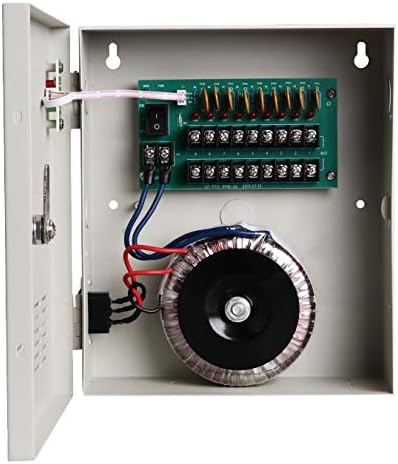
Figure 3: Internal view of the power box, showing the transformer and the 9-channel output terminal block.
4. Operating Instructions
4.1 Powering On
Once all connections are secure and verified, turn on the main AC power supply. The LED indicators on the front panel will illuminate, indicating power is supplied to the unit and to each active output channel.
4.2 LED Indicators
- Main Power LED: Indicates the unit is receiving input AC power.
- Channel Status LEDs: Each output channel has an individual LED. A lit LED indicates that the channel is active and providing power. If an LED is off, it suggests a fault (e.g., short circuit, overcurrent) on that specific channel, and its PTC fuse has tripped.
4.3 PTC Resettable Fuses
This power box utilizes PTC (Positive Temperature Coefficient) resettable fuses. In the event of a short circuit or overcurrent on an individual channel, the corresponding PTC fuse will trip, cutting power to that channel. Once the fault condition is removed, the PTC fuse will automatically reset and restore power to the channel after a brief cool-down period. There is no need for manual fuse replacement.
5. Maintenance
The EVERSECU 9-Channel AC 24V 5A CCTV Power Box requires minimal maintenance.
- Cleaning: Periodically clean the exterior of the unit with a soft, dry cloth. Do not use liquid cleaners or aerosols.
- Ventilation: Ensure ventilation openings remain clear of dust and debris to prevent overheating.
- Connection Checks: Occasionally inspect all power connections to ensure they are secure and free from corrosion.
6. Troubleshooting
Refer to the following table for common issues and their solutions.
| Problem | Possible Cause | Solution |
|---|---|---|
| No power to the unit (Main Power LED off) | No AC input power; Faulty power cord; Outlet issue. | Check AC power cord connection. Verify the wall outlet has power. Try a different power cord. |
| One or more output channels have no power (Channel LED off) | Short circuit or overcurrent on the specific channel; Device connected to the channel is faulty. | Disconnect the device from the affected channel. Wait a few minutes for the PTC fuse to reset. Reconnect the device. If the problem persists, test the device on another channel or with a different power source to confirm device functionality. Ensure total current draw does not exceed 2A per channel. |
| Connected devices are not functioning correctly or are damaged | Incorrect voltage requirement for the device; Output voltage fluctuation. | Verify that your devices are compatible with AC 24V power. Use a multimeter to measure the output voltage of the power box before connecting sensitive equipment. If the voltage is consistently outside the expected range, contact support. |
| Unit is overheating | Insufficient ventilation; Overload on multiple channels. | Ensure the unit has adequate airflow around it. Reduce the load by disconnecting some devices if the total current draw exceeds specifications. |
7. Specifications
Technical specifications for the EVERSECU 9-Channel AC 24V 5A CCTV Power Box (Model CP2409-5A).
| Feature | Specification |
|---|---|
| Model | CP2409-5A |
| Input Voltage | AC 100-240V, 50/60Hz |
| Output Voltage | AC 24V |
| Total Output Current | 5 Amps |
| Output Channels | 9 Channels |
| Max. Current per Channel | 2 Amps |
| Fuse Type | PTC Resettable Fuse |
| Fuse Rating | 1.1A per channel |
| Efficiency | >=70% |
| Operating Temperature | -20℃ to 60℃ (-4°F to 140°F) |
| Storage Temperature | -40℃ to 85℃ (-40°F to 185°F) |
| Product Net Weight | 3.79 kg (7.21 lbs) |
| Product Dimensions (L x W x H) | 206.4 x 242.3 x 84.8 mm (8.13 x 9.54 x 3.34 inches) |
| Certifications | CE, FCC |
8. Warranty and Support
8.1 Warranty Information
This EVERSECU product is covered by a 2-Year Warranty from the date of purchase. This warranty covers defects in materials and workmanship under normal use. It does not cover damage caused by misuse, accident, unauthorized modification, or improper installation.
8.2 Customer Support
For technical assistance, troubleshooting, or warranty claims, please contact EVERSECU customer support through the retailer where the product was purchased or visit the official EVERSECU website for contact information.