
1. Introduction
This manual provides instructions for the LAWOHO 315MHz Purple Learn Button Garage Door Remote Control Keychain. This remote is designed to provide convenient access to your garage door opener system. Please read these instructions carefully before use to ensure proper setup and operation.

Figure 1: Two LAWOHO 315MHz Purple Learn Button Garage Door Remote Control Keychains. These compact remotes feature a single button and a metallic keychain clip, designed for easy portability and secure attachment.
2. Compatibility
This remote control is only compatible with garage door openers featuring a Purple Learn Button and operating on a 315 MHz frequency. It is not compatible with garage door openers that have yellow, green, red, or orange learn buttons.
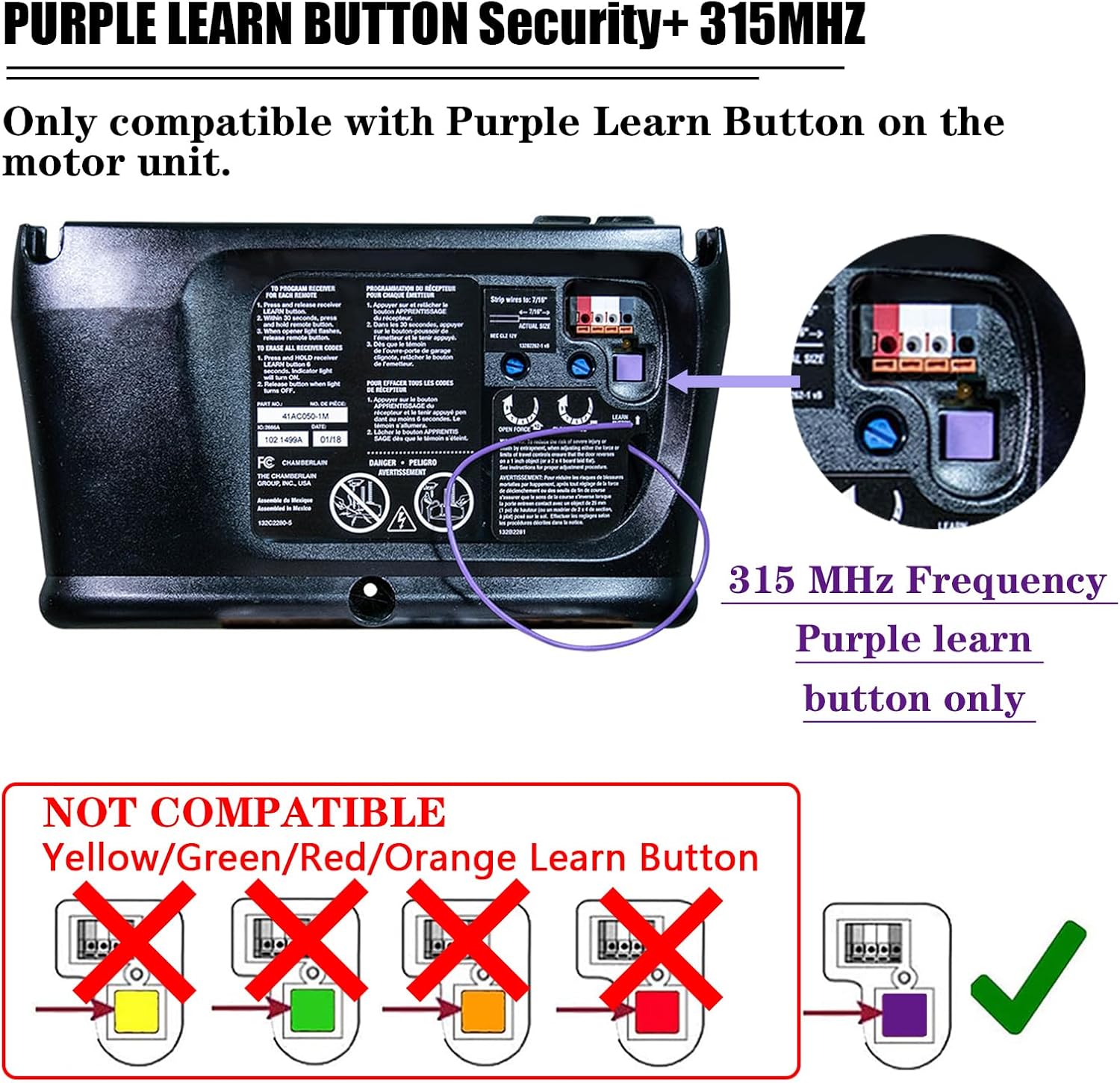
Figure 2: Visual guide indicating compatibility exclusively with 315 MHz Purple Learn Button systems. The image clearly shows that yellow, green, red, and orange learn buttons are not compatible.
2.1 Compatible Models
The remote is compatible with various LiftMaster, Chamberlain, and Sears Craftsman models that utilize the 315 MHz Purple Learn Button technology. Refer to the table below for a list of common compatible models.

Figure 3: A comprehensive table listing compatible garage door opener models from LiftMaster (2006-2014), Chamberlain (2005-Current), and Sears Craftsman (2005-Current), all featuring a Purple Learn Button and 315MHz Security+ technology.
Note: Always verify your garage door opener's learn button color and frequency (315 MHz) before attempting to program this remote control.
3. Features
- 315 MHz Security+ Rolling Code Technology: Ensures enhanced security and reliable operation.
- Compact and Portable Design: Small ellipse shape, ideal for attaching to keychains, fitting in pockets, purses, or backpacks.
- Durable Construction: Features a metal reinforced keychain frame and a stainless steel panel for increased durability compared to all-plastic remotes.
- Single Button Operation: Simple and intuitive control for your garage door.
- LED Indicator: A bright LED light indicates button presses and battery status.
- Pre-installed Battery: Comes with a CR2032 3V alkaline battery.

Figure 4: An annotated image detailing the remote control's features, including the bright LED indicator, sensitive button, latest RF technology, strong security encrypted design, metal reinforced keychain frame, stainless steel panel, and mini size.

Figure 5: The remote control's dimensions are shown (5.5cm / 2.16in length, 3.4cm / 1.34in width), illustrating its compact size and suitability for carrying on a motorcycle keyring, in a pocket, purse, or backpack.
4. Package Contents
Upon opening the package, you should find the following items:
- 2 x LAWOHO 315MHz Purple Learn Button Remote Controls
- 2 x Metal Keychains
- 2 x Product Instruction Leaflets

Figure 6: An illustration of the items included in the box: two remote controls, two metal keychains, and two product instruction leaflets.
5. Setup and Programming
To program your LAWOHO remote control to your garage door opener, follow these general steps. Specific details may vary slightly depending on your garage door opener model. Always refer to your garage door opener's manual for precise instructions if needed.
- Locate the Learn Button: On your garage door opener motor unit, locate the 'Learn' button. This button should be purple. It is typically found on the back or side panel of the motor unit, often under the light cover.
- Press the Learn Button: Press and immediately release the purple 'Learn' button on your garage door opener. The LED indicator on the opener will light up, signaling that it is in programming mode. You usually have about 30 seconds to complete the next step.
- Activate the Remote: Within 30 seconds of pressing the learn button on the opener, press and hold the button on your new LAWOHO remote control.
- Confirm Programming: The garage door opener's light will flash once (or click twice) to indicate that the remote has been successfully programmed. Release the button on the remote control.
- Test the Remote: Press the button on your new LAWOHO remote control to test its operation. The garage door should activate.
If the remote does not work, repeat the programming steps. Ensure your garage door opener has a purple learn button and operates at 315 MHz.
6. Operating Instructions
Once programmed, operating your LAWOHO remote control is straightforward:
- To Open or Close the Garage Door: Simply press the single button on the remote control. The garage door will begin to move.
- To Stop the Garage Door: Press the button again while the door is in motion to stop it.
- Range: The remote utilizes advanced RF technology for a reliable operating range. Ensure there are no significant obstructions between the remote and the garage door opener for optimal performance.

Figure 7: A hand holding the LAWOHO remote control, demonstrating its use to operate a garage door. The image emphasizes the simple, one-channel control.
7. Maintenance
7.1 Battery Replacement
The remote control uses a CR2032 3V alkaline battery. If the remote control's LED does not light up when the button is pressed, or if the operating range significantly decreases, it is time to replace the battery.
- Open the Remote Casing: Use a small screwdriver or a coin to gently pry open the remote control casing. There is usually a small notch or seam where the two halves meet.
- Remove Old Battery: Carefully remove the old CR2032 battery from its compartment.
- Insert New Battery: Insert a new CR2032 3V alkaline battery with the positive (+) side facing up.
- Close Casing: Snap the two halves of the remote control casing back together securely.
- Reprogram (if necessary): After replacing the battery, it may be necessary to reprogram the remote control to your garage door opener. Refer to Section 5: Setup and Programming.

Figure 8: Step-by-step visual guide for replacing the CR2032 3V battery. Image 1 shows using a tool to open the remote, and Image 2 shows the battery compartment with the CR2032 battery.
8. Troubleshooting
If you encounter issues with your LAWOHO remote control, try the following solutions:
- Remote LED does not light up:
- Check the battery. Replace the CR2032 3V battery if it is depleted. Refer to Section 7.1 for battery replacement instructions.
- After replacing the battery, reprogram the remote control as described in Section 5. - Remote does not activate garage door:
- Ensure your garage door opener has a purple learn button and operates at 315 MHz. This remote is not compatible with other learn button colors or frequencies.
- Reprogram the remote control following the steps in Section 5.
- Ensure you are within the operating range of the garage door opener and there are no significant interferences. - Reduced operating range:
- Replace the battery, as a low battery can affect the remote's range.
- Ensure there are no new sources of radio frequency interference near your garage door opener.
9. Specifications
- Brand: LAWOHO
- Frequency: 315 MHz
- Learn Button Compatibility: Purple Learn Button only
- Battery Type: CR2032 3V Alkaline (included)
- Number of Buttons: 1
- Special Feature: Portable, Keychain design
- Dimensions (approx.): 5.5 cm (2.16 in) x 3.4 cm (1.34 in)
10. Warranty and Support
For any questions, technical support, or warranty inquiries regarding your LAWOHO 315MHz Purple Learn Button Garage Door Remote Control Keychain, please contact the seller or refer to the product listing on the platform where it was purchased. Keep your purchase receipt for warranty purposes.