
1. Product Overview
This Easytry123 replacement remote control is designed to function with various JVC Color TV and Television models. It provides essential control functions for your television, allowing you to manage power, channels, volume, and other features. This remote is an infrared (IR) replacement and may not offer all advanced functions present on your original equipment manufacturer (OEM) remote.
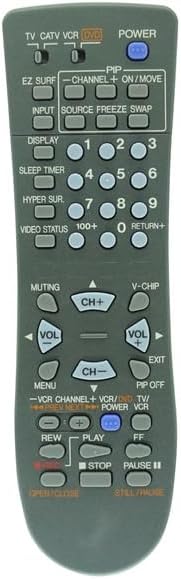
Image 1.1: Front view of the replacement remote control, showing all buttons and their labels.
2. Setup: Battery Installation
The remote control requires two (2) AA batteries for operation. Ensure correct polarity when inserting the batteries.
- Locate the battery compartment on the back of the remote control.
- Slide the battery compartment cover downwards or in the direction indicated by an arrow to open it.
- Insert two new AA batteries, matching the positive (+) and negative (-) terminals as indicated inside the compartment.
- Slide the battery compartment cover back into place until it clicks securely.
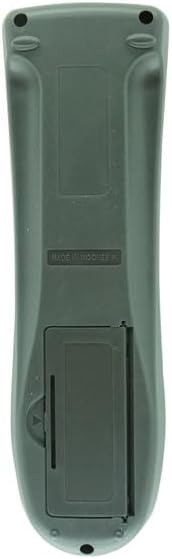
Image 2.1: Back view of the remote control, illustrating the battery compartment.
3. Operating Instructions
Point the remote control directly at the infrared receiver on your JVC television. Ensure there are no obstructions between the remote and the TV.
Basic Functions:
- POWER: Turns the television on or off.
- NUMBER BUTTONS (0-9): Directly select channels.
- CH+ / CH-: Changes channels sequentially up or down.
- VOL+ / VOL-: Adjusts the volume level up or down.
- MUTING: Mutes or unmutes the television audio.
- INPUT / SOURCE: Cycles through available input sources (e.g., TV, AV, HDMI).
- MENU: Accesses the television's main menu.
- ARROW BUTTONS (Up, Down, Left, Right): Navigate through menu options.
- ENTER / OK: Confirms a selection in the menu.
- EXIT: Exits the current menu or on-screen display.
- DISPLAY: Shows current channel information or time.
- SLEEP TIMER: Sets a timer for the TV to turn off automatically.
VCR/DVD Control (if applicable):
Some buttons may be labeled for VCR or DVD control. These functions are typically used when the remote is set to control a connected VCR or DVD player, often through a mode button (e.g., TV/VCR, TV/DVD). Refer to your television's original manual for specific device control setup.
- PLAY, STOP, PAUSE, REW, FF: Standard playback controls for connected VCR/DVD devices.
4. Maintenance
Proper maintenance ensures the longevity and reliable operation of your remote control.
- Battery Replacement: Replace batteries when the remote's response becomes sluggish or stops working. Always replace both batteries at the same time with new ones. Do not mix old and new batteries, or different types of batteries.
- Cleaning: Wipe the remote control with a soft, dry cloth. For stubborn dirt, lightly dampen the cloth with water or a mild, non-abrasive cleaner. Avoid using harsh chemicals or excessive moisture.
- Storage: Store the remote in a cool, dry place away from direct sunlight and extreme temperatures. If the remote will not be used for an extended period, remove the batteries to prevent leakage.
5. Troubleshooting
If you experience issues with your remote control, try the following steps:
- Remote not working:
- Check if the batteries are inserted correctly with the correct polarity.
- Replace the batteries with new ones.
- Ensure there are no obstructions between the remote control and the TV's infrared sensor.
- Confirm you are pointing the remote directly at the TV.
- Specific buttons not responding:
- Some advanced functions or device-specific buttons (e.g., VCR/DVD controls) may require the TV to be in a specific mode or may not be fully supported by this replacement remote.
- Clean the remote control, especially around the unresponsive buttons, to ensure no debris is interfering.
- Remote works intermittently:
- This often indicates low battery power. Replace the batteries.
- Ensure the remote's infrared emitter is clean and unobstructed.
If problems persist after following these steps, the remote may be incompatible with your specific TV model or may require further assistance. Please verify your TV model against the listed compatible models.
6. Specifications
- Product Type: Infrared (IR) Replacement Remote Control
- Power Source: 2 x AA Batteries (not included)
- Compatible Devices: JVC Color TV and Television models (AV-16N8, AV-20020, AV-20021, AV-2049S, AV-2050, AV-2051, AV-2051S, AV-2059S, AV-2060, AV-20808)
- Special Features: Ergonomic design, direct replacement functionality for listed models.
7. Warranty and Support
As a replacement product, this remote control is intended to replicate the basic functions of your original remote. For specific warranty information or support inquiries, please refer to the seller's policies or contact the seller directly. It is recommended to confirm compatibility with your specific TV model before purchase.