
1. Product Overview
This manual provides instructions for the Lasika W-H9012 Women's Digital Watch. This timepiece features a round dial, digital display, and a durable rubber strap. It is designed for everyday use and offers water resistance.
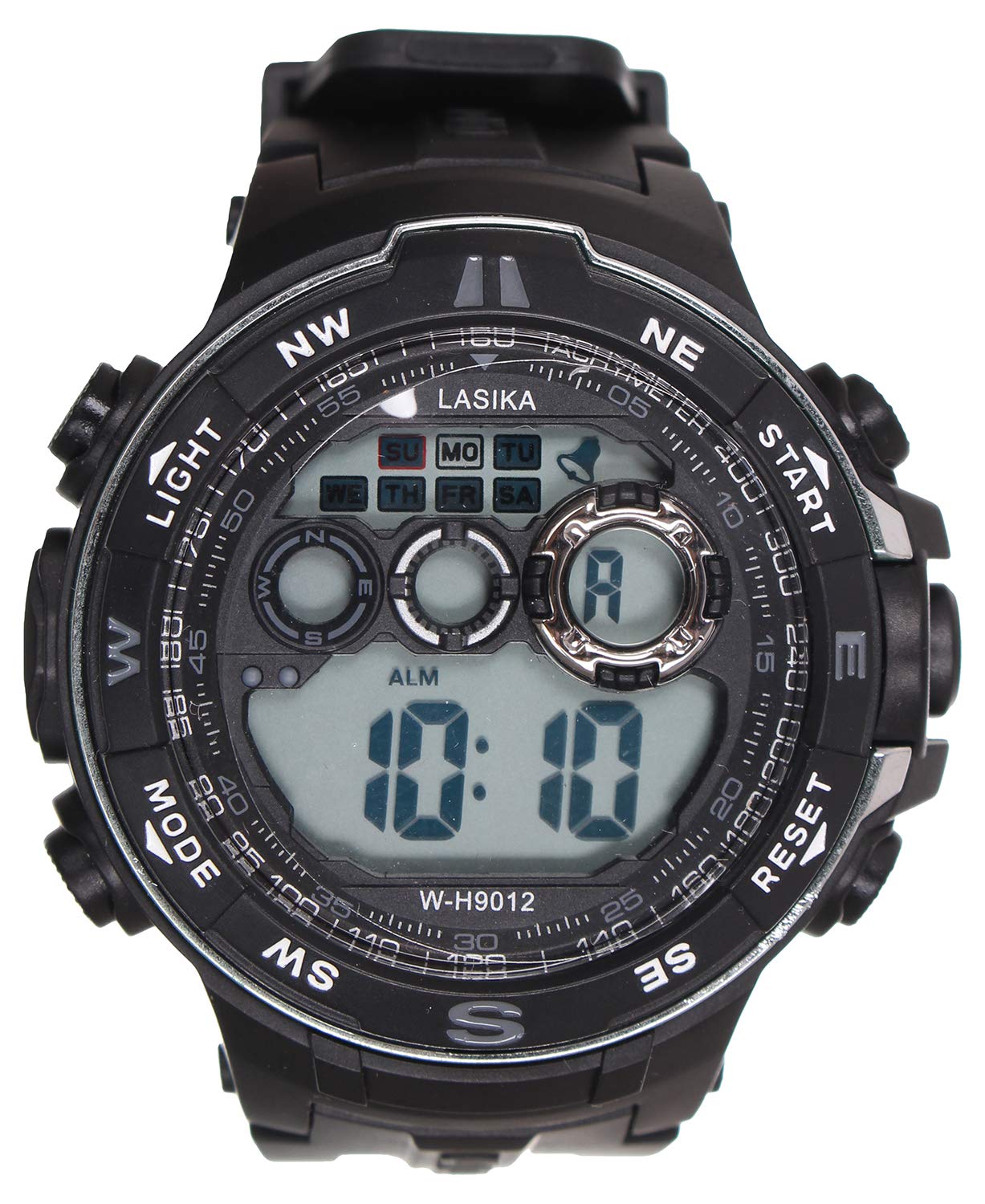
Image: Front view of the Lasika W-H9012 Women's Digital Watch, showcasing its round black dial and black rubber strap.
2. Safety Information
- Do not expose the watch to extreme temperatures (hot or cold) for prolonged periods.
- Avoid strong impacts or dropping the watch.
- While water-resistant, avoid pressing buttons underwater to prevent water ingress.
- Keep the watch away from strong magnetic fields.
- Do not attempt to open the watch case or replace the battery yourself, as this may void the warranty and damage the watch.
3. Package Contents
The package typically includes:
- Lasika W-H9012 Digital Watch
- User Manual (this document)
4. Product Features
- Display Type: Digital
- Movement: Quartz
- Case Shape: Round
- Case Diameter: 30 mm
- Strap Material: Rubber
- Clasp Type: Buckle
- Water Resistance: Water Resistant (suitable for daily splashes, not for swimming or diving)
- Power Source: Battery Powered
5. Setup
5.1 Initial Power On
The watch is typically shipped with a battery insulator. If the display is blank, remove any plastic tab from the crown or side buttons. The watch should power on automatically.
5.2 Setting the Time and Date
Digital watches usually have 2-4 buttons for setting. Common button functions are:
- MODE: Cycles through display modes (Time, Date, Alarm, Stopwatch).
- SET/ADJUST: Enters setting mode.
- START/RESET: Adjusts values or starts/resets functions.
To set the time:
- Press the MODE button until the time display is active.
- Press and hold the SET/ADJUST button until the digits begin to flash.
- Use the START/RESET button to adjust the flashing digit (e.g., hours, then minutes).
- Press MODE to move to the next setting (e.g., minutes, then date, month, year).
- Once all settings are correct, press SET/ADJUST again to exit setting mode.
Note: Button labels and functions may vary slightly. Refer to the specific markings on your watch.
6. Operating Instructions
6.1 Switching Display Modes
Press the MODE button repeatedly to cycle through the available display modes, which typically include:
- Current Time (Hour, Minute, Second)
- Date (Month, Day, Day of Week)
- Alarm Setting
- Stopwatch Function
6.2 Using the Stopwatch
- Press MODE until the stopwatch display appears (usually showing 00:00:00).
- Press START/RESET to begin timing.
- Press START/RESET again to pause/resume timing.
- To reset the stopwatch, ensure it is paused, then press and hold START/RESET.
6.3 Setting and Using the Alarm
- Press MODE until the alarm setting display appears.
- Press and hold SET/ADJUST until the alarm time digits flash.
- Use START/RESET to adjust the hour and MODE to switch to minutes.
- Press SET/ADJUST to confirm the alarm time.
- To turn the alarm ON/OFF, press START/RESET while in the alarm display mode. An alarm icon will typically appear when activated.
7. Maintenance
7.1 Cleaning
Wipe the watch case and strap with a soft, damp cloth. For stubborn dirt, a mild soap solution can be used, followed by rinsing with clean water and drying thoroughly. Avoid harsh chemicals or abrasive materials.
7.2 Battery Replacement
When the display becomes dim or the watch stops functioning, the battery may need replacement. It is recommended to have the battery replaced by a qualified watch technician to ensure proper sealing and water resistance.
7.3 Storage
Store the watch in a cool, dry place away from direct sunlight and extreme temperatures when not in use.
8. Troubleshooting
| Problem | Possible Cause | Solution |
|---|---|---|
| Display is blank | Battery depleted or insulator tab still present. | Remove insulator tab. Replace battery if necessary (professional service recommended). |
| Time is inaccurate | Time not set correctly or low battery. | Reset the time. Replace battery if issue persists. |
| Buttons unresponsive | Watch may be in a locked mode or internal issue. | Try a soft reset (if applicable, consult a professional). Avoid forcing buttons. |
| Water inside watch | Water resistance compromised. | Immediately take to a professional watch repair service. Do not attempt to dry it yourself. |
9. Specifications
| Feature | Detail |
|---|---|
| Brand Name | Lasika |
| Model Name | W-H9012 |
| Item Model Number | W-H9012 |
| Department | Women |
| Age Range Description | Adult |
| Item Shape | Round |
| Display Type | Digital |
| Face Style | Digital |
| Movement | Quartz |
| Power Source | Battery Powered |
| Case Material Type | Stainless Steel |
| Case Diameter | 30 millimeters |
| Dial Window Material Type | Crystal |
| Band Material Type | Rubber |
| Strap Type | Two-piece strap |
| Strap Color | Black |
| Dial Color | Grey |
| Clasp Type | Buckle |
| Water Resistance Level | Water Resistant |
| Decoration Feature | Crystal |
| Style | Strap |
| Sport Type | Walking |
| Shipping Dimensions | 11 x 11 x 6 cm; 66 grams |
| First Available Date | March 30, 2021 |
10. Warranty and Support
For warranty information or technical support, please refer to the documentation provided with your purchase or contact the retailer. Keep your proof of purchase for any warranty claims.