
Introduction
This manual provides detailed instructions for the proper use and care of your Lasika W-F96 Digital Sports Kids Watch. Please read this manual thoroughly before using the watch to ensure optimal performance and longevity.
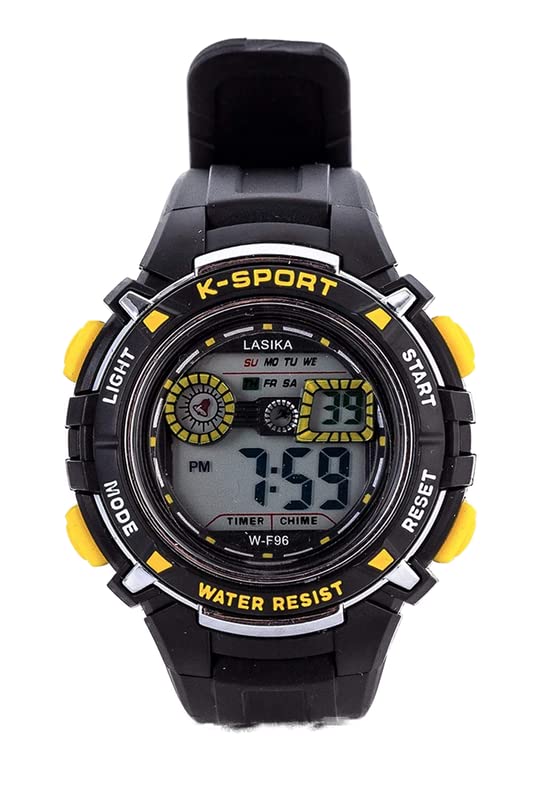
Image: Lasika W-F96 Digital Sports Kids Watch. This image displays the watch's digital face, round case, and rubber strap, highlighting its sporty design.
Setup
Initial Power On
Your Lasika W-F96 watch is designed for immediate use. Upon receiving, the digital display should be active. If the display is blank, it may indicate a low battery or a power-saving mode.
Setting Time and Date
- Enter Setting Mode: Locate the "MODE" button (usually on the bottom left). Press and hold it for approximately 3 seconds until the seconds digit starts flashing.
- Adjust Seconds: Press the "RESET" button (usually top right) to reset the seconds to zero.
- Set Hour: Press the "MODE" button once to move to the hour setting. Use the "START" button (usually top left) to adjust the hour. Pay attention to AM/PM if applicable.
- Set Minute: Press the "MODE" button again to move to the minute setting. Use the "START" button to adjust the minutes.
- Set Month: Continue pressing "MODE" to cycle through month, date, and day of the week settings. Use the "START" button to adjust each value.
- Exit Setting Mode: Once all settings are adjusted, press the "MODE" button one last time to return to the normal time display.
Operating Instructions
Display Modes
Press the "MODE" button briefly to cycle through different display modes:
- Time Display: Shows hour, minute, second, day of the week.
- Date Display: Shows month, date.
- Alarm Mode: Allows setting and viewing the alarm.
- Stopwatch Mode: For timing events.
Using the Backlight
To illuminate the display in low-light conditions, press the "LIGHT" button (usually on the top left). The cool backlight will activate for a few seconds.
Using the Stopwatch
- Enter Stopwatch Mode: Press the "MODE" button repeatedly until "ST" or "STOPWATCH" appears on the display.
- Start/Stop: Press the "START" button to begin timing. Press it again to pause.
- Reset: While the stopwatch is paused, press the "RESET" button to clear the time to zero.
- Exit Stopwatch Mode: Press the "MODE" button to return to the normal time display.
Setting and Using the Alarm
- Enter Alarm Mode: Press the "MODE" button repeatedly until "AL" or "ALARM" appears on the display.
- Set Alarm Time: Press and hold the "RESET" button until the hour digit flashes. Use the "START" button to adjust the hour. Press "RESET" again to move to minutes, and use "START" to adjust.
- Activate/Deactivate Alarm: In Alarm Mode, press the "START" button to toggle the alarm ON/OFF. An alarm icon (e.g., a bell) will appear when activated.
- Exit Alarm Mode: Press the "MODE" button to return to the normal time display.
- Snooze Function: When the alarm sounds, press any button (except "RESET") to activate snooze (if available). The alarm will sound again after a few minutes. Press "RESET" to turn off the alarm completely.
Maintenance
Cleaning
Wipe the watch regularly with a soft, dry cloth. For stubborn dirt, use a slightly damp cloth and then dry thoroughly. Avoid using chemical cleaners, as they may damage the watch's finish or components.
Battery Replacement
The watch is powered by a standard watch battery. When the display dims or functions become erratic, it's time to replace the battery. This procedure typically requires specialized tools and should be performed by a qualified watch technician to ensure water resistance (if applicable) and proper sealing.
Storage
Store the watch in a cool, dry place away from direct sunlight and extreme temperatures.
Troubleshooting
| Problem | Possible Cause | Solution |
|---|---|---|
| Display is blank or dim. | Low battery. | Replace the battery. |
| Time is incorrect. | Time not set correctly or accidental button press. | Refer to "Setting Time and Date" section to reset the time. |
| Alarm does not sound. | Alarm is not activated or set incorrectly. | Ensure the alarm is set and activated (alarm icon visible). Check alarm time. |
| Buttons are unresponsive. | Temporary software glitch or low battery. | Try removing and reinserting the battery (if comfortable doing so, otherwise seek professional help). Replace battery if old. |
Specifications
- Model Number: W-F96
- Brand: Lasika
- Display Type: Digital
- Movement: Digital Quartz
- Case Shape: Round
- Case Diameter: 27 mm
- Case Material: Plastic
- Band Material: Rubber
- Clasp Type: Tang Buckle
- Watch Glass Material: Plastic
- Special Features: Alarm, Stopwatch, Backlight (Cool Light), Time, Date, Day of Week
- Power Source: Battery
- Age Group: Child
Warranty and Support
Warranty Information
This product comes with a standard manufacturer's warranty against defects in materials and workmanship. Please refer to the packaging or contact your retailer for specific warranty terms and duration. Keep your proof of purchase for warranty claims.
Customer Support
For technical assistance, troubleshooting, or service inquiries, please contact the retailer where you purchased the watch. You may also visit the official Lasika website for further support resources.