
1. Introduction
This manual provides essential information for the safe and efficient operation of your ION Total PA Prime Bluetooth Speaker System. Please read these instructions thoroughly before using the product and retain them for future reference.
The ION Total PA Prime is a high-power, bi-amplified PA sound system designed for clear, vibrant audio reproduction. It features Bluetooth connectivity, Acoustic Optimization, an integrated FM radio, and multi-colored lighting effects.

Image 1.1: ION Total PA Prime Speaker System
This image displays the ION Total PA Prime speaker system, a black rectangular unit with a large circular speaker grille on the front, illuminated with colorful LED lights. The speaker is mounted on a black tripod stand, indicating its use for elevated sound projection. The ION logo is visible at the bottom of the speaker grille.
2. Important Safety Information
To reduce the risk of electric shock, fire, or injury, always follow basic safety precautions when using this product. These include, but are not limited to:
- Read all instructions before operating the product.
- Do not use this apparatus near water.
- Clean only with a dry cloth.
- Do not block any ventilation openings. Install in accordance with the manufacturer's instructions.
- Do not install near any heat sources such as radiators, heat registers, stoves, or other apparatus (including amplifiers) that produce heat.
- Do not defeat the safety purpose of the polarized or grounding-type plug. A polarized plug has two blades with one wider than the other. A grounding-type plug has two blades and a third grounding prong. The wide blade or the third prong are provided for your safety. If the provided plug does not fit into your outlet, consult an electrician for replacement of the obsolete outlet.
- Protect the power cord from being walked on or pinched, particularly at plugs, convenience receptacles, and the point where they exit from the apparatus.
- Only use attachments/accessories specified by the manufacturer.
- Unplug this apparatus during lightning storms or when unused for long periods of time.
- Refer all servicing to qualified service personnel. Servicing is required when the apparatus has been damaged in any way, such as power-supply cord or plug is damaged, liquid has been spilled or objects have fallen into the apparatus, the apparatus has been exposed to rain or moisture, does not operate normally, or has been dropped.
3. What's in the Box
Verify that all listed components are present in the packaging:
- Total PA Prime Speaker System
- Microphone with Cable
- Speaker Stand
- Power Cable
- Quickstart Guide (not included in this manual)

Image 3.1: Speaker System Components
This image shows the ION Total PA Prime speaker system alongside its included accessories: a microphone with a cable and a disassembled tripod speaker stand. The speaker's front grille is illuminated with multi-colored lights, and the overall setup suggests a complete portable audio solution.
4. Setup
4.1 Unpacking and Placement
- Carefully remove all contents from the box.
- Place the speaker on a stable, flat surface or assemble and use the included speaker stand. Ensure the stand is fully extended and locked for stability.
- Position the speaker in a location that allows for optimal sound dispersion and access to power.
4.2 Power Connection
- Connect the included power cable to the power input on the rear panel of the Total PA Prime.
- Plug the other end of the power cable into a grounded electrical outlet.
4.3 Microphone Connection
- Connect the microphone cable to one of the microphone input jacks on the rear panel of the speaker.
- Adjust the microphone volume knob on the control panel to an appropriate level.
5. Operating Instructions
5.1 Power On/Off
Press the Power button located on the control panel to turn the speaker system on or off. The display will illuminate when the unit is powered on.
5.2 Bluetooth Pairing
The Total PA Prime is Bluetooth 5.0 compatible, allowing wireless audio streaming up to 100 feet.
- Ensure your Total PA Prime is powered on.
- Activate Bluetooth on your mobile device (smartphone, tablet, etc.).
- On your device, select "Total PA Prime" from the list of available Bluetooth devices.
- The speaker will indicate a successful connection, and you can now stream audio wirelessly.
5.3 Acoustic Optimization
This feature allows you to adjust the speaker's sound profile based on your environment and event type.
- Locate the Acoustic Optimization controls on the rear panel.
- Select your desired Venue (e.g., Outdoor, Hall, Large Room) and Event Type (e.g., Dancing, Listening, Karaoke, Live, Speech).
- The speaker will automatically adjust its equalization for the selected settings.
5.4 ION Sound XP App
The ION Sound XP App provides remote control over audio and lighting functions from your iOS or Android device.
- Download the ION Sound XP App from your device's app store.
- Ensure your Total PA Prime is powered on and connected via Bluetooth to your mobile device.
- Open the app and follow the on-screen instructions to connect to your speaker.
- Use the app to control volume, EQ, lighting modes, and other settings.
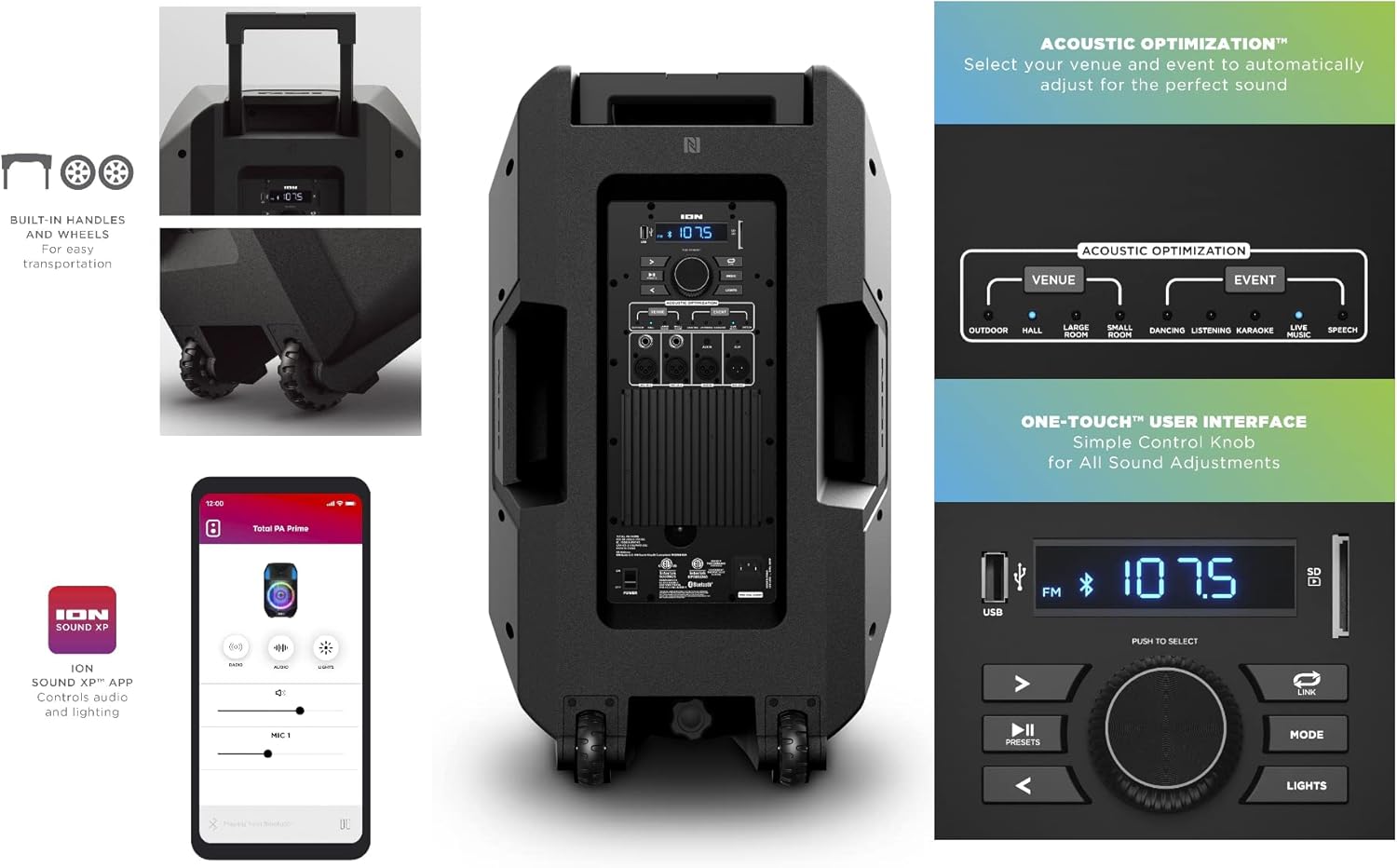
Image 5.1: Control Panel and App Interface
This image provides a detailed view of the ION Total PA Prime's rear control panel, highlighting the Acoustic Optimization settings, various input jacks, and the main display. Additionally, a screenshot of the ION Sound XP mobile application is shown, demonstrating its interface for controlling the speaker's functions remotely.
5.5 Stereo-Link 2.0
Wirelessly connect an additional compatible ION speaker for stereo sound.
- Ensure both ION speakers are powered on and within range.
- Follow the specific Stereo-Link 2.0 instructions provided with your secondary ION speaker to establish a wireless connection.
5.6 Microphone Usage
The included microphone can be used for announcements, karaoke, or vocal performances.
- Connect the microphone as described in Section 4.3.
- Adjust the microphone volume and apply echo effects using the dedicated controls on the panel or via the app.
5.7 FM Radio
Access local radio stations using the built-in FM tuner.
- Press the Mode button on the control panel until FM Radio is selected.
- Use the tuning buttons to scan for stations.
- Save your favorite stations using the preset functions.
5.8 Lighting Effects
The woofer glows in multiple colors and can synchronize with the beat of the music.
- Press the Lights button on the control panel to cycle through different lighting modes or turn the lights off.
- Further customization may be available through the ION Sound XP App.
5.9 USB Charging Port
A 1A USB charge port is available to keep your mobile devices powered.
- Connect your device's USB charging cable to the USB port on the Total PA Prime.
- Ensure the speaker is powered on for charging functionality.
6. Maintenance
6.1 Cleaning
- Always disconnect the power cable before cleaning.
- Use a soft, dry cloth to clean the exterior surfaces of the speaker.
- Do not use abrasive cleaners, waxes, or solvents as they may damage the finish.
6.2 Storage
- Store the speaker in a cool, dry place away from direct sunlight and extreme temperatures.
- If storing for an extended period, ensure the unit is clean and properly packed to prevent dust accumulation and physical damage.
7. Troubleshooting
If you encounter issues with your Total PA Prime, refer to the following common problems and solutions:
- No Power:
Ensure the power cable is securely connected to both the speaker and a working electrical outlet. Verify the outlet is receiving power. - No Sound:
Check the master volume control on the speaker and the volume on your audio source device. Ensure the correct input source is selected. Verify all cables are properly connected. - Bluetooth Not Connecting:
Make sure Bluetooth is enabled on your device and the speaker is in pairing mode. Try forgetting the device from your phone's Bluetooth settings and re-pairing. Ensure no other devices are currently connected to the speaker via Bluetooth. - Distorted Sound:
Reduce the volume on both the speaker and your audio source. Check for loose connections. Ensure the audio source is not overdriven. - Microphone Not Working:
Ensure the microphone is properly plugged into the input jack. Check the microphone volume knob. Test with another microphone if available.
For further assistance, consult the support section or contact customer service.
8. Specifications
| Feature | Detail |
|---|---|
| Brand | ION |
| Model Name | Total PA Prime |
| Item Model Number | TOTALPAPRIMEXEU |
| UPC | 842655102919 |
| Speaker Type | Woofer |
| Audio Driver Type | Dynamic Driver |
| Woofer Diameter | 15 Inches (381mm) |
| Tweeter Size | 1 Inch (25.4mm) |
| Speaker Maximum Output Power | 500 Watts (Bi-amplified) |
| Connectivity Technology | Bluetooth, USB |
| Wireless Communication Technology | Bluetooth 5.0 |
| Bluetooth Range | 100 Feet (30.48 Meters) |
| Special Feature | FM Radio, Acoustic Optimization, Multi-colored Lights, USB Charge Port |
| Control Method | App, On-device controls |
| Audio Output Mode | Stereo |
| Power Source | Corded Electric |
| Product Dimensions | 21.41"D x 18.3"W x 30.11"H |
| Item Weight | 59.9 pounds |
| Material | Paper, Polypropylene, Metal |
| Color | Black |
| Is Waterproof | FALSE |
9. Warranty Information
The ION Total PA Prime Bluetooth Speaker System comes with a Limited Warranty. For detailed information regarding warranty coverage, terms, and conditions, please refer to the warranty card included with your product or visit the official ION Audio website.
10. Support
For technical support, product registration, or to access additional resources, please visit the official ION Audio website at www.ionaudio.com. You may also contact their customer service department for direct assistance.


