
1. Introduction
This manual provides comprehensive instructions for the installation, operation, and maintenance of your TIGERKING Safe Box. Designed for securing valuables, important documents, and personal items, this safe combines robust construction with advanced security features to offer peace of mind. Please read this manual thoroughly before using your safe to ensure proper function and maximum security.

Figure 1: TIGERKING Safe Box (White, 3.7 Cubic Feet)
2. Safety Information
- Always keep the master keys and emergency keys in a secure location, separate from the safe itself, and away from unauthorized access.
- Do not store the emergency keys or master keys inside the safe.
- Ensure the safe is installed on a stable, level surface or securely mounted to a wall/floor to prevent tipping.
- Avoid exposing the safe to extreme temperatures or high humidity.
- Regularly check the battery level and replace batteries as needed to ensure continuous operation of the electronic keypad.
- Keep the keypad clean and free from debris to prevent malfunction.
3. Package Contents
Upon unpacking, please verify that all the following items are included:
- 1 x TIGERKING Safe Box
- 1 x User Manual
- 1 x Emergency Battery Box
- 2 x Blue Master Keys
- 2 x Emergency Keys
- 2 x Expansion Bolts (for mounting)

Figure 2: Included Components
4. Product Features
- Sturdy & Secure Construction: Made of solid steel with a 10MM thick door plate and five 25MM solid live-locking bolts. Features pry-resistant concealed hinges for enhanced security.
- Spacious Interior: Exterior Dimensions: 17.3" (L) x 15" (W) x 25" (H). Inner Dimensions: 17" (L) x 11.8" (W) x 20.8" (H). Includes a removable shelf for flexible storage of various items like pistols, jewelry, documents, and laptops.
- Dual Safety Key Lock System: Offers two unlocking methods: 1) Dual key unlocking (both master and emergency keys required), or 2) Master key + password unlocking. The master key is always required, providing an extra layer of security.
- Removable Shelf and Interior Lock Box: The interior is lined with leather to protect valuables. The removable shelf can be adjusted. An internal lock box provides a secure compartment for highly sensitive items like cash, jewelry, or passports, even if the main safe is shared.
- Smart Warning System: Records up to 35 opening events. Allows programming of a 1-8 digit code. The secure display feature (dial '*' before entering code) hides the entered code. Violent vibration or three incorrect entries will activate a 60-second alarm.
- Easy Installation: Two pre-drilled holes in the back with included expansion bolts allow for easy wall or floor mounting.

Figure 3: Smart Control Panel Overview

Figure 4: Safe Box Dimensions

Figure 5: Removable Shelf for Convenient Accommodation
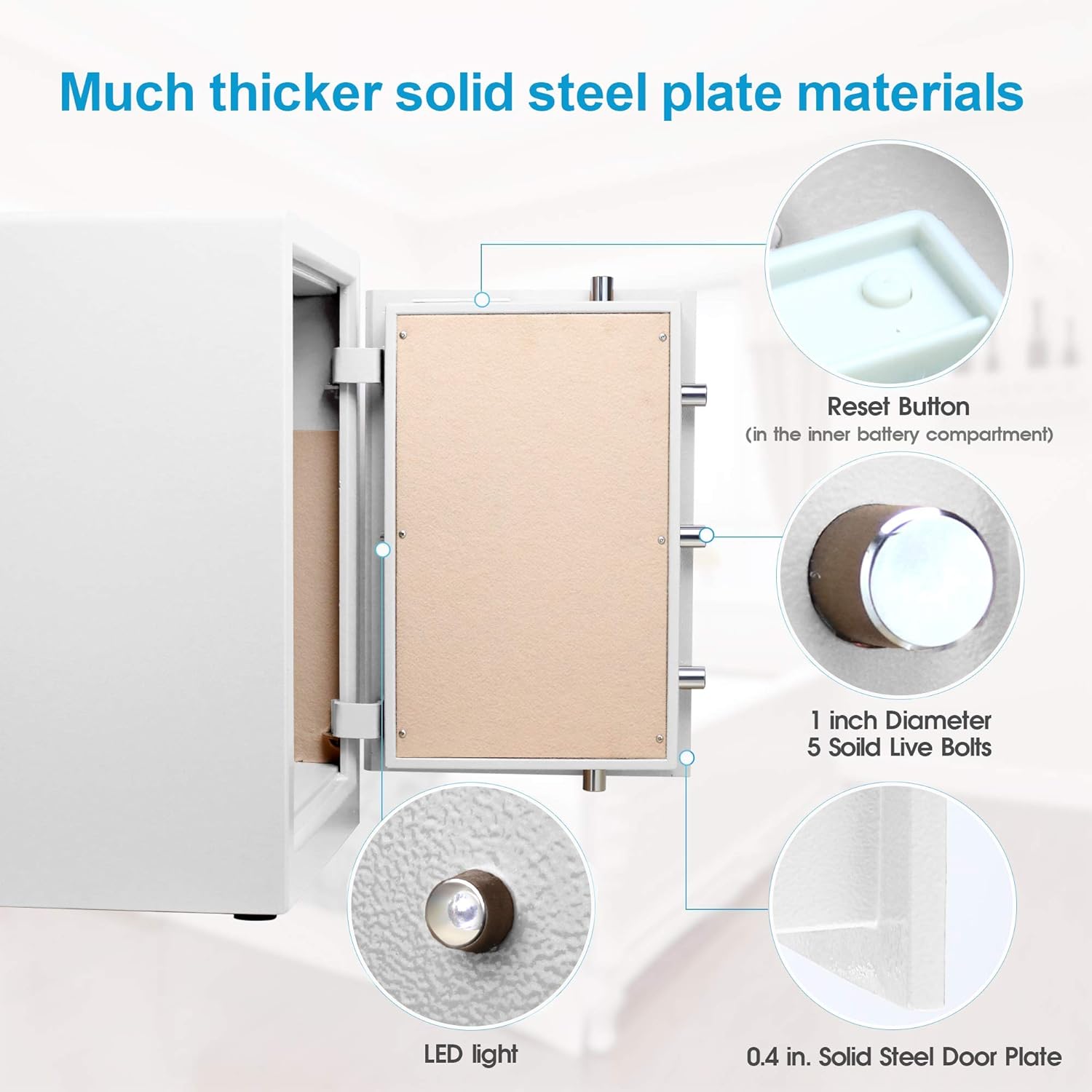
Figure 6: Thicker Solid Steel Plate Materials and Security Features
5. Setup
5.1 Initial Opening (Master Key + Emergency Key)
To open the safe for the first time or if you forget your code, use the master key and emergency key combination:
- Insert the emergency key into the emergency keyhole (located on the right side of the keypad).
- Turn the emergency key counter-clockwise.
- Insert the master key into the master keyhole (located on the left side of the keypad).
- Turn the master key clockwise.
- Turn the handle clockwise to open the safe door.
Video 1: How to use the master and emergency key to open the safe.
5.2 Setting the Master Code
To set your personal master code (1-8 digits):
- With the safe door open, press the "RESET" button located inside the battery compartment on the back of the door.
- The display will show "SET".
- Enter your desired new master code (1-8 digits) on the keypad.
- Press the "#" key to confirm. The display will show "INTO" indicating successful programming.
Video 2: How to set up the master code.
5.3 Mounting the Safe
The safe can be securely fixed to a wall or floor using the provided expansion bolts:
- Identify the two pre-drilled holes on the back of the safe.
- Position the safe in the desired location and mark the drilling points on the wall or floor through the holes.
- Drill holes at the marked points.
- Insert the expansion bolts into the drilled holes.
- Align the safe with the bolts and tighten them securely to fix the safe in place.

Figure 7: Easy Installation Steps
6. Operating Instructions
6.1 Opening the Safe (Master Key + Code)
To open the safe using your programmed code:
- Insert the master key into the master keyhole and turn it clockwise.
- Enter your 1-8 digit master code on the digital keypad.
- Press the "#" key to confirm. The display will show "OPEN".
- Turn the handle clockwise to open the safe door.
Video 3: How to use the master key and code to open the safe.
6.2 Setting the User Code
To set a user code (different from the master code):
- With the safe door open, press the "RESET" button located inside the battery compartment on the back of the door.
- The display will show "SET".
- Enter your desired new user code (1-8 digits) on the keypad.
- Press the "#" key to confirm. The display will show "INTO" indicating successful programming.
Video 4: How to set up the user code.
6.3 Secure Display Feature
To hide the digits as you enter your code for added privacy, dial "*" before entering your code.
6.4 Alarm System
The safe is equipped with a smart warning system:
- Vibration Alarm: If the safe experiences violent vibration, the alarm system will activate and sound for 60 seconds.
- Incorrect Entry Alarm: If three incorrect codes are entered consecutively, the alarm system will activate and sound for 60 seconds.

Figure 8: Dual Alarm System
7. Maintenance
- Battery Replacement: The keypad is powered by batteries. When the battery level is low, the LED screen will display "LO-BA". Replace the batteries promptly to ensure continued functionality. Use the emergency battery box if the internal batteries are completely depleted and you cannot open the safe.
- Cleaning: Wipe the exterior of the safe with a soft, damp cloth. Avoid using abrasive cleaners or solvents that could damage the finish.
- Interior Care: The interior is lined with leather to prevent wear on valuables. Periodically inspect the lining for any damage.
8. Troubleshooting
| Problem | Possible Cause | Solution |
|---|---|---|
| Safe does not open with code. | Incorrect code entered, low batteries, or keypad malfunction. | Verify the code. Replace batteries. Use the master key and emergency key to open. If issues persist, contact customer service. |
| Alarm sounds unexpectedly. | Violent vibration detected or three incorrect code entries. | Ensure the safe is stable. Avoid accidental impacts. Enter the correct code to disarm the alarm. |
| "LO-BA" displayed on screen. | Low battery power. | Replace all batteries with new ones immediately. |
| Keys do not turn. | Key not fully inserted or mechanism jammed. | Ensure keys are fully inserted and aligned. Do not force. Contact customer service if jammed. |
9. Specifications
| Feature | Detail |
|---|---|
| Brand | TIGERKING |
| Product Dimensions | 15"D x 17.3"W x 25"H |
| Lock Type | Electronic, Key |
| Color | White |
| Capacity | 3.7 Cubic Feet |
| Material | Steel |
| Special Features | Alarm System, Removable Shelf |
| Mounting Type | Floor Mount, Wall Mount |
| Control Type | Push Button Control |
| Item Weight | 70 Pounds |
| Alarm | Vibration |
| Water Resistance Level | Not Water Resistant |
| Item Model Number | 63XH-1W |
10. Warranty and Support
TIGERKING provides a one-year warranty for this safe box. We also offer a free return and exchange policy, along with 24-hour online customer service to assist you with any inquiries or issues.
For support, please refer to the contact information provided in your purchase documentation or visit the official TIGERKING website.

Figure 9: Warranty and Customer Support


