
1. Introduction
Welcome to the user manual for your new Kugoo M2 Pro Electric Scooter. This manual provides essential information for the safe operation, maintenance, and troubleshooting of your scooter. Please read it thoroughly before your first ride to ensure optimal performance and safety.

Image: The Kugoo M2 Pro Electric Scooter, showcasing its sleek design and pneumatic tires.
2. Safety Information
Your safety is paramount. Always adhere to the following guidelines:
- Local Regulations: Always observe and obey local traffic rules and laws regarding electric scooter use.
- Protective Gear: Always wear a helmet and appropriate protective tools (e.g., knee pads, elbow pads) while operating the electric scooter.
- Weather Conditions: Do not ride on rainy days. Avoid soaking the electric scooter in water to prevent damage to electronic components.
- Battery Care: Charge the electric scooter regularly, especially in winter. It is recommended to charge it at least once a week to prevent battery damage and extend its lifespan.
- Weight Limit: Do not exceed the maximum load capacity of 265 lbs (120 kg).
3. Package Contents
Upon unpacking, please verify that all items listed below are present:
- 1 x Kugoo M2 Pro Electric Scooter
- 1 x User Manual (this document)
- 2 x Screws
- 1 x Screwdriver
- 1 x Extended Inflatable Nozzle
- 1 x Power Adapter (Charger)
4. Product Overview and Features
The Kugoo M2 Pro is designed for efficient and comfortable urban commuting. Key features include:
- 8.5 Inch Pneumatic Tires: Provides excellent shock absorption for a comfortable and safe ride.
- 350W Motor: Offers strong driving force, enabling a top speed of 19.5 mph and a range of up to 19 miles per charge.
- High Capacity 7.5Ah Battery: A 36V 7.5Ah 18650 lithium battery ensures longer range and sustained performance.
- Dual Brake System: Equipped with a front electric brake and a rear mechanical disc brake, providing a short braking distance of 4 meters for enhanced safety.
- LCD Display: A clear and bright display for easy monitoring of speed, battery level, and other vital information, even on sunny days.
- Strong Structure: Built to support a maximum load of 265 lbs (120 kg).

Image: Detailed view of the 350W motor, highlighting its internal components for superior performance.
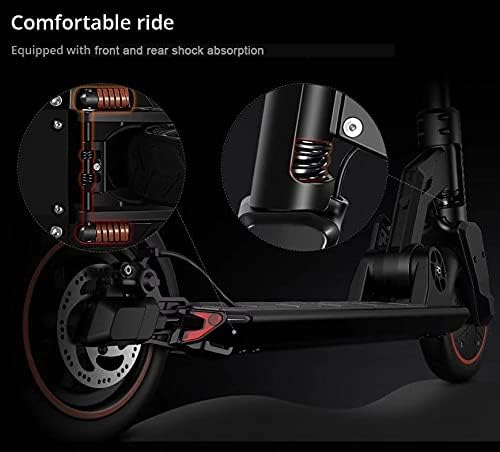
Image: Close-up of the scooter's suspension system, illustrating the front and rear shock absorption for a comfortable ride.

Image: Diagram showing the triple braking system, including disc brake, electronic brake, and foot brake, along with the blinking taillight for braking.

Image: Visual representation of the scooter's robust structure, indicating a maximum load capacity of 120 kg (265 lbs).
5. Setup and Assembly
The Kugoo M2 Pro Electric Scooter comes largely pre-assembled. Follow these steps for final setup:
- Unfold the Scooter: Carefully lift the handlebar stem until it locks into the upright position. Ensure the folding mechanism is securely latched.
- Attach Handlebars (if detached): If the handlebars are separate, align them with the stem and secure them using the provided screws and screwdriver.
- Check Tire Pressure: Use the extended inflatable nozzle to check and adjust the tire pressure to the recommended level (refer to specifications or tire sidewall).
- Initial Charge: Before first use, fully charge the scooter's battery using the provided power adapter. The charging port is typically located near the footboard.

Image: Technical drawing illustrating the dimensions of the Kugoo M2 Pro Electric Scooter in both folded and unfolded states.
6. Operating Instructions
Familiarize yourself with the controls and operation of your scooter:
- Power On/Off: Press and hold the power button on the LCD display to turn the scooter on or off.
- Acceleration: Use the thumb accelerator on the handlebar to control your speed.
- Braking: Apply the brake lever on the handlebar for electric braking. For stronger braking, also use the rear mechanical disc brake.
- Speed Modes: Your scooter may have multiple speed modes. Refer to the LCD display and its controls to switch between modes.
- Riding Posture: Maintain a balanced stance with both feet on the footboard. Lean slightly into turns.

Image: A person riding the Kugoo M2 Pro Electric Scooter on a bridge, demonstrating typical usage.
7. Maintenance
Regular maintenance ensures the longevity and safe operation of your scooter:
- Battery Charging: Charge the battery regularly, especially if the scooter will be stored for extended periods. Avoid completely draining the battery.
- Tire Care: Periodically check tire pressure and inflate as needed. Inspect tires for wear and tear or punctures.
- Brake Inspection: Regularly check the functionality of both the electric and mechanical brakes. Ensure brake levers are responsive and brake pads are not excessively worn.
- Cleaning: Wipe down the scooter with a damp cloth. Do not use high-pressure water jets or immerse the scooter in water.
- Fasteners: Periodically check all screws and bolts to ensure they are tight and secure.
8. Troubleshooting
This section addresses common issues you might encounter:
- Scooter Not Turning On: Ensure the battery is charged. Check if the power button is pressed correctly.
- Reduced Range/Speed: This could indicate a low battery charge, improper tire pressure, or riding against strong headwinds. Heavy loads can also reduce performance.
- Brakes Not Responsive: Inspect brake cables for tension and brake pads for wear. Adjust or replace as necessary.
- Unusual Noises: Check for loose components, debris in wheels, or issues with the motor. Discontinue use if a persistent unusual noise is heard.
For issues not covered here, please contact customer support.
9. Specifications
| Feature | Detail |
|---|---|
| Model | M2 PRO |
| Motor Power | 350W |
| Battery | 36V 7.5AH Lithium Ion |
| Max. Load | 265 lbs (120 kg) |
| Max. Range | Up to 19 Miles (approx. 30.5 km) |
| Max. Speed | 15.5 mph (approx. 25 km/h) |
| Charging Time | 3-4 hours |
| Tire Size | 8.5 inch Pneumatic Tires |
| Material | Aluminum alloy frame |
| Product Dimensions (unfolded) | 111.5 x 111.5 x 51.5 cm |
| Item Weight | 15.6 kg |
| Brake Type | Front Electric Brake, Rear Mechanical Disc Brake |
| Age Range | Adult |
10. Warranty and Support
Kugoo is committed to providing quality products and excellent customer service.
- Product Warranty: The Kugoo M2 Pro Electric Scooter comes with a One-Year Warranty covering the Controller, Lithium Battery, and Body.
- Accessory Warranty: Accessories such as the charger, brake lever, and thumb accelerator are covered under a Six-Month Warranty term.
- Customer Service: Our professional customer service team is available to assist you with any problems or inquiries. Please refer to your purchase documentation for contact details.
For more detailed warranty information, please refer to the specific warranty card included with your product or contact Kugoo customer support.


