
BOSS BD-2 & DS-1
BOSS Guitar Effects Pedals Instruction Manual
Models: BD-2 Blues Driver & DS-1 Distortion Pedal
Product Bundle: Standard Pedal + Distortion Guitar Pedal
1. Introduction
This manual provides essential information for the safe and effective operation of your new BOSS BD-2 Blues Driver and DS-1 Distortion Guitar Pedals. The BD-2 Blues Driver delivers a warm overdrive and emotive distortion, reminiscent of classic tube amplifiers, offering creamy yet crunchy blues guitar tones. The DS-1 Distortion Pedal is a foundational stompbox for rock and metal, providing versatile distortion with its intuitive controls. Please read this manual thoroughly before use and retain it for future reference.

Image 1: The BOSS BD-2 Blues Driver (blue) and DS-1 Distortion Pedal (orange) shown together. These pedals are designed to enhance guitar tone with distinct overdrive and distortion effects.
2. Safety Precautions
To ensure safe operation, always observe the following precautions:
- Do not attempt to disassemble or modify the unit.
- Do not expose the unit to extreme temperatures, humidity, or direct sunlight.
- Avoid strong impacts or dropping the unit.
- Use only the specified power supply (9V DC, center-negative) or a 9V battery.
- Keep out of reach of children.
- Disconnect power when not in use or during electrical storms.
3. Setup and Connections
3.1 Powering the Pedals
Each pedal can be powered by a 9V battery or an optional AC adapter (BOSS PSA series recommended, not included). To install a battery, loosen the thumbscrew on the front of the pedal, lift the pedal cover, and connect a 9V battery to the battery snap. Ensure correct polarity. For AC adapter use, connect the adapter to the 9V DC input jack on the rear of the pedal.
3.2 Connecting to Your Rig
Connect your guitar to the INPUT jack of the first pedal in your chain (typically the DS-1 for distortion, then the BD-2 for overdrive, or vice-versa depending on desired effect order). Connect the OUTPUT of the first pedal to the INPUT of the next pedal. Finally, connect the OUTPUT of the last pedal in your chain to your amplifier's input. Use standard 1/4-inch instrument cables for all connections.
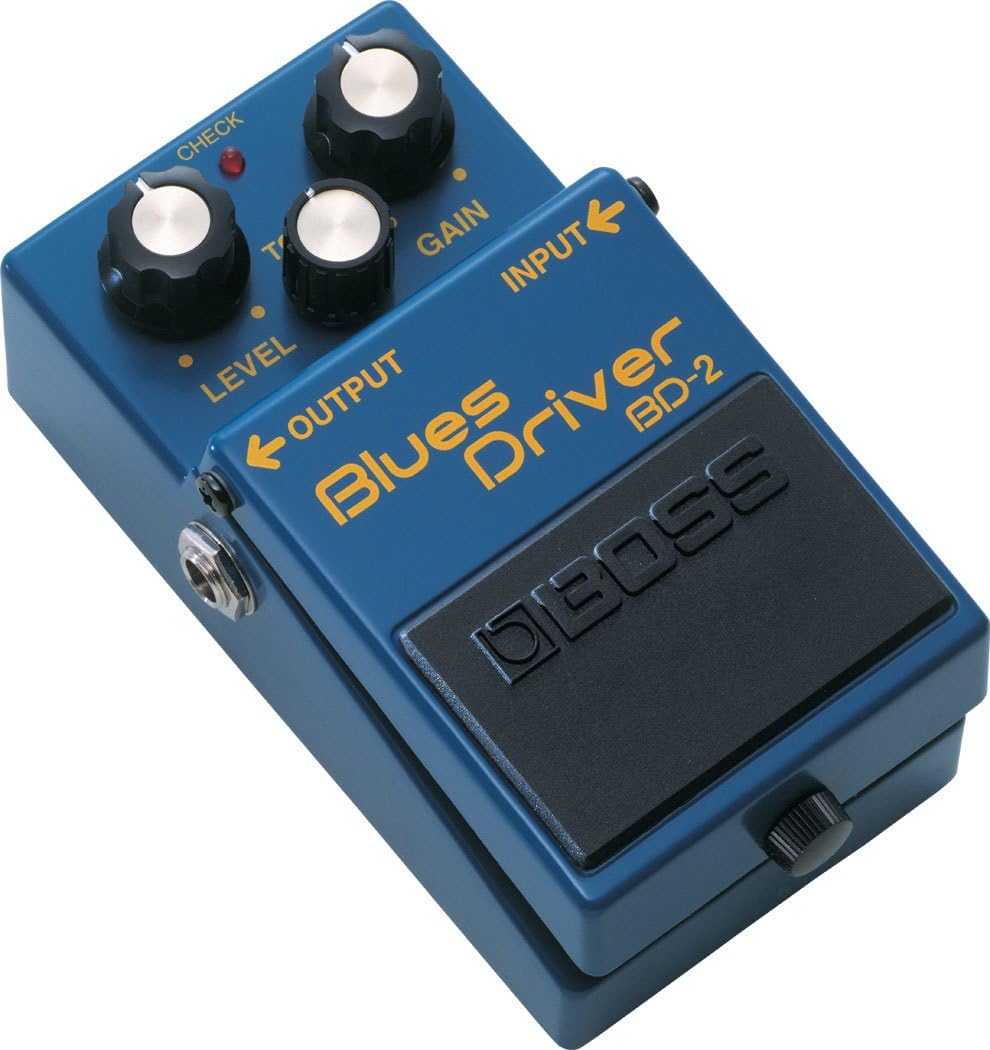
Image 2: The BOSS BD-2 Blues Driver pedal, illustrating the input and output jacks for connecting to a guitar and amplifier or other effects pedals.
4. Operating the Pedals
Each pedal features a footswitch to engage or bypass the effect. The CHECK indicator light illuminates when the effect is active.
4.1 BOSS BD-2 Blues Driver
The BD-2 provides a natural, tube-like overdrive. Its controls allow for a wide range of blues tones, from subtle crunch to singing lead. It is highly responsive to picking dynamics and guitar volume changes.

Image 3: Detailed view of the BOSS BD-2 Blues Driver's control knobs: LEVEL, TONE, and GAIN.
- LEVEL Knob: Adjusts the overall output volume of the effect.
- TONE Knob: Controls the tonal character, from warm and mellow to bright and cutting.
- GAIN Knob: Determines the amount of overdrive/distortion. Lower settings provide subtle breakup, while higher settings deliver more aggressive drive.
BD-2 Sample Settings
| Setting | LEVEL | TONE | GAIN | Description |
|---|---|---|---|---|
| Crunch | 12 o'clock | 1 o'clock | 10 o'clock | Light, dynamic overdrive for rhythm playing. |
| British Blues | 1 o'clock | 11 o'clock | 2 o'clock | Classic rock-blues tone with a slightly scooped mid-range. |
| OverDrive | 1 o'clock | 12 o'clock | 1 o'clock | Versatile overdrive for various genres. |
| American Blues | 11 o'clock | 2 o'clock | 12 o'clock | Warm, full-bodied blues tone. |
| Booster | Max | 12 o'clock | Min | Clean boost to push your amp or other pedals. |
| Chord Play | 12 o'clock | 10 o'clock | 1 o'clock | Rich, sustained chords with clarity. |
| Turbo OverDrive | 1 o'clock | 12 o'clock | Max | Aggressive, high-gain overdrive. |
| Clean Crunch | 12 o'clock | 12 o'clock | 9 o'clock | Subtle, dynamic crunch that cleans up with guitar volume. |
Note: These settings are starting points. Experiment to find your preferred tones.
4.2 BOSS DS-1 Distortion Pedal
The DS-1 is a classic distortion pedal known for its hard-edged attack and smooth sustain. It's a versatile pedal capable of producing a wide range of rock and metal tones.

Image 4: Detailed view of the BOSS DS-1 Distortion Pedal's control knobs: TONE, LEVEL, and DIST.
- TONE Knob: Adjusts the overall tonal balance, from warm to sharp.
- LEVEL Knob: Controls the output volume of the effect.
- DIST Knob: Determines the amount of distortion. Higher settings produce more aggressive and saturated distortion.
DS-1 Usage Tips
- Experiment with the TONE knob to find the sweet spot for your guitar and amplifier.
- The DS-1 can be used as a primary distortion or to boost an already overdriven amplifier.
- Combine with the BD-2 for layered overdrive and distortion effects.
5. Maintenance
5.1 Battery Replacement
When the CHECK indicator dims or fails to light, the battery is low and should be replaced. To replace the battery, loosen the thumbscrew on the front of the pedal, lift the pedal cover, disconnect the old battery, and connect a new 9V battery. Close the cover and tighten the thumbscrew.
5.2 Cleaning
Wipe the unit with a soft, dry cloth. Do not use abrasive cleaners, waxes, or solvents.
6. Troubleshooting
| Problem | Possible Cause | Solution |
|---|---|---|
| No sound or weak sound. | Incorrect connections, low battery, faulty cable, pedal not engaged. | Check all cable connections. Replace the 9V battery or use an AC adapter. Ensure the pedal is switched ON (CHECK indicator lit). Test with different cables. |
| Noise or hum. | Interference from other electrical devices, ground loop, faulty power supply. | Move the pedal away from power cables or fluorescent lights. Use a high-quality, regulated power supply. Ensure proper grounding of all equipment. |
| Effect not working as expected. | Control knobs set incorrectly, issue with guitar or amplifier. | Adjust LEVEL, TONE, and GAIN/DIST knobs. Test the pedal with a different guitar and amplifier to isolate the issue. |
7. Specifications
| Feature | Detail |
|---|---|
| Model: | BD-2 Blues Driver & DS-1 Distortion Pedal |
| Nominal Input Level: | -20 dBu |
| Input Impedance: | 1 M ohm |
| Nominal Output Level: | -20 dBu |
| Output Impedance: | 1 k ohm |
| Power Supply: | 9V DC (9V battery or AC adapter) |
| Current Draw: | BD-2: 20 mA, DS-1: 4 mA (approx.) |
| Controls: | BD-2: LEVEL, TONE, GAIN; DS-1: TONE, LEVEL, DIST |
| Indicators: | CHECK indicator (also serves as battery check indicator) |
| Connectors: | INPUT jack, OUTPUT jack, AC adapter jack (9V DC) |
*Specifications are subject to change without notice.
8. Warranty and Support
For detailed warranty information, product registration, and technical support, please refer to the warranty card included with your product or visit the official BOSS website. Keep your purchase receipt as proof of purchase for warranty claims.
For further assistance, contact BOSS customer support through their official channels.
Related documentsBD-2 & DS-1


Ask a question about this manual
Ask about setup, troubleshooting, compatibility, parts, safety, or missing instructions. Manuals+ will review the question and use this page’s manual context to help answer it.