
Introduction
This user manual provides essential information for the safe and efficient operation of your Atlantic MIA ECO-LNE.Y 7 KG front-load washing machine. Please read these instructions carefully before installation, use, and maintenance. Keep this manual for future reference.
Safety Information
Always follow basic safety precautions when using electrical appliances to reduce the risk of fire, electric shock, and injury to persons.
- Ensure the appliance is properly grounded.
- Do not allow children to play on or in the appliance.
- Do not operate the washing machine if it is damaged or malfunctioning.
- Unplug the appliance before performing any maintenance or cleaning.
- Do not wash items that have been cleaned in, washed in, soaked in, or spotted with combustible or explosive substances.
Setup and Installation
1. Unpacking
Carefully remove all packaging materials. It is crucial to remove all transport bolts from the rear of the machine before use. Failure to do so can cause severe damage to the appliance.
2. Location
Place the washing machine on a firm, level floor. Ensure there is adequate ventilation around the appliance. Avoid direct sunlight or extreme temperatures.
3. Water Connection
Connect the water inlet hose to a cold water tap with a 3/4-inch thread. Ensure all connections are tight to prevent leaks. Position the drain hose into a standpipe or over the edge of a sink, ensuring it is securely fixed to prevent displacement during operation.
4. Electrical Connection
Plug the power cord into a properly grounded electrical outlet. Do not use extension cords or adapters.
5. Leveling
Adjust the leveling feet at the bottom of the machine until the appliance is perfectly stable and level. Use a spirit level to verify. Proper leveling reduces vibration and noise during operation.
Operating Instructions
Control Panel Overview
The control panel allows you to select wash programs and adjust settings. Refer to the image below for a visual guide.
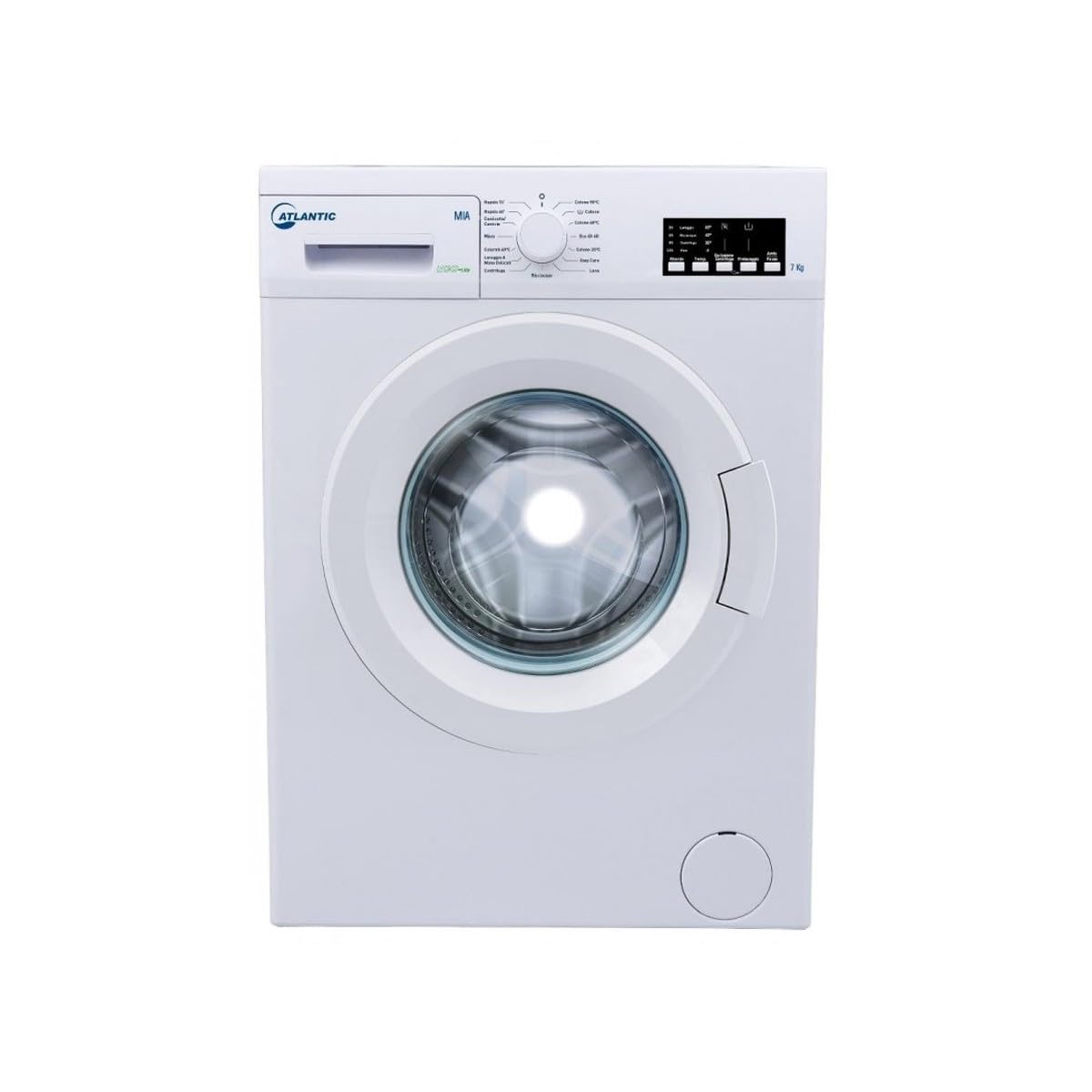
Figure 1: Front view of the Atlantic MIA ECO-LNE.Y washing machine, showing the detergent dispenser, program selector dial, and digital display with touch controls. The machine has a 7 kg capacity.
- Detergent Dispenser: Located on the upper left, for adding detergent and fabric softener.
- Program Selector Dial: Central dial to choose from 15 wash programs.
- Digital Display and Touch Controls: On the right, showing program status, time remaining, and options for spin speed, temperature, delay start, and other functions.
1. Loading Laundry
Open the door and load laundry into the drum. Do not overload the machine; the maximum capacity is 7 kg. Ensure items are evenly distributed.
2. Adding Detergent and Softener
Pull out the detergent dispenser drawer. Add appropriate amounts of detergent to the main wash compartment and fabric softener to its designated compartment. Refer to detergent packaging for dosage recommendations.
3. Program Selection
Turn the program selector dial to choose the desired wash program. The machine offers 15 programs, including:
- Rapido 15': Quick wash for lightly soiled items.
- Cotone 90°C: Cotton wash at 90°C.
- Cotone 60°C: Cotton wash at 60°C.
- Eco 40-60: Energy-efficient program for cottons at 40-60°C.
- Cotone 20°C: Cotton wash at 20°C.
- Easy Care: For synthetic and mixed fabrics.
- Lana: Wool program.
- Misto: Mixed fabrics.
- Colorati 40°C: Colored items at 40°C.
- Lavaggio a Mano Delicati: Hand wash/delicates.
- Centrifuga: Spin cycle only.
- Risciacquo: Rinse cycle only.
The digital display will show the default settings for the selected program.
4. Adjusting Settings (Optional)
Use the touch controls on the display to adjust spin speed (up to 1000 rpm), temperature, or activate special functions like delay start (Ritardo), prewash (Pre-lavaggio), or extra rinse (Risciacquo Extra), if available for the chosen program.
5. Starting the Wash Cycle
Press the Start/Pause button to begin the wash cycle. The door will lock, and the machine will start filling with water.
6. End of Cycle
Once the cycle is complete, the machine will signal, and the door will unlock. Remove your laundry promptly.
Maintenance and Care
1. Cleaning the Detergent Dispenser
Periodically remove and clean the detergent dispenser drawer under running water to prevent detergent residue buildup.
2. Cleaning the Drum
Run a maintenance wash (e.g., a hot cotton cycle with no laundry and a descaling agent or washing machine cleaner) monthly to keep the drum clean and fresh.
3. Cleaning the Drain Pump Filter
Locate the drain pump filter, usually at the bottom front of the machine (refer to Figure 1 for the circular cover). Open the cover, drain any residual water, and carefully remove and clean the filter of lint and foreign objects. Reinstall securely.
4. Cleaning the Exterior
Wipe the exterior surfaces with a soft, damp cloth. Do not use abrasive cleaners or solvents.
5. Winterization (if applicable)
If the machine is to be left in an unheated area during winter, drain all water from the hoses and pump to prevent freezing damage. Consult a qualified technician if unsure.
Troubleshooting
Before contacting customer service, review the following common issues and solutions:
- Machine does not start: Check if the power cord is plugged in, the door is closed properly, and the Start/Pause button has been pressed.
- No water filling: Ensure the water tap is open and the water inlet hose is not kinked.
- Water not draining: Check the drain hose for kinks or blockages. Clean the drain pump filter.
- Excessive vibration/noise: Ensure the machine is level and all transport bolts have been removed. Check for unevenly distributed laundry.
- Detergent residue in dispenser: Clean the dispenser drawer. Ensure water pressure is adequate.
If the problem persists, refer to the support section.
Specifications
| Feature | Specification |
|---|---|
| Brand | Atlantic |
| Model Name | MIA ECO-LNE.Y |
| Capacity | 7 Kilograms |
| Access Location | Front Load |
| Color | White |
| Item Weight | 96 Kilograms |
| Control Type | Touch |
| Recommended Uses | Domestic |
| Operating Mode | Fully Automatic |
| Maximum Spin Speed | 1000 rpm |
| Standard Cycles | 15 |
| Installation Type | Freestanding |
| Item Depth | 57.7 centimeters |
| Drum Material | Stainless Steel |
| Manufacturer Part Number | MIA ECO-LINE.Y |
| ASIN | B0913JJZWS |
| Energy Efficiency Class (New) | D |
| Washing Noise Level | 58 dB |
Warranty Information
This Atlantic washing machine comes with a standard manufacturer's warranty. Please refer to the warranty card included with your purchase for specific terms, conditions, and duration. Keep your proof of purchase for warranty claims.
Customer Support
For technical assistance, spare parts, or service requests, please contact Atlantic customer support. Contact details can typically be found on the manufacturer's website or on your warranty documentation. When contacting support, please have your model number (MIA ECO-LNE.Y) and serial number ready.