
Arcchio 9626302
Arcchio 'Walisa' Ceiling Lamp User Manual
Model: 9626302 | Brand: Arcchio
Introduction
This manual provides detailed instructions for the installation, operation, and maintenance of your Arcchio 'Walisa' Ceiling Lamp. Please read this manual thoroughly before installation and keep it for future reference.

Figure 1: Arcchio 'Walisa' Ceiling Lamp, a modern white aluminum fixture.
Safety Instructions
Always follow basic safety precautions when installing and operating electrical products to reduce the risk of fire, electric shock, and personal injury.
- Ensure the power supply is disconnected before installation or maintenance.
- Installation should be performed by a qualified electrician.
- Do not modify the product in any way.
- This product is designed for indoor use only (IP20). Do not expose to water or high humidity.
- Ensure proper grounding.
- Do not exceed the specified wattage for the GU10 bulb.
Package Contents
Verify that all components are present before beginning installation:
- 1 x Arcchio 'Walisa' Ceiling Lamp fixture
- Mounting hardware (screws, wall plugs)
- User Manual (this document)
- Note: Light bulbs (GU10) are not included.
Setup and Installation
Follow these steps carefully for safe and correct installation.
- Preparation: Turn off the main power supply at the circuit breaker before starting any electrical work.
- Marking and Drilling: Position the mounting bracket on the ceiling at the desired location. Mark the drilling points. Drill holes suitable for the provided wall plugs.
- Mounting Bracket Installation: Secure the mounting bracket to the ceiling using the provided screws and wall plugs.
- Wiring: Connect the electrical wires from the ceiling to the lamp's terminal block. Ensure correct polarity (Live, Neutral, Ground). Refer to the wiring diagram below.

Figure 2: Internal wiring connections of the lamp. Ensure proper connection of Live, Neutral, and Ground wires.
- Attaching the Fixture: Carefully attach the lamp fixture to the mounting bracket, ensuring all wires are securely tucked away and not pinched.
- Installing Light Bulbs: Insert the GU10 light bulbs (not included) into their respective sockets. The lamp supports one GU10 bulb for downward light and has an integrated LED module for upward light.

Figure 3: Close-up of the GU10 socket where the bulb is inserted.
- Final Check: Once installation is complete, restore power at the circuit breaker.

Figure 4: The Arcchio Walisa Ceiling Lamp installed and illuminated, showing both upward and downward light.
Operating Instructions
The Arcchio 'Walisa' Ceiling Lamp is designed for simple operation.
- Turning On/Off: The lamp is controlled by a standard wall switch connected to your electrical circuit.
- Dimming Functionality: This luminaire is dimmable via an external wall dimmer (not included). Ensure your dimmer is compatible with LED and GU10 bulbs.
- Light Distribution: The lamp provides both direct downward light from the GU10 bulb and indirect upward light from the integrated LED module, creating a balanced illumination.

Figure 5: Examples of the lamp's light output and appearance in various settings.
Maintenance
Regular cleaning and proper care will ensure the longevity and optimal performance of your lamp.
- Cleaning: Disconnect power before cleaning. Use a soft, dry cloth to wipe the lamp's surface. Do not use abrasive cleaners, solvents, or liquids directly on the fixture.
- Bulb Replacement (GU10): Ensure power is off. Allow the bulb to cool down before touching. Gently twist and pull the GU10 bulb to remove it. Insert a new GU10 bulb by aligning the pins and pushing it in with a slight twist.
- Integrated LED Module: The upward-facing LED module is integrated and not user-replaceable.
Troubleshooting
If you encounter issues with your lamp, refer to the following common problems and solutions:
| Problem | Possible Cause | Solution |
|---|---|---|
| Lamp does not turn on. | No power supply; Loose wiring; Faulty bulb; Faulty switch. | Check circuit breaker; Verify wiring connections; Replace GU10 bulb; Test switch. |
| Light flickers. | Incompatible dimmer; Loose bulb; Unstable power. | Ensure dimmer is LED compatible; Re-seat GU10 bulb; Consult electrician for power issues. |
| Dimming does not work. | No external dimmer installed; Incompatible dimmer. | Install a compatible external wall dimmer; Replace with a compatible dimmer. |
Specifications
Detailed technical specifications for the Arcchio 'Walisa' Ceiling Lamp.

Figure 6: Dimensions of the Arcchio 'Walisa' Ceiling Lamp.
| Feature | Detail |
|---|---|
| Brand | Arcchio |
| Model Number | 9626302 |
| Product Dimensions | 10 x 10 x 11.5 cm (Diameter x Height) |
| Item Weight | 490 g |
| Material | Aluminum |
| Color | White RAL 9003 |
| Style | Modern |
| Number of Light Sources | 2 (1 x GU10, 1 x Integrated LED) |
| Socket Type | GU10 |
| Max Wattage (GU10) | 8 W (LED GU10 Down) |
| Integrated LED Wattage | 4.6 W (LED Up) |
| Operating Voltage | 230 Volts |
| Protection Class | I |
| IP Rating | IP20 (Indoor use only) |
| Special Features | Dimmable (via external dimmer) |
| Energy Efficiency Class | G |
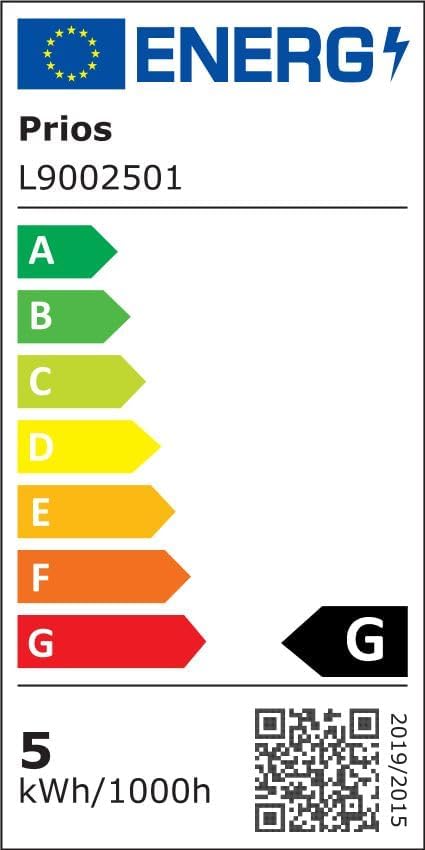
Figure 7: Energy Efficiency Label. For more details, visit eprel.ec.europa.eu/qr/747676.
Warranty and Support
For warranty information, please refer to the terms and conditions provided at the point of purchase or contact your retailer. Arcchio products are designed for quality and durability.
If you require technical assistance or have questions not covered in this manual, please contact Arcchio customer support or your authorized dealer. You can find more information on the official Arcchio brand store: Arcchio Store on Amazon.de.
Recycling and Disposal
This product falls under the WEEE Directive (Waste Electrical and Electronic Equipment). Do not dispose of electrical products with household waste. Please recycle where facilities exist. Check with your local authority for recycling advice.
- Recycling of Lamps: For information on recycling this and other types of lamps, please consult local recycling guidelines.
- Disposal of Broken or Damaged Lamps: Learn more about the proper disposal of broken or damaged lamps by contacting your local waste management facility.
Ask a question about this manual
Ask about setup, troubleshooting, compatibility, parts, safety, or missing instructions. Manuals+ will review the question and use this page’s manual context to help answer it.