
1. Product Overview
The Fotga USB Type-C Power Adapter Cable with EN-EL15 Dummy Battery (EP-5B DC Coupler) is designed to provide continuous power to compatible Nikon DSLR and Mirrorless cameras from a USB Type-C power source. This eliminates the need for frequent battery changes, making it ideal for long shooting sessions, studio work, or time-lapse photography.
Package Contents:
- 1 x USB Type-C to EN-EL15 Dummy Battery Adapter Cable
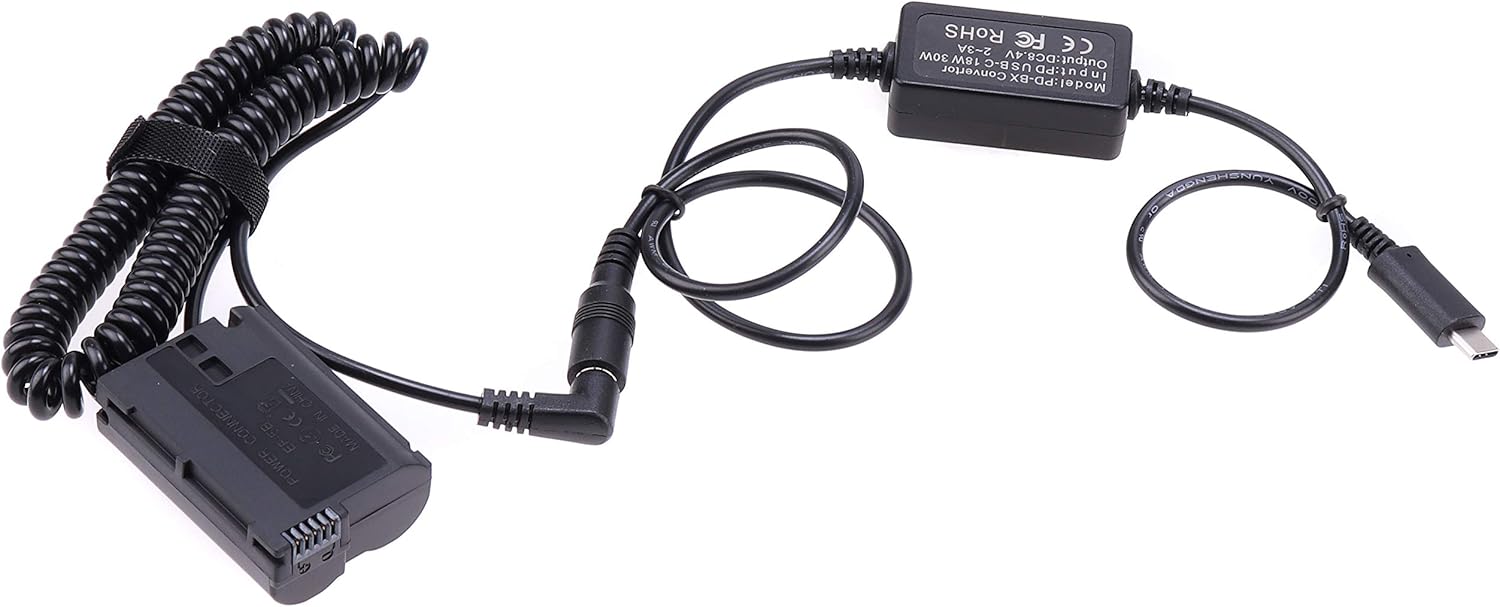
Image 1.1: Overview of the Fotga USB Type-C Power Adapter Cable and EN-EL15 Dummy Battery.
2. Compatibility
This adapter cable is compatible with the following Nikon camera models:
- Nikon D850, D810, D810A, D800, D800E
- Nikon D750, D610, D600
- Nikon D500
- Nikon D7500, D7200, D7100, D7000
- Nikon Z5, Z6, Z7 II
Important Note: This product is NOT compatible with Nikon Z8 or Zf cameras.
3. Setup Instructions
- Prepare the Camera: Ensure your Nikon camera is powered off before installation. Open the battery compartment door.
- Insert the Dummy Battery: Insert the EN-EL15 dummy battery (EP-5B DC Coupler) into your camera's battery compartment, ensuring it is oriented correctly. The cable should exit through the small opening provided on the battery compartment door, if available on your camera model.
- Close Battery Compartment: Gently close the battery compartment door. Ensure the cable is not pinched.
- Connect to Power Source: Connect the USB Type-C end of the adapter cable to a compatible USB Type-C power bank or power adapter. The power source must meet the input requirements of 5-5.5V and 18W-30W. A power bank with Power Delivery (PD) is recommended for optimal performance.

Image 3.1: The Fotga adapter cable with dummy battery connected to a compatible Nikon camera.

Image 3.2: A closer view of the adapter cable connected to the camera, showing the cable routing.
4. Operating Instructions
- Power On: After connecting the adapter cable to both the camera and a suitable power source, power on your camera.
- Verify Operation: The camera should power on and function normally, drawing power directly from the connected USB Type-C source.
- Continuous Power: This setup provides continuous power, allowing for extended shooting sessions without interruption.
- Power Off: To power off, first turn off the camera, then disconnect the USB Type-C cable from the power source. Finally, remove the dummy battery from the camera if not needed for future use.
5. Maintenance
- Keep the adapter cable and dummy battery clean and dry.
- Avoid bending or kinking the cables excessively to prevent internal damage.
- Store the product in a cool, dry place when not in use.
- Do not attempt to disassemble or repair the unit yourself. Contact the manufacturer or seller for assistance.
6. Troubleshooting
- Camera Not Powering On:
- Ensure the dummy battery is fully inserted into the camera's battery compartment.
- Verify that the USB Type-C cable is securely connected to both the adapter and the power source.
- Check if your USB Type-C power source is active and providing power.
- Confirm that your power source meets the required input specifications (5-5.5V, 18W-30W).
- Ensure your camera model is listed as compatible. This product is not compatible with Nikon Z8 or Zf.
- Camera Displays Error Message:
- This may indicate insufficient power from the USB Type-C source. Try a different power bank, preferably one with Power Delivery (PD) capabilities.
- Double-check camera compatibility.
- Intermittent Power:
- Check all connections for looseness.
- Ensure the power bank is not running low on charge.
- The power bank might not be providing stable output. Try a different power source.
7. Specifications
| Feature | Specification |
|---|---|
| Product Name | USB Type-C to EN-EL15 Dummy Battery Adapter Cable |
| Model (Converter) | PD-BX Convertor |
| Input (USB Type-C) | 5-5.5V, 18W-30W (Power Delivery recommended) |
| Output | 8.4V, 2A-3A |
| Dummy Battery Type | EN-EL15 (EP-5B DC Coupler) |
| Cable Length | Approx. 90cm to 185cm (coiled) |
| Connector Type | USB Type-C |
| Item Weight | 0.03 kg |
| Manufacturer | FOTGA |

Image 7.1: Close-up view of the PD-BX converter box, showing input/output specifications and dimensions.
8. Warranty and Support
For warranty information and technical support, please refer to the documentation provided with your purchase or contact the seller directly. FOTGA products typically come with a manufacturer's warranty against defects in materials and workmanship.
You can also visit the official FOTGA store for more information: FOTGA Store