
BOSS TU-05
BOSS TU-05 Clip-On Tuner User Manual
Model: TU-05
1. Introduction
The BOSS TU-05 is a reliable and accurate clip-on headstock tuner designed for various stringed instruments. It features a large, high-contrast color display for clear visibility and offers four distinct tuning modes. Equipped with a built-in rechargeable battery, the TU-05 provides extended operation without the need for frequent battery replacements, ensuring convenience and consistent performance.

Figure 1: Front view of the BOSS TU-05 Clip-On Tuner, showing its compact design and vibrant display.
2. Setup
2.1 Charging the Battery
Before initial use, fully charge the TU-05's built-in lithium-ion battery. A USB cable is included for this purpose.
- Connect the small end of the included USB cable to the USB port on the TU-05 tuner.
- Connect the standard USB end of the cable to a USB power adapter (not included) or a computer's USB port.
- The display will indicate charging status. A full charge typically provides up to 10 hours of continuous runtime.
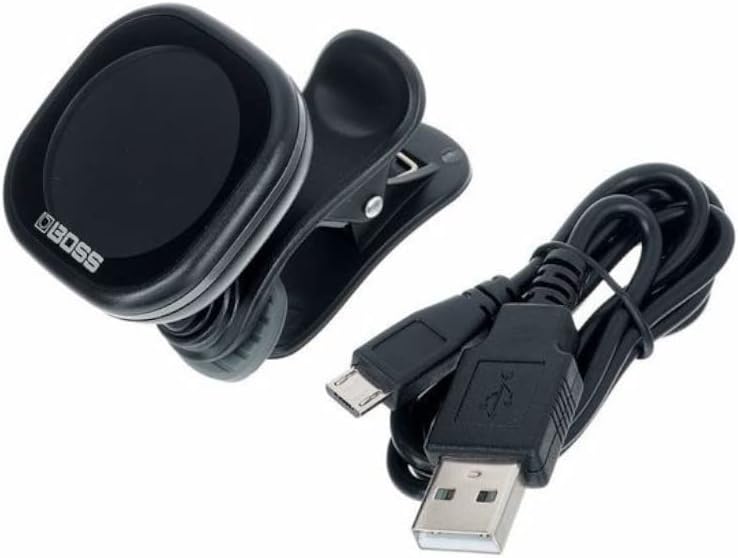
Figure 2: The BOSS TU-05 tuner alongside its included USB charging cable.
2.2 Attaching the Tuner
The TU-05 features a sturdy clip designed to securely attach to the headstock of your instrument.
- Gently open the clip by pressing the two ends together.
- Attach the tuner to the headstock of your guitar, bass, ukulele, or other stringed instrument. Ensure the display is visible to you while playing.
- The clip's rubberized pads protect your instrument's finish and provide a firm grip.

Figure 3: The BOSS TU-05 tuner securely clipped onto the headstock of a guitar, ready for tuning.
3. Operating Instructions
3.1 Power On/Off
- To power on the TU-05, press and hold the MODE/VALUE button located on the top of the unit.
- To power off, press and hold the MODE/VALUE button again until the display turns off.
- The tuner features an auto power-off function to conserve battery life. If no input is detected for a certain period, the unit will automatically shut down.
3.2 Selecting Tuning Modes
The TU-05 offers four tuning modes: Chromatic, Guitar, Bass, and Ukulele.
- With the tuner powered on, short press the MODE/VALUE button to cycle through the available tuning modes.
- Chromatic Mode: Displays the note name (C, C#, D, etc.) for any instrument.
- Guitar Mode: Optimized for standard guitar tuning.
- Bass Mode: Optimized for standard bass guitar tuning.
- Ukulele Mode: Optimized for standard ukulele tuning.
3.3 Interpreting the Display
The large, high-contrast color display provides clear visual feedback for accurate tuning.
- Note Name: The large letter in the center indicates the detected note.
- Pitch Meter: The horizontal bar and indicators show whether the pitch is flat, sharp, or in tune.
- Green: Indicates the note is in tune.
- Red/Blue: Indicates the note is flat or sharp, respectively. Adjust your string until the indicator turns green.
- A4 Calibration: The default A4 calibration is 440Hz, displayed as "A4=440". This can typically be adjusted if needed (refer to advanced settings if available, though not detailed here).
- Battery Indicator: A small icon on the display shows the current battery level.

Figure 4: Various angles of the BOSS TU-05, highlighting the display and physical controls.
4. Maintenance
4.1 Cleaning
- To clean the tuner, wipe it with a soft, dry cloth.
- Do not use abrasive cleaners, waxes, or solvents, as these can damage the finish or internal components.
4.2 Battery Care and Storage
- For optimal battery life, avoid fully discharging the battery frequently.
- If storing the tuner for an extended period, ensure the battery is partially charged (around 50%) to prevent degradation.
- Store the tuner in a cool, dry place away from direct sunlight and extreme temperatures.
5. Troubleshooting
| Problem | Possible Cause | Solution |
|---|---|---|
| Tuner does not power on. | Battery is depleted. | Charge the battery using the included USB cable. |
| Inaccurate tuning readings. | Tuner not securely attached; excessive ambient noise; incorrect tuning mode selected. | Ensure the tuner is firmly clipped to the headstock. Tune in a quiet environment. Verify the correct tuning mode (Chromatic, Guitar, Bass, Ukulele) is selected. |
| Battery not charging. | Faulty USB cable or power source; dirty USB port. | Try a different USB cable or power adapter. Ensure the USB port on the tuner is clean and free of debris. |
6. Specifications
| Feature | Detail |
|---|---|
| Model Number | TU-05 |
| Tuning Modes | Chromatic, Guitar, Bass, Ukulele |
| Detection Range | A0 (27.5 Hz) – C8 (4186.0 Hz) |
| Reference Pitch | A4 = 440 Hz |
| Power Supply | Rechargeable Lithium-Ion Battery |
| Battery Life | Approx. 10 hours of continuous use (varies with conditions) |
| Connectors | USB Micro-B port for charging |
| Dimensions (W x D x H) | 42 mm x 58 mm x 35 mm (1-11/16 in. x 2-5/16 in. x 1-3/8 in.) (Approximate, based on image) |
| Weight | 35 g (2 oz) (Approximate, based on image) |
| Material | Plastic |
| Color | Black |
| Included Accessories | USB cable |

Figure 5: Diagram showing the approximate dimensions of the BOSS TU-05 tuner.
7. Warranty and Support
For information regarding warranty coverage, product support, or service, please refer to the warranty card included with your product or visit the official BOSS website. You can also contact BOSS customer support directly for assistance with any issues or questions not covered in this manual.
Official BOSS Website: www.boss.info
Related documentsTU-05


Ask a question about this manual
Ask about setup, troubleshooting, compatibility, parts, safety, or missing instructions. Manuals+ will review the question and use this page’s manual context to help answer it.