
1. Introduction
Thank you for choosing the KALINCO P96 Smartwatch. This device is designed to help you monitor your health, track your fitness activities, and stay connected. This manual provides essential information for setting up, operating, and maintaining your smartwatch to ensure optimal performance and longevity.
2. Product Overview
The KALINCO P96 Smartwatch features a 1.69-inch TFT display and offers a wide range of functionalities:
- Health Monitoring: Continuous monitoring of heart rate, blood oxygen (SpO2), blood pressure, and sleep patterns. Includes a menstrual cycle tracking function for women.
- Customization: Split-screen mode for quick access to frequently used functions and over 100 stylish watch faces available via the GloryFit app. You can also upload personal photos as watch faces.
- Sports Modes: Over 100 sports modes (running, cycling, rope skipping, dancing, yoga, etc.) with activity tracking for steps, calories burned, distance, heart rate, and blood oxygen during exercise.
- Smart Notifications: Receive text messages and notifications from apps like WhatsApp, Messenger, Facebook, and Instagram directly on your watch. Notifications can be individually deleted from the watch.
- Durability & Battery Life: IP67 water resistance for daily use (hand washing, rain). Equipped with a 260 mAh battery, providing 5-7 days of active use and 15-20 days of standby time with a 2-hour charge.
- Additional Functions: Features include phone/watch finder, screen brightness adjustment, breathing training, remote photography, music control, sedentary reminder, alarm clock, timer, stopwatch, and weather forecasts.

Image: The KALINCO P96 Smartwatch displaying its 1.69-inch screen with multiple customizable watch faces and user interface elements.
3. Setup
3.1. Charging the Smartwatch
Before initial use, fully charge your smartwatch. Connect the magnetic charging cable to the charging contacts on the back of the watch and plug the USB end into a standard USB power adapter (not included). A full charge typically takes approximately 2 hours.
3.2. Downloading and Installing the App
The KALINCO P96 Smartwatch requires the GloryFit application for full functionality and data synchronization. You can download the app from:
- The Apple App Store (for iOS devices)
- Google Play Store (for Android devices)
- Scan the QR code provided in the quick start guide (if available).
The GloryFit app is compatible with smartphones running Android 5.0 or iOS 9.0 and above.
3.3. Pairing with Your Smartphone
- Ensure your smartphone's Bluetooth is enabled.
- Open the GloryFit app on your smartphone.
- Follow the in-app instructions to search for and connect to your KALINCO P96 Smartwatch. The watch will typically appear as 'P96' or a similar device name.
- Confirm the pairing request on both your smartphone and the smartwatch if prompted.
Once paired, the watch will synchronize time and data with your phone.
4. Operating Instructions
4.1. Basic Navigation
- Swipe Up/Down: Navigate through menus and notifications.
- Swipe Left/Right: Access quick functions or different data screens.
- Tap: Select an item or confirm an action.
- Side Button: Press to wake the screen, return to the home screen, or access the main menu.
4.2. Health Monitoring
The smartwatch continuously monitors several health metrics:
- Heart Rate: Provides 24-hour heart rate monitoring. View real-time data on the watch or detailed trends in the GloryFit app.
- Blood Oxygen (SpO2): Monitors blood oxygen levels using infrared technology. Access readings on the watch or app.
- Blood Pressure: Measures blood pressure. For accurate readings, ensure the watch is worn correctly and remain still during measurement. Consult a medical professional for precise medical data.
- Sleep Tracking: Automatically tracks your sleep patterns, including deep sleep, light sleep, and awake times. Review your sleep quality analysis in the GloryFit app.
- Menstrual Cycle Tracking: A dedicated feature for women to record and track menstrual cycles within the GloryFit app.

Image: The smartwatch interface showing health monitoring features such as blood oxygen, blood pressure, heart rate, and a visual representation of sleep tracking data.
4.3. Sports Modes and Activity Tracking
The P96 Smartwatch supports over 100 sports modes. To use:
- Navigate to the 'Sports' section on your watch.
- Select your desired activity (e.g., running, cycling, yoga).
- Start the activity. The watch will track metrics like steps, calories, distance, and heart rate.
- End the activity to save your data. Detailed reports are available in the GloryFit app.

Image: A visual representation of the smartwatch's 100+ sports modes icons and a smartphone screen displaying detailed daily activity tracking data including steps, distance, and calories.
4.4. Smart Notifications
Once paired with your phone, the watch can display notifications:
- Ensure app notifications are enabled in the GloryFit app settings.
- Incoming calls, text messages, and app alerts will vibrate the watch and display content on the screen.
- You can dismiss or delete notifications directly from the watch.

Image: The smartwatch showing icons for various smart notifications (calls, Facebook, Line, Instagram, etc.) and illustrations of vibration reminders for calls, sedentary alerts, and alarms.
4.5. Customization
- Watch Faces: In the GloryFit app, browse and select from over 100 watch faces. You can also upload your own photos to personalize the watch face.
- Split-Screen Mode: Swipe right on the main screen to access the split-screen area, allowing quick selection of frequently used functions.
4.6. Additional Functions
Explore other useful features:
- Stopwatch: Use the built-in stopwatch for timing activities.
- Weather Forecast: View current weather conditions and forecasts (requires app synchronization).
- Music Control: Control music playback on your smartphone (play, pause, skip tracks).
- Brightness Adjustment: Adjust screen brightness for optimal visibility in different lighting conditions.
- Find Phone/Watch: Locate your paired phone or watch if misplaced.
- Breathing Training: Guided breathing exercises for relaxation.
- Remote Photography: Use your watch as a remote shutter for your phone's camera.
- Sedentary Reminder: Get alerts to move if you've been inactive for too long.
- Alarm Clock & Timer: Set alarms and timers directly from your watch.
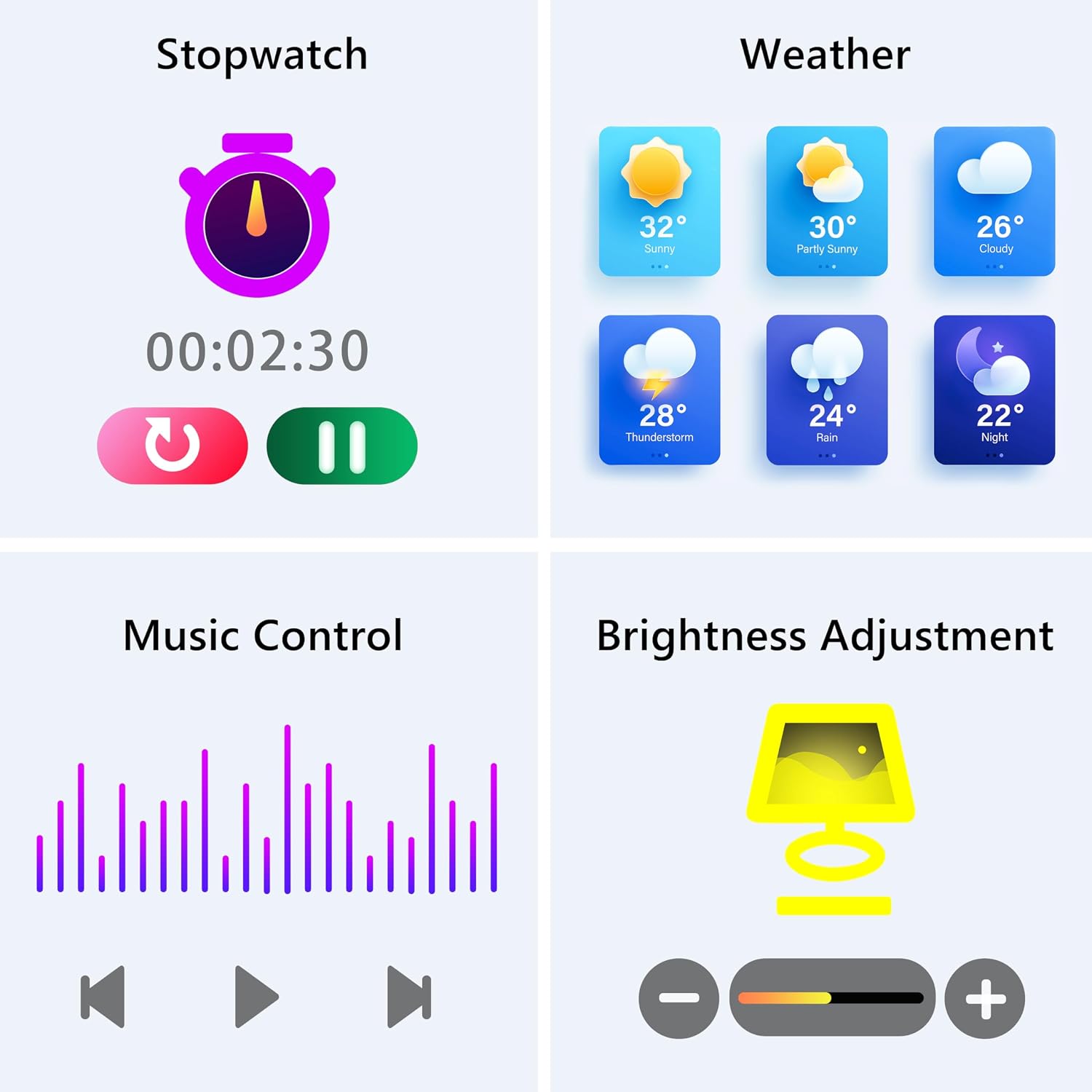
Image: The smartwatch screen showing various utility functions including a stopwatch, weather forecast, music control interface, and brightness adjustment slider.
5. Maintenance
- Cleaning: Regularly clean your smartwatch and strap with a soft, dry cloth. Avoid using harsh chemicals or abrasive materials.
- Water Resistance (IP67): The watch is IP67 water-resistant, meaning it can withstand splashes, hand washing, and rain. It is not suitable for swimming, showering with hot water, or diving. Avoid prolonged exposure to water.
- Battery Care: Charge the battery fully when indicated. Avoid completely draining the battery frequently to prolong its lifespan. Store the watch in a cool, dry place when not in use for extended periods.
- Software Updates: Keep the GloryFit app updated to ensure your smartwatch has the latest features and performance improvements.
6. Troubleshooting
If you encounter issues with your KALINCO P96 Smartwatch, try the following solutions:
- Watch not turning on: Ensure the watch is fully charged. Connect it to the charger for at least 10-15 minutes.
- Cannot pair with phone:
- Ensure Bluetooth is enabled on your phone.
- Make sure the watch is within Bluetooth range (typically 10 meters).
- Restart both your phone and the smartwatch.
- Check if the GloryFit app is updated to the latest version.
- If previously paired, try unpairing and re-pairing the device through the GloryFit app.
- Notifications not received:
- Verify that notifications are enabled for specific apps in the GloryFit app settings.
- Ensure your phone's notification settings allow the GloryFit app to display alerts.
- Check if the watch is properly connected via Bluetooth.
- Inaccurate health data:
- Ensure the watch is worn snugly on your wrist, not too tight or too loose.
- For blood pressure readings, remain still and follow instructions. Note that smartwatch blood pressure measurements are for reference only and should not replace professional medical equipment.
- Clean the sensor on the back of the watch.
- Short battery life:
- Reduce screen brightness.
- Disable continuous heart rate monitoring if not needed 24/7.
- Limit the number of apps sending notifications to the watch.
If problems persist, please refer to the support section for contact information.
7. Specifications
| Feature | Detail |
|---|---|
| Brand | KALINCO |
| Model Number | P96 |
| Screen Size | 1.69 Inches |
| Operating System | Multiple Versions of Both iOS and Android |
| Connectivity Technology | Bluetooth 4.0 |
| Battery Capacity | 260 mAh (Lithium-polymer) |
| Water Resistance | IP67 |
| Compatible Devices | Smartphone (Android 5.0+ / iOS 9.0+) |
| Special Features | Text Messaging, Notification, Health Monitoring |
| GPS | GPS via smartphone |
8. Warranty and Support
KALINCO is committed to providing exceptional products. Your KALINCO P96 Smartwatch comes with a 12-month warranty from the date of purchase.
If you encounter any problems, have suggestions, or require assistance, please do not hesitate to contact KALINCO customer support. We are dedicated to providing you with satisfactory solutions at all times.
For support, please refer to the contact information provided with your product packaging or visit the official KALINCO website.