
ODK B0101607
ODK Computer Desk User Manual
Model: B0101607 | Brand: ODK
Introduction
Thank you for choosing the ODK Computer Desk. This manual provides essential information for the safe and efficient assembly, operation, and maintenance of your new desk. Please read it thoroughly before beginning assembly and retain it for future reference.

Figure 1: ODK 55 Inch Computer Desk, Black
Safety Information
For your safety and to prevent damage to the product, observe the following guidelines:
- Always assemble the desk on a stable, level surface.
- Ensure the desk is properly anchored to the wall or floor to prevent tipping, especially when using heavy equipment or during earthquakes.
- Do not use the desk in commercial environments without proper anchoring.
- Keep small parts and packaging materials away from children to prevent choking hazards.
- Do not overload the desk. Refer to the specifications for maximum weight recommendations.
Package Contents
Before assembly, verify that all components are present and undamaged. If any parts are missing or damaged, please contact customer support immediately.
- Desktop panels (Engineered Wood, Laminated)
- Metal frame components (legs, crossbars)
- Side-mounted storage bag
- Detachable headphone hook
- Adjustable leg pads
- Assembly hardware (screws, bolts, etc.)
- Assembly tools (all necessary tools are included)
- Instruction manual
Setup and Assembly
The ODK Computer Desk is designed for quick and easy assembly. It is recommended that one person performs the assembly. Follow the detailed instructions provided in the separate assembly guide included with your package.
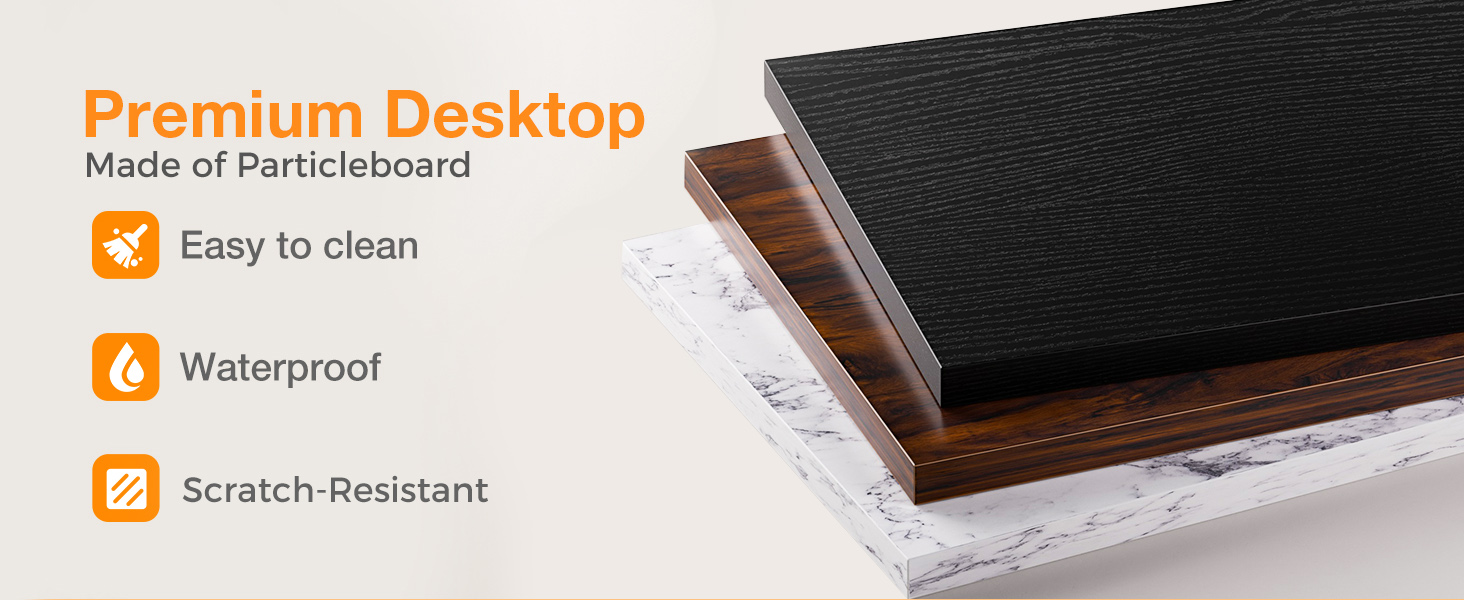
Figure 2: Quick and Easy Assembly Steps
Ensure all parts are correctly oriented and tightened securely. The side storage bag can be installed on either the left or right side of the desk to suit your preference.

Figure 3: Product Dimensions and Storage Bag Placement
Features and Usage
The ODK Computer Desk is designed to enhance your workspace with practical features:
- Ample Desktop Space and Legroom: Measuring 53.9" (L) x 19.7" (W) x 28.9" (H), the desk provides a spacious surface for your computer, accessories, and work materials, along with generous legroom for comfortable use.
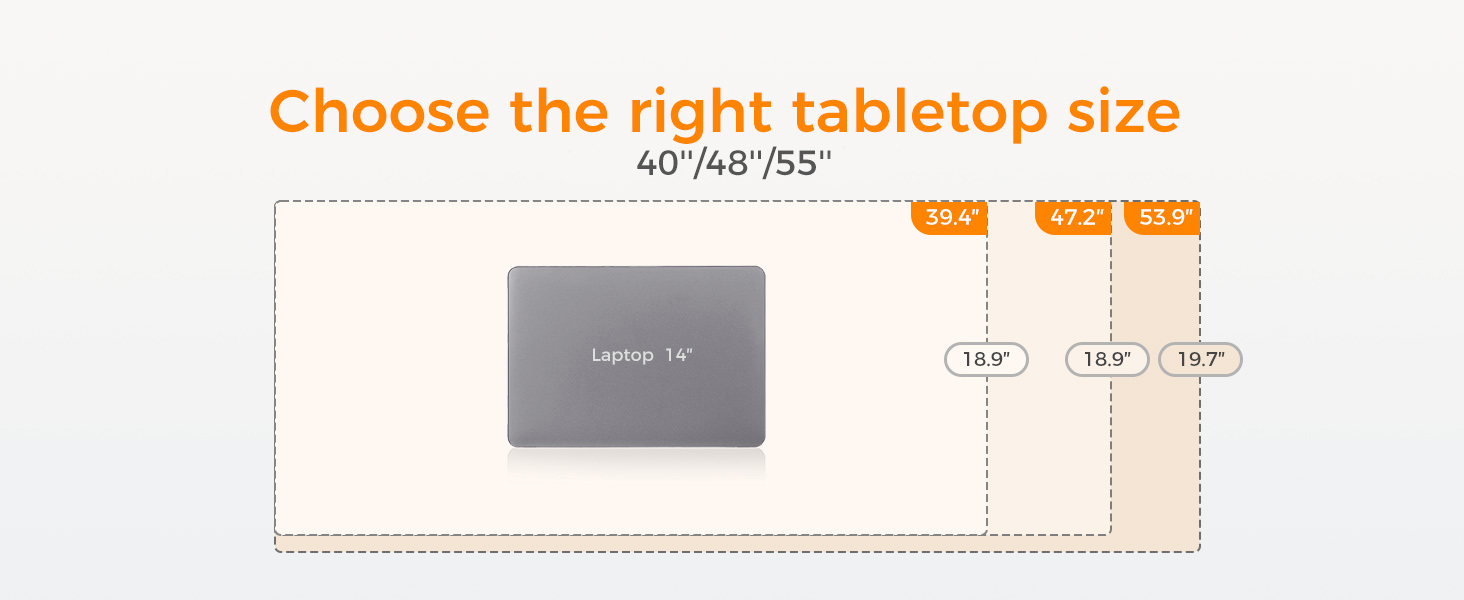
Figure 4: L-shaped Desk Configuration for Enhanced Legroom
- Integrated Storage: A side-mounted fabric bag offers convenient storage for books, documents, and office supplies, helping to keep your desktop organized. A detachable hook on the opposite side is ideal for hanging headphones or bags.

Figure 5: High Quality Cloth Bag for Convenient Storage
- Sturdy Construction: The desk features extra fixed steel brackets and adjustable leg pads for enhanced stability, ensuring a level desktop. Non-slip and anti-scratch protectors on the leg pads safeguard your floor and reduce noise when moving the desk.

Figure 6: Thick Metal Frame for Stability

Figure 7: Key Product Features
- Durable Desktop: The splice board desktop is crafted from high-quality particle board, offering scratch-resistant, anti-collision, and waterproof properties to protect against daily wear and tear.

Figure 8: High Quality Desktop with Waterproof Feature
Product Videos
Watch this video for a demonstration of the ODK computer desk's features, including its waterproof surface and integrated storage bag.
Video 1: ODK Computer Desk Features Overview
Explore the versatility of the ODK Home Office Computer Desk in various settings, showcasing its design and functionality.
Video 2: ODK Home Office Computer Desk Display
A comprehensive video showcasing the ODK Home Office Computer Desk, highlighting its practical applications and design elements.
Video 3: ODK Home Office Computer Desk Show
Operating Instructions
The ODK Computer Desk is designed for straightforward use in various environments such as home offices, bedrooms, and living rooms. Simply place your computer, monitors, and other items on the desktop. Utilize the side storage bag for organizing documents and supplies, and the headphone hook for convenient access to your headphones.

Figure 9: Desk in a Home Office Setting

Figure 10: Desk in a Study Room Setting

Figure 11: Desk in a Gaming Room Setting
Maintenance
To ensure the longevity and appearance of your ODK Computer Desk, follow these maintenance tips:
- Cleaning: The laminated particle board desktop is easy to clean. Wipe spills immediately with a soft, dry cloth. For general cleaning, use a damp cloth with mild soap and water, then dry thoroughly. Avoid harsh chemicals or abrasive cleaners.
- Scratch Prevention: While the desktop is scratch-resistant, it is not scratch-proof. Use coasters for drinks and desk mats for heavy or sharp objects to prevent potential damage.
- Stability Check: Periodically check all screws and connections to ensure they remain tight. Re-tighten if necessary to maintain desk stability.
Troubleshooting
If you encounter any issues with your ODK Computer Desk, consider the following common solutions:
- Wobbling Desk: Ensure the desk is on a level surface. Adjust the leg pads at the bottom of each leg to compensate for uneven flooring. Verify that all assembly screws are securely tightened.
- Damaged or Missing Parts: If your desk arrived damaged or with missing components, refer to the "Warranty and Support" section for contact information. Do not attempt to force assembly with incorrect or missing parts.
- Surface Scratches: While the desk is designed to be scratch-resistant, heavy use or sharp objects can cause marks. Consider using a desk mat or protective covering for high-traffic areas of the desktop.
Specifications
| Attribute | Detail |
|---|---|
| Brand | ODK |
| Model Number | B0101607 |
| Product Dimensions | 19.7"D x 53.9"W x 28.9"H |
| Color | Black |
| Style | Modern |
| Base Material | Metal |
| Top Material Type | Engineered Wood |
| Finish Type | Laminated |
| Special Feature | Scratch Resistant |
| Room Type | Office, Bedroom, Living Room |
| Recommended Uses | Working, Gaming |
| Included Components | Headphone Hook, Storage Bag |
| Maximum Weight Recommendation | 50 Kilograms |
| Assembly Required | Yes |
| Recommended Number of People for Assembly | 1 |
| Includes All Assembly Tools | Yes |
| Item Weight | 22 Pounds |
| UPC | 850037962204 |
Warranty and Support
ODK is committed to providing high-quality products and customer satisfaction. If your desk arrives damaged, has missing parts, or is scratched, please contact our professional customer support team. We are dedicated to helping you solve any problems within 24 hours.
For support, please refer to the contact information provided on the product packaging or the official ODK website.
Related documentsB0101607


Ask a question about this manual
Ask about setup, troubleshooting, compatibility, parts, safety, or missing instructions. Manuals+ will review the question and use this page’s manual context to help answer it.