
Introduction
Thank you for choosing the ODK 39-inch Computer Writing Desk. This manual provides detailed instructions for assembly, usage, maintenance, and troubleshooting to ensure optimal performance and longevity of your desk. Please read this manual thoroughly before beginning assembly or use.
Safety Information
For your safety and to prevent damage to the product, please observe the following:
- Always follow the assembly instructions carefully.
- For stability, consider anchoring the desk to the wall, especially if it's placed near high-traffic areas or if you have pets or children.
- Do not overload the desk or its accessories (storage bag, headphone hook) beyond their intended capacity.
- Keep small parts and packaging materials away from children.
- Ensure all screws and fasteners are securely tightened before use and periodically check for looseness.
Package Contents
Verify that all components are present before starting assembly. The package should include:
- Desk Top
- Desk Legs/Frame Components
- Storage Bag
- Headphone Hook
- Assembly Hardware (screws, bolts, Allen wrench)
- Instruction Manual
Assembly Instructions
Assembly of the ODK Computer Writing Desk is designed to be straightforward. Please follow the visual guide and steps below. It is recommended to assemble the desk on a soft, clean surface to prevent scratches.

Figure 1: Desk Dimensions and Switchable Storage Bag Feature
The storage bag and headphone hook are switchable, allowing for installation on either the left or right side of the desk to suit your preference and workspace layout.
Video 1: ODK Computer Desk Overview and Features
This video provides a visual overview of the ODK computer desk, demonstrating its features and potential uses. It can assist in understanding the assembly process and how various components integrate.
Product Features & Usage
The ODK Computer Writing Desk is designed for functionality and convenience in home office or study environments.
Storage Bag
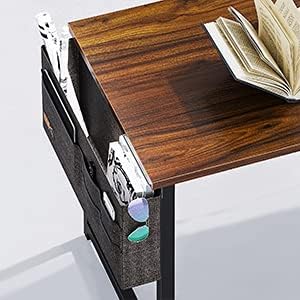
Figure 2: Integrated Side Storage Bag
The fabric storage bag attaches to the side of the desk frame, providing convenient access to books, documents, stationery, or personal items. It features multiple compartments for organization. As shown in Figure 1, this bag can be installed on either side of the desk.
Headphone Hook

Figure 3: Headphone Hook
A sturdy hook is included for hanging headphones, keeping them within reach and off the desk surface. This hook can also be installed on either side of the desk, opposite to or alongside the storage bag.

Figure 4: Typical Desk Setup
The desk provides ample surface area for a monitor, keyboard, mouse, and laptop, as demonstrated in Figure 4. Its compact design makes it suitable for small spaces while offering sufficient workspace.
Maintenance
To maintain the appearance and functionality of your ODK desk:
- Cleaning: Wipe the desk surface with a soft, damp cloth. Avoid harsh chemicals or abrasive cleaners that may damage the laminated finish.
- Spills: Immediately wipe up any spills to prevent water damage or staining. The laminated surface offers some resistance to spills, as shown in Video 1.
- Inspection: Periodically check all screws and connections to ensure they remain tight. Re-tighten if necessary.
- Avoid Extreme Conditions: Do not expose the desk to extreme temperatures, direct sunlight for prolonged periods, or high humidity, as this may cause warping or discoloration.
Troubleshooting
If you encounter any issues with your ODK desk, refer to the following common solutions:
- Wobbly Desk: Ensure all screws are fully tightened. Check that the desk is placed on a level surface. Adjust the leveling feet if present.
- Missing Parts: Double-check the packaging and compare with the package contents list. If parts are still missing, contact customer support.
- Difficulty Assembling: Review the assembly instructions and video carefully. Ensure you are using the correct hardware for each step. Do not force parts together.
- Damaged Surface: For minor scratches, touch-up pens or furniture markers matching the finish may be used. For significant damage, contact customer support.
Specifications
| Feature | Detail |
|---|---|
| Brand | ODK |
| Model Number | ZJZ-1844 |
| Product Dimensions (D x W x H) | 19"D x 39"W x 29"H |
| Color | Deep Brown |
| Style | Modern |
| Top Material Type | Metal (Laminated finish) |
| Base Material | Wood |
| Room Type | Office |
| Included Components | Desk, Storage Bag, Headphone Hook |
| Required Assembly | Yes |
| Storage Options | 1 storage bag |
Warranty and Support
This ODK product comes with a limited warranty. For specific warranty details, claims, or technical support, please refer to the warranty card included in your package or contact ODK customer service directly. Ensure you have your model number (ZJZ-1844) and purchase information ready when contacting support.


