
CUSP CV-F637 & F637H
User Manual: 2024 New Android Car Stereo Radio GPS Navigation System
Brand: CUSP | Model: CV-F637 & F637H
Introduction
This manual provides comprehensive instructions for the installation, operation, and maintenance of your CUSP Android Car Stereo Radio GPS Navigation System. Designed for Ford Taurus models from 2012-2016, this multimedia player features a 13.3-inch 4K IPS screen, 4G+64G memory, Car Play, Android Auto, and voice control capabilities. Please read this manual thoroughly before using the product to ensure proper functionality and safety.

Figure 1: CUSP Android Car Stereo Radio GPS Navigation System installed in a Ford Taurus dashboard, showcasing its large vertical display and integration with the vehicle's interior.
Setup and Installation
The CUSP Android Car Stereo is designed for plug-and-play installation with the provided OEM harness. Professional installation is recommended to ensure correct wiring and integration with your vehicle's systems.
1. Package Contents
Verify all components are present before beginning installation:
- Main Head Unit (13.3 inch 4K IPS Screen)
- OEM Harness
- Power Cable
- GPS Antenna
- Audio Cable
- External Microphone
- RCA Cable
- Video Cable
- Original USB Cables
- Radio Antenna
- Original Camera Cables (1 & 2)

Figure 2: Front and rear views of the CUSP car stereo unit, along with a detailed layout of all included cables and accessories such as power cable, GPS antenna, audio cable, external microphone, RCA cable, video cable, USB cables, radio antenna, and original camera cables.
2. Compatibility Check
This system is specifically designed for Ford Taurus models from 2012-2016. Ensure your vehicle's dashboard configuration matches the compatible types, particularly regarding manual vs. automatic A/C controls.
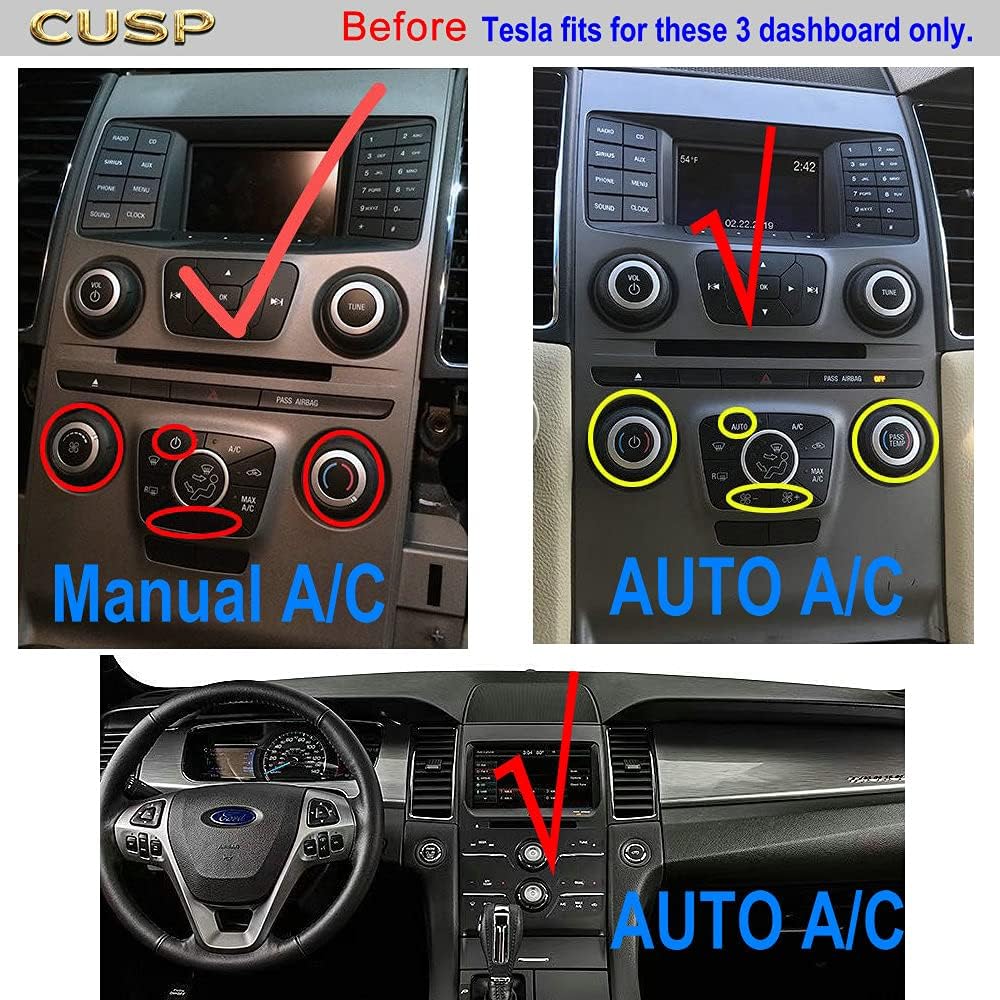
Figure 3: A visual guide illustrating compatible Ford Taurus dashboard configurations for both Manual A/C and AUTO A/C systems, highlighting the specific areas that need to match for proper fitment of the CUSP stereo.

Figure 4: A side-by-side comparison showing the original Ford Taurus dashboard setup and the same dashboard after the successful installation of the CUSP Android Car Stereo, demonstrating its seamless integration.
3. Installation Steps (Overview)
- Disconnect the vehicle's battery.
- Carefully remove the factory radio and dashboard trim.
- Connect the provided OEM harness to the vehicle's wiring and the new head unit.
- Connect the GPS antenna, radio antenna, and other necessary cables (USB, RCA, camera).
- Secure the new head unit in the dashboard.
- Reconnect the vehicle's battery and test all functions.
For detailed wiring diagrams and specific vehicle disassembly instructions, please refer to a professional automotive technician or a dedicated Ford Taurus service manual.
Operating Instructions
Your CUSP Android Car Stereo offers a wide range of features for an enhanced in-car experience.
1. Basic Navigation and Interface
The 13.3-inch 4K IPS capacitive touchscreen provides intuitive control. Navigate through applications and settings by tapping and swiping. The main screen displays essential information and quick access icons.
Video 1: An overview of the CUSP Car Stereo Radio GPS Navigation System for Ford Taurus, demonstrating its various functions including radio, video playback, Bluetooth connectivity, Google Maps navigation, and Car Play/Android Auto integration. The video also shows the split-screen feature and reverse camera view.
2. GPS Navigation
The unit comes with built-in GPS navigation and supports both online and offline maps (e.g., Google Maps, Igo, Waze). It features voice guidance and 2D/3D map views. The GPS dual zone function allows you to enjoy music or radio while navigating.

Figure 5: The car stereo display showcasing a variety of pre-installed and downloadable applications, including popular navigation apps like Google Maps and Waze, alongside entertainment and social media platforms, demonstrating the system's extensive app compatibility.

Figure 6: The car stereo display showing a GPS map interface, indicating its built-in navigation capabilities and support for automatic and manual station searches.
3. Car Play & Android Auto
The unit supports both wired and wireless Car Play for iPhones and wired Android Auto for Android phones. This allows seamless integration of your smartphone's features, including navigation, music, calls, and messages, directly on the stereo screen.

Figure 7: The car stereo display demonstrating the Wireless & Wired Car Play and Android Auto functionalities, showing how smartphone interfaces are mirrored and controlled on the large screen.

Figure 8: A visual representation of the Car Play and Android Auto interfaces as displayed on the CUSP car stereo, highlighting their support for both wired and wireless connections for iPhone and Android devices respectively.
4. Bluetooth Functionality
Connect your smartphone via Bluetooth for hands-free calling and audio streaming (A2DP). The system supports phonebook access, name search, and caller ID display.
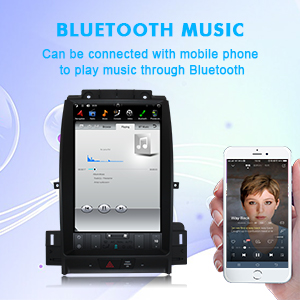
Figure 9: The car stereo display illustrating the Bluetooth (BT) function, including phonebook access with name search, caller ID for incoming/dialed/missed calls, and support for BT music streaming (A2DP).

Figure 10: A user holding a smartphone, demonstrating how the device can be connected to the car stereo via Bluetooth for seamless music playback, highlighting the Bluetooth music feature.
5. Multimedia Playback
The system supports various audio and video formats (MKV, MP4, 3GP, AVI, etc.). Enjoy your favorite media directly on the 4K IPS screen. It also features a built-in DSP (Digital Signal Processor) for enhanced audio quality and customization.

Figure 11: The car stereo display showcasing the built-in DSP (Digital Signal Processor) for audio customization and the video player interface, indicating support for various video formats and a strong amplifier IC for good music.

Figure 12: The car stereo display showing a video playing, confirming its capability as a video player supporting formats like MKV, MP4, 3GP, and AVI.

Figure 13: The car stereo display highlighting the built-in DSP (Digital Signal Processor) function, which includes a strong amplifier IC to deliver high-quality audio, allowing users to adjust sound settings.
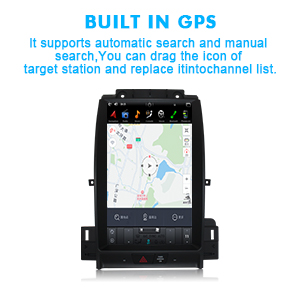
Figure 14: The car stereo display showing the radio mode interface, with options for radio, music, and navigation, emphasizing vibrant bass and a compact design.
Maintenance
To ensure the longevity and optimal performance of your CUSP car stereo, follow these maintenance guidelines:
- Screen Cleaning: Use a soft, lint-free cloth to gently wipe the touchscreen. For stubborn smudges, slightly dampen the cloth with water or a screen-safe cleaner. Avoid abrasive materials or harsh chemicals.
- Software Updates: Periodically check for software updates to ensure the system has the latest features, bug fixes, and security enhancements. Updates can typically be performed via Wi-Fi.
- Ventilation: Ensure the unit's ventilation areas are not obstructed to prevent overheating.
- Cable Connections: Occasionally check all cable connections at the rear of the unit to ensure they are secure and free from corrosion.
Troubleshooting
This section addresses common issues you might encounter. If the problem persists, contact customer support.
| Problem | Possible Cause | Solution |
|---|---|---|
| No power/Unit does not turn on | Loose power connection, blown fuse, vehicle battery issue. | Check power cable connections. Inspect the unit's fuse and vehicle's fuse box. Ensure vehicle battery is charged. |
| No sound | Volume too low, mute activated, loose speaker wires, incorrect audio settings. | Increase volume. Check if mute is on. Verify speaker wire connections. Adjust audio output settings. |
| GPS not acquiring signal | GPS antenna not properly connected or obstructed, outdated map data. | Ensure GPS antenna is securely connected and has a clear view of the sky. Update map software if necessary. |
| Bluetooth connection issues | Device not in pairing mode, interference, incorrect pairing procedure. | Ensure Bluetooth is enabled on both devices and in pairing mode. Delete previous pairings and re-pair. Move closer to the unit. |
| Touchscreen unresponsive | System freeze, dirty screen, hardware issue. | Restart the unit (if possible). Clean the screen. If persistent, contact support. |
Specifications
Key technical specifications of the CUSP Android Car Stereo:
| Feature | Detail |
|---|---|
| Operating System | Android 9 |
| Processor | Six Core Rockchip PX6 CPU |
| RAM | 4GB |
| ROM (Internal Storage) | 64GB |
| Screen Size | 13.3 Inches |
| Display Type | IPS HD 4K Capacitive Touch Screen |
| Resolution | 1920*1080 |
| Video Support | 4K Video Playback (MKV, MP4, 3GP, AVI, etc.) |
| Connectivity | Bluetooth (5.0), Cellular, USB, Wi-Fi |
| Navigation | Built-in GPS, Supports online/offline maps (Google Maps, Igo, Waze) |
| Smartphone Integration | Wired & Wireless Car Play, Wired Android Auto |
| Audio Features | Built-in DSP, Subwoofer connector, Audio/Video input/output |
| Voice Control | Supported |
| Steering Wheel Control | Supported |
| Item Weight | 8.88 pounds |
| Package Dimensions | 18 x 12.5 x 9.5 inches |
| Model Number | CV-F637 & F637H |
Warranty and Support
For warranty information and technical support, please refer to the contact details provided by CUSP Manufacturer Direct or your point of purchase. Keep your purchase receipt as proof of purchase for warranty claims.
Typical return policy allows for refund/replacement within 30 days. Protection plans may also be available for extended coverage.
Ask a question about this manual
Ask about setup, troubleshooting, compatibility, parts, safety, or missing instructions. Manuals+ will review the question and use this page’s manual context to help answer it.