
GAN 356 i Carry 2
GAN 356 i Carry 2 Smart Speed Cube User Manual
Brand: GAN | Model: 356 i Carry 2
1. Introduction
The GAN 356 i Carry 2 is a smart 3x3 speed cube designed to enhance your cubing experience. It features magnetic positioning, intelligent movement tracking, and connects seamlessly with the CubeStation app for interactive learning, online competition, and performance analysis. This manual provides essential instructions for setting up, operating, and maintaining your GAN 356 i Carry 2 Smart Speed Cube.

Image 1.1: The GAN 356 i Carry 2 Smart Speed Cube connected to the CubeStation app.
2. What's in the Box
Verify that all the following items are included in your product packaging:
- GAN 356 i Carry 2 Smart Cube
- Identity Card
- AI Tutorial Card
- User Manual (this document)
- GAN Box
- Storage Bag
- Adjustment Tool
- Beginner & CFOP Tutorial

Image 2.1: Packaging and included accessories for the GAN 356 i Carry 2.
3. Setup
3.1 Battery Installation
The GAN 356 i Carry 2 cube comes with a pre-installed Lithium Metal button cell battery. If replacement is needed, please refer to the 'Maintenance' section of this manual.
3.2 App Download
Download the official CubeStation app from your device's app store:
- For Android devices: Search 'CubeStation' on Google Play Store.
- For iOS devices: Search 'CubeStation' on Apple App Store.
3.3 Pairing Your Cube
- Ensure Bluetooth is enabled on your smartphone or tablet.
- Open the CubeStation app.
- The cube will automatically activate when moved. Follow the on-screen instructions within the app to detect and pair your GAN 356 i Carry 2 cube.
- If prompted, create an account to access all app features.

Image 3.1: The GAN 356 i Carry 2's smart chip and connectivity with the CubeStation app.
4. Operating Instructions
4.1 Basic Cube Operation
The GAN 356 i Carry 2 functions as a high-performance speed cube, offering smooth turns and precise magnetic feedback. Practice various algorithms and solving methods as you would with any standard speed cube.
4.2 CubeStation App Features
The CubeStation app unlocks the full potential of your smart cube:
- Real-time Tracking: The app tracks your cube's movements, providing detailed data on turns per second (TPS), move counts, and solve times for performance analysis.
- Tutorials: Access animated video guides, step-by-step instructions, and AI-escorted solving assistance to learn various algorithms and solving methods (e.g., CFOP).
- Online Competition: Participate in real-time battles, leagues, tournaments, and global leaderboards with other cubers worldwide.
- Practice Modes: Utilize various practice modes to improve specific aspects of your cubing, such as F2L, OLL, and PLL.

Image 4.1: AI Tutorial features within the CubeStation app.
4.3 Tension Adjustment
The GAN 356 i Carry 2 features 12 levels of customizable tension. Use the included adjustment tool to modify the tension to your preference. This allows you to fine-tune the cube's feel for optimal speed and stability.
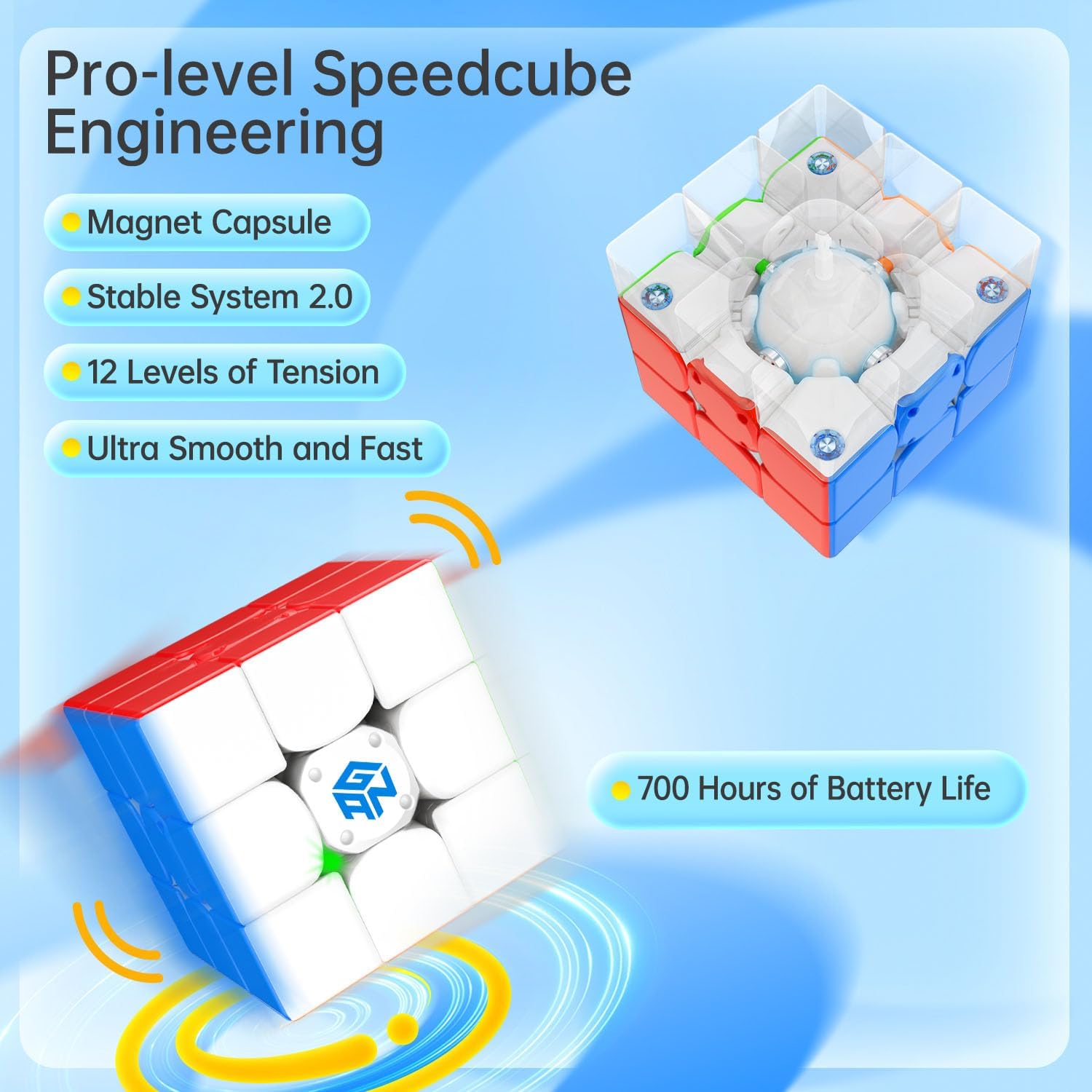
Image 4.2: Internal engineering highlighting tension adjustment and magnetic system.
5. Maintenance
5.1 Battery Replacement
The GAN 356 i Carry 2 uses a replaceable button cell battery (Lithium Metal, type CR1632). The battery life is approximately 700 hours.
- Locate the battery compartment on the cube.
- Carefully open the compartment using a small screwdriver or the edge of the adjustment tool.
- Remove the old battery.
- Insert a new CR1632 battery, ensuring correct polarity (+ side up).
- Close the compartment securely.
5.2 Cleaning
Wipe the cube with a soft, dry cloth to remove dust and fingerprints. Avoid using harsh chemicals, solvents, or abrasive materials, as these can damage the cube's surface and internal components.
6. Troubleshooting
If you encounter issues with your GAN 356 i Carry 2, refer to the following common solutions:
- Connectivity Issues:
- Ensure Bluetooth is active on your smartphone or tablet.
- Make sure the CubeStation app is updated to the latest version.
- Restart the CubeStation app and your device.
- Check if the cube's battery needs replacement.
- App Functionality:
- If the app crashes or experiences errors, try clearing the app cache or reinstalling the app.
- Ensure a stable internet connection for online features and updates.
- Cube Performance:
- If the cube feels too loose or too tight, adjust the tension using the provided tool.
- If movements are not tracking correctly, ensure the cube is clean and free from debris.
7. Specifications
| Product Dimensions | 2.2 x 2.2 x 0.1 inches |
| Item Weight | 7.8 ounces |
| Model Number | 356 i Carry 2 |
| Battery Type | 1 Lithium Metal battery (CR1632), included and replaceable |
| Battery Life | Approximately 700 hours |
| Connectivity | Bluetooth |
| Recommended Age | 6 years and up |
| Manufacturer | GAN |
8. Safety Information
WARNING:
- Not suitable for children under 72 months (6 years) due to small parts which may present a choking hazard.
- This product contains small magnets. Ingested magnets can stick across intestines causing serious injury. Seek immediate medical attention if magnets are swallowed.
9. Warranty and Support
For detailed warranty information, product support, or to contact customer service, please visit the official GAN website or reach out through the CubeStation app. Please retain your purchase receipt as proof of purchase for any warranty claims.
Official GAN Store: GAN Store on Amazon
Related documents356 i Carry 2


Ask a question about this manual
Ask about setup, troubleshooting, compatibility, parts, safety, or missing instructions. Manuals+ will review the question and use this page’s manual context to help answer it.