1. Introduction
Thank you for choosing the Orbegozo DH 1250 Dehumidifier. This manual provides essential information for the safe and efficient operation, maintenance, and troubleshooting of your appliance. Please read it thoroughly before use and keep it for future reference. This dehumidifier is designed to reduce humidity levels in indoor spaces up to 40 square meters, helping to prevent mold, mildew, and other moisture-related issues.
2. Safety Instructions
To ensure safe operation, always adhere to the following precautions:
- Ensure the power supply matches the voltage specified on the appliance's rating label (230V).
- Do not operate the dehumidifier with a damaged cord or plug.
- Place the unit on a stable, level surface to prevent water spillage.
- Maintain at least 20 cm (8 inches) clearance around the air inlet and outlet for proper airflow.
- Do not insert objects into the air vents.
- Unplug the unit before cleaning, moving, or performing any maintenance.
- This appliance uses R290 refrigerant, which is flammable. Handle with care and ensure proper ventilation during maintenance or repair.
- Keep the appliance out of reach of children and pets.
- Do not use the appliance in areas where flammable gases or liquids are stored.
- Do not immerse the unit in water or other liquids.
3. Product Overview
Familiarize yourself with the components of your Orbegozo DH 1250 Dehumidifier.
Main Components:
- Main Unit: Houses the compressor, fan, and control electronics.
- Control Panel: Located on the top, for setting operation modes and monitoring status.
- Water Tank: Removable tank for collecting condensed water.
- Air Filter: Reusable filter located at the air inlet.
- Handles and Wheels: For easy portability.
- Continuous Drain Outlet: For connecting a hose for continuous water drainage.
Control Panel:
The control panel features various buttons and indicator lights:
- Power Button: To turn the unit on or off.
- Humidity Setting Button: To cycle through desired humidity levels (40%, 50%, 60%, Continuous).
- Operation Indicator Light: Illuminates when the unit is running.
- Full Tank Indicator Light: Illuminates when the water tank is full and needs emptying.
- Defrost Indicator Light: Illuminates when the unit is in defrost mode.
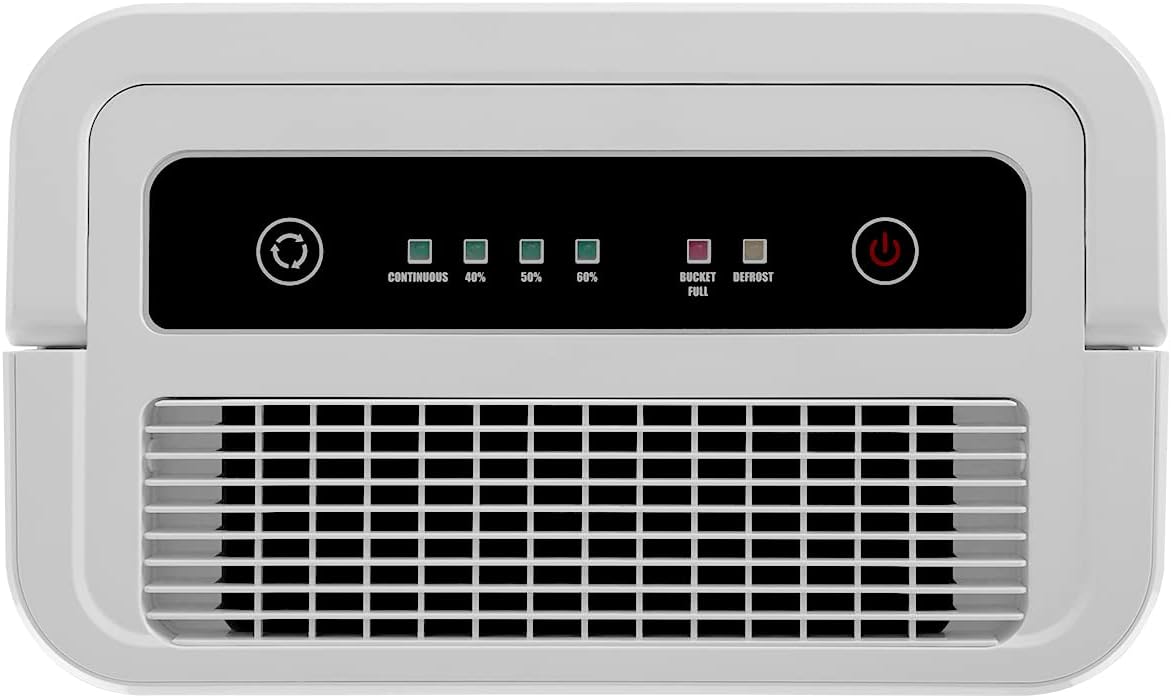
Figure 1: Control Panel of the DH 1250 Dehumidifier. This image shows the top-mounted control panel with buttons for power and humidity settings, along with indicator lights for continuous operation, 40%, 50%, 60% humidity, bucket full, and defrost.

Figure 2: Top view of the DH 1250 Dehumidifier. This image displays the top of the unit, highlighting the integrated handle for portability and the control panel.

Figure 3: Front view of the DH 1250 Dehumidifier. The image shows the front of the white dehumidifier, featuring its compact design and bottom-mounted wheels for easy movement.

Figure 4: Side view of the DH 1250 Dehumidifier. This image illustrates the side of the unit, clearly showing the removable water tank with its viewing window.
4. Setup
Follow these steps to set up your dehumidifier:
- Unpacking: Carefully remove the dehumidifier from its packaging. Retain the packaging for future storage or transport.
- Placement: Place the unit upright on a firm, level surface in the room where dehumidification is desired. Ensure there is at least 20 cm (8 inches) of space around all sides of the unit for proper air circulation. The recommended application area is up to 40 square meters.
- Power Connection: Plug the power cord into a grounded electrical outlet (230V).
- Water Tank: Ensure the water tank is correctly inserted into the unit. The unit will not operate if the tank is not properly seated or is full.
- Continuous Drainage (Optional): For continuous operation without needing to empty the water tank, connect a suitable drainage hose (not included) to the continuous drain outlet. Ensure the hose is sloped downwards to allow gravity drainage into a floor drain or larger container.
5. Operating Instructions
Operating your Orbegozo DH 1250 Dehumidifier is straightforward:
- Power On: Press the Power button on the control panel. The operation indicator light will illuminate, and the unit will begin to operate.
- Set Humidity Level: Press the Humidity Setting button repeatedly to cycle through the desired humidity levels: 40%, 50%, 60%, or Continuous. The corresponding indicator light will illuminate.
- 40%, 50%, 60%: The unit will operate until the room's humidity reaches the set level, then it will cycle on and off to maintain it.
- Continuous: The unit will operate continuously, regardless of the humidity level, until the water tank is full or the unit is turned off. This mode is ideal for very damp conditions or for use with continuous drainage.
- Emptying the Water Tank: When the water tank is full, the Full Tank indicator light will illuminate, and the unit will stop operating. Carefully remove the water tank, empty it, and reinsert it firmly into the unit. The dehumidifier will resume operation automatically.
- Anti-freeze System: The unit is equipped with an automatic anti-freeze system. If the coil temperature drops too low, the defrost indicator light will illuminate, and the unit will temporarily stop dehumidifying to melt any ice buildup. This is normal operation and ensures efficient performance in cooler environments.
- Power Off: Press the Power button again to turn off the unit.
6. Maintenance
Regular maintenance ensures optimal performance and longevity of your dehumidifier.
Cleaning the Air Filter:
The reusable anti-dust filter should be cleaned every two weeks or more frequently depending on usage and air quality.
- Turn off the unit and unplug it from the power outlet.
- Locate the air filter cover, usually on the back or side of the unit.
- Gently pull out the filter.
- Clean the filter with a vacuum cleaner or wash it with warm, soapy water. Rinse thoroughly and allow it to air dry completely before reinserting.
- Reinsert the dry filter and close the cover.

Figure 5: Removing the Air Filter. This image shows a hand pulling out the reusable anti-dust filter from the side of the dehumidifier for cleaning.
Cleaning the Water Tank:
Clean the water tank periodically to prevent mold and bacteria growth.
- Turn off the unit and unplug it.
- Remove the water tank.
- Wash the tank with mild detergent and warm water. Rinse thoroughly.
- Dry the tank completely before reinserting it into the unit.
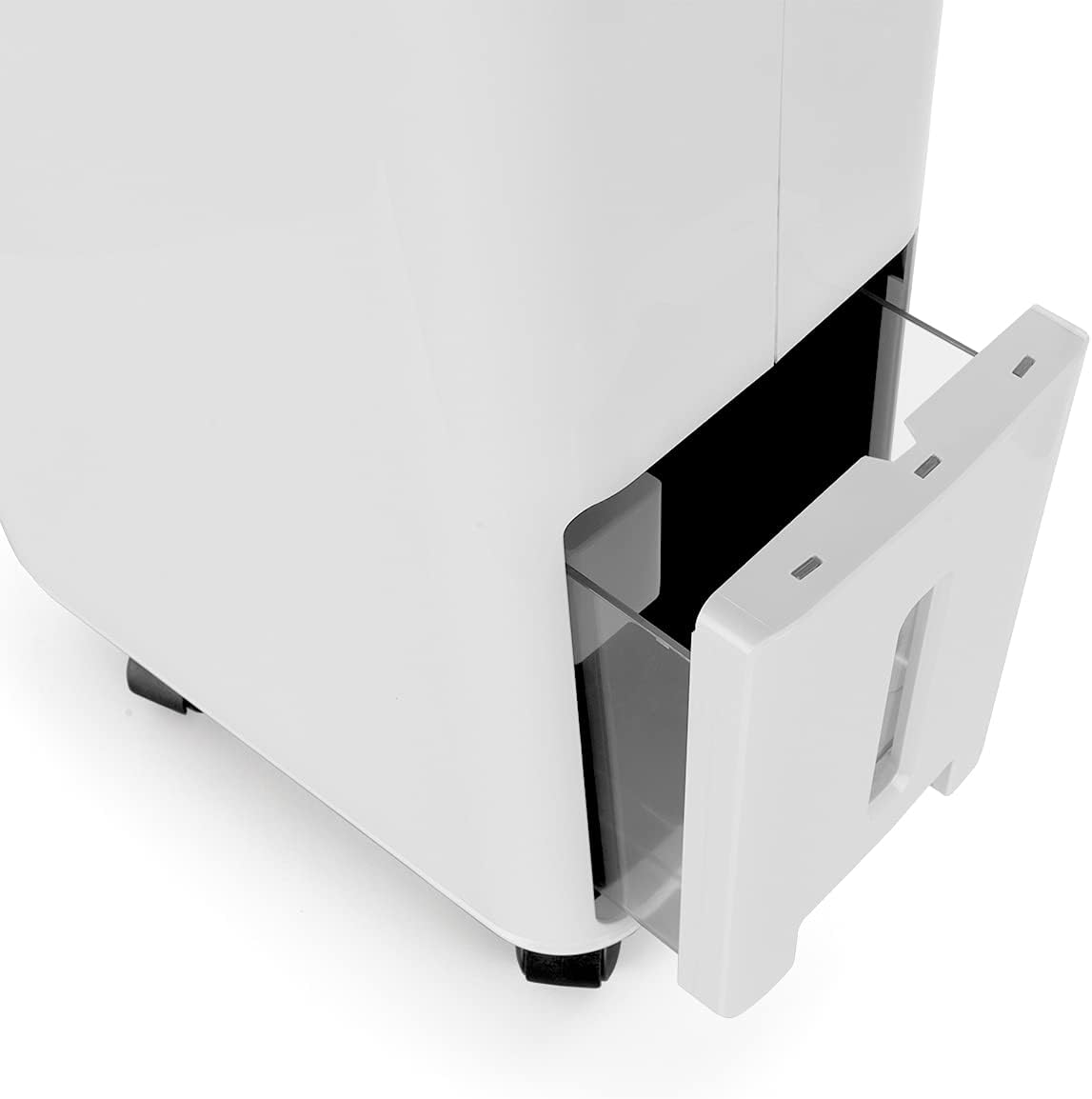
Figure 6: Removing the Water Tank. This image shows the water tank being pulled out from the front-lower section of the dehumidifier.
Cleaning the Exterior:
Wipe the exterior of the unit with a soft, damp cloth. Do not use harsh chemicals or abrasive cleaners.
Storage:
If storing the unit for an extended period, ensure the water tank is empty and clean, and the filter is clean and dry. Store the unit upright in a cool, dry place, preferably in its original packaging.
7. Troubleshooting
Before contacting customer support, try the following solutions for common issues:
| Problem | Possible Cause | Solution |
|---|---|---|
| Unit does not turn on. | No power supply; Power cord not plugged in; Water tank full or not properly inserted. | Check power connection; Empty and reinsert water tank correctly. |
| No dehumidification. | Air filter clogged; Room temperature too low; Humidity level already reached; Defrost mode active. | Clean the air filter; Ensure room temperature is above 5°C; Adjust desired humidity setting; Wait for defrost cycle to complete. |
| Water tank full indicator is on, but tank is not full. | Water tank not properly seated; Float switch malfunction. | Remove and reinsert the water tank firmly; If problem persists, contact support. |
| Unit is noisy. | Unit not on a level surface; Air filter clogged; Internal components vibrating. | Place on a level surface; Clean the air filter; If noise is excessive or unusual, contact support. |
| Defrost indicator is on. | Coil temperature is too low, unit is defrosting. | This is normal operation. The unit will resume dehumidifying once defrosting is complete. |
8. Specifications
Technical specifications for the Orbegozo DH 1250 Dehumidifier:
| Feature | Specification |
|---|---|
| Model | DH 1250 |
| Brand | Orbegozo |
| Dehumidification Capacity | 12 Liters/day |
| Refrigerant | R290 |
| Water Tank Capacity | 3 Liters |
| Recommended Area | Up to 40 m² |
| Power Consumption | 265 W |
| Voltage | 230 V |
| Noise Level | 40 dB |
| Dimensions (D x W x H) | 19.5 cm x 31.5 cm x 50 cm |
| Weight | 10 kg |
| Special Features | Anti-freeze system, Reusable anti-dust filter, Humidity adjustment (40%, 50%, 60%, Continuous) |

Figure 7: Product Dimensions. This diagram illustrates the height (50.01 cm), width (31.5 cm), and depth (19.51 cm) of the Orbegozo DH 1250 dehumidifier.
9. Warranty and Support
Your Orbegozo DH 1250 Dehumidifier comes with a manufacturer's warranty. Please refer to the warranty card included with your purchase or the retailer's terms and conditions for specific details regarding coverage and duration.
For technical assistance, troubleshooting beyond this manual, or to inquire about warranty service, please contact your retailer or the Orbegozo customer support line. Keep your proof of purchase handy when contacting support.


