
Sena SPIDER-ST1-01
Sena Spider ST1 Motorcycle Mesh Communication System User Manual
Model: SPIDER-ST1-01
Product Overview
The Sena Spider ST1 is a Mesh-equipped communication headset designed for motorcycle riders. It features a glove-friendly jog-dial control and operates exclusively on Sena's Mesh intercom platform. This system enhances rider-to-rider communication with robust reliability, offering both Multi-Channel Open Mesh and Group Mesh modes. It includes upgraded HD Speakers for improved audio quality and is compatible with the Sena Motorcycle App.

Image: Front view of the Sena Spider ST1 communication system, showing the main unit with the jog dial and LED indicator.
Package Contents
The Sena Spider ST1 package typically includes the following components:
- Communication Device (Sena Spider ST1 unit)
- USB Charging Cable
- Speaker Set (HD Speakers)
- Microphone (Boom or Wired, depending on kit)
- Mounting Hardware (Clamp Kit, Glued Surface Mounting Plate)
- Velcro Pads for Speakers and Microphone
Setup and Installation
1. Charging the Device
Before first use, fully charge the Sena Spider ST1. Connect the provided USB charging cable to the device's charging port and a USB power source. The LED indicator will show charging status.
- Charging Time: Approximately 2.5 hours for a full charge.
- Battery Life: Up to 12 hours of talk time.
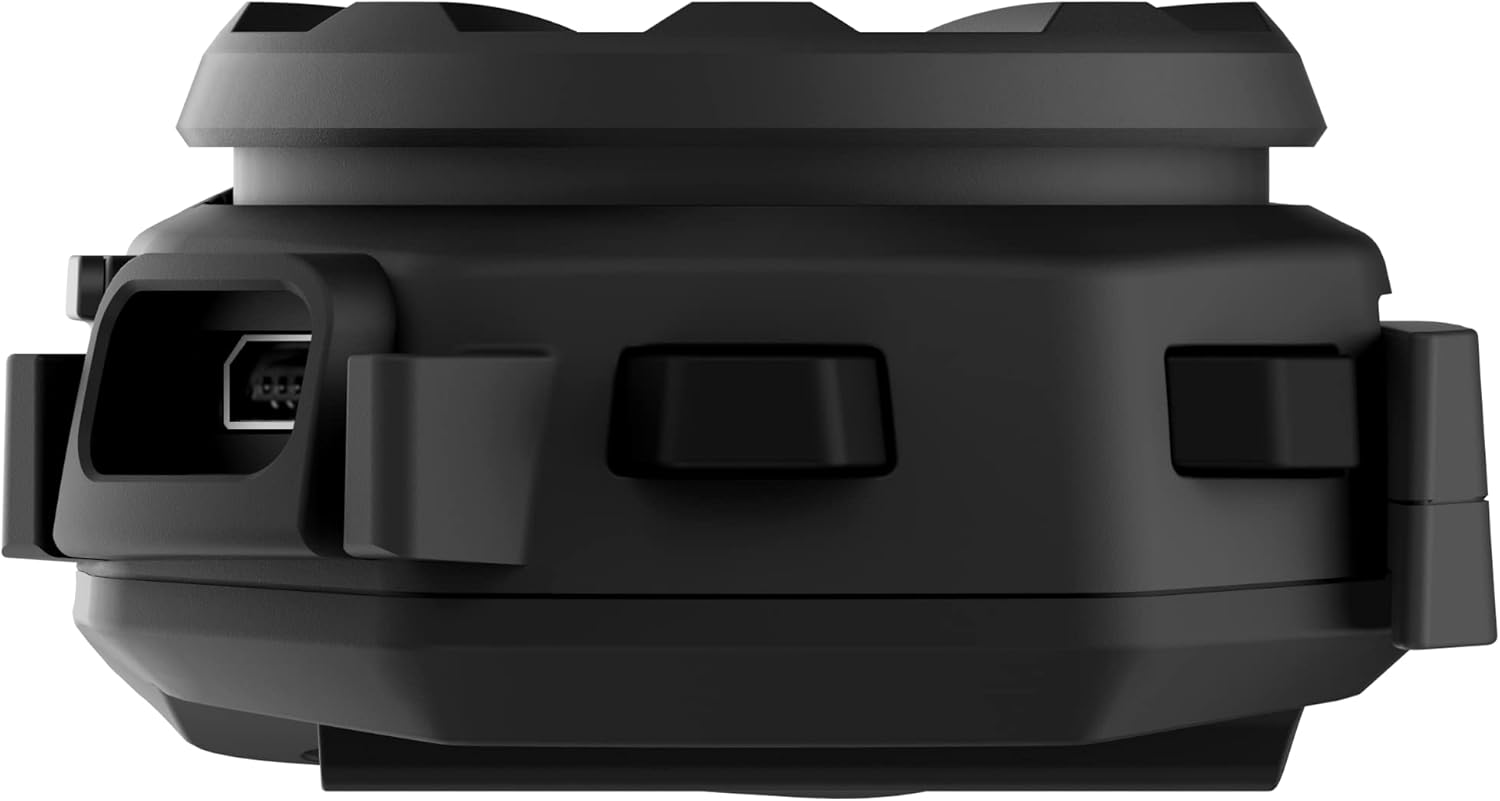
Image: Side view of the Sena Spider ST1 unit, highlighting the USB charging port for power connection.
2. Mounting on Helmet
The Spider ST1 can be mounted using either the clamp kit or the glued surface mounting plate. Ensure the mounting location allows for easy access to the jog dial and does not obstruct helmet functionality.
- Choose Location: Select a flat surface on the left side of your helmet.
- Attach Mount: Securely attach the chosen mounting accessory (clamp or adhesive plate) to the helmet.
- Install Speakers: Place the HD Speakers inside the helmet's ear pockets using the Velcro pads. Ensure they are positioned directly over your ears for optimal audio quality.
- Install Microphone: Attach the microphone to the helmet, positioning it close to your mouth but not directly in front of it to avoid wind noise.
- Attach Main Unit: Slide the Spider ST1 main unit onto the mounted accessory until it clicks securely into place.

Image: The Sena Spider ST1 communication system securely mounted on the side of a motorcycle helmet, with its LED indicator illuminated.
Operating Instructions
Power On/Off
- Power On: Press and hold the Jog Dial for 1 second.
- Power Off: Press and hold the Jog Dial for 5 seconds.
Volume Control
- Increase Volume: Rotate the Jog Dial clockwise.
- Decrease Volume: Rotate the Jog Dial counter-clockwise.
Mesh Intercom
The Spider ST1 utilizes Sena's Mesh Intercom technology for seamless group communication.
- Mesh Intercom On/Off: Press the Mesh Intercom Button (located on the side of the unit).
- Multi-Channel Open Mesh: Allows communication with a near-limitless number of riders. Switch between 9 channels using the Sena Motorcycle App.
- Group Mesh: Supports up to 24 participants in a private group. Create and manage groups via the Sena Motorcycle App.

Image: A screenshot displaying the user interface of the Sena Motorcycle App, showing options for Mesh Grouping and Channel selection.
Smartphone Connectivity (Bluetooth 5.1)
Connect your Spider ST1 to your smartphone for music, phone calls, and GPS navigation.
- Pairing Mode: With the unit off, press and hold the Jog Dial for 5 seconds until the LED flashes red and blue.
- Connect: On your smartphone, go to Bluetooth settings and select "Sena Spider ST1" from the list of available devices.
- Functions:
- Music Play/Pause: Press the Jog Dial.
- Next Track: Rotate Jog Dial clockwise and hold for 1 second.
- Previous Track: Rotate Jog Dial counter-clockwise and hold for 1 second.
- Answer/End Call: Press the Jog Dial.
- Voice Assistant (Siri/Google Assistant): Press the Jog Dial for 3 seconds.
Maintenance and Care
- Cleaning: Wipe the unit with a soft, damp cloth. Do not use harsh chemicals or abrasive cleaners.
- Storage: Store the device in a cool, dry place when not in use.
- Battery Care: For optimal battery life, avoid storing the device in extremely hot or cold conditions. Charge the battery at least once every six months if not used regularly.
- Water Resistance: The device is water resistant, but not fully waterproof. Avoid submerging it in water.
Troubleshooting
| Problem | Possible Cause | Solution |
|---|---|---|
| Device does not power on. | Low battery. | Charge the device fully. |
| No audio from speakers. | Speakers not connected properly or volume too low. | Check speaker connections. Increase volume using the Jog Dial. |
| Cannot connect to Mesh Intercom. | Mesh Intercom is off or out of range. | Ensure Mesh Intercom is enabled. Move closer to other Mesh users. |
| Bluetooth pairing issues. | Device not in pairing mode or smartphone Bluetooth is off. | Put the Spider ST1 in pairing mode. Ensure smartphone Bluetooth is on and visible. Try restarting both devices. |
| Poor microphone quality. | Microphone not positioned correctly or obstructed. | Adjust microphone position closer to your mouth. Ensure it is not blocked by helmet padding. |
Specifications
| Feature | Detail |
|---|---|
| Model Name | SPIDER |
| Item Model Number | SPIDER-ST1-01 |
| Material | Rubber |
| Color | Black |
| Item Weight | 60 Grams (2.12 ounces) |
| Product Dimensions | 1.8"D x 3.8"W x 1"H |
| Battery Life | 12 Hours (Talk Time) |
| Charging Time | 2.5 Hours |
| Bluetooth Version | 5.1 |
| Wireless Communication Technology | Bluetooth, Mesh Intercom |
| Maximum Mesh Range | Up to 5 Miles (8 km) |
| Speaker Maximum Output Power | 100 Watts |
| Frequency Response | 10000 Hz |
| Water Resistance Level | Water Resistant |
| Included Components | Communication Device, Cable |
Warranty and Support
Warranty Information
The Sena Spider ST1 comes with a 2-Year Warranty from the date of purchase. This warranty covers defects in materials and workmanship under normal use. Please retain your proof of purchase for warranty claims.
Customer Support
For further assistance, technical support, or warranty inquiries, please refer to the official Sena resources:
- Official User Manual (PDF): Download PDF Manual
- Sena Official Store: Visit Sena Store on Amazon
- For the most up-to-date support information, visit the official Sena website.
Related documentsSPIDER-ST1-01


Ask a question about this manual
Ask about setup, troubleshooting, compatibility, parts, safety, or missing instructions. Manuals+ will review the question and use this page’s manual context to help answer it.