
Introduction
The Microlife BPB6 Connect is an advanced automatic arm blood pressure monitor designed for accurate and reliable blood pressure measurement at home. It features clinically validated technology, including MAM (Microlife Average Mode) for multiple measurements and AFIBsens technology for atrial fibrillation detection, aiding in stroke prevention. With Bluetooth connectivity, it allows seamless data synchronization with your smartphone or PC for easy health monitoring and tracking.

Image: The Microlife BPB6 Connect blood pressure monitor with its arm cuff, displaying a digital reading.
Package Contents
Please check the package contents to ensure all items are present:
- Microlife BPB6 Connect Blood Pressure Monitor
- Universal Arm Cuff (22-42 cm)
- 4 x AA Batteries
- AC Adapter
- USB Cable
- Storage Bag
- Instruction Manual (this document)
- Software Download Voucher
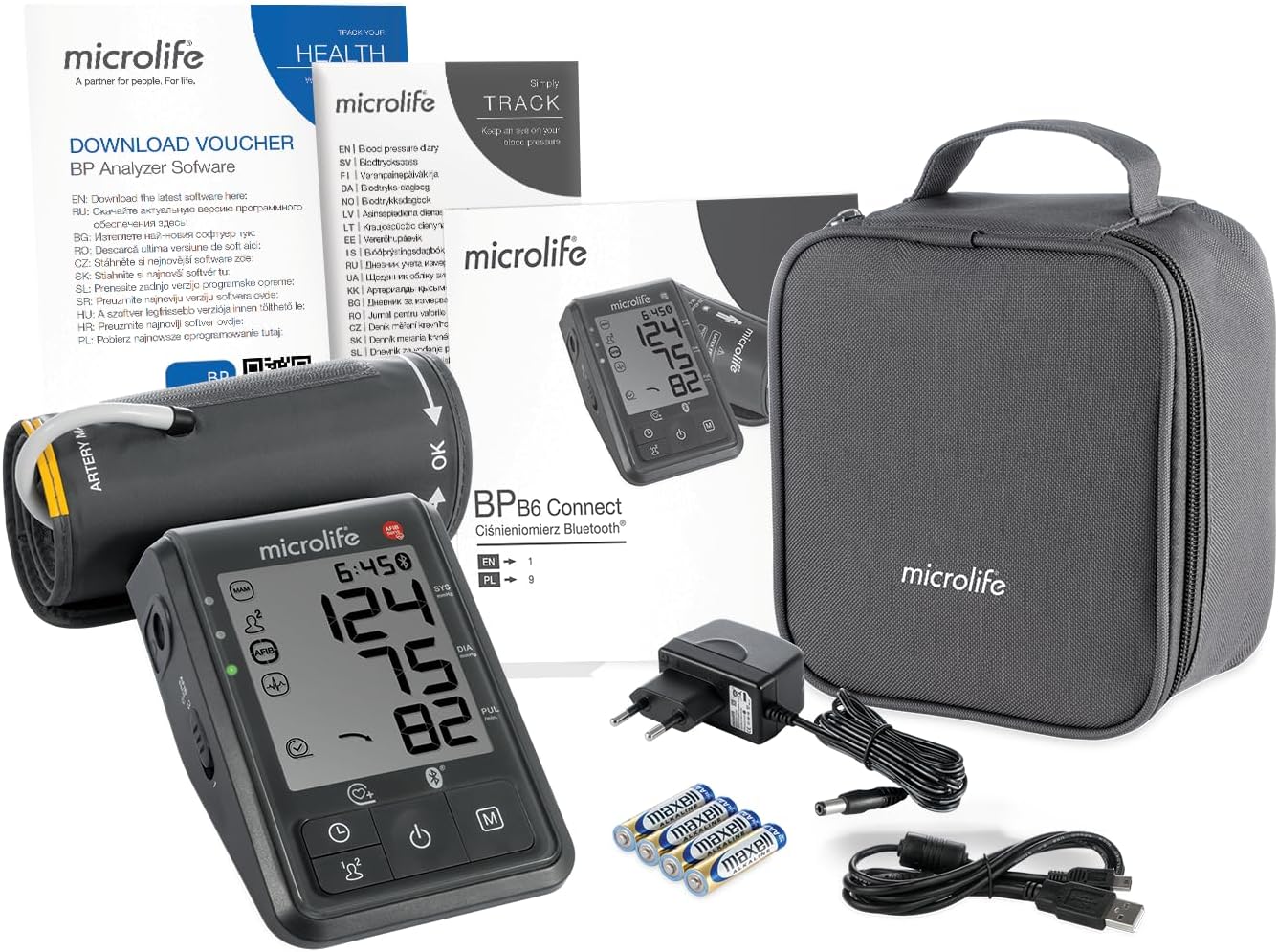
Image: All items included in the Microlife BPB6 Connect package, including the monitor, cuff, batteries, charger, USB cable, storage bag, and software voucher.
Key Features

Advanced Measurement Technologies
The BPB6 Connect incorporates several advanced technologies for accurate and comfortable measurements:
- MAM (Microlife Average Mode): Automatically takes three successive measurements to provide a more reliable average blood pressure reading.
- AFIBsens Technology: Detects Atrial Fibrillation (AF), a common heart arrhythmia, during blood pressure measurement, which is crucial for early stroke prevention.
- IHB (Irregular Heartbeat) Detection: Identifies irregular heartbeats during measurement.
- Gentle+: Ensures a more comfortable measurement experience by optimizing cuff inflation pressure.
- Good Positioning Indicator: Guides the user to ensure correct cuff placement for accurate readings.
- Cardiovascular Risk Indicator: Provides an indication of potential cardiovascular risk based on blood pressure readings.
Image: A doctor observing a patient, with icons illustrating features like good positioning, cardiovascular risk, Gentle+ comfort, and IHB detection.
Connectivity and Data Management
The device offers seamless data management for comprehensive health tracking:
- Bluetooth Connectivity: Easily syncs measurement data to the Microlife Connected Health+ app on your smartphone.
- USB Connectivity: Allows data transfer to a PC for detailed analysis using the provided software.
- Secure Cloud Save: Your health data can be securely stored in the cloud, enabling easy access and sharing with healthcare professionals.
- Two-User Memory: Stores up to 99 measurements for two individual users, with date and time stamps.
Image: A hand holding a smartphone displaying the Microlife Connected Health+ app, with icons for App Store, Google Play, Bluetooth, secure cloud save, and health tracking.


Professional and Clinically Validated
Microlife is committed to providing high-quality, reliable medical devices:
- Clinically Validated: The BPB6 Connect has undergone rigorous clinical validation to ensure its accuracy and reliability, recommended by doctors.
- Professional Accuracy: Designed to provide precise measurements for effective health monitoring.
- Exclusive Manufacturer for Health Insurance: Highlights Microlife's trusted position in the healthcare industry.
- 5-Year Warranty: Demonstrates confidence in product quality and durability.
Image: An elderly woman measuring her blood pressure, with icons highlighting professional accuracy, doctor recommendation, and 5-year warranty.
Setup
1. Battery Installation
- Open the battery compartment cover on the back of the device.
- Insert the four AA batteries (included) according to the polarity indicators (+/-) inside the compartment.
- Close the battery compartment cover securely.
- Alternatively, connect the AC adapter to the device and a power outlet for continuous power.
2. Cuff Attachment
- Ensure the cuff tube is securely plugged into the air jack on the side of the monitor.
- The universal cuff is designed for arm circumferences from 22 to 42 cm.
3. Initial Setup (Date and Time)
Upon first use or after battery replacement, the device may prompt you to set the date and time. Follow the on-screen instructions using the device buttons to adjust these settings for accurate record-keeping.
Operating Instructions
1. Before Measurement
- Avoid eating, smoking, or exercising for at least 30 minutes before measurement.
- Rest for 5-10 minutes in a quiet environment before taking a reading.
- Sit comfortably with your back supported and feet flat on the floor.
- Place your arm on a table so the cuff is at heart level.
- Ensure the cuff is directly on your bare skin, not over clothing.
2. Taking a Measurement (MAM Mode)
- Wrap the cuff firmly around your upper arm, ensuring it is snug but not too tight. The artery mark on the cuff should align with your brachial artery.
- Press the START/STOP button to turn on the device. The device will automatically enter MAM mode (three consecutive measurements).
- Remain still and silent during the measurement process. The device will inflate and deflate the cuff three times, with short pauses in between.
- After the third measurement, the average blood pressure (systolic and diastolic) and pulse rate will be displayed.
- If AFIB is detected, the AFIB symbol will appear on the display. Consult your doctor if this symbol appears regularly.
- Press the START/STOP button again to turn off the device, or it will automatically shut off after a period of inactivity.
3. Viewing Stored Measurements
Press the M (Memory) button to access stored measurements. Use the arrow buttons (if available) to scroll through previous readings for both users.
4. Connecting to App/PC
- Bluetooth: Enable Bluetooth on your smartphone and open the Microlife Connected Health+ app. Follow the app's instructions to pair your device and sync data.
- USB: Connect the device to your PC using the USB cable. Install the Microlife BP Analyzer software (downloadable via voucher) and follow its instructions to transfer and analyze data.
Maintenance and Care
- Cleaning: Clean the monitor and cuff with a soft, dry cloth. If necessary, use a cloth lightly dampened with water or a mild detergent. Do not use abrasive cleaners or immerse the device in water.
- Storage: Store the device in its storage bag in a cool, dry place, away from direct sunlight, extreme temperatures, and humidity.
- Battery Replacement: When the low battery indicator appears, replace all four AA batteries with new ones. Dispose of old batteries according to local regulations.
- Cuff Care: The cuff is washable. Refer to the cuff's label for specific washing instructions. Ensure the cuff is completely dry before reattaching it to the monitor.
Troubleshooting
| Problem | Possible Cause | Solution |
|---|---|---|
| Device does not turn on. | Batteries are dead or incorrectly inserted. | Replace batteries or check polarity. Ensure AC adapter is properly connected if using. |
| Error message (e.g., "ERR 1", "ERR 2"). | Cuff not properly attached, movement during measurement, or air leakage. | Re-attach cuff securely. Remain still and silent. Check cuff and tube for damage. |
| Inaccurate readings. | Incorrect cuff size, improper arm position, or not resting before measurement. | Ensure cuff fits correctly (22-42 cm). Position arm at heart level. Rest for 5-10 minutes before measuring. |
| Bluetooth connection issues. | Bluetooth off on phone, app not open, or device not in pairing mode. | Ensure Bluetooth is enabled on your phone. Open the Microlife Connected Health+ app. Restart both devices if necessary. |
If the problem persists, please refer to the detailed troubleshooting section in the full user manual or contact Microlife customer support.
Specifications
| Feature | Detail |
|---|---|
| Model Number | BPB6-Connect |
| Brand | Microlife |
| Power Source | 4 x AA Batteries (included) or AC Adapter |
| Display Type | LCD |
| Arm Circumference Range | 22 - 42 cm |
| Product Dimensions (L x W x H) | 21 x 17 x 10.5 cm |
| Item Weight | 415 Grams |
| Material Feature | Environmentally friendly |
| Memory | 99 measurements per user for 2 users |
| Connectivity | Bluetooth, USB |
Warranty and Support
The Microlife BPB6 Connect Blood Pressure Monitor comes with a 5-year warranty from the date of purchase, covering manufacturing defects and material flaws. Please retain your proof of purchase for warranty claims.
For technical support, troubleshooting assistance, or warranty inquiries, please visit the official Microlife website or contact their customer service department. Contact details can typically be found on the Microlife website or in the full user manual provided with your product.
Microlife is a global leader in diagnostic equipment, committed to providing reliable health solutions and excellent customer service.

Image: A man measuring his blood pressure with a Microlife device, illustrating the brand's commitment as a health partner and its global leadership in diagnostic equipment and clinical validations.


