Introduction
This instruction manual provides detailed information on the operation, maintenance, and troubleshooting of your KingSom Portable Bluetooth Pool Speaker, Model CT602. Please read this manual thoroughly before using the product to ensure proper function and longevity.

Image: The KingSom Portable Bluetooth Pool Speaker, Model CT602, shown floating in water. The upper part of the speaker is blue, and the lower part illuminates with a gradient of colors, indicating its light features. Water splashes around the speaker, highlighting its waterproof design.
Package Contents
Upon opening the package, please verify that all the following items are included:
- One (1) KingSom Floating Bluetooth Speaker
- One (1) Micro USB Charging Cable
- One (1) Quick Start Guide
Product Features
- IP68 Waterproof Rating: Fully submersible up to 3 feet for 2 hours, resistant to splashes, rain, and gentle sprays.
- Integrated Lighting: Features 8 color changing modes including single color, gradient, fast flash, slow flash, and color off. Lights can pulsate with music in slow flash mode.
- 360° Surround Stereo Sound: Equipped with a 6W speaker for immersive, dynamic audio with deep bass and crisp treble.
- Bluetooth 5.0 Technology: Provides a stable wireless connection up to 85 feet.
- Long Battery Life: Up to 7 hours of playtime on a full charge.
- Hands-Free Calling: Built-in microphone for answering calls.
- Automatic Power Management: Enters sleep mode after 20 minutes without pairing and automatically shuts down after 60 minutes of Bluetooth disconnection.

Image: A banner highlighting the key features of the KingSom Floating Pool Speaker, including Bluetooth 5.0, 8 Light Modes, Stereo Sound, and IP68 Waterproofing. The speaker is shown floating in a pool with people enjoying the water.
Setup Guide
1. Charging the Speaker
Before first use, fully charge the speaker. Locate the DC 5V charging jack on the top of the speaker. Connect the provided Micro USB charging cable to the speaker and the other end to a USB power adapter (not included) or a computer USB port. The charging time is approximately 7 hours for a full charge.
2. Powering On/Off
To power on the speaker, press and hold the Multifunction button (labeled with a power symbol) for a few seconds until you hear an audible prompt and the Bluetooth indicator light illuminates. To power off, press and hold the Multifunction button again until the speaker powers down.
3. Bluetooth Pairing
- Ensure the speaker is powered on and the Bluetooth indicator light is flashing blue, indicating it is in pairing mode.
- On your device (smartphone, tablet, etc.), enable Bluetooth and search for available devices.
- Select "KingSom CT602" from the list of found devices.
- Once paired successfully, the Bluetooth indicator light will turn solid blue, and you will hear a confirmation sound.
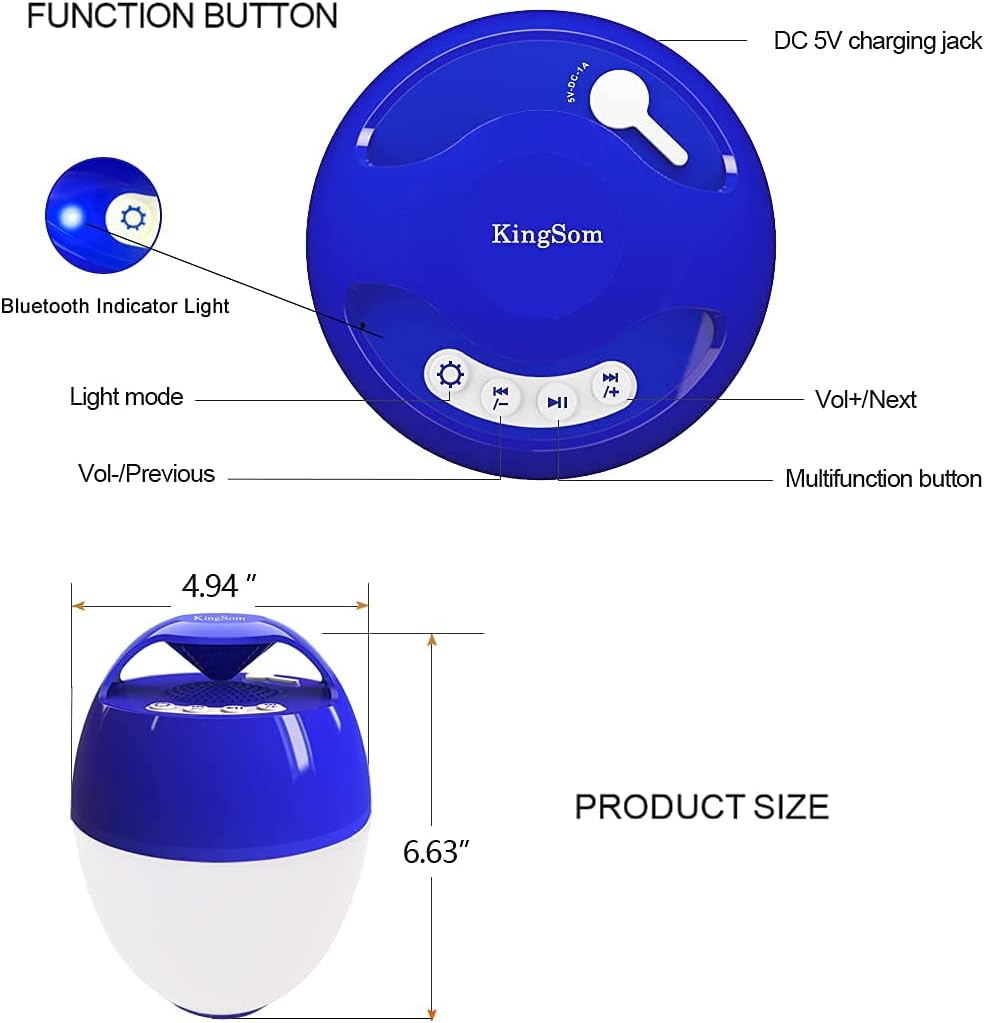
Image: A detailed diagram showing the location and function of buttons on the KingSom speaker, including the DC 5V charging jack, Bluetooth indicator light, Light mode button, Volume/Previous, Volume/Next, and Multifunction button. Product dimensions are also provided.

Image: A visual representation of a smartphone wirelessly connecting to the KingSom Bluetooth speaker, illustrating the ease of pairing.
Operating Instructions
Music Playback
- Play/Pause: Press the Multifunction button once to play or pause music.
- Volume Up: Press the "Vol+/Next" button to increase volume.
- Volume Down: Press the "Vol-/Previous" button to decrease volume.
- Next Track: Press and hold the "Vol+/Next" button to skip to the next track.
- Previous Track: Press and hold the "Vol-/Previous" button to go to the previous track.
Light Modes
The speaker features 8 distinct light modes. Press the "Light mode" button to cycle through the available options:
- Single Color (Red, Green, Blue, Orange)
- Color Gradient
- Color Fast Flash
- Color Slow Flash (lights flash to the beat of the music)
- Color Off

Image: A visual demonstration of the KingSom speaker's various light modes, including different solid colors and dynamic flashing patterns. A brightness slider is also depicted, indicating adjustable light intensity.
Hands-Free Calling
When connected to your smartphone via Bluetooth, the speaker can be used for hands-free calls:
- Answer Call: Press the Multifunction button once to answer an incoming call.
- End Call: Press the Multifunction button once during a call to end it.
- Reject Call: Press and hold the Multifunction button for 2 seconds to reject an incoming call.

Image: A child in a swimming pool interacting with the KingSom speaker, which is shown next to them. A speech bubble indicates a hands-free call, demonstrating the speaker's call functionality even in a wet environment.
Maintenance
- Cleaning: Wipe the speaker with a soft, damp cloth. Do not use abrasive cleaners or solvents.
- Drying: After immersion in water, allow the speaker to air dry completely before charging. Water will automatically pop out from the speaker grille to maintain sound quality.
- Storage: Store the speaker in a cool, dry place when not in use. Avoid prolonged exposure to direct sunlight or extreme temperatures.
- Charging Port: Ensure the charging port is dry and free of debris before connecting the charging cable.

Image: The KingSom speaker floating in a hot tub with a couple in the background, emphasizing its IP68 waterproof rating and suitability for water environments. The speaker's lights are subtly visible.
Troubleshooting
| Problem | Possible Cause | Solution |
|---|---|---|
| Speaker does not power on. | Low battery; Power button not held long enough. | Charge the speaker fully. Press and hold the Multifunction button for 3-5 seconds. |
| Cannot pair with Bluetooth device. | Speaker not in pairing mode; Device Bluetooth off; Too far from speaker; Interference. | Ensure speaker is flashing blue. Turn device Bluetooth off/on. Move device closer (within 85ft). Avoid obstacles. |
| No sound or low sound. | Volume too low; Speaker not connected; Water in speaker grille. | Increase speaker and device volume. Re-pair Bluetooth. Allow speaker to dry completely. |
| Lights not working. | Light mode off; Battery low. | Press the Light mode button to cycle through options. Charge the speaker. |
| Speaker automatically shuts off. | No Bluetooth connection for 60 minutes; No pairing for 20 minutes. | This is normal power-saving behavior. Reconnect or re-pair as needed. |
Specifications
| Feature | Detail |
|---|---|
| Model Name | CT602 |
| Material | Plastic |
| Speaker Type | Outdoor |
| Water Resistance Level | IP68 Waterproof |
| Connectivity Technology | Bluetooth 5.0, USB |
| Bluetooth Range | Up to 85 feet |
| Speaker Maximum Output Power | 6 Watts |
| Audio Output Mode | Stereo, Surround |
| Battery Life | Up to 7 hours |
| Charging Time | Approx. 7 hours |
| Product Dimensions | 6.3"D x 4.72"W x 4.72"H |
| Item Weight | 1.43 pounds (0.65 kg) |
| Power Source | Battery Powered (2 A batteries included) |
| Control Method | Touch |
| Color | Azure |
Warranty and Support
This KingSom product comes with a limited warranty. For specific warranty terms and conditions, please refer to the Quick Start Guide included in your package or contact KingSom customer support.
If you encounter any issues or have questions regarding your KingSom Portable Bluetooth Pool Speaker, please contact our customer support team:
- Email: Refer to your Quick Start Guide for the most current contact information.
- Online Support: Visit the official KingSom website for FAQs and support resources.
Warning: Please keep away from fire.

Image: A warning sign with an exclamation mark triangle and text in multiple languages, including English, stating "Please follow the enclosed instructions!" and "Warning: Please keep away from fire."


