
Bernette 79
Bernette B79 Sewing & Embroidery Machine User Manual
Model: B79
1. Introduction
The Bernette B79 is a state-of-the-art sewing and embroidery machine, combining advanced technology with user-friendly design. This versatile machine is equipped to handle a wide range of projects, from intricate embroidery designs to robust quilting tasks. Its intuitive touchscreen display and multifunction knobs provide seamless control, making it suitable for both novice and experienced crafters. This manual provides essential information for setting up, operating, maintaining, and troubleshooting your Bernette B79.

Figure 1.1: The Bernette B79 Sewing & Embroidery Machine, designed for ease of use and advanced features.
2. Setup
2.1 Unpacking and Placement
Carefully remove all components from the packaging. Place the machine on a stable, flat surface with adequate space for fabric movement. Ensure the power outlet is easily accessible.
2.2 Component Identification
Familiarize yourself with the machine's components, including the main unit, embroidery module, various presser feet, bobbins, needles, and the extension table.

Figure 2.1: Overview of the Bernette B79 machine and its comprehensive accessory kit, including hoops, threads, and tools.
2.3 Power Connection
Connect the power cord to the machine and then to a suitable electrical outlet. Turn on the machine using the main power switch.
2.4 Initial Threading and Bobbin Winding
Follow the on-screen instructions or refer to the quick start guide for proper upper thread tension and bobbin winding procedures. The machine features an automatic needle threader for convenience.
2.5 Extension Table Setup
Attach the included extension table for larger projects like quilting, providing a wider and more stable work surface.
3. Operating Instructions
3.1 Control Panel and Touchscreen Display
The Bernette B79 features a 5-inch LCD touchscreen display for easy navigation through settings and designs. Use the multifunction knobs for precise adjustments of stitch length, width, and tension.

Figure 3.1: The Bernette B79's intuitive interface allows for easy customization of stitch settings.
3.2 Stitch Selection and Customization
Select from over 200 built-in stitches directly on the touchscreen. Adjust stitch length, width, and tension to suit your fabric and project requirements. The machine offers complete control over your projects.
3.3 Embroidery Functions
Attach the embroidery module and hoop to begin embroidery projects. The machine supports various hoop sizes and comes with design files to jumpstart your creative journey. The included software allows for design editing and monogramming.
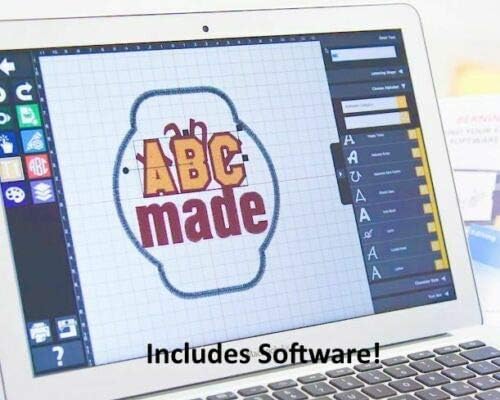
Figure 3.2: The included software provides tools for monogramming, lettering, and editing embroidery designs.
3.4 Using Presser Feet
The B79 comes with a variety of presser feet for different sewing tasks, including a hemmer foot, overcast foot, and shirring foot. Ensure the correct presser foot is attached for your chosen stitch and fabric type.

Figure 3.3: Examples of specialized presser feet: Hemmer Foot, Overcast Foot, and Shirring Foot.
3.5 LED Lighting
The integrated LED lighting illuminates the workspace, providing clear visibility for precise control during all sewing and embroidery operations.
4. Maintenance
4.1 Cleaning
Regularly clean the bobbin area and feed dogs using the provided brush to remove lint and thread residue. Ensure the machine is unplugged before cleaning.
4.2 Needle Replacement
Replace needles frequently, especially when working with different fabric types or if the needle shows signs of wear. Always use the correct needle type and size for your project.
4.3 Software Updates
Keep your machine's software up-to-date to ensure optimal performance and access to new features and designs. Refer to the Bernette website for the latest updates.

Figure 4.1: Regular software updates ensure your Bernette B79 operates with the latest features and improvements.
5. Troubleshooting
This section addresses common issues you might encounter. For more detailed troubleshooting, please refer to the full product manual or contact customer support.
- Thread Breaking: Check for proper threading, correct needle size and type for the fabric, and ensure the thread is not tangled or snagged. Adjust tension if necessary.
- Skipped Stitches: Often caused by a bent or dull needle, incorrect needle insertion, or improper threading. Replace the needle and re-thread the machine.
- Machine Not Powering On: Verify the power cord is securely connected to both the machine and the outlet. Check the power switch position.
- Uneven Stitches: Ensure consistent fabric feeding, correct tension settings, and that the presser foot is appropriate for the fabric.
6. Specifications
| Feature | Detail |
|---|---|
| Model Number | 79 |
| ASIN | B08ZC7Y3NX |
| Manufacturer | Bernette |
| Item Weight | 43.5 pounds |
| Package Dimensions | 22.5 x 21.5 x 18.5 inches |
| Color | White |
| Is Electric | Yes |
7. Warranty & Support
7.1 Warranty Information
The Bernette B79 comes with a manufacturer's warranty. Please refer to the warranty card included with your product or visit the official Bernette website for detailed terms and conditions regarding coverage and duration.
7.2 Customer Support
For technical assistance, service, or any questions not covered in this manual, please contact Bernette customer support. Contact information can typically be found on the manufacturer's website or in your product packaging.
Related documents79


Ask a question about this manual
Ask about setup, troubleshooting, compatibility, parts, safety, or missing instructions. Manuals+ will review the question and use this page’s manual context to help answer it.